Where to Find 3D Videos, and How to Watch Them
How we researched this: written by Owl3D from published sources, all 32 listed at the end.
Short answer
The easiest free place to find 3D video is YouTube: search, open Filters, and under Features pick 3D or VR180 [27]. Which video to open depends on what you own: red-cyan glasses, a 3D screen or a VR headset. One to start with for each is below.

What a side-by-side 3D video looks like on an ordinary screen: the left-eye and right-eye pictures next to each other. A frame of Big Buck Bunny from the 4K 3D upload listed below. Image: © Blender Foundation, bigbuckbunny.org, CC BY 3.0.
Key takeaways
- Thirteen checked videos are listed by format, with the device each suits: 3D videos to watch today.
- Movie theater glasses add no depth on a phone, laptop or regular TV; red-cyan glasses work on any color screen: which glasses work.
- YouTube's terms bar downloading, but Big Buck Bunny and NASA's Goddard tour are free to keep: downloads.
- On a computer, a tagged YouTube 3D video usually shows as a red-cyan anaglyph or flat, not as a double picture: YouTube 3D by device.
- On the Owl3D Shift, a side-by-side or top-bottom video playing on screen shows in 3D without glasses, and any 2D video is converted to 3D instantly as it plays. That conversion is made by AI, not recorded by a camera: on the Shift.
Quick picks
- Red-cyan glasses and any screenAnaglyph 3D Video 2025!
- A 3D TV, video glasses or a glasses-free 3D displaythe European Space Agency's side-by-side tour of the International Space Station
- A VR headsetVR180 Virtual Dive Great Barrier Reef
3D videos you can watch today, free
Each video below is stereoscopic, with a separate view for each eye, and none is a clip from a studio film. The figure shows what the layouts named in the tables look like.
One 3D picture, four ways to pack it


Side-by-side (SBS) 3D videos: for a 3D TV, projector, video glasses or glasses-free display
Play one full screen, then switch the screen to its side-by-side 3D mode. In October 2026 all four reached web browsers as the plain double picture these screens need. Full and half layouts are explained in the formats table.
| Video | From | Subject | Length | Layout |
|---|---|---|---|---|
| Narrated 3D tour of the International Space Station | European Space Agency, 2016 | Space | 13 min | Full side-by-side |
| Ultra HD 3D Film: September Forest Walk | Nature 3D Taeuber, 2013 | Nature | 7 min | Half side-by-side, 4K |
| 3D/SBS/Stereo Images and Video Snippets from the Dolomites | Stereo Symphony, 2025 | Nature | 15 min | Full side-by-side |
| Big Buck Bunny 4K 3D 60fps | Blender's open film, in a 2016 upload by Yingyu Yao | Animation | 11 min | Half side-by-side, 4K |
Last checked : every video opened.
Notes on the side-by-side list: the second Dolomites upload, and more forest walks
- The Dolomites film is posted twice: the plain version above, and a second upload that carries YouTube's 3D tag for its headset apps.
- For more forest walks in the same format, see Nature 3D Taeuber's channel.
3D videos for VR: VR180, 360 and tagged 3D
Open these in the YouTube app on a headset. YouTube lists the app for Meta Quest 2, Quest Pro, Quest 3, PICO 4 and Apple Vision Pro [2], and it also shipped on Samsung's Galaxy XR [12]. VR180 covers the view in front of you, 360 covers the whole surround, and "tagged 3D" is an ordinary-shaped video that YouTube knows is 3D.
| Video | From | Subject | Length | Kind |
|---|---|---|---|---|
| VR180 Virtual Dive Great Barrier Reef | ECOVR, 2020 | Nature, underwater | 5 min | VR180 |
| Tranquility with a tiger in 3D 180VR | Big Cat Rescue, 2021 | Animals | 2 min | VR180 |
| Narrated Tour: Artemis II, Launch Complex 39 Gantry in VR180 8K 3D | Whirl VR180, 2026 | Space | 3 min | VR180 |
Three more for a headset: one 360 3D film and two tagged 3D videos
| Video | From | Subject | Length | Kind |
|---|---|---|---|---|
| the Blu: Whale Encounter (3D 360 VR) | Wevr, 2017 | Animation | 2 min | 360 3D |
| In 3D, The World Beneath The Ocean | Underwater 3D Channel (Barry Chall Films), 2018 | Nature, underwater | 15 min | Tagged 3D |
| The Daily Dweebs: 8K UHD Stereoscopic 3D | Blender Studio, 2018 | Animation | 1 min | Tagged 3D |
Last checked : every video opened.
Anaglyph 3D videos: for any screen, with red-cyan glasses
| Video | From | Subject | Length |
|---|---|---|---|
| Anaglyph 3D Video 2025! | 3DN3D, 2025 | Pop-out demo | 4 min |
| NASA's 3-D Tour of the International Space Station | NASA's Marshall Space Flight Center, 2014 | Space | 3 min |
| Anaglyph 3D Video - My favorite Shrine | 3D Anaglyph Renkon, 2024 | Nature, travel | 6 min |
Last checked : every video opened.
A fourth is The Best 3D Video, which has more than 5 million views; its channel, 3DN3D, has posted anaglyph videos since 2011.
How to find more 3D videos on YouTube
Use YouTube's own filters, or add the format to your search.
- Use the filters. On YouTube's website, search for a subject, open Filters, and under Features choose 3D, VR180 or 360°, as the site offered on October 7, 2026 [27]. Matching results carry a small "3D", "VR180" or "360°" label, and the headset app has the same kind of filter: "360°, VR180, 4K, 3D and CC" [2].
- Search by format. Add "SBS" for plain side-by-side uploads, or "anaglyph" for red-cyan ones.
- 3D movies on YouTube. What is free and legitimate is creators' own work, like the films above. For studio films, see which streaming services have 3D movies, 3D Blu-ray in 2026 and the best 3D movies.
YouTube 3D in 2026: how it plays on each device
In a headset's YouTube app a 3D video plays in 3D. On a computer or a phone it depends on whether the upload is tagged as 3D.
| Device | Tagged 3D video | Untagged side-by-side video | VR180 and 360 video |
|---|---|---|---|
| VR headset | 3D, in the YouTube app [2][28] | Double picture, as uploaded | 3D |
| Computer | Red-cyan anaglyph or flat, by users' reports [13][28] | Double picture, as uploaded | Plays in Chrome, Firefox, Edge and Opera; drag the view around [14] |
| Phone | Anaglyph, by a 2023 report [28] | Double picture, as uploaded | 3D on an Android phone inside a Cardboard-style viewer |
A tagged video is one YouTube knows is 3D and labels as such; an untagged side-by-side upload is an ordinary video to YouTube.
Tagged and untagged 3D uploads on YouTube: what the tag is, and what each kind does
YouTube says you can "upload and playback 3D videos as either rectangular 3D videos, VR180, or 360 3D (VR videos)" [1]. Rectangular means the normal flat-screen shape. To count as 3D, a rectangular upload has to be left-right side-by-side and carry stereo metadata, a tag inside the file that tells YouTube it is 3D [1]. That tag splits YouTube's side-by-side videos into two kinds.
Tagged 3D videos. YouTube knows these are 3D, labels them, and decides how to show them. On a computer that is not a double picture a 3D screen can use. Some tagged uploads are exceptions, including the ESA, forest and Big Buck Bunny videos listed above.
Untagged side-by-side videos. Without the tag, a side-by-side upload is an ordinary video to YouTube. The double picture every device shows is what a screen with its own side-by-side mode needs.
3D video glasses: which glasses work with which video
The glasses have to match the screen, not only the video.
| Glasses | Screen they need | Video to play | Work on an ordinary phone, laptop or TV? |
|---|---|---|---|
| Red-cyan (anaglyph) | Any color screen | An anaglyph video | Yes |
| Polarized, including RealD glasses from movie theaters | A passive 3D TV, or a theater's projector filter and silver screen [24][25] | On a passive 3D TV, side-by-side or top-bottom video with the TV in 3D mode [11] | No |
| Active-shutter | The 3D TV or projector they sync with | Side-by-side or top-bottom video with the set in 3D mode [11] | No |
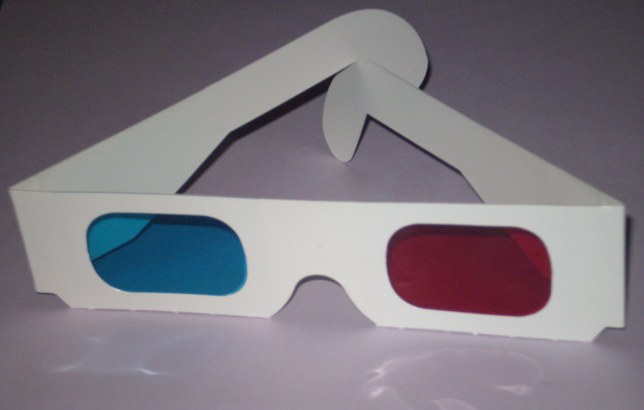
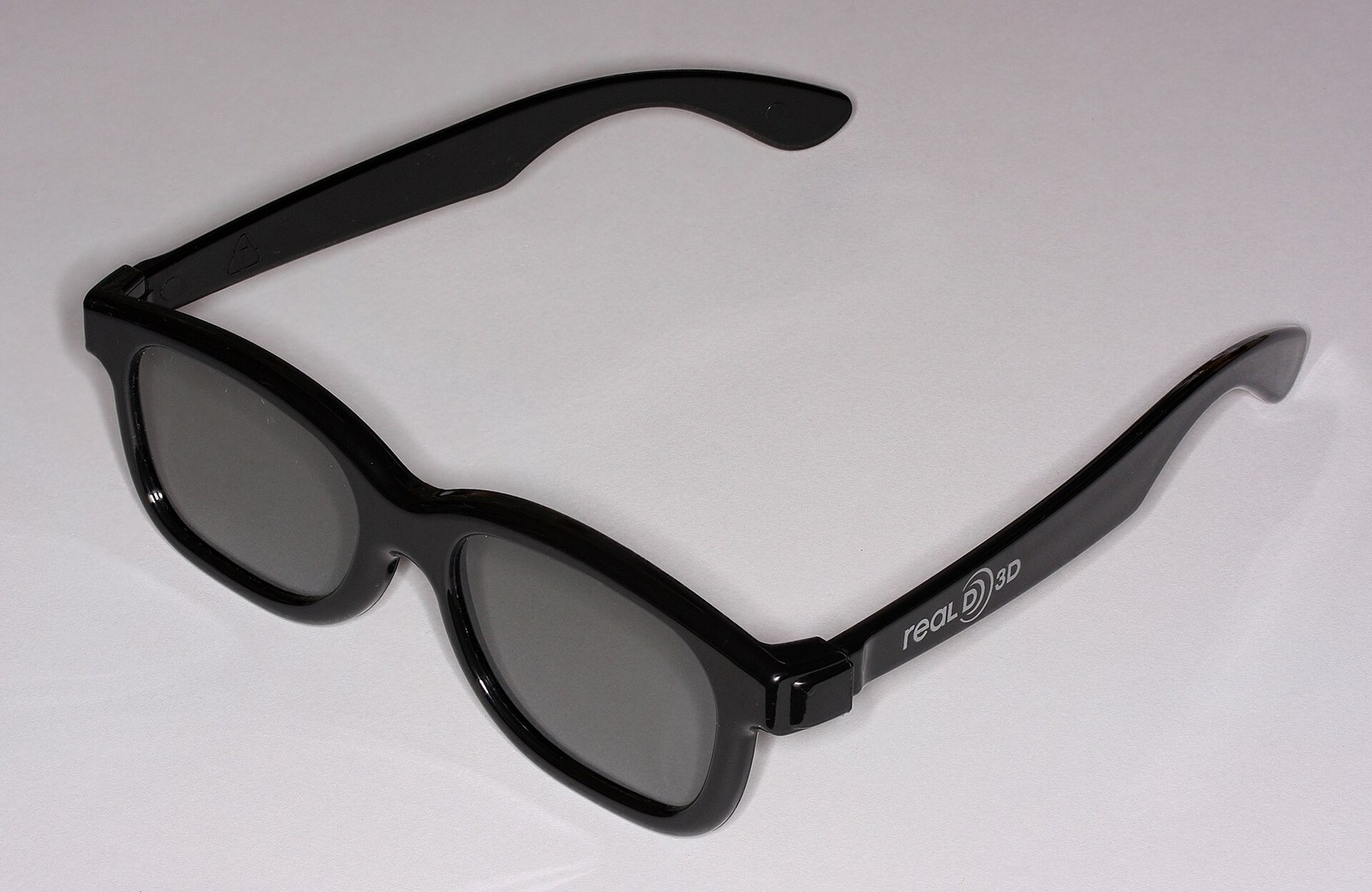
A note on each kind of glasses: a test video, and how polarized and active-shutter glasses work
- Red-cyan. To test a pair, play Anaglyph 3D Video 2025!
- Polarized. The screen has to polarize the two views differently. A passive 3D TV does it with polarizing stripes on alternate lines [24].
- Active-shutter. Each lens darkens in turn, "in synchronization with the refresh rate of the screen" [31].
For more on each kind, and on whether a theater's RealD glasses work on a passive 3D TV, see types of 3D glasses.
How to watch 3D videos, by device
Match the video's format to the device you own.
| Device | What it plays |
|---|---|
| Any color screen, plus red-cyan glasses | Anaglyph videos, and side-by-side files through VLC's anaglyph filter [21] |
| Android phone in a Cardboard-style viewer | YouTube's VR180 and 360 videos [15] |
| VR headset | YouTube's 3D, VR180 and 360 videos in the YouTube app [2]; your own side-by-side and over-under files in a player app |
| Video glasses (wearable displays such as XREAL One) | Full SBS and Half SBS video from a connected device [7] |
| 3D TV or 3D projector | Side-by-side and top-bottom video, with the glasses made for that set |
| Glasses-free 3D display | Depends on the model; the Owl3D Shift shows Full SBS, Half SBS and top-bottom video |
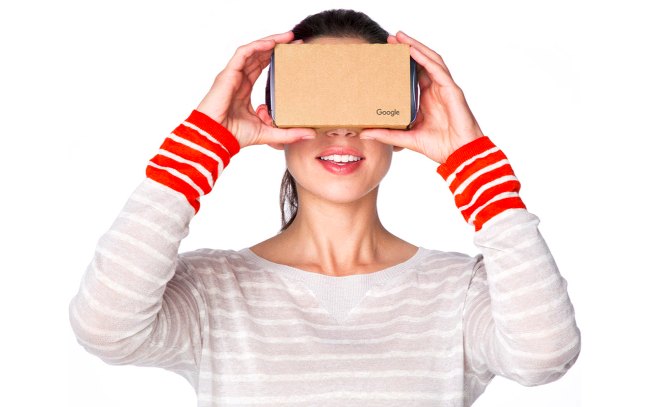
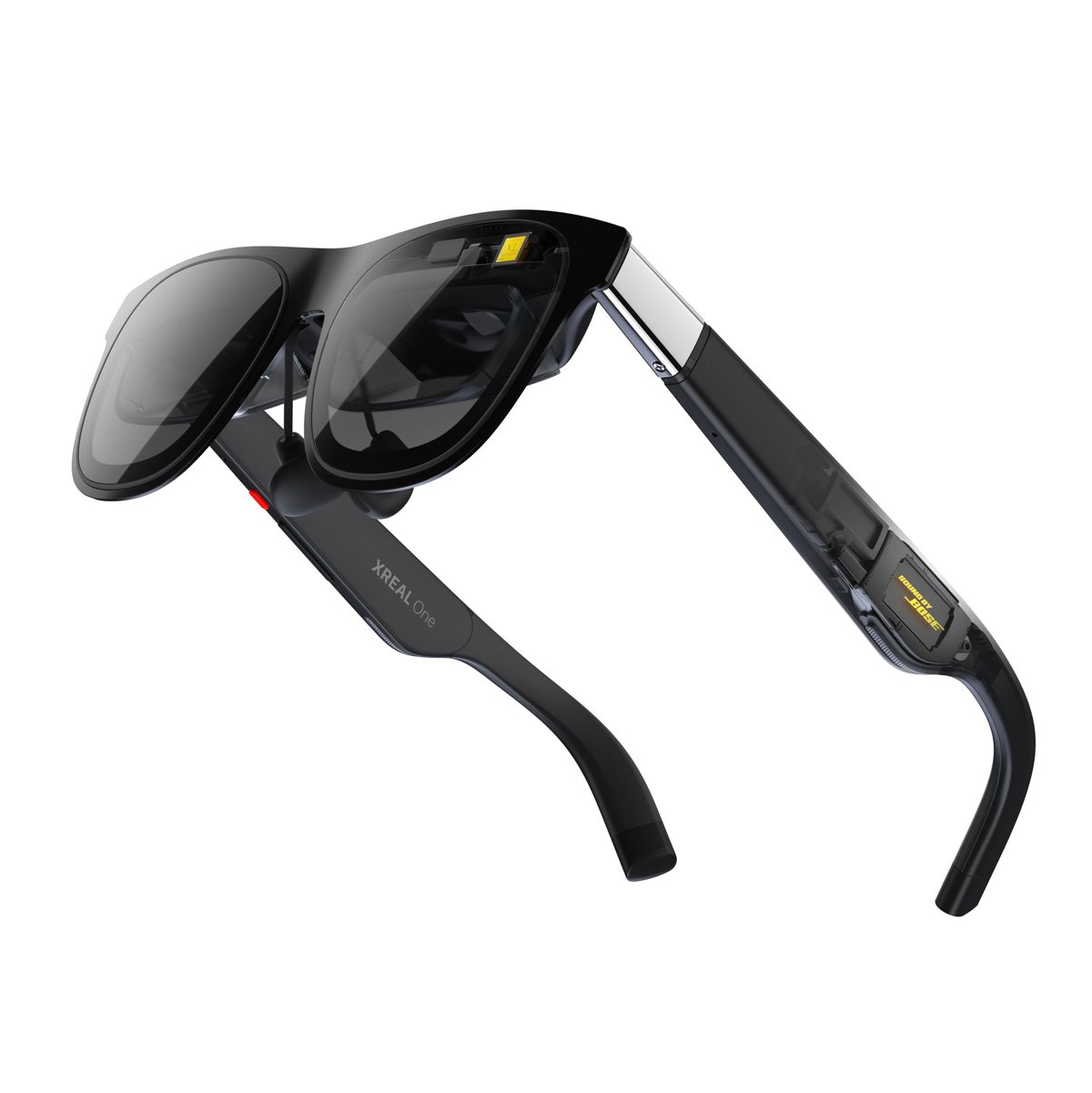
Setup notes for each device: red-cyan glasses, Cardboard, headset, video glasses, 3D TV or projector
- Red-cyan glasses. The cheapest route, though reds look weak and ghosting (a faint double image) can appear [9]. See anaglyph 3D.
- Cardboard-style viewer. A holder with two lenses that the phone slides into; tap the Cardboard icon in the Android app [15]. Google stopped selling its own in March 2021 [16], and "Cardboard is not supported for iPhone and iPad" [15].
- VR headset. Bigscreen, free on Steam, plays side-by-side and over-under files from a PC [22]. See watching movies in VR.
- Video glasses. Switch on 3D Mode in the glasses' menu and choose Half SBS or Full SBS to match the video [7].
- 3D TV or projector. HDMI 1.4a requires 3D displays to accept both layouts [11], but check which formats your model accepts: BenQ lists "Side by side and Top & Bottom (streaming) 3D formats" for its TK710 projector [23]. See 3D TVs in 2026 and 3D projectors.
- Glasses-free 3D display. The Shift is covered below; for other models, see glasses-free 3D monitors.
On the Owl3D Shift
Owl3D, the publisher of this guide, makes the Shift. It is a 14-inch, $499 glasses-free 3D display used as a second monitor, and it shows 3D video in two ways.
Stereo 3D Playback, for video that is already 3D. Put a Full SBS, Half SBS or top-bottom picture on the Shift's screen and press Start on the Stereo 3D Playback tab in the Owl3D app; the Shift detects the layout and shows it in 3D. It works on the picture, not on a particular app, so a 3D file in your own media player and a side-by-side YouTube video in a browser both count.
Live 3D Screen, for ordinary 2D video. It converts a 2D window, such as a browser playing any YouTube video, to 3D instantly, in real time: no waiting and no file to prepare. That is an AI conversion, not 3D that a camera recorded. It needs an NVIDIA RTX 30-series graphics card or newer, or a Mac with Apple Silicon. For the highest quality, convert a file instead.
Its limits: it needs a computer running the Owl3D app, and on a Mac, macOS 15.5 or later. It shows 3D to one viewer at a time, at 1920×2160 per eye, half the panel's horizontal resolution. A native 3D video player is coming, with no date announced.
What each Shift feature needs from the computer
Stereo 3D Playback. It needs an NVIDIA GTX 1650 or Radeon RX 570 graphics card or better, and on AMD and Intel graphics it works in full screen only.
Live 3D Screen. It needs a Windows PC with an NVIDIA RTX 30-series graphics card or newer (AMD cards are not supported), or a Mac with Apple Silicon. An M1 Pro chip or better is recommended; a MacBook Air works, but the picture can stutter unless the laptop is kept cool.
Can you download 3D videos from YouTube?
Not under YouTube's rules. Its Terms of Service bar downloading videos "except: (a) as expressly authorized by the Service" or with written permission [17], so this page does not cover downloaders. This is not legal advice. These two 3D videos are free to download and keep:
NASA Goddard in 3D
- What a short 2011 tour of the Goddard Space Flight Center "in Stereoscopic 3D", from NASA's Scientific Visualization Studio [29]
- Files an anaglyph file, which plays as it is, or separate left-eye and right-eye 1080p files, which must be joined into one side-by-side file first [29]
- License public domain, according to NASA's YouTube upload of it [32]
Your own spatial videos. Apple added spatial video recording to the iPhone 15 Pro and Pro Max in December 2023 [10]. For newer phones and VR180 cameras, see spatial photos and 3D cameras.
Your own 2D videos, converted
Owl3D's desktop app for Windows and Mac is an AI 2D-to-3D converter. It turns ordinary 2D video files into side-by-side, half side-by-side or top-bottom 3D on your own computer, and on a Mac into Spatial Video for Apple Vision Pro. The 3D is made by AI from the 2D picture, not captured by a second camera; the app has a free tier and paid plans.
There are two routes: instant and live, or the highest quality from a file. Live 3D Screen on the Shift converts instantly as you watch. StereoGen, Owl3D's strongest conversion model, is coming soon with the next version of the converter. It is not instant: it takes a video file you have the right to use and hours of processing on an NVIDIA RTX graphics card, and Owl3D describes the result as "Hollywood-grade 3D at the highest quality".
What is a 3D video?
A 3D video is a stereoscopic video. It is recorded by two cameras from slightly different angles [3], or rendered that way by a computer, which gives a left view and a right view. When each eye sees only its own view, "near things look near, and far things appear far" [4].
"3D" is also used for computer animation, which is an ordinary flat video, and much of what a search for "3D video" returns is that kind. ESA/Hubble's "3D animations" archive is an example: its Horsehead Nebula video is a computer-generated fly-through with no left and right views [5][6].
3D video formats: side-by-side (SBS), top-bottom, anaglyph, VR180, spatial video
| Format | What the file contains | Where it plays in 3D |
|---|---|---|
| Full side-by-side (Full SBS) | The left and right views next to each other, each at full size: 3840×1080 for a 1080p video [7] | Headset player apps, video glasses, 3D TVs and projectors, glasses-free displays |
| Half side-by-side (Half SBS) | Both views squeezed sideways into one normal 1920×1080 frame [7] | The same devices as Full SBS |
| Top-bottom (over-under) | The two views "stacked vertically in a single frame" [7], in full and half versions [8] | The same kinds of device, though some offer side-by-side only |
| Anaglyph | Both views overlaid in one picture in two colors, usually red and cyan [9] | Any color screen, with red-cyan glasses |
Two more formats: VR180 and spatial video
To tell which one you have, open the file in an ordinary player and compare it with the figure near the top. Two nearly identical pictures next to each other means side-by-side. One above the other means top-bottom. A single picture with red and cyan fringes is an anaglyph. If each picture looks squashed, it is a "half" version.
More on half side-by-side, top-bottom, VR180 and spatial video
- Half SBS. The player stretches each half back, so each eye gets half the horizontal detail.
- Top-bottom. One device that offers side-by-side only: the 3D Mode on XREAL's One glasses lists Half SBS and Full SBS [7].
- VR180. A stereoscopic format YouTube introduced in June 2017. It "focuses on what's in front of you", and headsets and viewers show it "stereoscopically in 3-D" [4].
- Spatial video. It is Apple's name for the format. On other devices it appears "as regular, 2D videos" [10].
How to play a 3D video in VLC
VLC opens a side-by-side file as a normal video, with both halves on screen. Its anaglyph filter, part of VLC since version 2.1.0, turns that into one picture for red-cyan glasses [21].
In VLC 3.0:
- Open the effects window. Windows and Linux: Tools → Effects and Filters (Ctrl+E) [21][30]. Mac: Window → Video Effects [30].
- Open the tab with the filter. Windows and Linux: the Video Effects tab, then the Advanced tab. Mac: the Miscellaneous tab.
- Tick the filter. It is named Anaglyph 3D on Windows and Linux, and Anaglyph on a Mac.
How to change the color pair
Red-cyan is the default. To use another color pair, go to Tools → Preferences (All) → Video → Filters → Anaglyph, change the color scheme, then save and restart VLC [21].
Frequently asked questions
Can I watch 3D videos on my phone?
Yes. Any phone plays anaglyph video for red-cyan glasses, and an Android phone in a Cardboard-style viewer plays YouTube's VR180 and 360 videos in 3D. iPhones are left out of the second route [15], and an iPhone's own spatial videos show in 2D on its screen [10].
Do you need a 3D TV to watch 3D videos?
No. A VR headset, video glasses, a 3D projector or a glasses-free 3D display all show stereoscopic video, and anaglyph video needs only red-cyan glasses. For what is left of 3D TVs, see 3D TVs in 2026.
Sources (32)
- YouTube Help, "Upload 3D videos". https://support.google.com/youtube/answer/7278886?hl=en (opened 2026-10-07)
- YouTube Help, "Get started with YouTube VR". https://support.google.com/youtube/answer/7205134?hl=en (opened 2026-10-07)
- Lighthouse Media Services, "What Is 3D Video", May 31, 2024. https://lighthousemediaservices.com/what-is-a-3d-video/ (opened 2026-10-07)
- YouTube Official Blog, "The world as you see it with VR180", June 22, 2017. https://blog.youtube/news-and-events/the-world-as-you-see-it-with-vr180/ (opened 2026-10-07)
- ESA/Hubble, "Video Archive: 3D Animations". https://esahubble.org/videos/archive/category/3d/ (opened 2026-10-07)
- ESA/Hubble, "Zooming in on the Horsehead Nebula (3D)", video heic1307b. https://esahubble.org/videos/heic1307b/ (opened 2026-10-07)
- XREAL, One series tutorial, "3D Mode". https://tutorials.xreal.com/docs/glasses/one-series/osd/3d-mode/ (opened 2026-10-07)
- Bino, "Bino Manual". https://bino3d.org/bino-manual.html (opened 2026-10-07)
- Wikipedia, "Anaglyph 3D". https://en.wikipedia.org/wiki/Anaglyph_3D (opened 2026-10-07)
- Apple Newsroom, "Apple introduces spatial video capture on iPhone 15 Pro", December 11, 2023. https://www.apple.com/newsroom/2023/12/apple-introduces-spatial-video-capture-on-iphone-15-pro/ (opened 2026-10-07)
- Wikipedia, "HDMI" (versions 1.4 and 1.4a). https://en.wikipedia.org/wiki/HDMI (opened 2026-10-07)
- CineD, "YouTube Launches Dedicated App for Apple Vision Pro", February 13, 2026. https://www.cined.com/youtube-launches-dedicated-app-for-apple-vision-pro-3d-vr180-360-degree-and-8k-playback/ (opened 2026-10-07)
- Mozilla Add-ons, "YouTube Force SBS (Raw 3D)", version 1.0, released January 16, 2026. https://addons.mozilla.org/en-US/firefox/addon/yt-force-sbs@exxttender.extension/ (opened 2026-10-07)
- YouTube Help, "Upload 180- or 360-degree videos". https://support.google.com/youtube/answer/6178631?hl=en (opened 2026-10-07)
- YouTube Help, "Watch VR180 and 360-degree videos with Cardboard". https://support.google.com/youtube/answer/6239930?hl=en (opened 2026-10-07)
- Wikipedia, "Google Cardboard". https://en.wikipedia.org/wiki/Google_Cardboard (opened 2026-10-07)
- YouTube, "Terms of Service", effective December 15, 2023. https://www.youtube.com/static?template=terms&hl=en&gl=US (opened 2026-10-07)
- Blender Foundation, "Big Buck Bunny: Download". https://peach.blender.org/download/ (opened 2026-10-07)
- Wikipedia, "Big Buck Bunny". https://en.wikipedia.org/wiki/Big_Buck_Bunny (opened 2026-10-07)
- Blender download server, directory "demo/movies/BBB". https://download.blender.org/demo/movies/BBB/ (opened 2026-10-07)
- VideoLAN Wiki, "Documentation:Modules/anaglyph". https://wiki.videolan.org/Documentation:Modules/anaglyph (opened 2026-10-07)
- Steam, "Bigscreen Beta" store page. https://store.steampowered.com/app/457550/Bigscreen_Beta/ (opened 2026-10-07)
- BenQ, "TK710 specifications" (US). https://www.benq.com/en-us/projector/home-projectors/tk710/spec.html (opened 2026-10-07)
- Wikipedia, "Polarized 3D system". https://en.wikipedia.org/wiki/Polarized_3D_system (opened 2026-10-07)
- Wikipedia, "RealD 3D". https://en.wikipedia.org/wiki/RealD_3D (opened 2026-10-07)
- Road to VR, "Quest Now Natively Supports Spatial Video Originally Meant for Vision Pro", February 1, 2024. https://roadtovr.com/quest-spatial-video-support-vision-pro/ (opened 2026-10-07)
- YouTube, search results for "3d video" with the 3D filter applied (Filters, then Features). https://www.youtube.com/results?search_query=3d+video&sp=EgI4AQ%3D%3D (opened 2026-10-07)
- 360 Rumors, "FAQ: How to watch 3D videos on YouTube in 2023 (Meta Quest, iOS or Android)", by Mic Ty, September 26, 2023. https://360rumors.com/youtube-3d-videos/ (opened 2026-10-07)
- NASA Scientific Visualization Studio, "The NASA Goddard Space Flight Center - in Stereoscopic 3D!", April 30, 2011. https://svs.gsfc.nasa.gov/10744 (opened 2026-10-07)
- VideoLAN, VLC 3.0 source code, interface files for the Effects and Filters window (Windows and Linux) and the Video Effects window (Mac). https://github.com/videolan/vlc/tree/3.0.x/modules/gui (opened 2026-10-07)
- Wikipedia, "Active shutter 3D system". https://en.wikipedia.org/wiki/Active_shutter_3D_system (opened 2026-10-07)
- NASA Goddard on YouTube, "NASA | See Goddard in 3D!", video description, April 8, 2011. https://www.youtube.com/watch?v=08rMlpvUP3w (opened 2026-10-07)