Free 3D Movies: Where to Watch Them Legally, on Each Device
How we researched this: written by Owl3D from published sources, all 25 listed at the end.
Short answer
Yes, there is free and legal 3D, but most of it is short. You get YouTube 3D and VR180 videos, free titles in headset apps, and Big Buck Bunny, an openly licensed animated short with a 3D release [1][7][8][13][15]. Studio 3D films are not free from any legal source we found. You buy or rent them, or watch them with a subscription such as Disney+ [10][19]. Pick your device below.

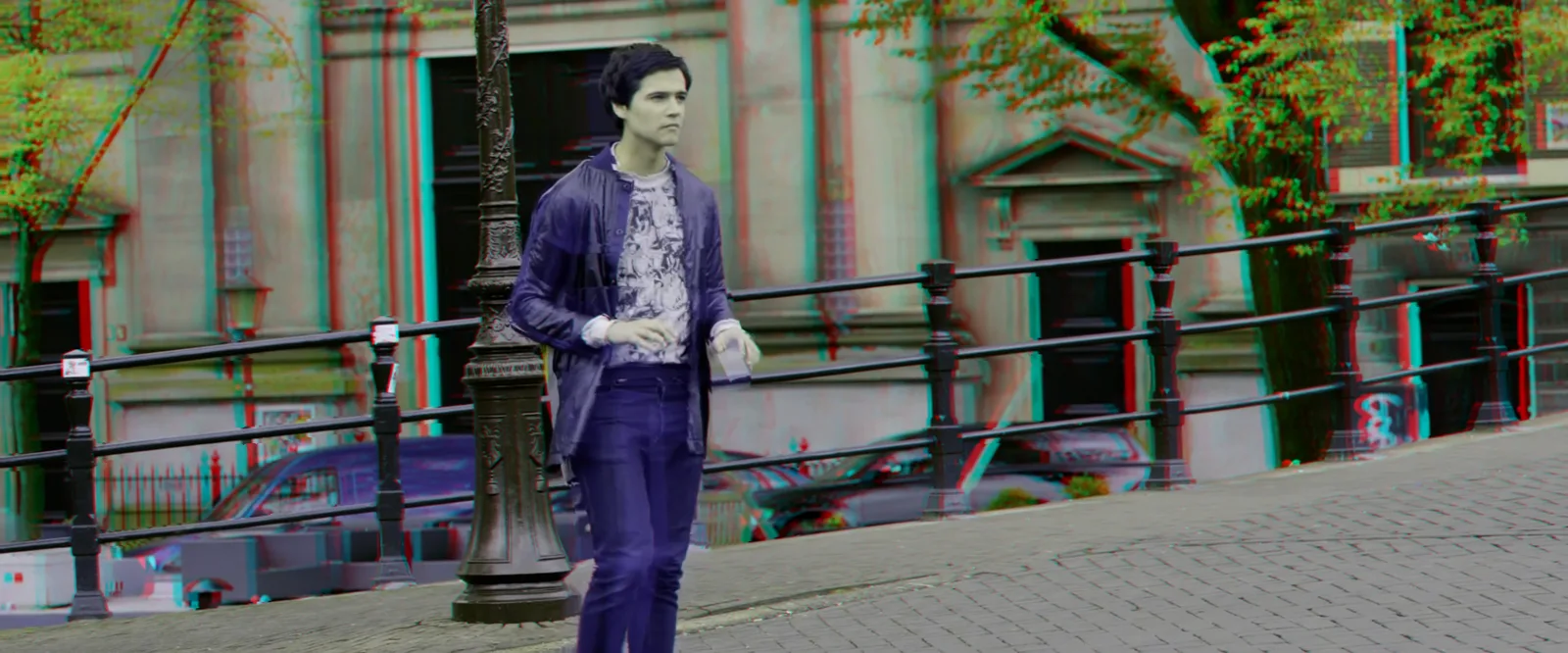
Big Buck Bunny's free 3D release, red-cyan version, at 2:00. Our frame grab from Blender's download server, November 2026. © Blender Foundation, bigbuckbunny.org, CC BY 3.0 [15].
Key takeaways
- VR headset (Quest, PICO, Vision Pro): the YouTube app with its 3D filter, plus free titles in Meta Horizon TV, Spatial Film and the Apple TV app. See headsets.
- 3D TV or projector: Big Buck Bunny's top-bottom file from a USB stick or Plex. Two pictures side by side? See the fix.
- Red-cyan glasses on a normal screen: Big Buck Bunny's red-cyan file and a NASA clip. See glasses.
- Studio 3D films need a purchase, a rental or a subscription. See what costs money.
Can I watch full 3D movies for free?
Not studio films. No free legal source we found streams them. What is free:
| Your device | Free 3D to start with | What it is |
|---|---|---|
| Meta Quest | YouTube, Meta Horizon TV, Spatial Film (Quest 3, 3S) | Videos, an hour-long 3D 360° film, some free films [1][7][8] |
| PICO 4 | YouTube VR app | Videos [1] |
| Apple Vision Pro | YouTube app, Apple TV app | Videos, some free Apple Immersive titles [4][9] |
| 3D TV or projector | Big Buck Bunny (top-bottom file) | An animated film of about 10.5 minutes (our check) |
| Screen and red-cyan glasses | Big Buck Bunny (red-cyan file), NASA's Ingenuity clip | A short film and a clip [16] |
| Android phone and Cardboard | YouTube app | VR180 and 360-degree videos [3] |
Last checked : each app page or help page, read from outside the US; free titles may vary by country.
Some answers in forums point to illegal streams or ripping. The UK government says that when you watch through "an unauthorised website, app, add-on or another illegal source, you are infringing copyright and may be committing a crime" [20]. This page lists legal sources only.
On a VR headset
YouTube. Per YouTube Help (November 2026), the YouTube VR app runs on Meta Quest 2, Quest Pro, Quest 3, PICO 4 and Apple Vision Pro [1]. Meta's store lists the YouTube app for Quest 3S as well [17]. To find 3D, search, then filter the results by "3D" or "VR180" [1]. YouTube plays 3D as rectangular 3D, VR180 or 360 3D [2]. VR180 is 3D video that fills the view in front of you. On Vision Pro, the YouTube app is a free download and needs no Premium subscription [4].
Expect to dig: see what viewers say. For the steps, see YouTube VR.
Meta Horizon TV (Quest). The TV app comes pre-installed on all Quest headsets [5]. Red Bull and Meta's "Touching the Sky" is "an hour-long 3D 360° experience" there, free (UploadVR, August 2025) [7]. The app's tags mark 180° and 360° videos but do not tell 2D from 3D (UploadVR, September 2025) [6].
Spatial Film (Quest 3 and 3S). This app streams VR180 and 3D films. Its store page says "A selection of films is always free" [8]. The rest needs a subscription with a 7-day free trial [8].
Apple TV app (Vision Pro). Apple Immersive Video is a 180-degree 3D format [12]. Apple made Tour De Force free in the Apple TV app (September 2025) [9]. Apple adds that "Title availability varies by country or region" [9].
For more free films made for VR, see free VR movies.
On a 3D TV or projector
Download Big Buck Bunny's 3D release from Blender's download server [13][14]. Take the 1080p 30 fps file with stereo_abl in its name (bbb_sunflower_1080p_30fps_stereo_abl.mp4.zip). In our check it holds two pictures, one above the other (top-bottom), and runs about 10.5 minutes. The zip is about 434 MB [14].
Play it from a USB stick or a media app. We have not played it on a 3D TV ourselves. Plex's smart TV app plays 3D, but Plex says you must turn on the TV's 3D mode yourself [21]. On a Sony 3D TV, for two pictures one above the other, press 3D until "3D (Over-Under)" appears [18].
For YouTube on a 3D TV, see YouTube 3D on a 3D screen.
"I see two pictures side by side"
What you see: the same scene twice, next to each other. Why: it is a side-by-side 3D video. The TV shows the file as it is until you switch its 3D mode. What to do: turn on the TV's 3D mode and pick side-by-side. Sony's manual says: "If two pictures are displayed side-by-side, press the 3D button repeatedly until [3D (Side-by-Side)] appears." [18] Other brands name the setting differently. See when the TV will not switch.
With red-cyan glasses on a normal screen
Two free sources work on any color screen:
- Big Buck Bunny, red-cyan version. Take a 1080p 30 fps file with
stereo_arcdorstereo_arccin its name. In our check both show red-cyan fringes and run about 10.5 minutes. In our check thestereo_agmhfile is green-magenta, so red-cyan glasses do not suit it. - NASA's "Ingenuity Flies in 3D". A short clip of the Mars helicopter, made for "color-filtered glasses" [16]. It is a 5.31 MB MP4, not a movie [16]. Credit: NASA/JPL-Caltech/ASU/MSSS.
For other red-cyan films, which are mostly on disc, see anaglyph 3D movies.
On a phone with a cheap viewer
Android only. Per YouTube Help, you can watch VR180 and 360-degree videos with Cardboard and the YouTube app [3]. Search for "Virtual Reality" to find YouTube's VR channel [3]. "Cardboard is not supported for iPhone and iPad." [3]
Studio 3D films: what costs money
- Disney+ on Quest 3, 3S and 2: select titles in 3D, with a Disney+ subscription. Meta's store page says the 3D content "may vary by region, plan and device" [19]. See Disney+ in 3D.
- Apple Vision Pro: you buy or rent 3D movies in the Apple TV app [10]. An Apple TV subscription does not cover them: it "does not include ... content available for rental or purchase" [11]. See Apple Vision Pro 3D movies.
- Other services and discs: see 3D movies to stream and the best 3D movies.
Can I make 3D from my own 2D videos?
Yes, for a video you own or may use. Owl3D, the publisher of this guide, makes the Owl3D converter. It turns a 2D video into a side-by-side or top-bottom 3D file for a headset, 3D TV or projector. For Vision Pro it makes Spatial Video, on a Mac only. It is an AI conversion, not the studio's 3D version, and it takes time on your computer. The free tier converts up to 60 seconds of video per conversion. See pricing.
What viewers say
Three people on two forums. We have not tested their setups.
- A 3D TV owner, Blu-ray.com forum, March 2018, about 3D trailers that showed two pictures: "They are side by side but how do you watch them to get the 3D effect?" After a reply about the TV's side-by-side mode: "Duh, that is it? Great!" [24]
- A projector owner, AVS Forum, May 2022, who was pointed to free half side-by-side videos to test with: "Well, that was an awesome answer," [25]
- A viewer on Blu-ray.com, October 2013: "The 3d on YouTube is really hit or miss in my experiance - its like a scavenger hunt to find anything good." [22]
Frequently asked questions
Is Big Buck Bunny in 3D free to download?
Yes. Big Buck Bunny is an openly licensed animated short from the Blender Foundation, and it has a 3D release [15]. Take the top-bottom file for a 3D TV or projector. Take the red-cyan file for a normal screen and red-cyan glasses. See glasses.
Can I watch free 3D on an iPhone?
Not with a Cardboard viewer. Per YouTube Help, "Cardboard is not supported for iPhone and iPad." [3] On Apple Vision Pro, the YouTube app is a free download and needs no Premium subscription [4].
Are free 3D movie streaming sites legal?
A site that streams studio 3D films for free is not a legal source we found. The UK government says that watching through "an unauthorised website, app, add-on or another illegal source" infringes copyright [20]. This page lists legal sources only.
Sources (25)
- YouTube Help, "Get started with YouTube VR". https://support.google.com/youtube/answer/7205134?hl=en (opened 2026-11-12)
- YouTube Help, "Upload 3D videos". https://support.google.com/youtube/answer/7278886?hl=en (opened 2026-11-12)
- YouTube Help, "Watch VR180 and 360-degree videos with Cardboard". https://support.google.com/youtube/answer/6239930?hl=en (opened 2026-11-12)
- YouTube Help, "Get started with YouTube XR on Apple visionOS". https://support.google.com/youtube/answer/16868229?hl=en (opened 2026-11-12)
- Meta Quest Help, "Learn about Meta Horizon TV". https://www.meta.com/help/quest/790611548516076/ (opened 2026-11-12)
- UploadVR, "Meta Overhauls Quest's TV App To Be A Hub For Streaming Content" (September 11, 2025). https://www.uploadvr.com/meta-overhauls-quest-tv-app-to-be-hub-for-streaming-content/ (opened 2026-11-12)
- UploadVR, "Touching The Sky Is An Hour-Long 3D 360° Experience From Red Bull & Meta" (August 1, 2025). https://www.uploadvr.com/touching-the-sky-3d-360-red-bull-meta-quest-tv/ (opened 2026-11-12)
- Meta Horizon Store, "Spatial Film". https://www.meta.com/experiences/spatial-film/4681126188877415/ (opened 2026-11-12)
- Apple Newsroom, "Apple previews new immersive films for Apple Vision Pro" (September 2025). https://www.apple.com/newsroom/2025/09/apple-previews-new-immersive-films-for-apple-vision-pro/ (opened 2026-11-12)
- Apple Support, "Watch Apple Immersive Video and 3D movies in the Apple TV app on Apple Vision Pro". https://support.apple.com/guide/apple-vision-pro/tanc09caabb3/visionos (opened 2026-11-12)
- Apple, "Apple TV app". https://www.apple.com/apple-tv-app/ (opened 2026-11-12)
- Apple, "Apple Vision Pro". https://www.apple.com/apple-vision-pro/ (opened 2026-11-12)
- Blender Foundation, "Big Buck Bunny: Download". https://peach.blender.org/download/ (opened 2026-11-12)
- Blender Foundation, Big Buck Bunny download folder. https://download.blender.org/demo/movies/BBB/ (opened 2026-11-12)
- Blender Foundation, "Big Buck Bunny: About". https://peach.blender.org/about/ (opened 2026-11-12)
- NASA Photojournal, "Ingenuity Flies in 3D" (PIA24522, added May 12, 2021). https://science.nasa.gov/photojournal/ingenuity-flies-in-3d/ (opened 2026-11-12)
- Meta Horizon Store, "YouTube". https://www.meta.com/experiences/youtube/2002317119880945/ (opened 2026-11-12)
- Sony, Help Guide for the XBR-55X905B 3D TV, "3D Picture/Glasses Symptoms". https://helpguide.sony.net/gbmig/C7021001/v1/uen/index_988_585.html (opened 2026-11-12)
- Meta Horizon Store, "Disney+". https://www.meta.com/experiences/disney/10068174916592965/ (opened 2026-11-12)
- UK Government, "The effect of piracy" (2024). https://www.gov.uk/government/publications/meta-counterfeit-and-piracy-campaign/the-effect-of-piracy (opened 2026-11-12)
- Plex Support, "What media formats are supported on Smart TVs?". https://support.plex.tv/articles/203810286-what-media-formats-are-supported/ (opened 2026-11-12)
- Blu-ray.com forum, "3D Trailer Discussion Thread", page 8. https://forum.blu-ray.com/showthread.php?t=207674&page=8 (opened 2026-11-12)
- Blender Foundation, "Tears of Steel: About". https://mango.blender.org/about/ (opened 2026-11-12)
- Blu-ray.com forum, "3D Trailer Discussion Thread", page 9. https://forum.blu-ray.com/showthread.php?t=207674&page=9 (opened 2026-11-12)
- AVS Forum, "3D glasses for DLP projector". https://www.avsforum.com/threads/3d-glasses-for-dlp-projector.3244749/ (opened 2026-11-12)