YouTube 3D: How to Watch It on Your Device, and Where the 3D Option Went
How we researched this: written by Owl3D from published sources, all 15 listed at the end.
Short answer
YouTube still plays 3D [1], but the way in depends on your device. In a VR headset, use the YouTube app, which adds support for 360 and VR video and has a 3D search filter [2]. On a computer, we opened nine 3D videos in Chrome, signed out, on October 10, 2026: two had a 3D entry in the player's gear menu, and it offered 2D and Anaglyph (red-cyan glasses) and nothing else [4]. The four that showed two pictures next to each other had no 3D option; such a video needs a screen or headset that merges the two. Owl3D, the publisher of this guide, makes the Shift.
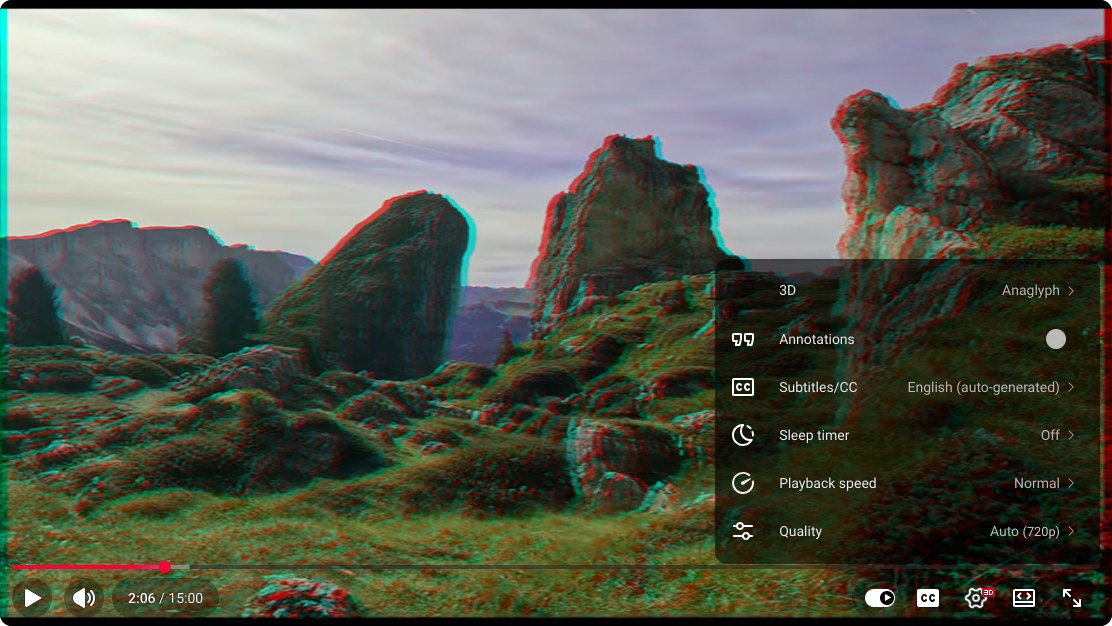
The 3D row in YouTube's gear menu, set to Anaglyph, in Chrome on a computer, signed out, on October 10, 2026. Screenshot: Owl3D; video: Stereo Symphony on YouTube.
Key takeaways
- Seven of the nine 3D videos we opened had no 3D row in the gear menu: where the 3D option went.
- On a computer the only 3D choice we found is Anaglyph, for red-cyan glasses: on a computer.
- In a headset, use the YouTube app, not a browser: in a VR headset.
- A 3D TV, projector or glasses-free display needs a plain side-by-side upload and its own 3D mode: on a 3D screen.
Find your device
| You have | What YouTube plays in 3D | How |
|---|---|---|
| Computer and red-cyan glasses | Videos with a 3D row in the gear menu [4] | Gear, 3D, Anaglyph: steps |
| VR headset | VR180, 360 and 3D-labelled videos, in the YouTube app [2][13] | In a VR headset |
| Android phone in a Cardboard-style viewer | VR180 and 360 videos [3] | Tap the Cardboard icon: on a phone |
| iPhone | Not with Cardboard: "Cardboard is not supported for iPhone and iPad" [3] | On a phone |
| 3D TV or 3D projector | A side-by-side upload, merged by the set | On a 3D screen |
| Glasses-free 3D display beside a computer | A side-by-side upload, merged by the display | On a 3D screen |
Where did the 3D option go?
It was still there on two of the nine videos we checked, with two choices.
YouTube's help says a 3D upload "should contain stereo metadata", a tag inside the file, and that a tagged video will "play back as 3D" once processed [1]. It does not say what happens to a side-by-side upload without the tag.
We opened nine 3D videos in Chrome on a computer, signed out, from a connection in Taiwan, on October 10, 2026 [4]:
- Two had the 3D row. Its choices were 2D and Anaglyph. It was set to 2D when the page opened, so the video looked flat until we changed it.
- Three that YouTube labels 3D or VR180 had no 3D row and played flat.
- Four side-by-side uploads had no 3D row and showed two pictures, as uploaded.
So a missing option does not mean you did something wrong. No side-by-side choice appeared on any of the nine. Others have said the same: a thread on Acer's community forum is titled "YouTube 3D SBS gone? (3D content only in Anaglyph blue red, or 2D)" [5]. The author of a browser add-on last updated in January 2026 says YouTube "removed the option to manually select Side-by-Side (SBS) playback on the desktop player" [6]. A user's blog about YouTube 3D, in a 2016 post, says: "When YouTube switched from their Flash based viewer to an HTML 5 viewer the 3D viewing menu options were broken" [7].
On a computer
You need red-cyan glasses; see anaglyph 3D for what they are. These are the steps as we did them in Chrome [4].
- Open the video on youtube.com. Start it playing.
- Click the gear. On a video with the option, the gear carries a small red "3D" mark and the menu's first row reads 3D.
- Choose 3D, then Anaglyph. The picture turns into a red and cyan overlay. Put the glasses on.
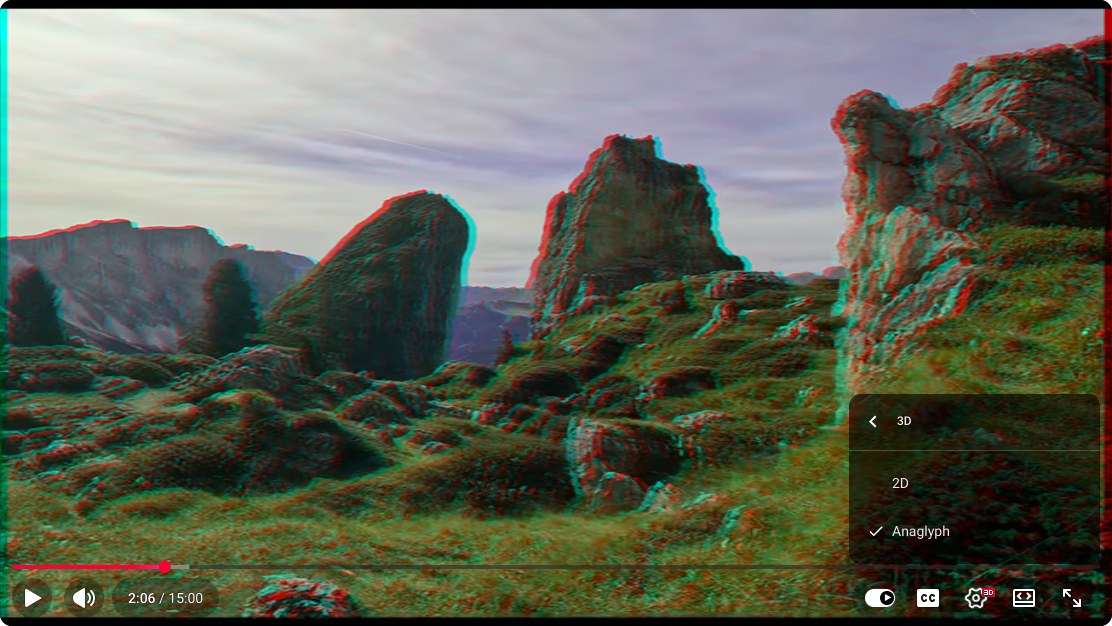
If there is no 3D row:
- You see two pictures. It is a plain side-by-side upload. Red-cyan glasses will not help; it needs a 3D screen or a headset.
- You see one flat picture. That is what three labelled videos gave us. We found no setting in the player that changes it; the route left is a headset's YouTube app.
We checked Chrome only, signed out, on one day, from Taiwan. We did not check Firefox, Safari or Edge, a signed-in account, a US connection or YouTube's phone apps, so yours may differ.
On a 3D TV, projector or glasses-free display
These screens do the merging themselves, so they want the plain side-by-side upload, the kind that shows two pictures. Adding "SBS" to a search finds them. A video that plays flat or in red and cyan gives the screen nothing to merge.
3D TV or projector. Play the video full screen and switch the set to its side-by-side 3D mode. Sony's manual for one of its 3D TVs says: "If two pictures are displayed side-by-side, press the 3D button repeatedly until [3D (Side-by-Side)] appears" [8]. If nothing changes, the same manual says "3D signal of 4K cannot be displayed" [8], so try 1080p under Settings, then Quality, in YouTube's player [9]. That last step is our reading of Sony's page; we have not tested it on a 3D TV.
Owl3D Shift. The Shift is a 14-inch glasses-free 3D display used as a second monitor. Its Stereo 3D Playback is built to detect a side-by-side picture on its screen, a video on a web page included, and show it in 3D, to one viewer at a time, after you press Start on the Stereo 3D Playback tab in the Owl3D app. We have not yet run it with a YouTube video ourselves. It needs the computer running the Owl3D app. Separately, its Live 3D Screen converts an ordinary 2D video in a browser to 3D instantly as it plays, and Owl3D Link, a free app, does the same in a Meta Quest from a Windows PC with an NVIDIA RTX 3060 or better. That is an AI conversion, not 3D a camera recorded.
From Owl3DOwl3D ShiftA 14-inch glasses-free 3D display that sits beside your computer.In a VR headset
Use the YouTube app on the headset, not a browser. YouTube lists its VR app for Meta Quest 2, Quest Pro, Quest 3, PICO 4 and Apple Vision Pro [2], and says the Vision Pro app plays "360°, VR180°, and 3D formats" [10]. In the app's search you can filter results by "360°, VR180, 4K, 3D and CC" [2]. YouTube's page for the Quest app does not spell out that a 3D-labelled video plays in depth; 360 Rumors' 2023 walkthrough says "YouTube will automatically show the video in 3D" [13]. We have not checked it in a headset.
A plain side-by-side upload still arrives as two pictures. In the Quest's own Browser, Meta's developer documentation says a viewer who puts a web video in full screen can "choose between a monoscopic mode or a stereoscopic mode of left-right or top-bottom" [11]; left-right is side-by-side. We have not tried that with a YouTube video.
One owner's account, which we have not tested: a Quest 2 owner on Meta's community forum, about 2024, watched YouTube in a desktop browser over Quest Link: "No matter what format they are, I always get the flat video" [12]. Meta's support account replied that it takes a VR app such as YouTube VR. For player apps and your own files, see watching movies in VR.
On a phone
An Android phone in a Cardboard-style viewer (a holder with two lenses) plays YouTube's VR180 and 360 videos: start the video in the YouTube app and tap the Cardboard icon, which splits the screen "into two smaller screens" [3]. YouTube's page is blunt about Apple: "Cardboard is not supported for iPhone and iPad" [3].
For tagged 3D videos, a 2023 walkthrough by 360 Rumors says: "The YouTube app will automatically show the video in anaglyph 3D format" [13]. YouTube's help does not mention it and we have not checked it on a phone.
Frequently asked questions
How do I find 3D videos on YouTube?
Search for a subject, open Filters, and under Features pick 3D, VR180 or 360°; all three were there on October 10, 2026 [14]. For thirteen videos we checked, sorted by format and device, see where to find 3D videos.
Do movie theater 3D glasses work with YouTube 3D?
Not on a phone, a laptop or a regular TV. See which glasses work with which video.
Can I download a 3D video from YouTube?
YouTube's Terms of Service do not allow downloading "except: (a) as expressly authorized by the Service" or with written permission [15].
Sources (15)
- YouTube Help, "Upload 3D videos". https://support.google.com/youtube/answer/7278886?hl=en (opened 2026-10-10)
- YouTube Help, "Get started with YouTube VR". https://support.google.com/youtube/answer/7205134?hl=en (opened 2026-10-10)
- YouTube Help, "Watch VR180 and 360-degree videos with Cardboard". https://support.google.com/youtube/answer/6239930?hl=en (opened 2026-10-10)
- Owl3D, our own check of nine YouTube 3D videos in Chrome on a computer (signed out, from a connection in Taiwan), October 10, 2026; repeated on three of them the same day. The video in the screenshots: https://www.youtube.com/watch?v=bj85eXqzfrc (opened 2026-10-10)
- Users' reports: Acer Community, SpatialLabs forum, thread "YouTube 3D SBS gone? (3D content only in Anaglyph blue red, or 2D)". https://community.acer.com/en/discussion/704654/youtube-3d-sbs-gone-3d-content-only-in-anaglyph-blue-red-or-2d (opened 2026-10-10)
- Mozilla Add-ons, "YouTube Force SBS (Raw 3D)", version 1.0, last updated January 17, 2026. https://addons.mozilla.org/en-US/firefox/addon/youtube-force-sbs-raw-3d/ (opened 2026-10-10)
- "Viewing Options for YouTube 3D", a user's blog, post of November 3, 2016 with a 2018 update. https://youtube3d.wordpress.com/ (opened 2026-10-10)
- Sony, BRAVIA i-Manual for the XBR-55X905B, "3D Picture/Glasses Symptoms". https://helpguide.sony.net/gbmig/C7021001/v1/uen/index_988_585.html (opened 2026-10-09)
- YouTube Help, "Change the quality of your video". https://support.google.com/youtube/answer/91449?hl=en (opened 2026-10-10)
- YouTube Help, "Get started with YouTube XR on Apple visionOS". https://support.google.com/youtube/answer/16868229?hl=en (opened 2026-10-10)
- Meta for Developers, "Browser Video Support". https://developers.meta.com/horizon/documentation/web/browser-video/ (opened 2026-10-10)
- Users' reports: Meta Community Forums, thread "How do I watch VR videos on YouTube?". https://communityforums.atmeta.com/discussions/OtherTroubleshooting/how-do-i-watch-vr-videos-on-youtube/1203710 (opened 2026-10-09)
- 360 Rumors, "FAQ: How to watch 3D videos on YouTube in 2023 (Meta Quest, iOS or Android)", by Mic Ty, September 26, 2023. https://360rumors.com/youtube-3d-videos/ (opened 2026-10-10)
- YouTube, search results for "3d video", Filters dialog. https://www.youtube.com/results?search_query=3d+video (opened 2026-10-10)
- YouTube, "Terms of Service", dated December 15, 2023. https://www.youtube.com/static?template=terms&hl=en&gl=US (opened 2026-10-10)