Nvidia 3D Vision in 2026: What Replaced It for PC Games
How we researched this: written by Owl3D from published sources, all 29 listed at the end.
Short answer
PC games still play in stereoscopic 3D in 2026, without Nvidia. geo-11, a community-made driver, renders true stereo 3D in DirectX 11 games on current graphics cards and can still drive 3D Vision glasses [5][6], and SuperDepth3D, a shader for ReShade, adds 3D to games from DirectX 9 to 12 [7][8]. Nvidia 3D Vision itself, the kit of active-shutter glasses and driver software, is discontinued: Nvidia announced the end in March 2019, and the last driver that includes it is version 425.31, from April 2019 [1][2][20].
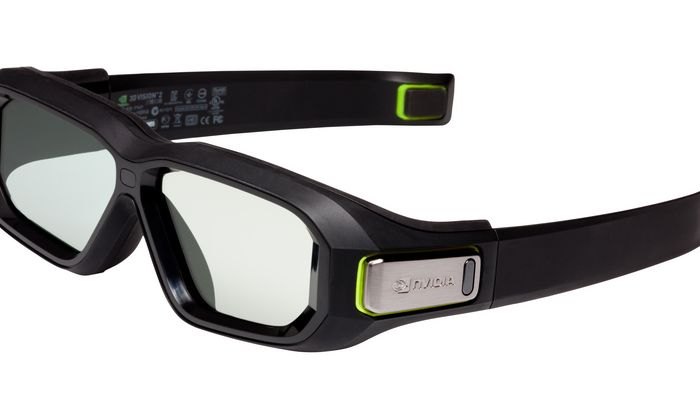
Nvidia's 3D Vision 2 glasses, the active-shutter glasses of the discontinued kit. Image: Nvidia.
Key takeaways
- Still own the kit? 3D Vision glasses and monitors work in part: Nvidia's original driver runs DirectX 9 games, and geo-11 runs DirectX 11 games [5][6]: what still works.
- No kit is needed any more. geo-11 and SuperDepth3D output side-by-side, top-and-bottom and anaglyph 3D for 3D TVs, projectors, video glasses, VR headsets and glasses-free monitors: match the tool to your display.
- geo-11 runs on current graphics drivers, AMD cards included: how to install geo-11.
- The Owl3D Shift, a glasses-free display, converts almost any game on its screen to 3D instantly, as it runs. That is an AI conversion, not true stereo, and competitive multiplayer games and games with anti-cheat software often block it: on the Shift.
- Nvidia ended 3D Vision in 2019, did not replace it and pointed to VR instead [1]: is it discontinued?
Quick picks
- 3D Vision monitor and glassesNvidia's original driver for DirectX 9 games, geo-11 for DirectX 11
- 3D TV, 3D projector or video glassesgeo-11 or SuperDepth3D, set to side-by-side
- VR headsetUEVR for Unreal Engine games, or vorpX
- Glasses-free 3D monitorthe maker's game list, or community tools
- Any monitor, with red-cyan glassesgeo-11 or SuperDepth3D, set to anaglyph
Does 3D Vision still work in 2026?
Partly, with tools from HelixMod, the community that publishes per-game 3D Vision fixes. What runs depends on the game's DirectX version (DirectX is Microsoft's graphics interface for Windows games), your graphics card and your driver [5][6]:
| Game uses | Card and driver | What works with a 3D Vision monitor and glasses |
|---|---|---|
| DirectX 9 | Any, including current cards | Nvidia's original 3D Vision driver [6] |
| DirectX 11, on an older setup | RTX 20-series or older, on driver 452.06 or earlier | The original driver, or geo-11's nvidia_dx11 mode, which has about 150 game profiles [5][6] |
| DirectX 11, on a newer setup | RTX 30-series or newer, or any newer driver | geo-11's nvidia_dx9 mode, in roughly 100 games tagged for it [5][6] |
3D Fix Manager is the HelixMod program that holds this together. It says it "Auto restores 3D Vision compatibility with Win 10 > 1809 and Geforce drivers beyond 425.31", installs fixes with one click, and can install driver 452.06 for you. It needs an Nvidia graphics card. Its latest version, 1.87, is from March 2024 [6].
Why DirectX 11 3D Vision broke, driver by driver
- DirectX 9. 3D Fix Manager's author writes that "DirectX 9 games are still fully compatible to stereoscopic 3D and run on latest graphics cards" [6].
- DirectX 11, older setup. From driver 456.38 on, DirectX 11 3D Vision is broken [11].
- DirectX 11, newer setup. The
nvidia_dx9mode needs the 3D Vision Driver installed and the game in fullscreen mode [5][6].
The split exists because, in the words of 3D Fix Manager's author, Nvidia "partially removed stereoscopic 3D support" from its drivers in October 2020, when the RTX 30-series arrived, and DirectX 11 games lost 3D [6].
Nvidia 3D Vision glasses and monitors today
Can you still use the glasses? Yes, with the kit's infrared emitter (the USB box that keeps the glasses in step with the screen) and a 3D Vision monitor, within the limits in the table above. The glasses do nothing on their own.
3D Vision 2, from October 2011, has lenses 20 percent larger and was sold alongside LightBoost monitors, which gave what Nvidia called "up to 2X brighter 3D images". Nvidia said the glasses were "fully backwards-compatible with all existing NVIDIA 3D Vision Ready content and supporting products" [4].
3D Vision monitors. A 3D Vision monitor is a 120 Hz monitor from that period built for the kit. The first with LightBoost was the ASUS VG278H: 27 inches, 1920 x 1080, 120 Hz, sold with 3D Vision 2 glasses for $699 [4].
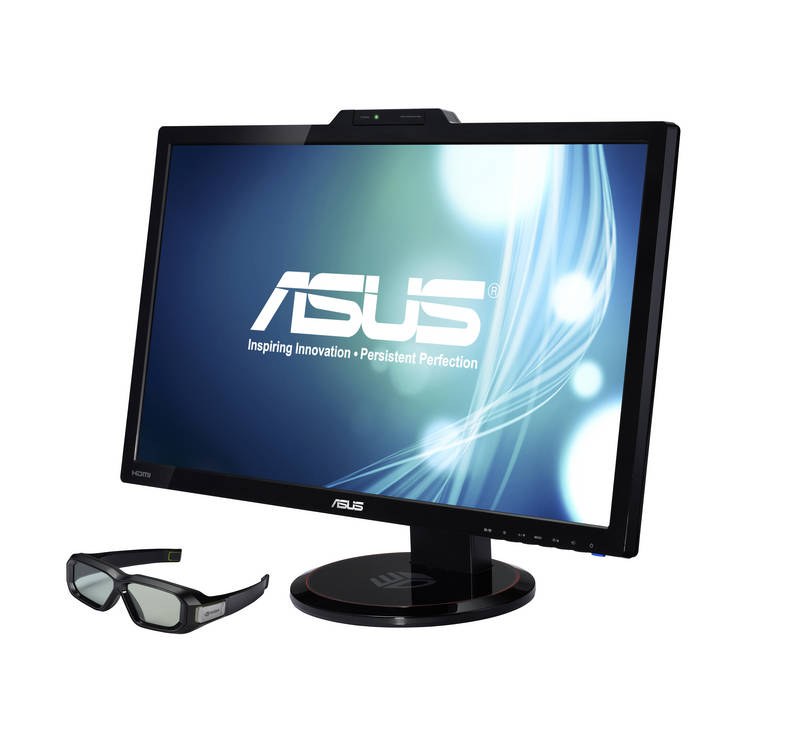
Acer and BenQ models were to follow [4]. In a used monitor, LightBoost is the feature to look for.
What the glasses cost, and where to buy them. In 2011 the 3D Vision 2 kit, "one pair of NVIDIA 3D Vision 2 glasses and a wireless USB IR emitter", cost $149, and extra glasses $99 [4]. The kit is discontinued [2], so glasses and emitters now come from the second-hand market. Listings for "3D Vision Pro" glasses are the professional, radio-linked version, which needs its own Pro RF emitter, not the consumer kit [28].
You no longer need this hardware to play in 3D: geo-11 and SuperDepth3D output standard 3D formats that other displays accept.
Five ways to play PC games in 3D in 2026
Five routes work today, and they make three different kinds of 3D.
| Method | Kind of 3D | Games | Needs |
|---|---|---|---|
| geo-11, with HelixMod fixes | True stereo | DirectX 11 games only; set up per game [5] | Any graphics driver, AMD cards included [5] |
| SuperDepth3D, a shader for ReShade | Depth-buffer 3D | Any game ReShade can hook: Direct3D 9 to 12, OpenGL, Vulkan [8] | Usable depth data; not multiplayer [8] |
| VR mods: UEVR, vorpX | Stereo 3D in a headset | UEVR: Unreal Engine 4.8 to 5.4 [9]. vorpX: more than 250 DirectX 9 to 12 games [10] | A VR headset connected to the PC |
| Glasses-free monitor software: Samsung Odyssey 3D Hub, Acer SpatialLabs TrueGame | Per-game profiles from the monitor maker | Only games on the maker's list | That maker's monitor |
| Instant AI conversion: Owl3D Shift | AI depth estimate made in real time as the game runs, not true stereo | Almost any; not games that block screen capture | The Shift and the computer described below |
Status of each tool in October 2026: versions, game counts and prices, plus a sixth project
| Tool | Status, October 2026 |
|---|---|
| geo-11 | Active: updated September 2026 [5] |
| SuperDepth3D | Active: repository updated October 2026 [7]; ReShade 6.8.0, August 2026 [8] |
| UEVR | Free download; latest release 1.05, November 2024 [9] |
| vorpX | Paid; version 25.1.5 [10] |
| Samsung Odyssey 3D Hub | More than 60 games, more than 120 promised (March 2026) [13] |
| Acer SpatialLabs TrueGame | A review counted 185 games in August 2025 [15] |
| Owl3D Shift | Priced at $499 |
A sixth project is at an earlier stage: wiz3D, an open-source wrapper that aims at DirectX 7 to 9 games and games with built-in 3D Vision or AMD HD3D support. Its own status list rates DirectX 9 as mostly working, and its latest release, 0.3.1, is from July 2026 [26].
Last checked : versions, game counts and prices.
True stereo, depth-buffer 3D and AI conversion are not the same
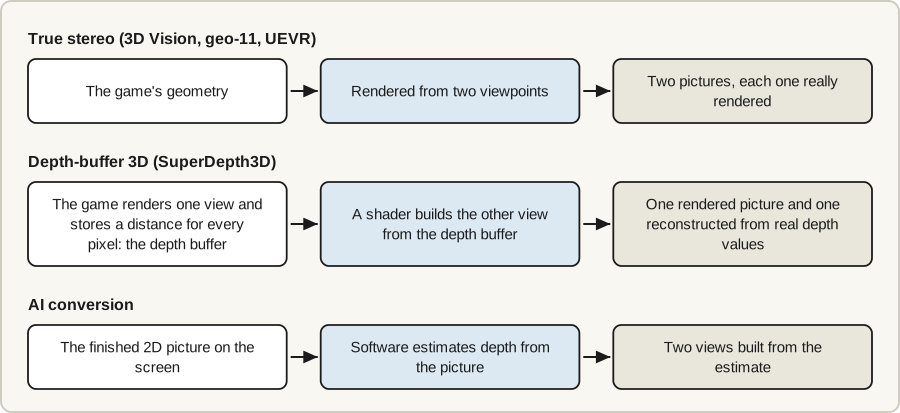
- True stereo (3D Vision, geo-11, UEVR): the game's geometry is rendered from two viewpoints, so each eye gets a picture that was really rendered [3][5][9]. Many games show defects when drawn twice [29], which is why HelixMod publishes per-game fixes, more than 1,000 of them [6].
- Depth-buffer 3D (SuperDepth3D): the game renders one view, and the shader builds the other from the depth buffer, the distance the game stores for every pixel [21]. The depth values are real, but quality depends on the depth data the game exposes: its author notes that some engines "do not hand ReShade a clean depth buffer" [7].
- AI conversion (Owl3D Shift): software estimates depth from the finished 2D picture, not the game's geometry, and builds two views from the estimate, instantly, as the game runs. It has no list of supported games, but it is a different thing from the two methods above, not a substitute for them.
More on the tools named above: ReShade, UEVR, vorpX and Acer's profiles
SuperDepth3D (ReShade 3D): what it is, where to download it, how to install it
SuperDepth3D is a shader by BlueSkyDefender that runs inside ReShade and, in its author's words, "builds a stereoscopic image out of the game's own depth buffer", with no patch to the game [21]. The current version is 5.4.0 [21]. It is "free for personal use, but it is not open source", and it comes with ready-made settings for "well over nine hundred titles" [7].
Where to download it.
- ReShade: reshade.me [8]
- SuperDepth3D, in the Depth3D package: depth3d.info or the Depth3D repository on GitHub [7][21]
- Optional: GPU Selector, the author's launcher, which installs both for you: GPU Selector releases [7]
How to install it. In short: install ReShade for the game, add the Depth3D shaders, press Home in the game and tick SuperDepth3D.
If the game has a profile, the shader says so at the top of its menu and sets depth and convergence for you. If not, the wiki's Shader Adjustments page explains how to build one [7].
Both installs step by step: by hand, and with GPU Selector
How to install it by hand, following the four steps on the author's site [21]:
- Install ReShade for your game. Run its installer, select the game, and when asked select the graphics interface the game uses (DirectX 9, or DirectX 10, 11 or 12) [24].
- Add the Depth3D shaders. They go in your shader folder. The installer can do it: on its "Select effects to install" page, tick "Depth3D by BlueSkyDefender" [24][25].
- Open the ReShade menu. Launch the game and press Home.
- Turn the shader on. Tick SuperDepth3D.
- Choose the output. Under "3D Display Modes", choose the output your display needs. Side by Side is the default; Top and Bottom, Line Interlaced, Column Interlaced, Checkerboard and Anaglyph are among the others [7][22].
How to install it with GPU Selector, the author's "Easy Install", for Windows 10 or later [7][22]:
- Download ReShade. In the Mods tab, set the ReShade card's Build Type to Full Add-on Support and click Download ReShade.
- Turn on Inject Mode. It is the syringe button on the ReShade card.
- Deploy the shaders. Click Deploy on the Depth3D card.
- Start the game. Use Launch in GPU Selector, then press Home.
For which games expose usable depth data, the author's site points to PCGamingWiki's ReShade page [21].
geo-11: what it is and how to install it
geo-11 is a community-made driver that renders DirectX 11 games in true stereo 3D. Its announcement calls it "a full replacement for NVidia 3D Vision for DX11 games". It was written by davegl1234 on top of the 3Dmigoto modding tool and first released on June 21, 2022; the newest build, 0.7.11, is dated September 6, 2026. It loads existing HelixMod DirectX 11 fixes directly [5].
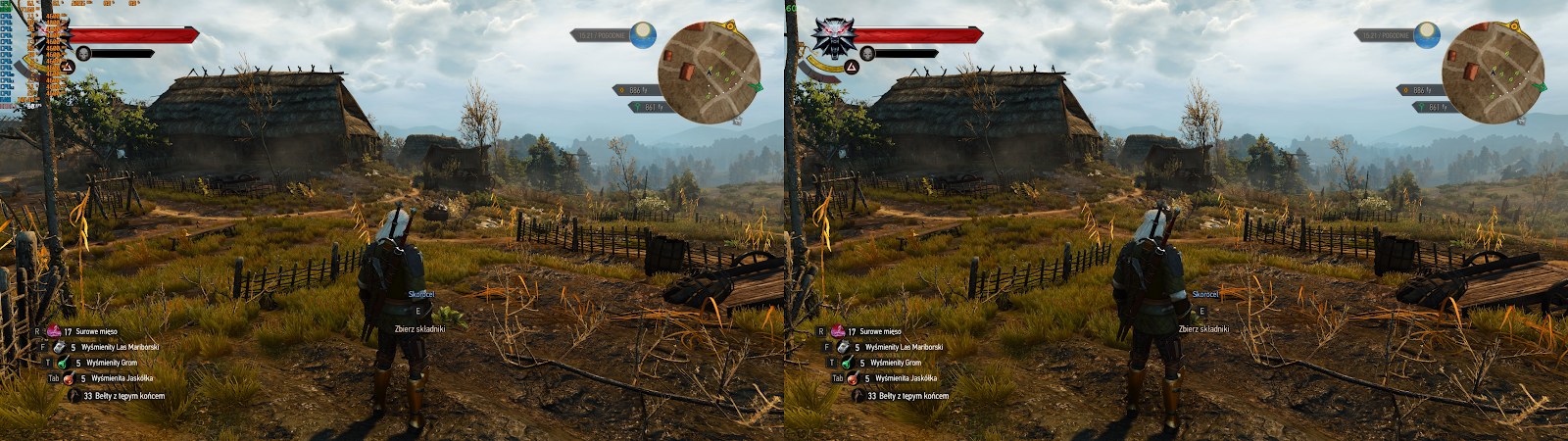
What it needs. A DirectX 11 game, and any graphics driver: the page says it has "no requirement for any NVidia software" and runs on AMD cards. Only its two 3D Vision output modes need Nvidia's 3D Vision Driver [5].
Where to download it. The builds are linked at the bottom of the geo-11 project page; the newest file is geo-11_v0.7.11.7z. The links are direct downloads with no payment step [5].
How to install it. In short: install the game's HelixMod fix, copy three geo-11 files into the game folder, and set the output your display needs. With an Nvidia card, 3D Fix Manager can do all of this for you [6].
The seven install steps, as the project page describes them
How to install it, as the project page describes [5]:
- Start with a game known to work. The page suggests The Witcher 3.
- Look at the game's HelixMod fix. If it is marked as a geo-11 file, drag all of its files into the folder that holds the game's .exe file. That is the whole install.
- Otherwise, install the regular fix first. Install the game's regular HelixMod fix and check that the game still runs.
- Copy three files. Open the geo-11 archive. From the x32 or x64 folder that matches the game, copy
d3d11.dll,nvapi64.dllandd3dxdm.iniinto the game folder. - Turn geo-11 on. In the game folder's
d3dx.inifile, setforce_stereo=2; edit the file the fix installed, do not overwrite it. For a game with no fix, the page says the defaults "should suffice". - Choose the output. In
d3dxdm.ini, setdirect_modeto the output your display needs (table below). The default issbs. - Start the game. Separation and convergence (how strong the 3D is, and where the screen plane sits) are set in the same file and have hotkeys.
Every direct_mode value and the display it is for
direct_mode value |
Use it for |
|---|---|
sbs, tab |
Anything that takes side-by-side or top-and-bottom |
interlaced, checkerboard |
Displays that need those formats |
anaglyph |
Red-cyan glasses on any screen |
katanga_vr |
VR headsets |
simulated_reality |
Glasses-free monitors on Leia's SR platform |
nvidia_dx11, nvidia_dx9 |
3D Vision monitors; which one depends on your card and driver (table above) |
The page's advice on the first row: "Use TAB if you can, it's better quality because of no horizontal compression". Of simulated_reality it says: "Full resolution on any Leia hardware".
Limits. DirectX 11 only: asked about DirectX 12, the page answers "No current plans". The announcement calls geo-11 "beta caliber" and says its authors had "only really tested maybe 80 games or so" [5].
Match the tool to the display you own
Start from the display: it decides the signal, and the signal decides the tool.
| Display you own | What it needs | Tools that feed it |
|---|---|---|
| 3D Vision monitor, glasses and emitter | Nvidia's 3D Vision signal and the 3D Vision Driver | The original driver for DirectX 9 games; geo-11's nvidia_dx11 or nvidia_dx9 mode for DirectX 11 games [5][6] |
| 3D TV or 3D projector | Side-by-side (SBS) or top-and-bottom (TAB) [16][18] | geo-11 (sbs, tab) [5] or SuperDepth3D (Side by Side, Top and Bottom) [7] |
| VR headset on a PC | A VR app | UEVR [9]; vorpX [10]; SuperDepth3D's VR mode [7]; geo-11's katanga_vr mode [5] |
| Glasses-free monitor on Leia's SR ("Simulated Reality") platform, such as Acer SpatialLabs | The monitor's SR software | The maker's game list; geo-11's simulated_reality mode [5]; side-by-side output with the 3DGameBridge add-on [24][25] |
| Owl3D Shift ($499) | A side-by-side or top-bottom picture on its screen, or any window | geo-11 or SuperDepth3D through Stereo 3D Playback (expected to work, not tested by us); AI conversion through Live 3D Screen |
Three more displays, and a note on each: video glasses, Samsung Odyssey 3D, red-cyan glasses
| Display you own | What it needs | Tools that feed it |
|---|---|---|
| Video glasses such as XREAL One | Full SBS at 3840 x 1080, or Half SBS at 1920 x 1080 [16] | geo-11 or SuperDepth3D set to SBS [5][7] |
| Samsung Odyssey 3D ($1,399.99) [12] | Samsung's Odyssey 3D Hub | Games on Samsung's list [13] |
| Any monitor, with red-cyan glasses | Anaglyph (color-filtered) 3D | geo-11 (anaglyph) or SuperDepth3D (Anaglyph) [5][7] |
- 3D TV or projector. SBS and TAB pack both eyes' pictures into one frame, so set the display's 3D mode to match. BenQ's TK710 projector, for one, accepts both [17].
- VR headset. UEVR is for Unreal Engine games. geo-11's
katanga_vrmode needs the Katanga app from HelixVision, a product no longer on Steam [5][11]. - Video glasses. The glasses' own "REAL 3D" setting converts 2D to 3D; XREAL describes it for video [16].
- SR monitors. Acer's game list is TrueGame, on the Predator SpatialLabs View 27 [14][15]; the community routes are below.
- Samsung Odyssey 3D. Samsung's product page says its AI conversion is for video and may not work with games [12].
Last checked : prices.
For more on each display type, see 3D TVs, 3D projectors, glasses-free 3D monitors and anaglyph 3D.
Glasses-free 3D monitors are not limited to the maker's game list
Several glasses-free displays run a shared software layer called Simulated Reality (SR), whose developer kit comes from Leia Inc [24]. Three community projects work with it:
The three community projects for Simulated Reality monitors, and 3DGameBridge's limits
- geo-11 has had a
simulated_realityoutput mode since version 0.7.7 (June 2026). Its release notes list games run "in SR mode", among them The Witcher 3, Alien Isolation and Monster Hunter World [5]. - SuperDepth3D's author published a video in September 2024, "Depth3D ReShade Simulated Reality Install Guide. (Easy)", whose description links Acer SpatialLabs, ASUS Spatial Vision and Sony Spatial Reality as SR hardware [23].
- 3DGameBridge is a ReShade add-on, offered in ReShade's installer as "3DGameBridge by Janthony & DinnerBram" and described there as "Enable stereoscopic 3D on LeiaSR displays for SBS content" [25]. It turns a side-by-side picture, from SuperDepth3D or from geo-11 set to
sbs, into the monitor's glasses-free 3D.
3DGameBridge's notes give its limits: DirectX 9 to 12 and OpenGL games but not Vulkan, an output resolution that matches the screen's, the SR Platform software installed, and both the display cable and the USB cable connected [24].
Playing these games on the Owl3D Shift
Owl3D, the publisher of this guide, makes the Shift: a 14-inch glasses-free 3D display that sits beside a computer as a second monitor and needs the Owl3D app running on that computer. It gives two routes for games: it shows the 3D that geo-11 and SuperDepth3D make, or it converts the game's picture itself, instantly.
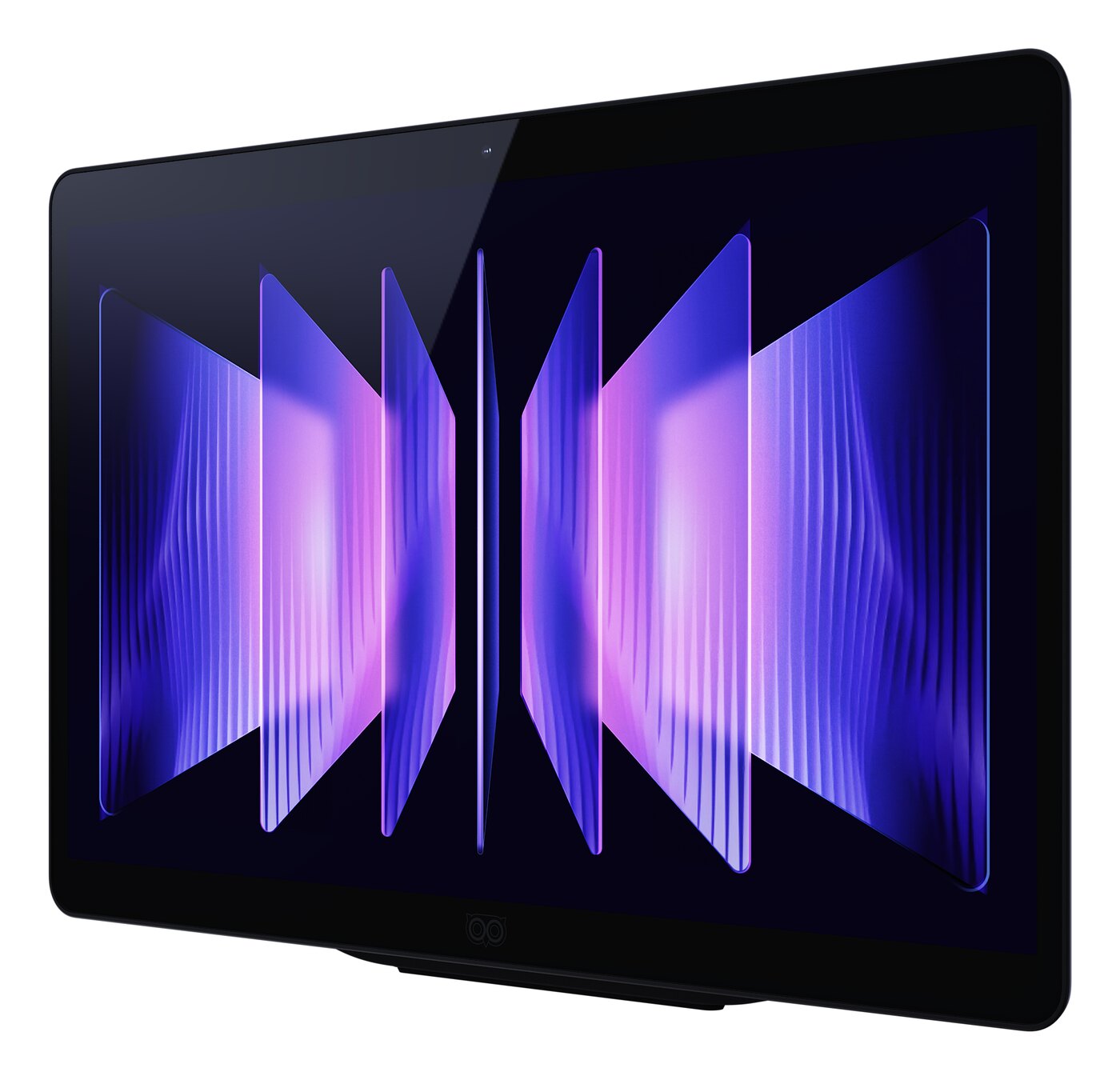
Stereo 3D Playback: the 3D these tools make
- Takes a Full side-by-side, Half side-by-side or top-bottom picture on its screen
- You see true stereo from the game's geometry with geo-11, depth-buffer 3D with SuperDepth3D
- Needs an NVIDIA GTX 1650 or Radeon RX 570 or better
Live 3D Screen: AI conversion of almost any game
- Takes any window dragged onto the Shift, converted from 2D to 3D instantly, in real time
- You see AI depth estimation, not true stereo from the game's geometry
- Needs a Windows PC with an NVIDIA RTX 30-series graphics card or newer, or a Mac with Apple Silicon
Multiplayer games. Competitive multiplayer games and games with anti-cheat software often block screen capture, and when they do, the Shift cannot convert them. The side-by-side route is affected in the same games: tools such as ReShade often cannot produce their 3D output in multiplayer titles, so there is no side-by-side picture to show.
Limits either way. The Shift shows 1920 x 2160 to each eye, to one viewer at a time, and it does not work with a game console.
Setting up each route on the Shift, and what a Mac needs
Setting up Stereo 3D Playback. Set geo-11 to sbs or tab (or SuperDepth3D to Side by Side or Top and Bottom), put the game on the Shift's screen, and press Start on the Stereo 3D Playback tab in the Owl3D app. Detection works on the picture, not on the program that drew it, so a game that outputs side-by-side qualifies. On AMD and Intel graphics it works in fullscreen only.
What Live 3D Screen converts. It works on the screen image, not inside the game, so it works with almost any game and has no list of supported titles; single-player games are the best fit. AMD cards are not supported for real-time conversion. A Mac needs macOS 15.5 or later: M1 Pro or better is recommended, and a MacBook Air works but can stutter unless it is kept cool.
Is Nvidia 3D Vision discontinued?
Yes. In March 2019 Nvidia said Release 418, due that April, would be the last driver branch with 3D Vision, with critical fixes until April 2020 [1]. Nvidia's reason: "We have seen the industry and our user base move to newer forms of immersive experiences such as Virtual Reality" [1].
Version 425.31 is the last driver with 3D Vision. Nvidia's release notes for it are dated April 11, 2019, and still list 3D Vision game profiles [20]; driver releases after it do not include 3D Vision [2]. Nvidia's 3D Vision download page is still online, lists drivers only for Windows Vista and Windows 7, and does not say the product has ended [19].
What Nvidia 3D Vision is and what it does
3D Vision was a stereoscopic 3D kit for GeForce graphics cards, launched at CES 2009 [1]. Stereoscopic 3D means each eye gets its own, slightly different picture, and the brain reads the difference as depth. The kit had three parts:
- Glasses. Wireless active-shutter glasses: liquid-crystal lenses black out one eye at a time in step with the screen, kept in sync by an infrared emitter on the PC. Each lens runs at 60 Hz, so the display runs at 120 Hz [2].
- A display. A 120 Hz monitor, a 3D projector or, through Nvidia's 3DTV Play software, an HDMI 3D TV [1][3].
- The driver. It rendered each scene twice, "once for the left eye, and once for the right eye", by modifying the game's shaders (the small programs that draw each frame) as it ran [3]. The game needed no 3D support of its own.
For other kinds of glasses, see types of 3D glasses.
Frequently asked questions
Which games are compatible with Nvidia 3D Vision?
Nvidia claimed "more than 550" 3D games in 2011 [4], but by the end of 2013 only about 40 had been certified "3D Vision Ready", among them Batman: Arkham Asylum, Battlefield 3 and Just Cause 2 [29]. Today the working list is the community's: the HelixMod blog keeps a game list [27]. For geo-11, the project page names games known to work well, including The Witcher 3: Wild Hunt, God of War, Final Fantasy XV and Dark Souls III [5].
Does Nvidia 3D Vision work on Windows 11, or with RTX 50-series cards?
Not documented either way. 3D Fix Manager lists Windows 7, 8 and 10 and names cards up to the RTX 4000 series [6], the geo-11 page names no Windows version [5], and Nvidia's download page stops at Windows 7 [19]. The route that is documented for Windows 11 is SuperDepth3D, because ReShade lists Windows 11 as supported [8].
Does SuperDepth3D work in VR?
Yes. It has "a Virtual Reality mode for OpenXR headsets and a Theater mode for phone VR and AR glasses" [7]. It is still depth-buffer 3D; for true stereo in VR, UEVR is the tool to look at.
Sources (29)
- Engadget, Jon Fingas, "NVIDIA will stop supporting 3D glasses in April (updated)", March 11, 2019. https://www.engadget.com/2019-03-11-nvidia-ends-3d-vision-support.html (opened 2026-10-07)
- Wikipedia, "Nvidia 3D Vision". https://en.wikipedia.org/wiki/Nvidia_3D_Vision (opened 2026-10-07)
- NVIDIA Developer, "3D Vision and Surround Technology". https://developer.nvidia.com/3d-vision-and-surround-technology (opened 2026-10-07)
- NVIDIA Newsroom, "NVIDIA 3D Vision Vaults to New Dimension With Next-Gen 3D Glasses and Monitors", press release, October 14, 2011. https://nvidianews.nvidia.com/news/nvidia-3d-vision-vaults-to-new-dimension-with-next-gen-3d-glasses-and-monitors (opened 2026-10-07)
- HelixMod blog, "Announcing new geo-11 3D driver" (the geo-11 project page; first release June 21, 2022; latest listed release geo-11 v0.7.11, dated 9-6-26). https://helixmod.blogspot.com/2022/06/announcing-new-geo-11-3d-driver.html (opened 2026-10-07)
- HelixMod blog, "3D Fix Manager" (version 1.87, last updated March 23, 2024). https://helixmod.blogspot.com/2017/05/3d-fix-manager.html (opened 2026-10-07)
- GitHub, BlueSkyDefender/Depth3D, README (SuperDepth3D); repository last pushed October 1, 2026, per the GitHub API. https://github.com/BlueSkyDefender/Depth3D (opened 2026-10-07)
- ReShade home page (version 6.8.0, released August 2, 2026). https://reshade.me/ (opened 2026-10-07)
- GitHub, praydog/UEVR, README and releases (UEVR 1.05, published November 16, 2024). https://github.com/praydog/UEVR (opened 2026-10-07)
- vorpX home page (version 25.1.5). https://www.vorpx.com/ (opened 2026-10-07)
- Steam, "HelixVision" store page. https://store.steampowered.com/app/1127310/HelixVision/ (opened 2026-10-07)
- Samsung US, "27-inch Odyssey 3D G90XF" product page. https://www.samsung.com/us/monitors/gaming/27-inch-odyssey-3d-g90xf-4k-165hz-gaming-monitor-sku-ls27fg900xnxza/ (opened 2026-10-07)
- SamMobile, Asif Iqbal Shaik, "Samsung's Odyssey 3D gaming monitor will support over 120 3D games", March 10, 2026. https://www.sammobile.com/news/samsung-odyssey-3d-gaming-monitor-support-120-3d-games/ (opened 2026-10-07)
- Acer, "Acer Expands SpatialLabs Stereoscopic 3D Portfolio with New Laptop and Gaming Monitor", press release, January 7, 2024. https://news.acer.com/acer-expands-spatiallabs-stereoscopic-3d-portfolio-with-new-laptop-and-gaming-monitor (opened 2026-10-07)
- Tom's Hardware, "Acer Predator SpatialLabs View 27 (PSV27-2) 3D gaming monitor review", August 5, 2025. https://www.tomshardware.com/monitors/gaming-monitors/acer-predator-spatiallabs-view-27-psv27-2-3d-gaming-monitor-review (opened 2026-10-07)
- XREAL, One series tutorial, "3D Mode". https://tutorials.xreal.com/docs/glasses/one-series/osd/3d-mode/ (opened 2026-10-07)
- BenQ US, "TK710" specifications and FAQ. https://www.benq.com/en-us/projector/home-projectors/tk710/spec.html (opened 2026-10-07)
- Wikipedia, "HDMI" (3D formats in versions 1.4 and 1.4a). https://en.wikipedia.org/wiki/HDMI (opened 2026-10-07)
- NVIDIA, "3D Vision Drivers and Downloads". https://www.nvidia.com/en-in/drivers/GeForce-3D-Drivers-Downloads/ (opened 2026-10-07)
- NVIDIA, "Release 418 Driver for Windows, Version 425.31: Release Notes" (RN-08399-425.31_v01), April 11, 2019. https://us.download.nvidia.com/Windows/425.31/425.31-win10-win8-win7-release-notes.pdf (opened 2026-10-07)
- Depth3D website, home page (SuperDepth3D v5.4.0; "Getting started"). https://www.depth3d.info/ (opened 2026-10-07)
- GitHub, BlueSkyDefender/Depth3D wiki, "GPU Selector" and "Shader Adjustments" pages (wiki last edited September 30, 2026). https://github.com/BlueSkyDefender/Depth3D/wiki (opened 2026-10-07)
- YouTube, BlueSkyDefender, "Depth3D ReShade Simulated Reality Install Guide. (Easy)", published September 21, 2024 (title, date and description). https://www.youtube.com/watch?v=ovXh54DkKbU (opened 2026-10-07)
- GitHub, JoeyAnthony/3DGameBridgeProjects, README, INSTALL.md and release notes (v2.1.0, December 3, 2025). https://github.com/JoeyAnthony/3DGameBridgeProjects (opened 2026-10-07)
- GitHub, crosire/reshade-shaders, the ReShade installer's package lists (EffectPackages.ini and Addons.ini, "list" branch). https://github.com/crosire/reshade-shaders/tree/list (opened 2026-10-07)
- GitHub, effcol/wiz3D, README and releases (v0.3.1, July 4, 2026). https://github.com/effcol/wiz3D (opened 2026-10-07)
- HelixMod blog, "Game List (automatically updated)". https://helixmod.blogspot.com/2013/10/game-list-automatically-updated.html (opened 2026-10-07)
- Schneider Digital online shop, "NVIDIA 3D Vision Pro RF-Glasses". https://shop.schneider-digital.com/en/nvidia-3d-vision-pro-rf-glasses (opened 2026-10-07)
- Wikipedia, "List of Nvidia 3D Vision Ready games". https://en.wikipedia.org/wiki/List_of_Nvidia_3D_Vision_Ready_games (opened 2026-10-07)