ReShade: What It Is, How to Install It, and Play in 3D
How we researched this: written by Owl3D from published sources, all 16 listed at the end.
Short answer
ReShade is a free Windows program that adds effects such as ambient occlusion, depth of field and color correction to PC games [1][6]. Download it only from reshade.me; the current version is 6.8.0, released August 2, 2026 [1]. To install it, run the setup tool, pick the game's .exe file, pick the game's graphics API, tick the effects you want, then start the game and press Home [2]. To remove it, run the setup tool again, select the same game and choose "Uninstall ReShade and effects" [3]. For 3D, tick "Depth3D by BlueSkyDefender" during setup and turn on SuperDepth3D in the game [5][11]. Owl3D, the publisher of this guide, makes the Shift, a glasses-free 3D display, described in one passage below.
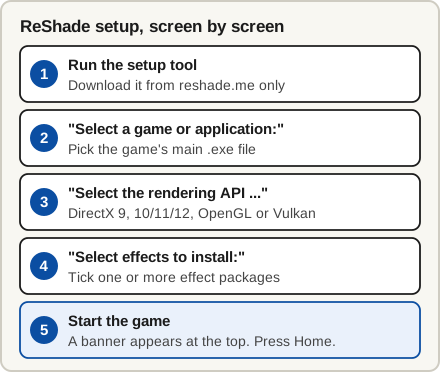
The five steps of a ReShade install. Diagram: Owl3D, with screen titles from the ReShade setup tool.
Key takeaways
- ReShade goes into one game at a time, into the folder of that game's .exe file [2].
- Online games: use the standard build. Most anti-cheat systems flag the "full add-on support" build [6], and the setup tool refuses banned games [10]. See ban risk.
- 3D: the free SuperDepth3D shader makes side-by-side, top-and-bottom, anaglyph or VR output from the game's depth data [4][5]. See 3D with SuperDepth3D.
What is ReShade?
ReShade is a post-processing injector: it changes the finished picture of a game, not the game's files [1][6]. Its author, crosire, wrote that it "pretends to be the DirectX or OpenGL driver" [7].
It works with Direct3D 9, 10, 11 and 12, OpenGL and Vulkan, on Windows 7 SP1, 8.1, 10 or 11 with .NET Framework 4.8 [1]. Presets are .ini files of settings that people share [1].
Where to download ReShade safely
Only from reshade.me. It offers two buttons [1]:
| Build | Use it for | Limit |
|---|---|---|
| ReShade 6.8.0 (standard) | Online and multiplayer games | Turns off depth access when it sees the game's network traffic [6] |
| ReShade 6.8.0 with full add-on support | Single-player games, and 3D with SuperDepth3D [6][15] | Unsigned [1]; most anti-cheat systems flag it [6] |
Is ReShade safe? Can it get you banned?
On your PC, the reshade.me download is the one to trust: ReShade is open source, and its code is public on GitHub [1]. ReShade's forum FAQ says some antivirus tools, Windows Defender and browsers can flag a new version as a false positive until they whitelist it [8].
Yes, it can get you banned in some games. The setup tool stops on any game its compatibility list marks as banned: "The target application is known to have blocked or banned the usage of ReShade." [10] On November 3, 2026, that list marked 30 games, among them Fortnite, Valorant, Roblox and Counter-Strike 2 [12]. Dead by Daylight is listed as not banned, but the list is no promise. Anti-cheat systems can also treat ReShade as untrusted software, often just after a new release [8]. The Depth3D author warns: "Using ReShade in competitive multiplayer can break a game's terms of service. Check the game's rules first." [5]
How to install ReShade for one game
- Download and run the setup tool from reshade.me [1]. If it will not start, install .NET Framework 4.8 [8].
- Pick the game. Select its main .exe file in the list, or use Browse... ReShade installs into that file's folder. For a game in Program Files, run the setup tool as administrator [2].
- Pick the graphics API. The choices are DirectX 9, DirectX 10/11/12, OpenGL and Vulkan, and the tool preselects a guess [14]. It must match the game: the wrong API can stop ReShade loading. Check the game's graphics settings or documentation [2].
- Pick effects. ReShade changes nothing until shaders are installed. Tick one or more effect packages, or Browse to a preset file to install it and the shader packages it needs [2]. The add-on build then shows an add-ons page: install only add-ons you trust and need [2].
- Start the game and press Home. A banner at the top confirms the install. Home is the default key and can be changed [2].
ReShade does not show up or does not work
| What you see | Why | What to do |
|---|---|---|
| No banner when the game starts | Wrong .exe or wrong API | Run the setup tool again and pick the other one [2][8] |
| Banner, but Home does nothing | ReShade's FAQ gives no cause | Outside the game, edit the KeyOverlay line in ReShade.ini: KeyOverlay=113,0,1 is Shift+F2 [8] |
| The game crashes | An overlay tool conflicts, or an old ReShade | Update ReShade; turn off MSI Afterburner or RivaTuner; in a DirectX 11 game, try renaming dxgi.dll to d3d11.dll [8] |
| Setup refuses the game, or it never loads in one online game | The game is on ReShade's ban list, or its anti-cheat blocks ReShade [8][10] | Leave ReShade out of that game [8] |
How to uninstall ReShade
Close the game, run the setup tool again and select the same game. It finds the existing install and offers "Uninstall ReShade and effects", which will "Remove ReShade, related configuration, logs and all installed effect files from the target game." [3] Use this route for Vulkan games: there ReShade is a layer installed for the whole PC, not a .dll beside the game [10].
ReShade is not in Windows' installed apps: the setup tool's code adds no entry there [10]. Its game list does not mark which games have ReShade [13], so look for ReShade.ini beside the game's .exe.
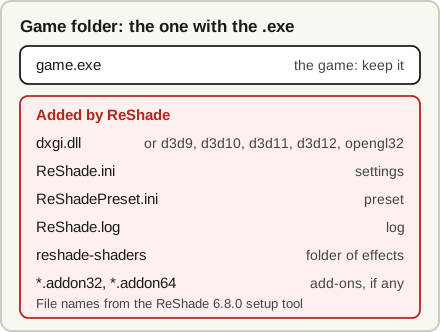
To do it by hand, open the folder that holds the game's .exe file and delete the files above [8][10]. Other mods can use the same .dll names; the setup tool deletes a .dll only if its product name is ReShade [10]. Do not know where the folder is? In Steam or GOG Galaxy, right-click the game and select Manage or Browse local files [9]. Repeat this in every game you added ReShade to.
Play games in 3D with ReShade and SuperDepth3D
SuperDepth3D is a shader for ReShade by BlueSkyDefender. It "builds a stereoscopic image out of the game's own depth buffer" [5]: the distance from the camera that the game stores for every pixel [16]. Its helper file, Overwatch (not the game), has profiles for "well over nine hundred titles" and sets them up for you [4]. It is "free for personal use, but it is not open source" [4]. Not every game works perfectly, because depth data differs [15].
- Install ReShade for the game as above. For a single-player game, use the full add-on support build: it keeps depth access on at all times [6].
- Tick "Depth3D by BlueSkyDefender" on the effects page [11].
- Start the game, press Home and tick SuperDepth3D [5].
- Pick the output your display takes in the shader's settings, then switch the display itself to its 3D mode [5][15].
| Your display | SuperDepth3D output to try |
|---|---|
| 3D TV or 3D projector | Side by Side or Top and Bottom [5] (3D TVs) |
| Passive (polarized) 3D monitor | Line Interlaced [5] |
| Red-cyan glasses | Anaglyph [5] |
| VR headset | VR and OpenXR mode [5] |
| Phone VR viewer or AR glasses | Theater mode [4] |
| Glasses-free 3D screen | Side by Side, if the screen takes it (glasses-free 3D monitors) |
One 3D picture, four ways to pack it
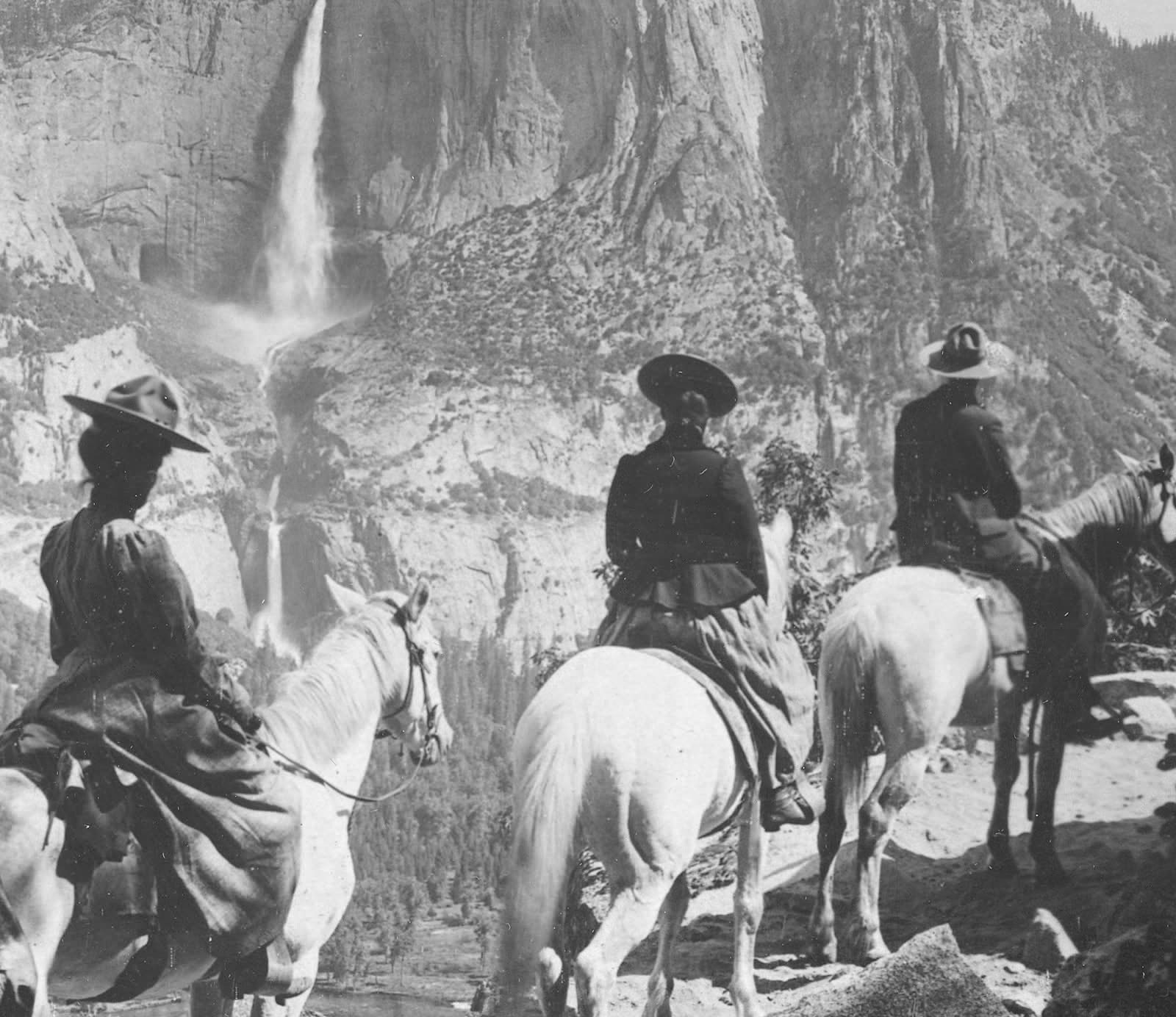
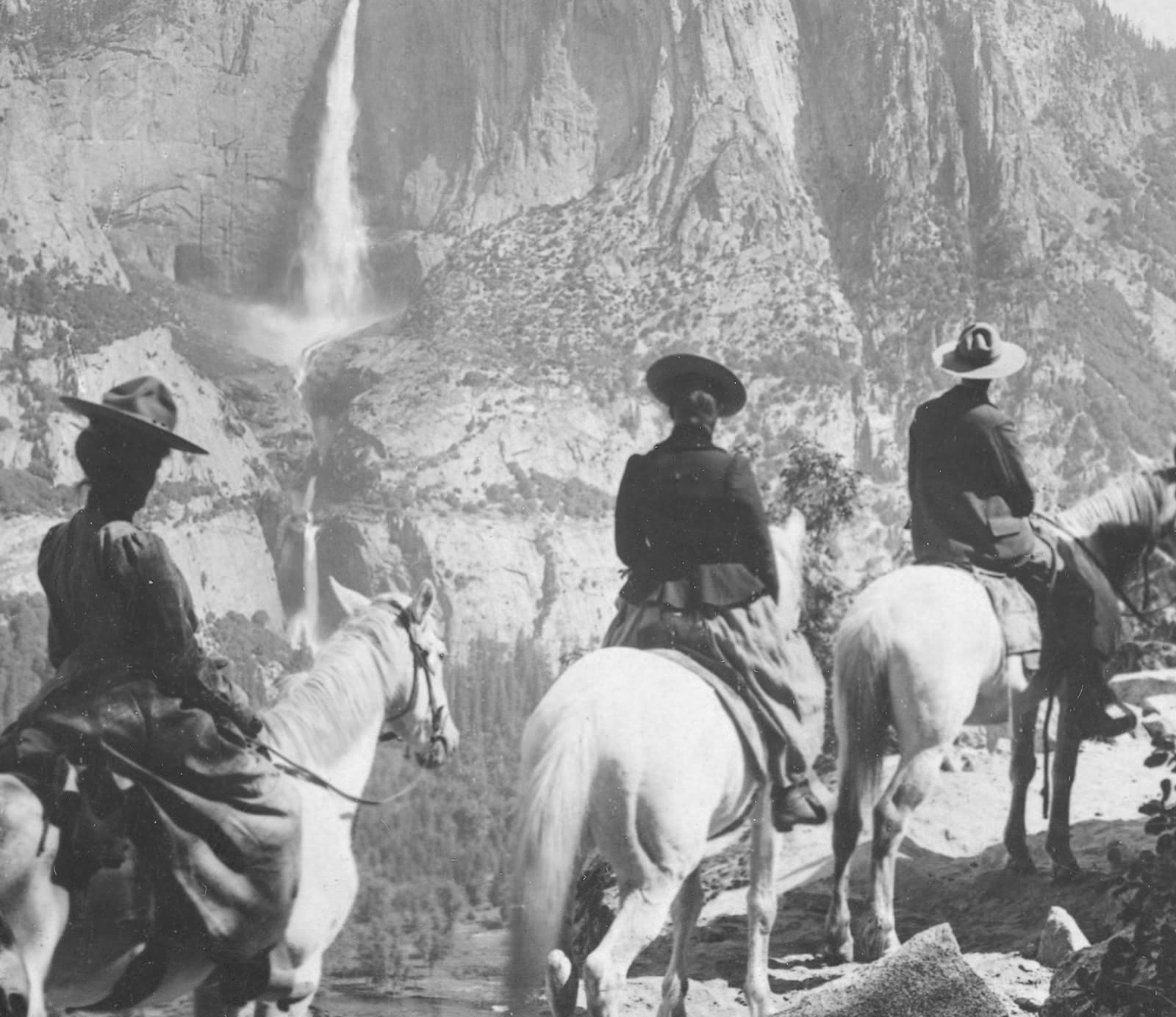
You see two pictures side by side, not 3D. The display is not in its 3D mode, or it expects another layout. One guide says the game appears in Half-SBS and you then "enable 3D mode in your display" [15].
The picture is flat. SuperDepth3D needs the depth buffer. Turn on the DisplayDepth shader: it should show a black-and-white depth map [15][16]. Turn off MSAA, and with DLSS, FSR or XeSS try "Copy depth buffer before clear operations" in the Generic Depth add-on [16].
Coming from Nvidia 3D Vision? See what replaced 3D Vision.
3D on a glasses-free screen: Owl3D Shift
The Shift is a 14-inch glasses-free 3D display used as a second monitor. Its Stereo 3D Playback detects a Full side-by-side, Half side-by-side or top-bottom picture on its screen, including a game's, and shows it in 3D. It needs an NVIDIA GTX 1650 or Radeon RX 570 or better, and on AMD and Intel graphics it works in fullscreen only. We expect SuperDepth3D's Side by Side output to work this way, but we have not tested it.
Without ReShade, Live 3D Screen converts a game window on the Shift to 3D instantly, as you play. It is an AI conversion, not a studio's 3D version and not true stereo rendered from the game. It needs an NVIDIA RTX 30 series or newer, or a Mac with Apple Silicon (M1 Pro, or any M2 chip or newer). Multiplayer and anti-cheat games often block screen capture and ReShade's side-by-side output alike.
From Owl3DOwl3D ShiftA 14-inch Live 3D monitor: anything on its screen turns into glasses-free 3D.FAQ
Does ReShade lower your frame rate?
It can. ReShade's forum FAQ calls it "mostly GPU hungry" [8]. Lower a shader's Quality, Resolution or Samples settings to get some performance back [8].
Does ReShade work on a Mac?
Not as far as ReShade's site says. Its home page lists only Windows 7 SP1, 8.1, 10 and 11 as the requirement and does not mention macOS [1].
Can SuperDepth3D put flat games in a VR headset?
Yes. SuperDepth3D has a VR mode for OpenXR headsets [4].
Sources (16)
- ReShade, home page (version 6.8.0, released August 2, 2026). https://reshade.me/ (opened 2026-11-03)
- Marty's Mods guides, "ReShade Setup Tool" (linked from reshade.me). https://guides.martysmods.com/reshade/installing/setuptool (opened 2026-11-03)
- GitHub, crosire/reshade, setup/Pages/SelectOperationPage.xaml (the setup tool's operation page). https://github.com/crosire/reshade/blob/main/setup/Pages/SelectOperationPage.xaml (opened 2026-11-02)
- GitHub, BlueSkyDefender/Depth3D, README. https://github.com/BlueSkyDefender/Depth3D (opened 2026-11-02)
- Depth3D, home page (SuperDepth3D v5.4.0). https://www.depth3d.info/ (opened 2026-11-03)
- Marty's Mods guides, "Downloading ReShade". https://guides.martysmods.com/reshade/downloading (opened 2026-11-02)
- ReShade forum, "How does reshade work?", answer by crosire, 2017. https://reshade.me/forum/general-discussion/3119-how-does-reshade-work (opened 2026-11-02)
- ReShade forum, "Introducing: Easy Troubleshooting", by Duran.te, last edited 2020. https://reshade.me/forum/troubleshooting/5227 (opened 2026-11-02)
- Marty's Mods guides, "Manually Installing ReShade". https://guides.martysmods.com/reshade/installing/manualinstall (opened 2026-11-02)
- GitHub, crosire/reshade, setup/MainWindow.xaml.cs, version 6.8.0 (the setup tool's code). https://github.com/crosire/reshade/blob/v6.8.0/setup/MainWindow.xaml.cs (opened 2026-11-03)
- GitHub, crosire/reshade-shaders, EffectPackages.ini (the setup tool's package list). https://github.com/crosire/reshade-shaders/blob/list/EffectPackages.ini (opened 2026-11-02)
- GitHub, crosire/reshade-shaders, Compatibility.ini (the setup tool's game list). https://github.com/crosire/reshade-shaders/blob/list/Compatibility.ini (opened 2026-11-03)
- GitHub, crosire/reshade, setup/Pages/SelectAppPage.xaml, version 6.8.0 (the setup tool's game list page). https://github.com/crosire/reshade/blob/v6.8.0/setup/Pages/SelectAppPage.xaml (opened 2026-11-03)
- GitHub, crosire/reshade, setup/Pages/SelectApiPage.xaml (the setup tool's API page). https://github.com/crosire/reshade/blob/main/setup/Pages/SelectApiPage.xaml (opened 2026-11-02)
- Tridimensional, "How to play your PC games in Stereoscopic 3D", by Kano3D, August 18, 2025. https://tridimensional.info/blog/2025/how-to-play-your-pc-games-in-stereoscopic-3d/ (opened 2026-11-02)
- Marty's Mods guides, "Depth". https://guides.martysmods.com/reshade/depth (opened 2026-11-02)