3D Projectors in 2026: Which Ones Still Support 3D
How we researched this: written by Owl3D from published sources, all 56 listed at the end.
Short answer
Yes. You can still buy a new 3D projector in October 2026, from $499 to about $33,000. If you already own one and 3D is greyed out or will not turn on, go to 3D greyed out or not working. Owl3D, the publisher of this guide, makes a 2D-to-3D video converter.
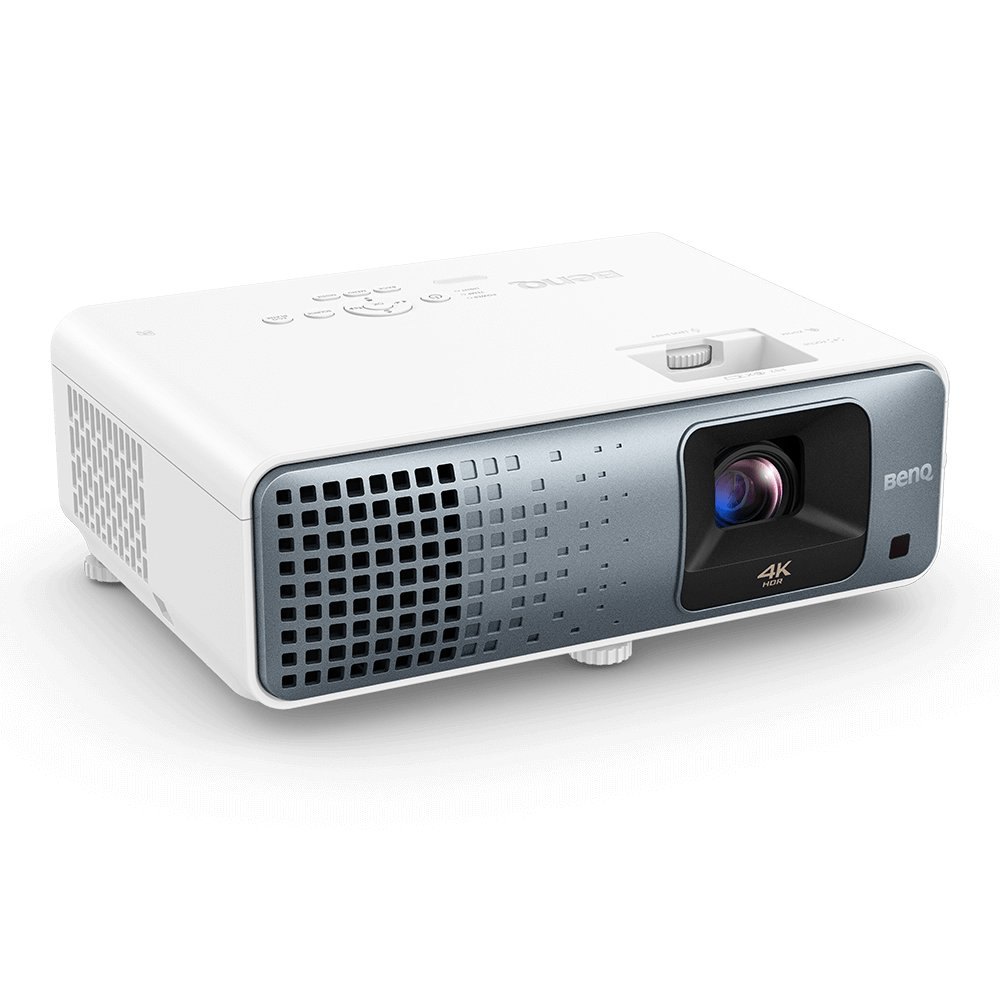
One of the 22 current projectors that support 3D: the BenQ TK710, a 4K laser model. Image: BenQ.
Key takeaways
- 22 current models support 3D, most of them DLP projectors; Sony's current home projectors have no 3D.
- All need active shutter glasses, usually sold separately; DLP-Link and RF glasses do not mix. See the glasses and a source that sends 3D.
- A 4K 3D projector shows no more than 1080p in 3D, and a 4K signal is the first thing to check when 3D will not turn on.
- Side-by-side files need the 3D format set by hand, and three BenQ models do not play them at all: 3D formats.
- No 3D version of your video? Make a 3D file online or on your computer.
Which projectors still support 3D
Each model was checked against its maker's own product page, datasheet or manual on October 7, 2026. Prices are US prices that day from the maker's store; "street" marks a ProjectorCentral street price.
| Model | Price | Type | Glasses | 3D formats it accepts |
|---|---|---|---|---|
| Optoma HD146X | $499 street [1] | 1080p DLP, lamp | DLP-Link [2] | Frame packing, side-by-side, over-under [3] |
| XGIMI MIRA | $1,449 [4] | 4K DLP, ultra-short throw, laser | Not stated for this model [5] | Frame packing, side-by-side [4] |
| Optoma GT3900UHD | $1,499 street [6] | 4K DLP, short throw, laser | DLP-Link [7][8] | Frame packing, side-by-side, top-bottom [7] |
| Epson Home Cinema 3800 | $1,799.99, "Out of Stock" at Epson [9]; $1,399 street [10] | 3LCD, lamp | RF [11] | Side-by-side, top-and-bottom, frame packing [11] |
| BenQ TK710 | $1,966 street [12] | 4K DLP, laser | DLP-Link [13] | Frame sequential, frame packing, side-by-side, top-and-bottom [14] |
| Valerion VisionMaster Pro 2 | $1,999 [15] | 4K DLP, laser | DLP-Link [16] | Frame packing, side-by-side, top-and-bottom [15] |
| NexiGo Aurora Pro MKII | $2,499.99 [17] | 4K, ultra-short throw, laser | Not stated on the projector page [17] | Frame packing, frame sequential, left-right, top-and-bottom [17] |
| AWOL Vision Aetherion Pro, Aetherion Max | $3,499; $3,999 [18][19] | 4K DLP, ultra-short throw, laser | DLP-Link [20] | Frame packing, side-by-side, top-bottom, per the manual [21] |
| JVC DLA-NZ800, DLA-NZ900 | $18,999.95; $32,999.95 [22] | D-ILA, laser | RF, with an add-on emitter [22] | Frame packing, side-by-side, top-and-bottom [23] |
Last checked : prices and stock.
Eleven more models support 3D, but their makers' pages list no 3D formats: the JMGO N1S Ultimate, N3 Ultimate and IRIS Ultra Max [6][24][25][26]; the XGIMI HORIZON 20 Max and TITAN Noir, Noir Pro and Noir Max [27][28][29][30]; the Valerion VisionMaster Max [31]; the AWOL Vision LTV-3000 Pro [32]; the Hisense PX3-PRO [33]; and the BenQ AK700ST [34]. Sony's BRAVIA Projector 7, 8 and 9 have no 3D mode on ProjectorCentral's pages [35][36][37].
3D formats: frame packing, side-by-side, top-bottom
No maker in the table lists a 3D format above 1080p, even on a 4K projector [3][7][11][14][15][17][21][23].
| Format | What sends it | Does the projector switch to 3D by itself? |
|---|---|---|
| Frame packing | A 3D Blu-ray player, over HDMI | Yes, "if the source gives the correct 3D information" [40] |
| Side-by-side (SBS) | A 3D file, from a computer, media box or USB stick | Usually not: pick side-by-side in the 3D menu [40][41] |
| Top-bottom (over-under) | A 3D file | Usually not: pick top-and-bottom in the 3D menu [40][41] |
BenQ says the HT2060, TH690ST and X3000i take only frame sequential and frame packing: on current firmware, "the side by side 3D and Top & Bottom 3D are not supported yet" [56]. So a side-by-side file does not play in 3D on them. What each layout looks like: 3D video formats.
What else you need, and how to play 3D
Glasses that match the projector
Every maker in the table specifies active shutter glasses, with one of two sync methods:
- DLP-Link. The projector flashes white briefly between frames and the glasses pick the flash up, so there is no separate emitter [38]. Optoma, BenQ, XGIMI, JMGO, Valerion and AWOL Vision name it [2][5][13][16][20][39]. XGIMI's pair costs $29 [5].
- RF sends the timing by radio [38]. Epson and JVC use it [11][22].
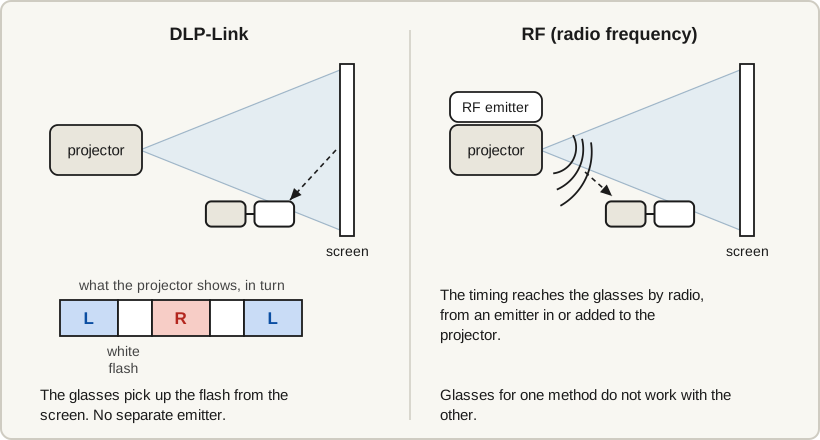
Glasses from a 3D TV are a gamble [38]. Another brand's DLP-Link glasses can work, but BenQ says "there may be differences in signal reception capabilities for different brands" [13]; see 3D glasses for a projector.
A source that sends 3D
You do not need a 3D Blu-ray player. A 3D video file played from a computer, a media box or, on some projectors, a USB stick works too [40][41]; see where to find 3D videos. For discs, start with the best 3D movies.
What does not work: a PlayStation 5, because "3D stereoscopic output is not supported on PS5", in PlayStation's PS5 FAQ of November 9, 2020 [42]; an Xbox Series X or S, which does not play 3D Blu-ray [43]; and streaming, where we found no service that sends 3D to a projector as of October 2026 (which streaming services have 3D movies).
Three steps
- Connect the 3D source by HDMI. Play a 3D file full screen.
- Set the 3D mode. A disc switches the projector by itself [40][44]. For a file, pick its format in the 3D menu [40], under Display > 3D on Optoma and BenQ projectors [40][44].
- Switch on the glasses. BenQ says to press the DLP Link button on the glasses to re-sync them [40].
No 3D version? Make a 3D file
Owl3D, the publisher of this guide, makes a 3D file from a 2D video you have the right to use. It is an AI conversion, not a studio's 3D release, and a whole film takes hours.
- Owl3D Cloud, in a web browser. No graphics card and no install. It saves Full SBS by default: a 1080p video comes back 3840×1080. Most projectors need 1920×1080 Half SBS: pick Half SBS in its Output menu, or do the extra step on a Full SBS file.
- Owl3D's desktop app, on Windows or Mac. It writes Half SBS directly (1920×1080 with Output resolution on 1080p).
Neither makes frame-packed files, so neither suits the three BenQ models above. We have not tested either on a projector.
3D greyed out or not working
Check the signal first, then the 3D menu, then the glasses.
| What you see | Likely cause, per the makers | What to do |
|---|---|---|
| 3D will not turn on, and the source is set to 4K | Optoma's manual for the GT3900UHD and ZK431ST and BenQ's TK710 manual say a 4K signal is not shown in 3D [8][45] | Set the player, box or computer to output 1080p |
| 3D will not turn on, on an Optoma | The GT3900UHD and ZK431ST manual says the input frame rate "should be set to 60Hz only" [8]. On the UHD38x, 3D is disabled while "Enhanced Gaming" is on [46] | Set the source to 60 Hz, or turn Enhanced Gaming off |
| Two pictures side by side (or one above the other), not 3D | BenQ: the projector switches by itself only "if the source gives the correct 3D information" [40]. By owners' reports, a file from a PC often does not [51] | Start the video, then choose side-by-side or top-and-bottom in the 3D menu yourself [40][41]. The HT2060, TH690ST and X3000i have no such option [56]. More routes: two pictures side by side |
| The player says the display is not 3D, or the disc plays in 2D | Epson's list covers each link in the chain [47] | A 3D-compatible player and disc, an HDMI cable that supports 3D signals, the player set to play in 3D, and the projector's 3D Display setting on Auto or 3D [47][48] |
| A doubled picture, and no depth with the glasses on | JMGO says of its N1 Ultra that once 3D mode is on the picture "looks like a double-image effect" [49]. That leaves the glasses | Charge the glasses and switch them on. DLP-Link: press the button on the glasses to re-sync [40]. Epson: use RF glasses and pair them with the projector [47] |
Fixes owners say worked (we have not tested them)
- A 4K signal from the receiver. An owner of a projector named in the post as the Optoma 51A, March 2020: "I have to go into the settings of the Denon and change it's output to 1080p otherwise my projector greys out the 3D option in the menu" [50].
- A side-by-side file from a PC. An Optoma HD27e owner, January 2023: "Do not use any 3D options in your player, play it normally." Then "you have to choose side by side manually" in the projector's 3D menu [51].
Frequently asked questions
Do you need a special 3D screen?
Not for active 3D: the glasses do the separating at your eyes [38]. JVC warns that its glasses "may not work with certain polarized/Ambient Light Rejecting screen materials" [52].
Can a home projector use passive, cinema-style glasses?
None of the 22 is passive. Passive 3D takes a polarizing module added to one projector [53] or two aligned projectors with polarizing filters; both need a silver or aluminized screen [54].
How much brightness does 3D cost?
Half the 2D brightness is the ceiling, and about a quarter is the usual estimate [55]. Buy more brightness than you would for 2D alone, and watch 3D in a dark room.
Sources (56)
- ProjectorCentral, Optoma HD146X specifications. https://www.projectorcentral.com/optoma-hd146x.htm (opened 2026-10-07)
- Optoma, HD146X datasheet (PDF), dated May 27, 2020. https://region-resource.optoma.com/products/import/Documents/9217e8bc-5b2c-4f17-9abd-8f9332f254c9.pdf (opened 2026-10-07)
- Optoma USA, HD146X product page. https://www.optomausa.com/product/hd146x (opened 2026-10-07)
- XGIMI US, MIRA product page. https://us.xgimi.com/products/mira (opened 2026-10-07)
- XGIMI US, "Active Shutter 3D Glasses". https://us.xgimi.com/products/3d-glasses (opened 2026-10-07)
- ProjectorCentral, "New 3D Projectors". https://www.projectorcentral.com/new-3d-projectors.htm (opened 2026-10-07)
- Optoma USA, GT3900UHD product page. https://www.optomausa.com/product/gt3900uhd (opened 2026-10-07)
- Optoma, user manual linked from the GT3900UHD and ZK431ST pages (PDF). https://region-resource.optoma.com/products/documents/CWqYJUpb2tPRrTwMj1QGYRcPXH2q7xeKXHsKXAZ4.pdf (opened 2026-10-07; re-read 2026-10-09)
- Epson US, "Home Cinema 3800 4K PRO-UHD 3-Chip Projector with HDR". https://epson.com/For-Home/Projectors/Home-Cinema/Home-Cinema-3800-4K-PRO-UHD-3-Chip-Projector-with-HDR/p/V11H959020 (opened 2026-10-07)
- ProjectorCentral, Epson Home Cinema 3800 specifications. https://www.projectorcentral.com/epson-home_cinema_3800.htm (opened 2026-10-07)
- Epson support, Home Cinema 3200 and 3800 user guide, "Projector features". https://files.support.epson.com/docid/cpd5/cpd57551/source/product_info/concepts/projector_features_hc3200_3800.html (opened 2026-10-07)
- ProjectorCentral, BenQ TK710 specifications. https://www.projectorcentral.com/benq-tk710.htm (opened 2026-10-07)
- BenQ US, FAQ: "Which 3D glasses are recommended for BenQ projectors with 3D features?", dated October 27, 2025. https://www.benq.com/en-us/support/downloads-faq/faq/product/specification/projector-faq-k-00007.html (opened 2026-10-07; re-read 2026-10-09)
- BenQ US, TK710 specifications and FAQ. https://www.benq.com/en-us/projector/home-projectors/tk710/spec.html (opened 2026-10-07)
- Valerion, "VisionMaster Pro 2 & Pro 4K RGB Triple Laser Projector" product page and FAQ. https://www.valerion.com/product/valerion-visionmaster-pro2-pro-4k-rgb-triple-laser-projector (opened 2026-10-07)
- Valerion, "How Do 3D Glasses Work? Active Shutter vs. Polarized Explained", December 30, 2025. https://www.valerion.com/blog/how-do-3d-glasses-work (opened 2026-10-07)
- NexiGo, "NexiGo Aurora Pro MKII UST Tri-Color Laser Projector". https://www.nexigo.com/products/nexigo-aurora-pro-mkii-ust-tri-color-laser-projector (opened 2026-10-07)
- AWOL Vision, "Aetherion Max RGB Laser UST Projector". https://awolvision.com/products/rgb-laser-ust-projector-aetherion-max (opened 2026-10-07)
- AWOL Vision, "Aetherion Pro RGB Laser UST Projector". https://awolvision.com/products/rgb-laser-ust-projector-aetherion-pro (opened 2026-10-07)
- AWOL Vision, "AWOL 3D Glasses". https://awolvision.com/products/3d-glasses (opened 2026-10-07)
- AWOL Vision, Aetherion Max and Pro user manual (PDF). https://cdn.shopify.com/s/files/1/0554/7445/4576/files/Aetherion_User_Manual_20260209_compressed.pdf?v=1779349103 (opened 2026-10-07)
- JVC USA, "Projectors". https://www.jvc.com/usa/projectors/ (opened 2026-10-07)
- JVC USA, DLA-NZ800 product page. https://www.jvc.com/usa/projectors/procision/dla-nz800/ (opened 2026-10-07)
- JMGO US store, N1S Ultimate product page. https://global.jmgo.com/products/jmgo-n1s-ultimate (opened 2026-10-07)
- JMGO US store, N3 Ultimate product page. https://global.jmgo.com/products/jmgo-n3-ultimate (opened 2026-10-07)
- JMGO US store, IRIS Ultra Max product page. https://global.jmgo.com/products/jmgo-iris-ultra-max (opened 2026-10-07)
- XGIMI US, TITAN Noir Max product page. https://us.xgimi.com/products/titan-noir-max (opened 2026-10-07)
- XGIMI US, TITAN Noir product page. https://us.xgimi.com/products/titan-noir (opened 2026-10-07)
- XGIMI US, TITAN Noir Pro product page. https://us.xgimi.com/products/titan-noir-pro (opened 2026-10-07)
- XGIMI US, HORIZON 20 Max product page. https://us.xgimi.com/products/horizon-20-max (opened 2026-10-07)
- Valerion, "VisionMaster Max 4K RGB Triple Laser Projector" product page. https://www.valerion.com/product/valerion-visionmaster-4k-rgb-triple-laser-projector (opened 2026-10-07)
- AWOL Vision, "LTV-3000 Pro 4K 3D RGB Laser Projector". https://awolvision.com/products/4k-3d-triple-laser-projector-ltv-3000pro (opened 2026-10-07)
- Hisense USA, "Hisense Laser Cinema PX3-PRO TriChroma Laser Projector". https://www.hisense-usa.com/product-page/projectors-laser-cinema-trichroma-laser-projector-px3-pro (opened 2026-10-07)
- BenQ US, AK700ST specifications. https://www.benq.com/en-us/projector/golf/ak700st/spec.html (opened 2026-10-07)
- ProjectorCentral, Sony VPL-XW5100ES (Bravia Projector 7) specifications. https://www.projectorcentral.com/sony-vpl-xw5100es-b.htm (opened 2026-10-07)
- ProjectorCentral, Sony VPL-XW6100ES specifications. https://www.projectorcentral.com/sony-vpl-xw6100es-b.htm (opened 2026-10-07)
- ProjectorCentral, Sony VPL-XW8100ES specifications. https://www.projectorcentral.com/sony-vpl-xw8100es.htm (opened 2026-10-07)
- Wikipedia, "Active shutter 3D system". https://en.wikipedia.org/wiki/Active_shutter_3D_system (opened 2026-10-07)
- JMGO US store, "Active 3D Shutter Glasses". https://global.jmgo.com/products/active-3d-shutter-glasses-2024 (opened 2026-10-07)
- BenQ US, FAQ: "3D is not working or getting lost sync on my projector. How can I fix it?", dated July 9, 2024. https://www.benq.com/en-us/support/downloads-faq/faq/product/troubleshooting/projector-faq-kn-00076.html (opened 2026-10-07; re-read 2026-10-09)
- AWOL Vision support, "How do I watch 3D content on my Aetherion projector?". https://support.awolvision.com/hc/en-us/articles/15936500627983-How-do-I-watch-3D-content-on-my-Aetherion-projector (opened 2026-10-09)
- PlayStation.Blog, "PS5: The Ultimate FAQ", November 9, 2020. https://blog.playstation.com/2020/11/09/ps5-the-ultimate-faq/ (opened 2026-10-09)
- Xbox Support, "Supported regions and formats for Blu-ray and DVD movies on XBOX". https://support.xbox.com/en-US/help/games-apps/apps-help/watch-bluray-dvd-movies (opened 2026-10-09)
- Optoma, DLP projector user manual linked from the HD146X page (PDF). https://region-resource.optoma.com/products/import/Documents/29cf1dc9-dbdf-490e-baa4-311643560c2b.pdf (opened 2026-10-07)
- BenQ, TK710 user manual (PDF), linked from BenQ US's TK710 manual page. https://esupportdownload.benq.com/esupport/PROJECTOR%20FOR%20CONSUMER/UserManual/TK710/TK710_UM_EN_260223155422.pdf (opened 2026-10-09)
- Optoma, UHD38x user manual (PDF), linked from the UHD38x page. https://region-resource.optoma.com/products/import/Documents/13cdc4ab-4017-4930-a4fd-d023d407c4fe.pdf (opened 2026-10-09)
- Epson support, Home Cinema 3200 and 3800 user guide, "Solutions When a 3D Image Does Not Display Correctly". https://files.support.epson.com/docid/cpd5/cpd57551/source/troubleshooting/reference/problem_image_3d_active.html (opened 2026-10-09)
- Epson support, Home Cinema 3200 and 3800 user guide, "Viewing 3D Images". https://files.support.epson.com/docid/cpd5/cpd57551/source/basic_use/tasks/image_viewing_3d_active.html (opened 2026-10-09)
- JMGO, "Guide for Enabling 3D Mode on JMGO N1 Ultra", August 24, 2023. https://global.jmgo.com/blogs/user-guides/guide-for-enabling-3d-mode-on-jmgo-n1-ultra (opened 2026-10-09)
- Users' reports: AVForums, thread "Optoma HD39HDR 3d with ZD101 glasses", post of March 17, 2020. https://www.avforums.com/threads/optoma-hd39hdr-3d-with-zd101-glasses.2279167/ (opened 2026-10-09)
- Users' reports: AVForums, thread "How to Run 3D movies on PC - Projector?? Optoma", posts of January 28 and March 7, 2023. https://www.avforums.com/threads/how-to-run-3d-movies-on-pc-projector-optoma.2395442/ (opened 2026-10-09)
- JVCKENWOOD, DLA-NZ900 / DLA-NZ800 / DLA-RS4200 / DLA-RS3200 instruction manual, 3D viewing page. https://manual3.jvckenwood.com/projector/mobile/dla/b5a-4578-01/GOUMSYbuasobor.php (opened 2026-10-07)
- BenQ US, "3D Projectors and Glasses: Avoid Mistakes Before You Buy", May 14, 2024. https://www.benq.com/en-us/knowledge-center/knowledge/3d-projectors-and-3d-glasses-what-to-know-before-i-buy-them.html (opened 2026-10-07)
- Wikipedia, "Polarized 3D system". https://en.wikipedia.org/wiki/Polarized_3D_system (opened 2026-10-07)
- Projector Reviews, "3D Brightness", by Art Feierman, undated buying-guide page. https://www.projectorreviews.com/articles-guides/guide-to-buying-the-best-home-theater-projector-for-you-part-2/3d-brightness (opened 2026-10-07)
- BenQ, FAQ: "What 3D effects or modes does the projector support?", applicable models HT2060, TH690ST, X3000i. https://www.benq.com/en-au/support/downloads-faq/faq/pre-sales/specifications/projector-support-3d-effects-or-modes.html (opened 2026-11-04)