What Is a Lenticular Lens? Sheets, Prints and 3D Screens
How we researched this: written by Owl3D from published sources, all 26 listed at the end.
Short answer
A lenticular lens is a sheet of many narrow cylindrical lenses lying side by side, also called a lenticular array or lenticular sheet. Each lens shows you a different strip of whatever lies behind it, depending on the angle you look from.
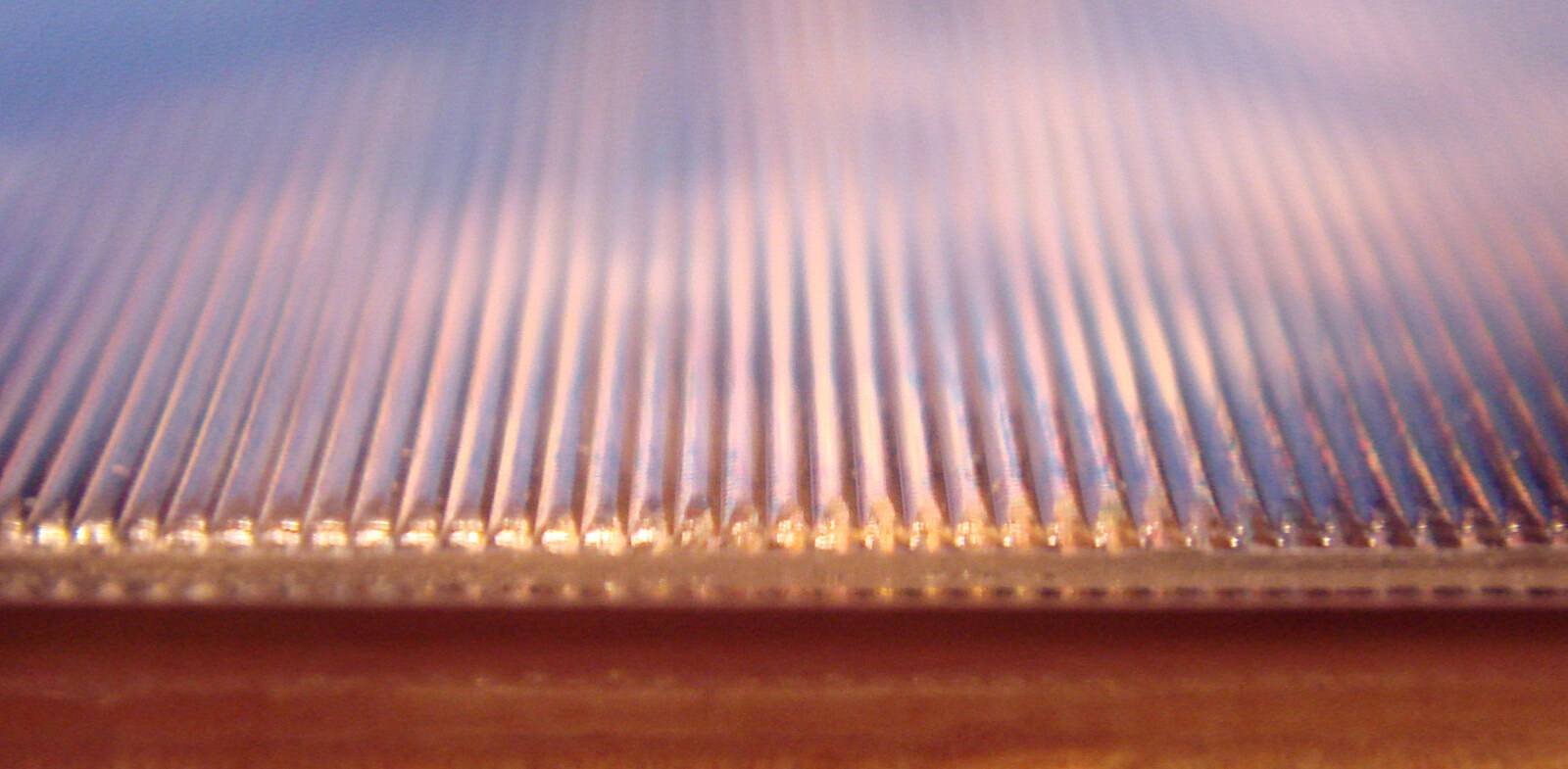
The surface of a lenticular print, seen close up: each ridge is one long, narrow lens. Photo: World Imaging, CC BY-SA 4.0, via Wikimedia Commons.
Key takeaways
- Move your head and each lens shows a different strip of the picture behind it. That one effect gives prints that flip or look 3D, glasses-free 3D screens and "invisibility shields"; see how it works.
- "Lenticular" means lens-shaped, after the shape of a lentil; see what the word means.
- Sheets are sold by lenses per inch (LPI), commonly from 10 to 200: fine lenses for close viewing, coarse for distance; see which LPI for which job.
- A lenticular print needs 2 pictures for a flip and usually 10 to 16 views for 3D; see how a lenticular print is made.
- On a screen, the lenses send a different image to each eye, so no 3D glasses are needed; see 3D screens, where the Owl3D Shift is the worked example.
What is a lenticular lens used for? Six things share the name
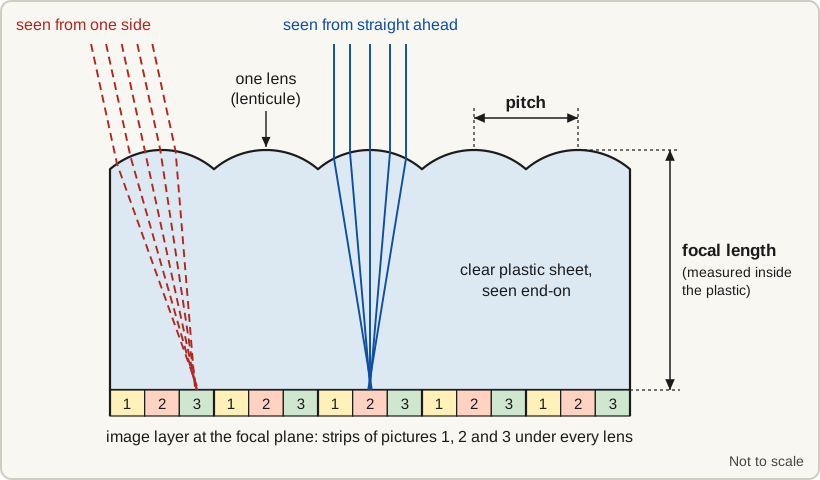
A lenticular lens is used for pictures that change, for 3D screens, for hiding things and for projection screens. The same name is also given to an unrelated kind of eyeglass lens. Find the one you mean:
| If you mean | What it is | Good to know |
|---|---|---|
| A lenticular sheet, lenticular lens sheet or lenticular array | A clear plastic sheet with a row of cylindrical lenses on one side and a flat back [4] | Prints, 3D screens and invisibility shields are all built on one |
| A lenticular print, poster, card or "lenticular edition" | A picture printed as interlaced strips of two or more images behind a lens sheet [6] | It flips, animates or looks 3D as you move [6] |
| A lenticular 3D screen | A display panel with a lens array on top that shows 3D without glasses [7] | For one viewer or several, depending on the design |
| An "invisibility shield" | A clear lenticular sheet with nothing printed on it, used to hide what is behind it [8][9] | It blurs in one direction only |
| A lenticular projection screen | A projection screen with a molded lenticular surface [10] | It sends more of the light toward the viewers [10] |
| Lenticular eyeglass lenses | An eyeglass lens with a small, very strong central circle and little or no power around it [11] | Unrelated to the rest; ask an eye doctor |
More on sheets, prints, projection screens and eyeglass lenses
- Sheets. As a bare optical part, a lenticular array serves as a diffuser, in projection screens and in 3D photography [5].
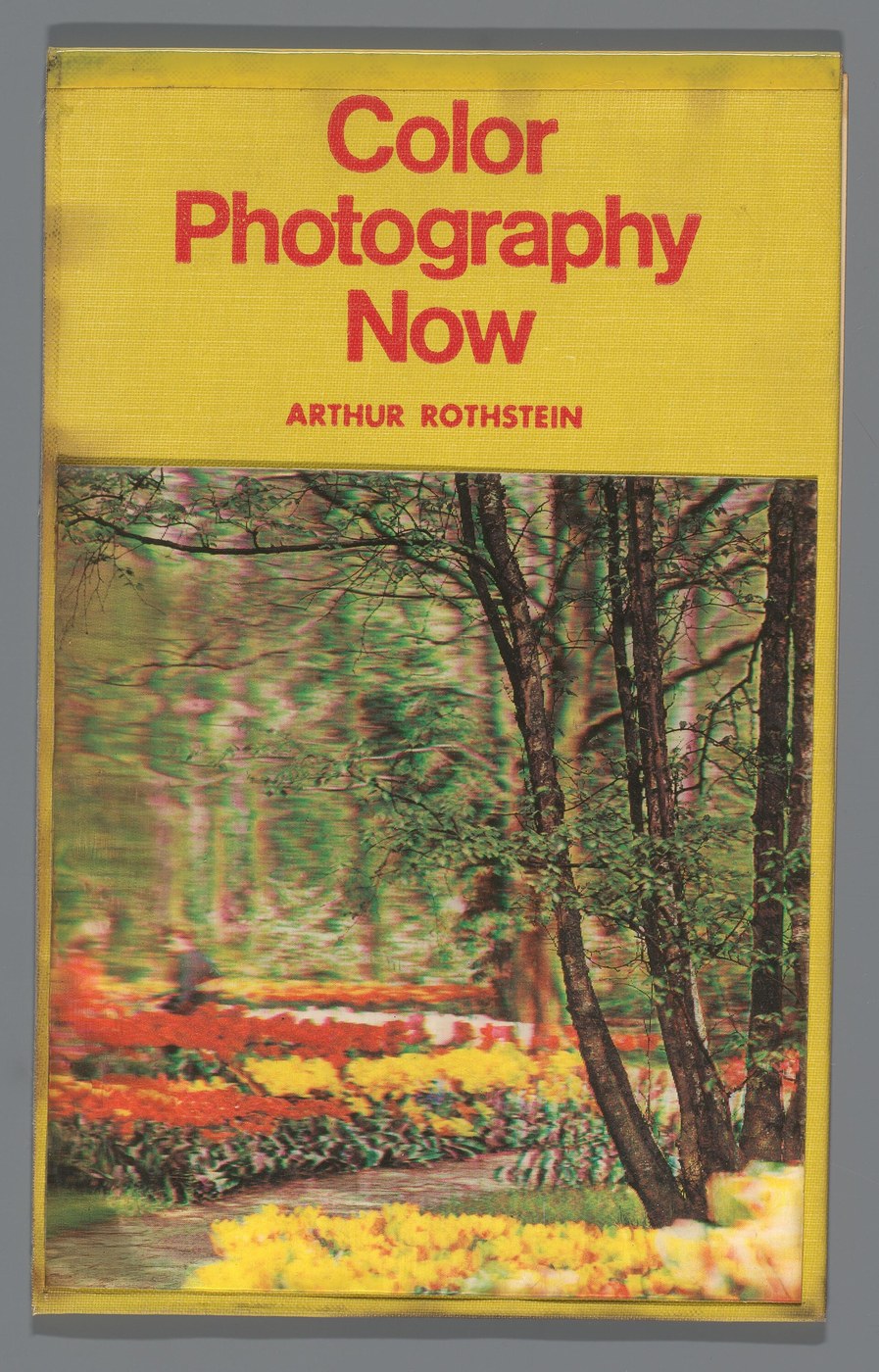
- Prints. They are common on postcards, trading cards, posters and covers for books, albums and movies [6].
- Projection screens. They are used with projection television sets. The "lenticular" screens sold for ultra-short-throw projectors use tiny reflective ridges instead of clear lenses, to reject room light from above [10].
- Eyeglass lenses. They are used for aphakia (an eye with no natural lens) and for very strong nearsightedness or farsightedness [11].
What "lenticular" means
"Lenticular" means lens-shaped, or relating to a lens. The shape meant is a lentil's: Dictionary.com also defines the word as "biconvex" (bulging outward on both sides) and "resembling the seed of a lentil in form", and traces it to the Latin lenticularis, like a lentil [1]. The same word names lenticular galaxies [1] and lenticular clouds [2].
In optics, a lenticular lens is not one lens but a row of them: "a linear array of thick plano-convex cylindrical lenses called 'lenticules'", in the words of a peer-reviewed review of 3D displays [3]. Plano-convex means flat on one side and curved on the other, so each lenticule is a long ridge on the front of a sheet whose back is flat.
What a lenticular lens does, and how it works
Because the lenses are cylinders, they bend light in one direction only: across their width.
A lenticular sheet is usually designed so that each lens focuses on the flat back of the sheet [10], which is where the picture goes or, on a screen, where the pixels are. From any one direction, you see through each lens only one narrow strip of what is behind it, magnified to fill the lens. Move, and every lens shows you a different strip, as the cross-section at the top of this page shows.
What you see depends on what is in the strips:
| What is in the strips | What you see |
|---|---|
| Strips cut from different pictures | An image that flips or animates as the angle changes; see prints |
| Strips cut from views of one scene, taken from slightly different positions | A different view for each eye, so the picture looks 3D without glasses [6]; a 3D screen does the same with pixel columns |
| Nothing: the sheet is clear | A blur that can hide what is behind the sheet [8] |
Why a clear lenticular sheet can make things disappear
A sheet with nothing printed on it smears whatever is behind it across the width of its lenses and leaves it unchanged along their length. "Invisibility shields" are large sheets used this way. The result is a blur, not transparency, and it works best in front of strong horizontal lines, which vertical lenses distort least [8].
Two descriptions: Popular Science's pencil test and one maker's explanation
Popular Science describes pencils seen through one: with the lenses vertical, the vertical pencils blur "to the point of invisibility", and when the sheet is turned, the horizontal ones vanish instead [8].
One maker, Invisibility Shield Co., says the vertical lenses spread the upright strip of light from a standing person "sideways across the face of the shield", while the brighter, wider background is "effectively smeared horizontally across the front face of the shield" [9].
Lenticular sheets and lenticular arrays: how they are specified
"Lenticular array" is the name optics suppliers use for a lenticular sheet sold as an optical component [5]. Either way, a specification gives six things: pitch (the distance from the center of one lens to the center of the next [13], given on print sheets as lenses per inch, LPI), thickness, focal length, viewing angle, material and lens direction. A 30 LPI sheet has 30 lenses in every inch [4].
What each number on a specification means, with typical values
| Specification | What it is | Typical values |
|---|---|---|
| Pitch, or lenses per inch (LPI) | The center-to-center distance between neighboring lenses [13]; print sheets give it as LPI [4] | 10 to 200 LPI [14] |
| Thickness | The lower the LPI, the thicker the sheet [14] | About 0.25 mm to 6.3 mm [14] |
| Focal length | How far behind the lens surface light comes to a focus [10] | Typically 3 to 5 times the width of one lens, per Edmund Optics [5] |
| Viewing angle | The V-shaped zone in front of the sheet within which the picture reads correctly | Narrow for 3D, wide for flips and animation [14] |
| Material | The plastic the sheet is made of | Commonly APET, PETG or acrylic [6] |
| Lens direction | Parallel to the short edge or to the long edge | Say which when ordering [16] |
- Focal length. On a print sheet the focus is the flat back [10], while optical arrays state it as a number.
- Viewing angle. Suppliers draw the line differently. One printer's guide gives 24 to 29 degrees for 3D and about 45 to 50 for animation [15], while DP Lenticular lists its 3D sheets at 37 to 41 degrees and its motion sheets at 54 [16].
- Material. One supplier suggests acrylic or APET for do-it-yourself work [14].
Which LPI for which job
Fine lenses are for close viewing and coarse lenses for distance [14].
| Lenses per inch | Width of one lens | Example thickness [16] | Viewing distance [14] | Typical use |
|---|---|---|---|---|
| 100 LPI | 0.25 mm | 0.33 mm (0.52 mm for a 3D sheet) | 6 to 10 inches | Detailed pieces seen close up [17] |
| 60 LPI | 0.42 mm | 0.76 mm | 1 to 10 feet | Handheld prints up to letter or A4 size [14][19] |
| 40 LPI | 0.64 mm | 0.83 mm | 1 to 15 feet | Letter size [14], up to large formats seen from more than 1 meter [19] |
| 20 LPI | 1.27 mm | 1.95 mm (motion) or 3 mm (3D) | 5 to 20 feet | Large formats seen from about 2 meters [19] |
Lens width is 25.4 mm divided by the LPI. Thickness varies by maker and lens design, so that column shows one catalog's values.
Three more sizes (75, 30 and 10 to 15 LPI), and the rule for a home inkjet printer
| Lenses per inch | Width of one lens | Example thickness [16] | Viewing distance [14] | Typical use |
|---|---|---|---|---|
| 75 LPI | 0.34 mm | 0.41 mm | 6 inches to 3 feet | Close viewing; thinner lenses suit postcards, book covers and packaging [18] |
| 30 LPI | 0.85 mm | 2.15 mm (at 28 LPI) | 3 to 15 feet | Posters and in-store signs [14] |
| 10 to 15 LPI | 2.54 to 1.69 mm | not listed | 5 to 50 feet | Very large prints [20] |
Where to buy a lenticular sheet, and what it costs
Blank sheets are sold singly, cut to size. ViCGI, a lenticular printer in San Jose, California, sells them in 10, 16, 25, 30 and 40 LPI. On October 7, 2026, its online calculator priced one 12 x 12 inch, 40 LPI sheet without adhesive backing at 15 US dollars, and a letter-size one at 9.74 US dollars [20].
Last checked : ViCGI's calculator prices.
Other sellers: trade suppliers and optical arrays
- Trade suppliers. DP Lenticular supplies printing companies and also takes small orders [16]. Pacur makes sheets mainly for printers buying in volume [14].
- Optical arrays. These are sold like other lenses, by size, lenses per inch and focal length. One Edmund Optics catalog item is an 11 x 11 inch acrylic array with 64 lenses per inch, a 2.16 mm focal length and a 2.2 mm center thickness [21].
How a lenticular print is made
A lenticular print is made by cutting two or more pictures into strips, combining the strips into one image and fixing it behind a lens sheet. How many pictures you need depends on the effect.
What is a lenticular effect? Flip, animation, morph, zoom and 3D
| Effect | What you see as the angle changes | Pictures needed |
|---|---|---|
| Flip | One picture switches to another | 2; more than 3 is hard to keep clean [17] |
| Animation (motion) | A short sequence plays | Commonly 4 to 8 [18] |
| Morph | One picture gradually turns into another | 10 to 20 [17] |
| Zoom | Part of the picture grows or seems to move toward you [6][17] | A sequence, as for animation [6] |
| 3D | Depth without glasses, because each eye sees a different view | Usually 10 to 16 views of one scene [18] |

A 3D print works only when the picture changes as you move sideways, because your eyes sit side by side. The other effects work in either direction, and tend to look cleaner when the print is tilted up and down [6].
How to create a lenticular image, step by step
- Choose the effect, then the lens. The effect sets the viewing angle: narrow for 3D, wide for flips and animation [14]. The print size and viewing distance set the LPI, as in the LPI table.
- Prepare the pictures. Use the numbers in the effects table above.
- Run a pitch test. It finds the true lens pitch of your sheet on your printer. Print a pitch-test sheet on the printer you will use, lay the lens on it, and read off the value that matches [15].
- Interlace. An image editor or interlacing software cuts each picture into strips and combines them into one file, so that one strip from every picture sits under each lens [6].
- Print and join. At home, print on paper with an inkjet printer and fix the lens sheet over it with double-sided adhesive, lining the strips up with the lenses [15][6].
- Check for the two usual faults. Ghosting, where two pictures show at once, comes from poor alignment, a mismatched pitch or too many frames. Banding, where bands run along the lenses, comes from a slight mismatch between print resolution and lens pitch [17].
Why the pitch test is needed, a rule for interlacing, and how print shops do it
- Pitch test. A sheet sold as 60 LPI may measure anywhere from 59.7 to 60.3 LPI, and printers are not exact either [15].
- Interlacing. One rule of thumb is to work at 300 pixels per inch or more, with the number of pixels under each lens divisible by the number of pictures [15].
- Print shops. Print shops print the interlaced image, mirrored, straight onto the flat back of the sheet: on offset presses for runs of about 300 or more, and on UV printers for large sizes in small numbers [15][17].
How a lenticular lens makes a screen 3D
A lenticular lens makes a screen 3D by sending alternate pixel columns toward different eyes. A picture looks 3D when each eye receives its own, slightly different image and the brain combines the two. 3D glasses do that sorting at your face. A glasses-free screen, technically an autostereoscopic display, does it at the screen [7].
The lens sheet is fixed to the front of the panel with the pixels at the focal plane of the lenses, so a pixel's position under its lens decides the direction its light leaves in [12]. The display puts the left-eye image on some pixel columns and the right-eye image on the columns between them, and the lenses send each set toward a different eye [12][7].
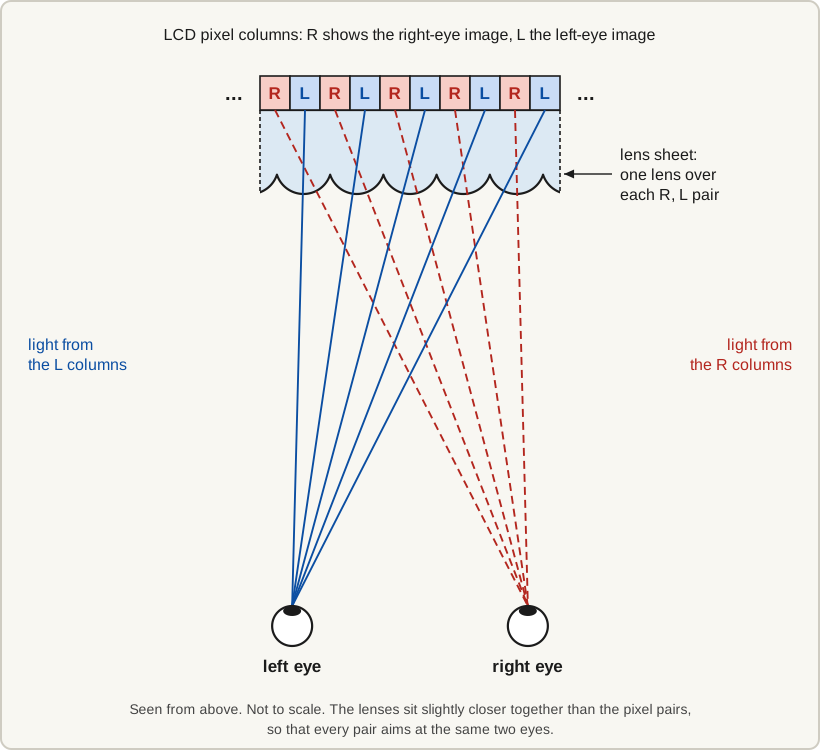
The two diagrams on this page were made by Owl3D. They may be downloaded and reused free of charge with credit to Owl3D.
A "view" is one complete image sent in one direction. More views let several people watch [7] and let you look a little way around an object by moving your head [12]. The price is resolution: with N views, each view gets about 1/N of the panel's pixels [3], and with two views each eye generally gets slightly less than half [7].
Views, lens pitch and slanted lenses: the figures, with the Philips patent's examples
| Design | Pixel columns | What each view gets |
|---|---|---|
| Two views, the simplest | Each lens covers two columns, one for each eye [12] | Generally "slightly less than half the resolution of the original display panel" [7] |
| Five views | Every fifth column belongs to the same view [3] | About 1/N of the panel's pixels with N views [3] |
With upright lenses, then, the lens pitch is roughly one pixel column's width times the number of views.
Slanted lenses. Lenses that run straight up and down, parallel to the pixel columns, put all of the resolution loss on the horizontal axis. They also magnify the thin dark gaps between pixel columns into black bands between the views [12].
In 1996, Philips researchers Cornelis van Berkel and John Clarke filed a patent on tilting the lenses a few degrees away from the columns (9.46 degrees in their six-view example) [12]. A tilted lens crosses rows as well as columns, so the loss is shared between the two axes. The patent's five-view example on an 800 x 600 panel shows it [12]:
| Lens layout | Resolution of each of the five views |
|---|---|
| Upright lenses | 160 x 600 |
| Slanted lenses | 480 x 200 |
A tilted lens also never lines up with a dark gap from top to bottom, so the bands become much less visible [12]. Neighboring views blend a little at their edges, which softens the jump from one to the next [3]. Lens sheets today are "often applied at a slant" [7].
Sweet spots, and why older screens had them
With fixed lenses over a fixed image, the directions never change, so the places where the 3D looks right, called sweet spots, are fixed by the design of the display [3]. Move your head sideways out of one and an eye starts to pick up part of the other eye's image. This leak is called crosstalk, and you see it as ghosting, a faint double image [7]. Move further and the two images swap eyes, which flips the depth [3].
So older glasses-free screens had to choose: two views for the sharpest picture and a narrow sweet spot, or many views for more room to move and a softer picture [22].
What eye tracking adds
Eye tracking solves the sweet spot from the other direction. Instead of adding views, the display sends just a left-eye and a right-eye image and moves them: a camera finds the viewer's eyes, and the display shifts the two images so each stays on the correct eye [7]. You can move your head and keep the 3D, and each eye keeps about half the panel rather than a small fraction of it.
The cost is that only one person sees 3D at a time [7]. The tracking also has to be accurate, because crosstalk rises when your eyes are not where the display has aimed the images [7].
The lens layout on such a display need not be the simple one drawn above. What each eye perceives depends on the viewing position, the slant of the lens and how the two images are woven into the pixels [7].
Lenticular lens vs parallax barrier
A parallax barrier is the other main way to build a glasses-free screen [7]. Instead of lenses, it has a layer of fine vertical stripes that block the light heading to the wrong eye, as in the Nintendo 3DS [22].
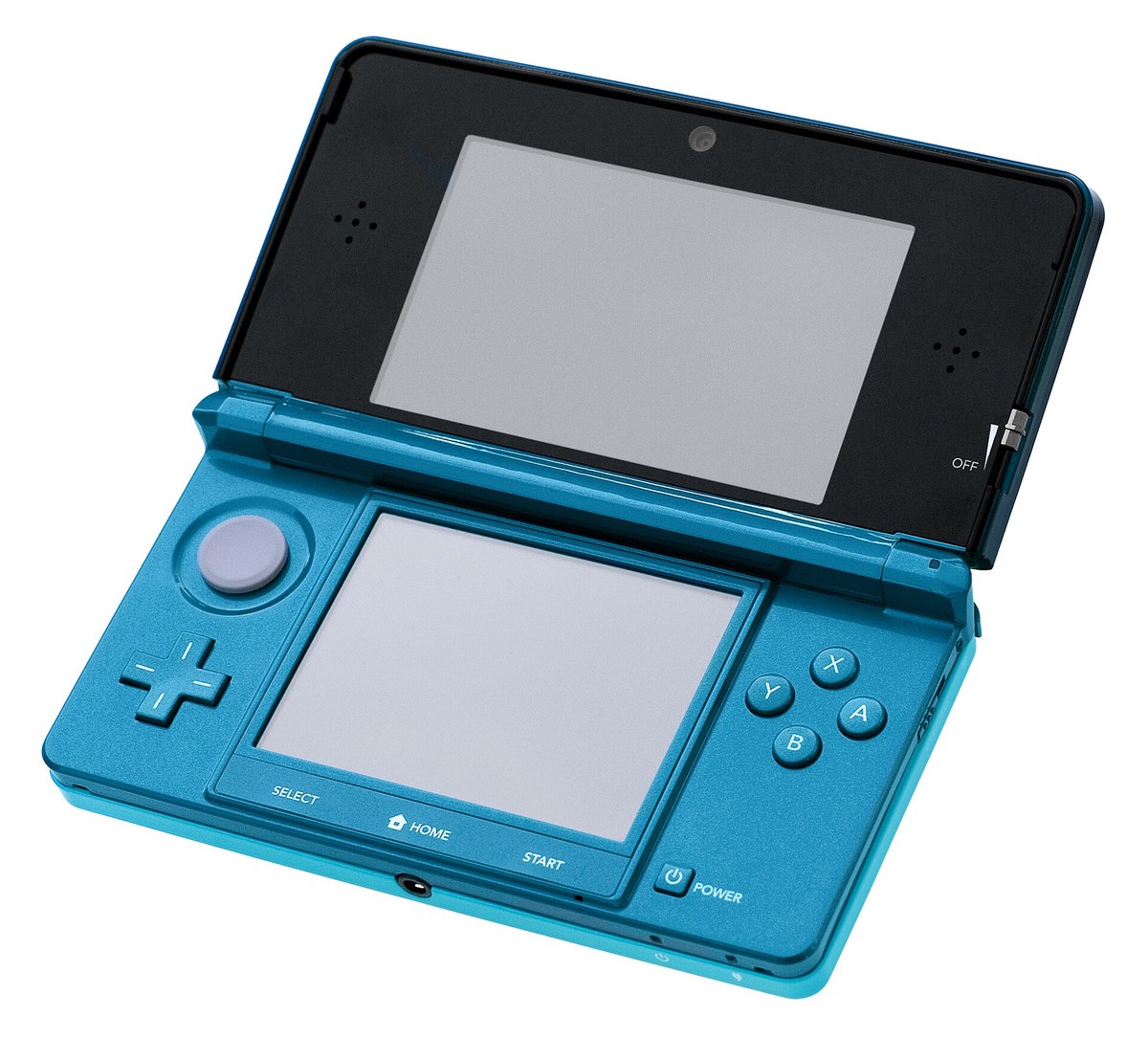
Both pay in resolution and viewing position. The lens's advantage is brightness: a barrier blocks much of the light, so the backlight is driven harder, while a lens sheet is transparent [3][22].
Barrier, fixed lens and eye-tracked lens compared, with examples and their figures
| Type | Light | Resolution per eye | Viewing position | Examples |
|---|---|---|---|---|
| Parallax barrier | Much of the light is blocked, so the backlight is driven harder [3][22] | 1/N of the panel for N views [3] | A fixed sweet spot, unless face tracking is added [22][25] | Nintendo 3DS [22] |
| Fixed lenticular lens | The sheet is transparent, so far more light gets through [3] | 1/N of the panel for N views [3] | Fixed zones; with enough views, several people can watch [7] | The glasses-free TVs Toshiba announced in 2010 [22] |
| Eye-tracked lenticular lens | Same as a fixed lens | About half the panel [7] | Follows one viewer within a set range | Lenovo ThinkVision 27 3D [23][24], Owl3D Shift |
- The Nintendo 3DS, a barrier screen. Its screen is 800 x 240 and shows 400 x 240 to each eye. The same article says the 3D on a barrier screen of this kind fades if the viewing distance is off by as little as 5 cm [22].
- Lenovo ThinkVision 27 3D, an eye-tracked lens. A reviewer describes it as using a switchable lenticular lens [23]. Lenovo's specification says "Number of viewers: 1" and lists a range of ±20 degrees and 60 to 100 cm [24].
- Switchable lenses. Some monitors turn the lens off for 2D work, using a liquid-crystal lens that acts as a lens only when a voltage is applied [7].
A worked example: the Owl3D Shift
Owl3D, the publisher of this guide, makes the Shift: a 14-inch glasses-free 3D display that sits beside a computer as a second monitor, priced at 499 US dollars. It is an eye-tracked lenticular screen (and not a hologram): an array of cylindrical lenses on a 4K LCD panel, with a camera that follows the viewer. Its published numbers show how the principles above work out in a product.
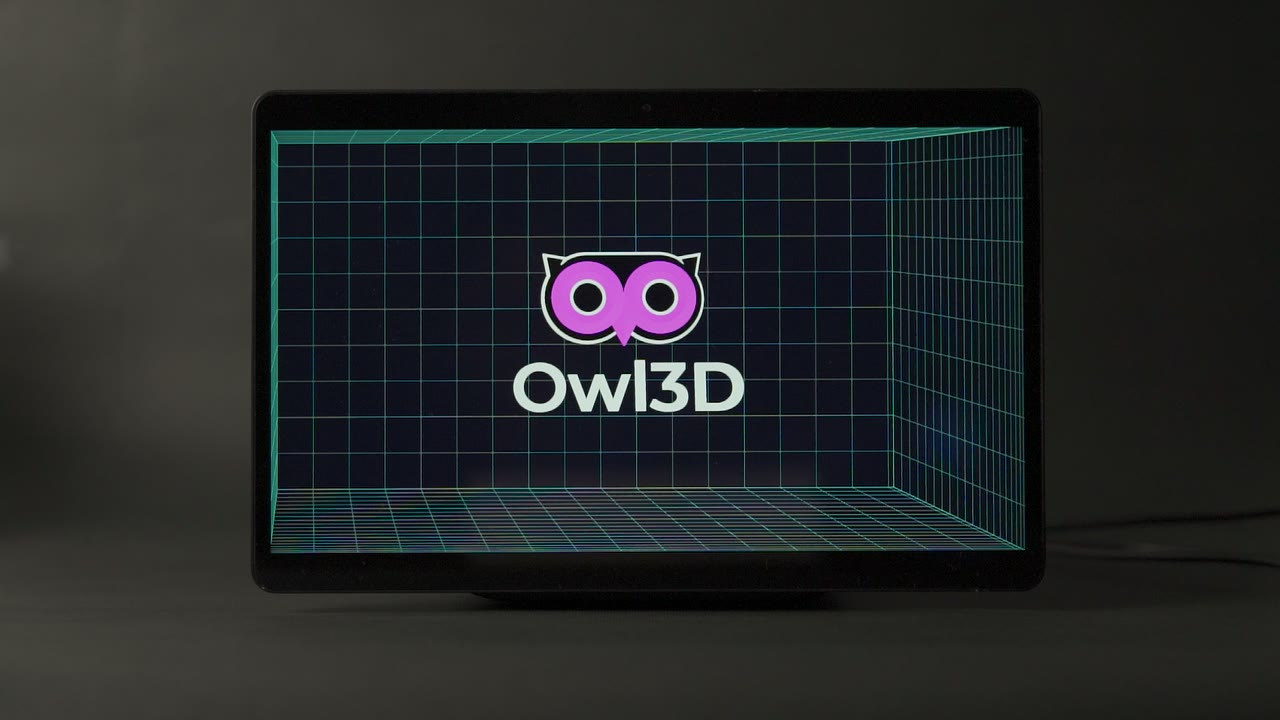
- Resolution per eye. The panel is 3840 x 2160. In 3D, each eye gets 1920 x 2160, half the panel's horizontal resolution.
- One viewer, tracked. A camera tracks the viewer's eyes 60 times a second, and the display steers the left-eye and right-eye images to where the eyes are. One person sees the 3D at a time.
- Viewing distance. About 45 to 100 cm, and best at 50 to 70 cm.
- Ghosting. Lining up a lens sheet with a pixel grid takes significant effort [3]. Each Shift is calibrated at the factory, and the software uses that calibration to reduce ghosting.
- 2D beside 3D. Text and other 2D content stay sharp next to 3D content with no mode switch, because the 3D treatment is applied only to the parts of the screen that hold 3D content.
- What it shows. The Owl3D app on the computer converts any window dragged onto the Shift from 2D to 3D instantly, as it plays. That is an AI conversion of a flat picture. It also shows side-by-side and top-bottom 3D that already exists.
Its limits: it does not show 3D on its own. It needs a computer running the Owl3D app, and at 14 inches it is a desk display, not a living-room screen.
To compare it with the other monitors on sale, see glasses-free 3D monitors compared.
From Owl3DOwl3D ShiftA 14-inch glasses-free 3D display that sits beside your computer.Frequently asked questions
What are the downsides of lenticular lenses?
- Prints: the effect works only within the sheet's viewing angle and distance, and small errors in pitch or alignment show up as ghosting or banding [14][17].
- 3D screens: each view gets only a fraction of the panel's pixels, the 3D looks right only from certain positions unless the screen tracks your eyes, and the view changes only when you move sideways, not up or down [3].
- Eyeglasses: only the small central circle carries the prescription, some designs show a visible edge between the two zones, and specialized lenses may cost more [11].
Is a lenticular lens the same as a progressive lens?
No. A progressive lens changes power gradually from distance vision at the top to near vision at the bottom, with no obvious lines. A lenticular eyeglass lens puts a very strong prescription in a small central circle [11]. Neither is related to the lens sheets used for prints and 3D screens.
What is the difference between a lenticular array and a microlens array?
A lenticular array is a row of long cylindrical lenses, so it bends light in one direction only. "Microlens array" is the broader term: many very small lenses, generally less than a millimeter across, in a one-dimensional or two-dimensional array [26]. A two-dimensional array of spherical lenses bends light both ways. 3D displays built on one, called integral displays, show depth for up-and-down as well as side-to-side movement, at a higher cost in resolution [3].
What is a lenticular poster, and what does "lenticular edition" mean?
A lenticular poster is a poster made as a lenticular print, so the picture changes or shows depth as you walk past. "Lenticular edition" is a retail label, not a technical term: it generally means a film, game, book or album release whose cover or slipcover is a lenticular print. Lenticular covers for movies on DVD and Blu-ray became common in the 2010s [6]. The label describes the packaging, so check the listing for anything else that differs.
Sources (26)
- Dictionary.com, "lenticular". https://www.dictionary.com/browse/lenticular (opened 2026-10-07)
- National Weather Service Albuquerque, "Altocumulus Standing Lenticular Clouds". https://www.weather.gov/abq/features_acsl (opened 2026-10-07)
- Jason Geng, "Three-dimensional display technologies", Advances in Optics and Photonics 5(4), 456-535, 2013. https://pmc.ncbi.nlm.nih.gov/articles/PMC4269274/ (opened 2026-10-07)
- Metoree, "12 Lenticular Lens Manufacturers in 2026". https://us.metoree.com/categories/3103/ (opened 2026-10-07)
- Edmund Optics, "Lenticular Arrays". https://www.edmundoptics.in/f/lenticular-arrays/12445 (opened 2026-10-07)
- Wikipedia, "Lenticular printing". https://en.wikipedia.org/wiki/Lenticular_printing (opened 2026-10-07)
- Tom Kimpe, Stijn Crul and Viktor Vörös (Barco), "Autostereoscopic Displays for Healthcare Applications", invited paper 29-4, SID 2025 Digest, pp. 385-388. https://sid.org/Portals/sid/Files/SID-Digest/docs/29-4.pdf (opened 2026-10-07)
- Popular Science, "A new take on creating an invisibility shield borrows from classical physics", by Jess Romeo, October 24, 2019. https://www.popsci.com/invisibility-cloak-how-it-works/ (opened 2026-10-07)
- designboom, "From fiction to reality: this shield is designed to make you invisible", March 16, 2022. https://www.designboom.com/technology/from-fiction-to-reality-this-shield-is-designed-to-make-you-invisible-03-16-2022/ (opened 2026-10-07)
- Wikipedia, "Lenticular lens". https://en.wikipedia.org/wiki/Lenticular_lens (opened 2026-10-07)
- All About Vision, "Lenticular lenses: Uses, benefits, cost and more", by Anna Barden, reviewed by Sonia Kelley, OD, April 11, 2022. https://www.allaboutvision.com/eyewear/eyeglasses/lenses/lenticular-lenses/ (opened 2026-10-07)
- Cornelis van Berkel and John A. Clarke (assigned to US Philips Corp), US Patent 6,064,424, "Autostereoscopic display apparatus", priority date February 23, 1996, granted May 16, 2000. https://patents.google.com/patent/US6064424 (opened 2026-10-07)
- FindLight, "Lenticulars for Precision Light Transport". https://www.findlight.net/optics/lenses/lenticulars (opened 2026-10-07)
- ViCGI, "Choosing the Right Lenticular Sheet for an Inkjet Printer", by CG Sheng. https://vicgi.com/DIY-lenticular-print.html (opened 2026-10-07)
- ViCGI, "The Printer's Guide to Lenticular Printing", by Peter Grochowski, August 10, 2022. https://www.vicgi.com/lenticular-printing-guide-for-printers.html (opened 2026-10-07)
- 3D Products SRL (DP Lenticular), "Products": lenticular sheets and rolls. https://dplenticular.com/products/ (opened 2026-10-07)
- ViCGI, "3D Lenticular Printing FAQs". https://vicgi.com/lenticular-faqs.html (opened 2026-10-07)
- ViCGI, "Lenticular Lens FAQs". https://vicgi.com/lenticular-lens-faqs.html (opened 2026-10-07)
- 3D Products SRL (DP Lenticular), "How to make the best lens choice?", by Daniel Pierret, April 7, 2017. https://dplenticular.com/how-to-make-the-best-lens-choice/ (opened 2026-10-07)
- ViCGI, "Buy Lenticular Lens sheets with 10, 16, 25, 30, 40 LPI", with price calculator. https://vicgi.com/lenticular-lens.html (opened 2026-10-07)
- Edmund Optics, "11" x 11", 0.085" FL, Lenticular Array", stock no. 43-028, specifications. https://www.edmundoptics.in/p/11quot-x-11quot-0085quot-fl-lenticular-array/4746/ (opened 2026-10-07)
- IEEE Spectrum, "3-D Without Four Eyes", November 23, 2010. https://spectrum.ieee.org/3d-without-four-eyes (opened 2026-10-07)
- StorageReview, "Lenovo ThinkVision 27 3D Monitor Review", July 15, 2024. https://www.storagereview.com/review/lenovo-thinkvision-27-3d-monitor-review (opened 2026-10-07)
- Lenovo PSREF, "ThinkVision 27 3D" product specifications, PDF dated November 24, 2025. https://psref.lenovo.com/syspool/Sys/PDF/ThinkVision/ThinkVision_27_3D/ThinkVision_27_3D_Spec.pdf (opened 2026-10-07)
- Nintendo European Research & Development, "NERD Teams Up With Hardware Experts in Japan to Deliver 'Super-Stable 3D' on the New Nintendo 3DS", October 2014. https://www.nerd.nintendo.com/optics/2014/10/01/Super_stable_3D.html (opened 2026-10-07)
- Wikipedia, "Microlens". https://en.wikipedia.org/wiki/Microlens (opened 2026-10-07)