3D Movie Trailers for 3D Glasses: Where to Get and Play Them
How we researched this: written by Owl3D from published sources, all 6 listed at the end.
Short answer
The 3D trailers we found are side-by-side (SBS) video files from home-theater trailer sites, such as The Digital Theater [1][2] and Demolandia [3]. The layout has to match your glasses. A 3D TV or projector plays SBS or top-bottom in its 3D mode. A VR headset plays SBS in a 3D video player. Red-cyan glasses need an anaglyph version [3]. Test your setup first with a short clip, such as the free 3-second clips below. Owl3D, the publisher of this guide, makes the Owl3D app, Owl3D Cloud and the free tools named here.
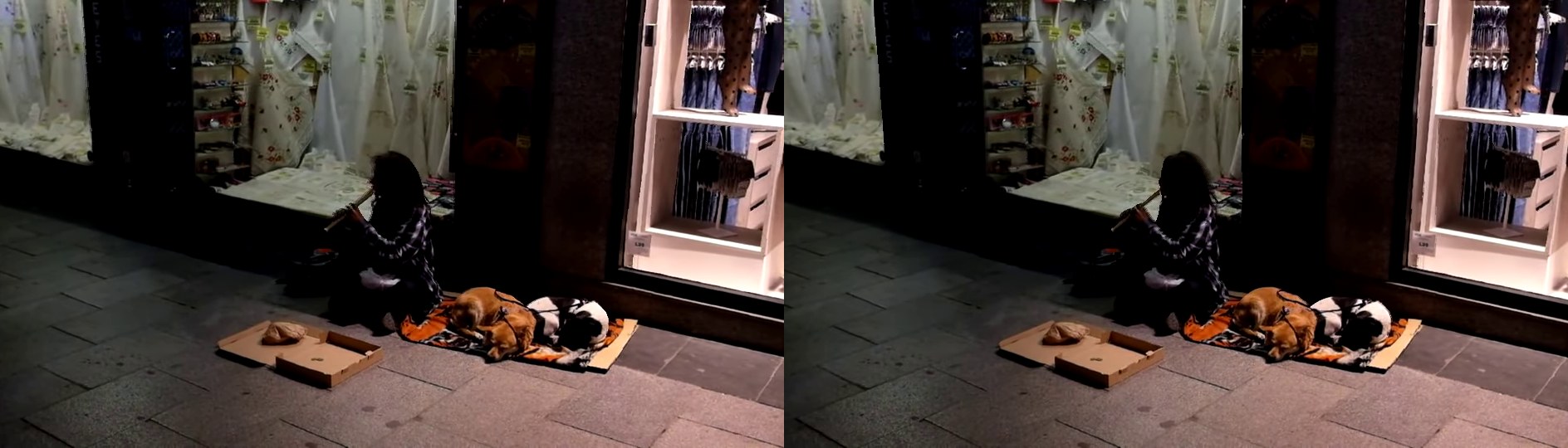
A 3D frame in Full SBS: the left eye's view on the left, the right eye's view on the right. Made by Owl3D from an ordinary 2D clip with the depth model of our Photo to 3D tool, so the depth is an AI estimate. Video: Nicolas Vigier, CC0, via Wikimedia Commons [5].
Key takeaways
- The 3D trailers we found are SBS files you download. Find the sites in where to find 3D trailers.
- Pick the layout your glasses need: SBS or top-bottom for a 3D TV or projector, SBS for a headset, anaglyph for red-cyan glasses. See which layout.
- Play a 3-second test clip before a full trailer. It shows in seconds if your 3D mode is set right. See test your setup.
- No 3D version of a trailer? An AI conversion makes one from the 2D video, but it is not the studio's 3D. See only in 2D.
Where to find 3D trailers
We opened each site on November 28, 2026.
| Site | What it has | Layout and size | How you get it |
|---|---|---|---|
| The Digital Theater | A "3D Movie Trailers" section with new films, for example Moana (2026), Toy Story 5 (2026) and Hoppers (2026) [1] | Toy Story 5, Trailer 2: SBS, "Full (3840×1038) and Half (1920×1038)" [2] | Download. The site asks you to turn off ad blockers [1] |
| Demolandia | 3D trailers and demo clips, for example 3D Disney, 3D 20th Century Fox and TV makers' demos from LG, Samsung and Sony [3] | The page title says "Side by side and anaglyph". The files we saw are m2ts (two also as Vob) at 1080/23.98p [3] | Download |
| 3dtv.at | Trailers and short films, for example Dracula 4D, The Eye 3D and Knight's Quest 3D [4] | "Most of the movies are available in multiple resolutions", such as 720p and 1080p [4]. The technical demos play in 3D only in the site's Stereoscopic Player [4] | Download. "All videos are copyrighted and are solely intended for private use" [4] |
| YouTube | Uploads titled "3D Trailer", for example for Luca (2021) and Avatar: Fire and Ash, were in Google's video results [6] | Not stated. Check the video's description | Stream |
Last checked : sites, titles and file sizes.
For full 3D films, not trailers, see free 3D movies and 3D movies to stream. For 3D on YouTube, see YouTube 3D.
Which layout for which glasses
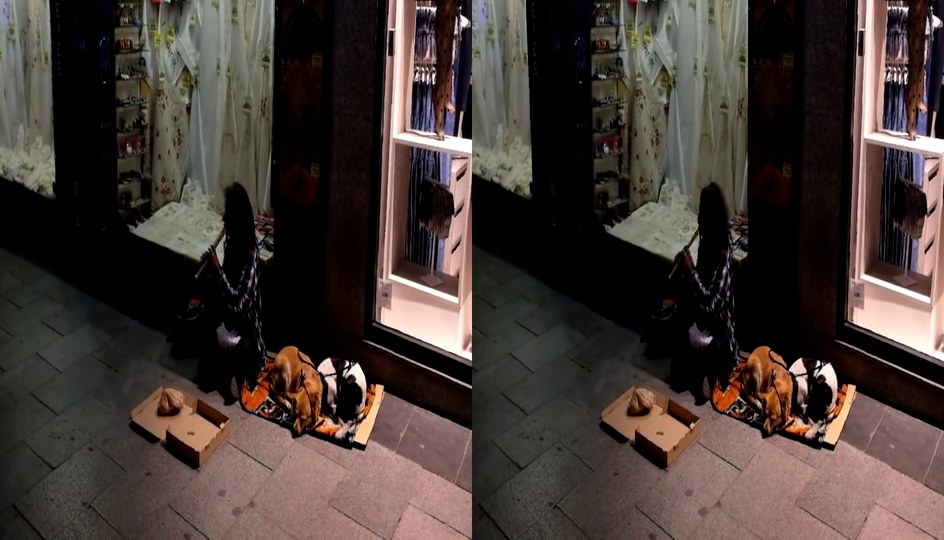
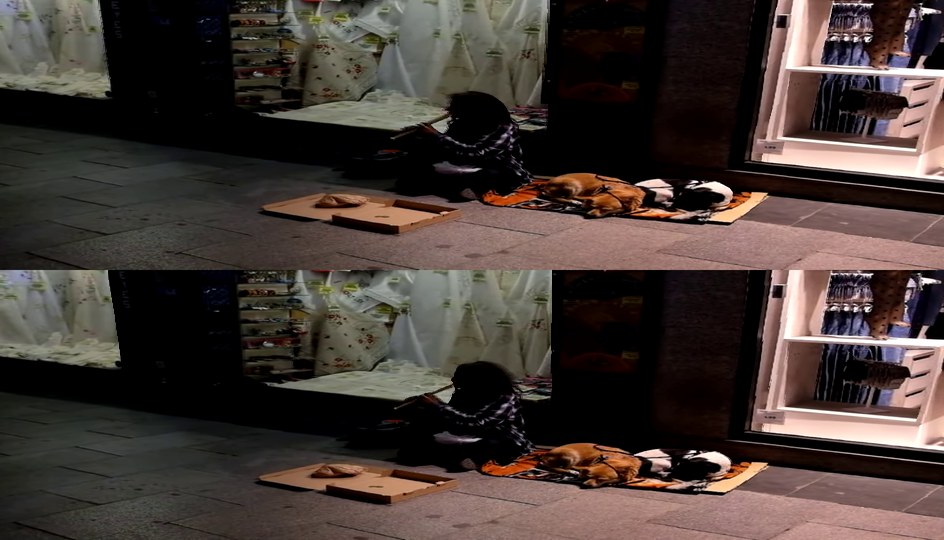
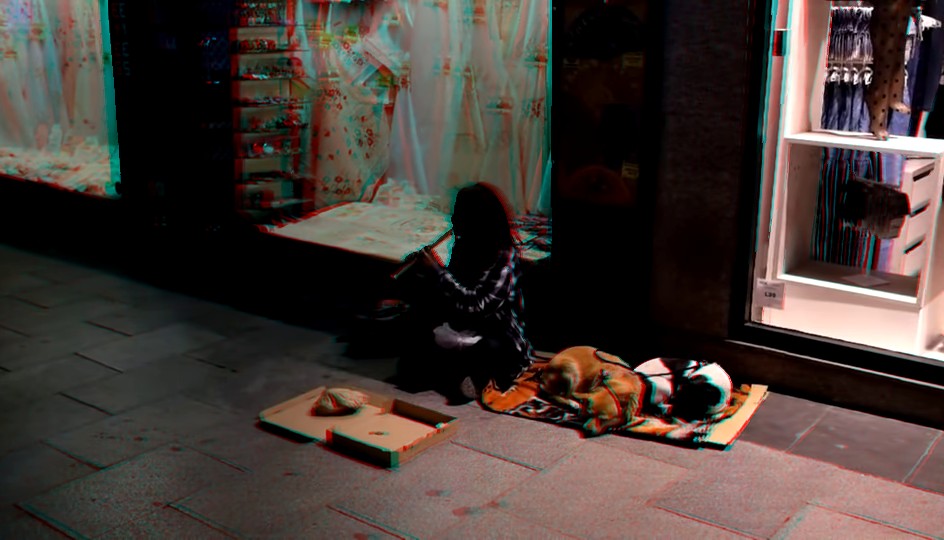
A 3D trailer holds two pictures, one for each eye. The layout says where the two pictures are in the frame. Here is the same frame of our test clip in the three other layouts.
| Your glasses or screen | Layout to get | How to play it |
|---|---|---|
| 3D TV (passive or active glasses) | Half SBS. Full SBS can be too wide for the TV's player; see Full or Half SBS | Play the file, then pick Side-by-Side in the TV's 3D menu. For stacked pictures, pick Top-and-Bottom. Glasses for your TV |
| 3D projector | Half SBS or top-bottom | The same as a TV: the projector's 3D menu |
| VR headset | Full SBS | A video player app with a 3D SBS mode. See VR video players |
| Red-cyan (anaglyph) glasses | Anaglyph | Any screen and any player. With an SBS file you see two pictures side by side, not 3D |
| No glasses | SBS, small on the screen | Parallel viewing works on a small SBS picture, with some practice |
Test your setup with a 3-second clip
A 3D demo file can be hundreds of megabytes. Demolandia's 3D files are 10 MB to 579 MB [3]. Test with a small clip first. We made two from the frame above: 90 frames (3 seconds) at 944 × 540 px, H.264 video with no sound.
- Download the Half SBS test clip (MP4, 0.4 MB), for a 3D TV, projector or headset.
- Download the red-cyan test clip (MP4, 0.4 MB), for red-cyan glasses.
- Copy the clip to the player. On a TV, use a USB stick or the TV's media app. In a headset, copy it to the headset or open it in the player.
- Play it and set the 3D mode. For the Half SBS clip, pick Side-by-Side. You should see one picture, not two.
- Look at the dogs. They are nearer than the shop window. The dogs should look in front of the window, and the window farther back.
- If the depth looks inside out, the eyes are swapped. Use the player's or TV's swap or L/R setting.
We have not tested these clips on a 3D TV or a projector.
When a trailer exists only in 2D
When you cannot find a 3D version of a trailer, you can make a 3D version of a 2D video with AI: the AI estimates the depth of each frame, then draws a second view for the other eye. That is how we made our test clip.
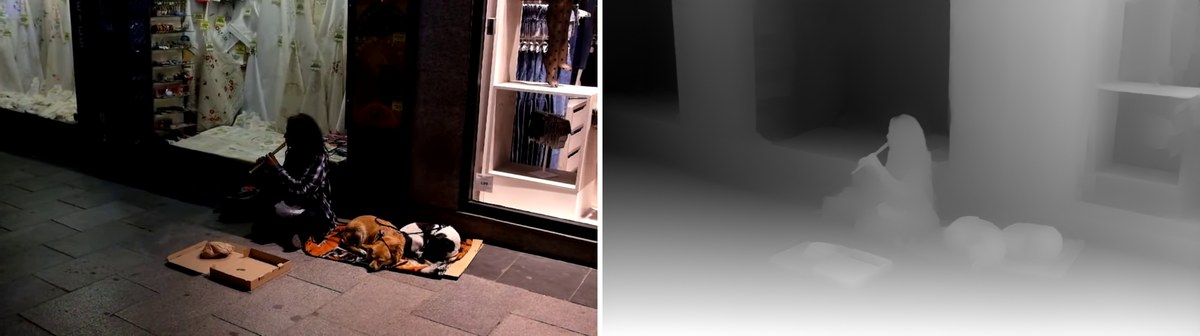
The Owl3D app does this for a video file on your computer. It saves Full SBS for headsets, Half SBS for older 3D TVs, and top-bottom. The free plan converts the first 60 seconds of each video. Use it only for videos you have the right to use. It is an AI conversion, not the studio's 3D version.
From Owl3DOwl3D converterA desktop app for Windows and Mac that turns 2D videos and photos into 3D.Owl3D Cloud does the same in a web browser, from a video file or a pasted YouTube link, again only for videos you have the right to use. It can convert only one part of a video. For a 3D picture for red-cyan glasses, use the free anaglyph maker. For more on 3D trailers on a TV, see convert a video to 3D for a TV.
Frequently asked questions
Are there official 3D trailers on YouTube?
Some uploads are titled "3D Trailer", for example for Luca (2021) and Avatar: Fire and Ash, from a channel named 3D Clips And Trailers [6]. The results do not show that a studio posted them. Check the description for the layout. On a computer, YouTube's own 3D menu offered only Anaglyph in our test; see YouTube 3D.
Do red-cyan glasses work with SBS trailers?
No. Red-cyan glasses need an anaglyph picture, where the two views are mixed in red and cyan [3]. On an SBS file you see the two pictures side by side. Use an anaglyph version, such as our red-cyan test clip.
Can I watch a 3D trailer on a Quest without a PC?
Yes. Download the SBS file to the headset and play it in a video player app with a 3D SBS mode. See VR video players.
Which format for a passive 3D TV?
Half SBS, as for the other 3D TVs in the table above. Set the TV's 3D mode to Side-by-Side. For glasses that fit your TV, see 3D glasses for your TV.
Sources (6)
- The Digital Theater, "3D Movie Trailers" category. https://thedigitaltheater.com/category/3d-movie-trailers/ (opened 2026-11-28)
- The Digital Theater, "Toy Story 5 (2026) Trailer 2 3D Side by Side DTS-HD MA and AC3 5.1", March 31, 2026. https://thedigitaltheater.com/2026/03/31/toy-story-5-2026-trailer-2-3d-side-by-side-dts-hd-ma-and-ac3-5-1/ (opened 2026-11-28)
- Demolandia, "3D Video Trailers Side by side and anaglyph". https://www.demolandia.net/3d-video.html (opened 2026-11-28)
- 3dtv.at, "3D Movies". https://www.3dtv.at/Movies/Index_en.aspx (opened 2026-11-28)
- Nicolas Vigier, "Music in the street, Madrid 10.webm", Wikimedia Commons, CC0. https://commons.wikimedia.org/wiki/File:Music_in_the_street,_Madrid_10.webm (opened 2026-11-28)
- Google search, United States, "3d movie trailers for 3d glasses", video results, captured 2026-11-28 by Owl3D. https://www.youtube.com/watch?v=CrmVN3cbXRc and https://www.youtube.com/watch?v=mUXXUs7Uufg (opened 2026-11-28)