VR Video Players: Which App Plays Your File, and How to Make It Look Right
How we researched this: written by Owl3D from published sources, all 43 listed at the end.
Short answer
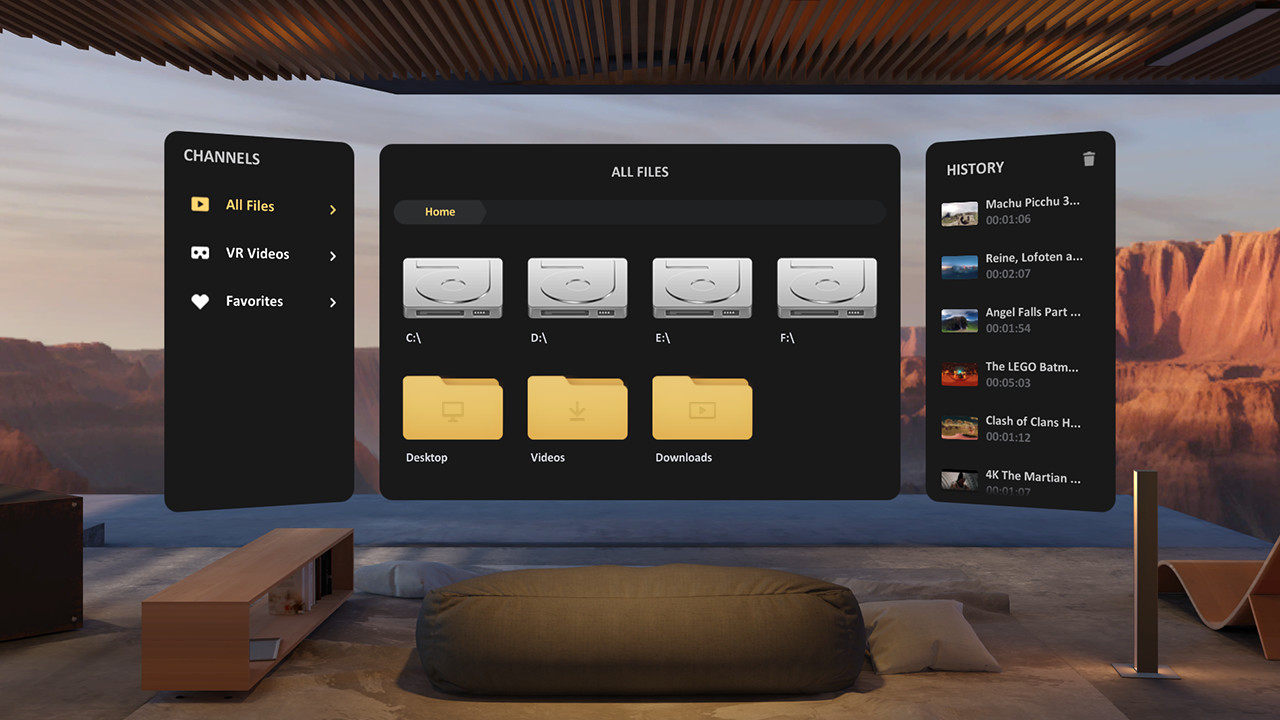
A VR video player wraps a 180 or 360 degree video around you in a headset, or shows a 3D file on a virtual screen. On a Meta Quest, Skybox ($9.99) and DeoVR (free) play files stored on the headset [1], [8], [10]; 4XVR is a third choice, with no price on its store page and a $29.99 add-on [7]. On an Apple Vision Pro with visionOS 26, the Files app plays 180 and 360 degree footage from supported cameras by itself [17]. On a computer with no headset, VLC plays a 360 video and lets you look around [20]. If the picture is split in two, warped or flat, the file is usually fine: the player has picked the wrong format, and you can set it by hand.
Owl3D, the publisher of this guide, makes 2D-to-3D conversion software. It appears in one section near the end. Owl3D does not make any of the players compared here.
Key takeaways
- Split in two, warped, or flat when it should surround you? Two settings fix most of it: how many pictures the file holds, and how far round it wraps. See the two settings, then fixes by what you see.
- Not sure which app? The table by device covers Meta Quest, PC headsets, Apple Vision Pro, phones and a plain computer, with what each costs.
- You may not need to buy anything: DeoVR and Bigscreen are free on a Quest, and the Quest's own browser can wrap a video around you. See the free ways.
- A file that picks the wrong format every time can be renamed so the player gets it right: the file-name keywords that Skybox and DeoVR publish.
- No headset? A 360 video plays on a computer screen in VLC; on Windows, one asker got it working in the Movies & TV app: without a headset.
Quick picks
- Meta Quest, least fussSkybox, $9.99, which its maker says sets the format by itself
- Meta Quest, freeDeoVR
- PC headset through SteamDeoVR or Skybox
- Apple Vision Prothe Files app, for footage from the cameras Apple lists
- No headsetVLC, for 360 video
Which VR video player for your device
These rows come from each maker's own listing or help page, read on October 9, 2026. They are not hands-on tests. "Wrap-around" means 180 or 360 degree video.
| Player | Device | Cost | Wrap-around video | 3D layouts |
|---|---|---|---|---|
| Skybox VR Video Player | Meta Quest [1]; PC headsets through Steam [12] | $9.99 on Quest [1] | 180, 200, 220, 360 [1] | Side-by-side, top-bottom [1] |
| DeoVR | Meta Quest; PC headsets through Steam [11]; Apple Vision Pro, Pico 4 Ultra [10] | Free [10], [11] | 180, 360, fisheye [9] | Side-by-side, top-bottom [9] |
| 4XVR Video Player | Meta Quest | No price shown on its store page (October 9, 2026); $29.99 Premium add-on [7] | 180, 360 [7] | Full and half side-by-side, full and half over-under [7] |
| Virtual Desktop | Meta Quest, with a Windows PC or Mac | $24.99 [14] | 180, 360, from the computer [14] | Side-by-side, over-under, on a screen [14] |
| Bigscreen | Meta Quest | Free [40] | Not named in its listing | Side-by-side, over-under [13] |
| Files app | Apple Vision Pro, visionOS 26 or later | Built in | 180, 360 and wide-angle footage from supported cameras [17] | Not stated |
| VaR's VR Video Player | Android phone in a phone viewer | No price shown on Google Play (October 9, 2026); contains ads [23] | 180, 360 [23] | Side-by-side, stacked [23] |
| VR Player mw | iPhone in a phone viewer | Free, with in-app purchases [24] | 180, 360 [24] | Side-by-side [24] |
| VLC | A computer or phone screen, no headset | Free [43] | 360 [20] | Not stated |
| Whirligig | Windows: on the screen or in a PC headset | Paid on Steam; price not seen from the US | 180, 360, fisheye [21] | Side-by-side, over-under [21] |
Prices are in US dollars as Meta's store showed them to a computer outside the US.
Last checked : prices and formats, from each maker's listing.
A few things the table cannot show:
- Skybox and 4XVR say they recognize the format by themselves. Skybox's listing says it recognizes 180, 200, 360, 2D and 3D automatically [1], and 4XVR's says the same of flat, 180 and 360 video and four 3D layouts [7]. When the guess is wrong, both have a manual setting; see the two settings.
- Where Skybox finds your files. Videos copied to the headset appear under Local Files; videos shared from a computer appear under Network, or under AirScreen if you install Skybox's Windows or Mac program [6].
- DeoVR streams video as well as playing your local files; its listing describes both [8]. This guide is about your own files. On a Quest the listing names Quest 2, Pro, 3 and 3S [8].
- Virtual Desktop can stream the file from your computer, so it does not have to be copied to the headset first [14].
- Bigscreen is a cinema, not a wrap-around player. Its listing describes local files and 3D films on a screen and does not mention 180 or 360 video [13].
- Moon VR Player lists 2D, 3D, 180, 190, 200, 220 and 360 with automatic detection on its own site [25], which gives no price.
- NEX is a newer Quest player that is free to try, with a $9.99 full version [15]. Its listing does not name 180 or 360 video.
- YouTube's VR app plays YouTube's own 180 and 360 videos, not your files. It is on Meta Quest 2, Pro and 3, PICO 4 and Apple Vision Pro [18]; there is no version for PC headsets on that list.
To get a file onto a Quest in the first place (cable, USB drive, a shared folder on a computer), see how to transfer your movies to the headset. The steps are the same for a VR video.
Free ways to play a VR video
On a Meta Quest: DeoVR is free [10] and plays local files [8]. 4XVR showed no price on its store page when we opened it on October 9, 2026, and sells a $29.99 Premium add-on there [7]. Bigscreen's maker says it is free on Meta Quest [40]; it plays local files and 3D films on a screen [13].
In the Quest's own browser. Meta's developer documentation says of a video on an ordinary web page: "If a user puts a video in full screen, they can select to reproject it to a custom projection such as spherical 360 or 180 degree equirect." The viewer can also choose one picture, left-right or top-bottom [16]. So a 180 or 360 video on a web page needs no extra app.
On an Apple Vision Pro: the Files app, if the footage comes from a camera on Apple's list: Canon EOS VR, GoPro HERO11 and later, GoPro MAX, Insta360 X4, X5 and X6, among others [17].
On a computer: VLC and, on Windows, the Movies & TV app; see without a headset.
The two settings that make a VR video look right
Every VR video player needs to know two things about a file. When it guesses either one wrong, the picture looks broken.
- How many pictures are in the frame. A 2D file has one. A 3D file has two, one for each eye, either next to each other (side-by-side, also written SBS or LR) or stacked (top-bottom, TB, or over-under) [26].
- How far the picture wraps. A flat film sits on a screen. A 180 video fills the half of the world in front of you. A 360 video goes all the way round. Some files hold a round fisheye picture instead [3], [9].
Open the file in an ordinary player on a computer and you can see both at a glance:
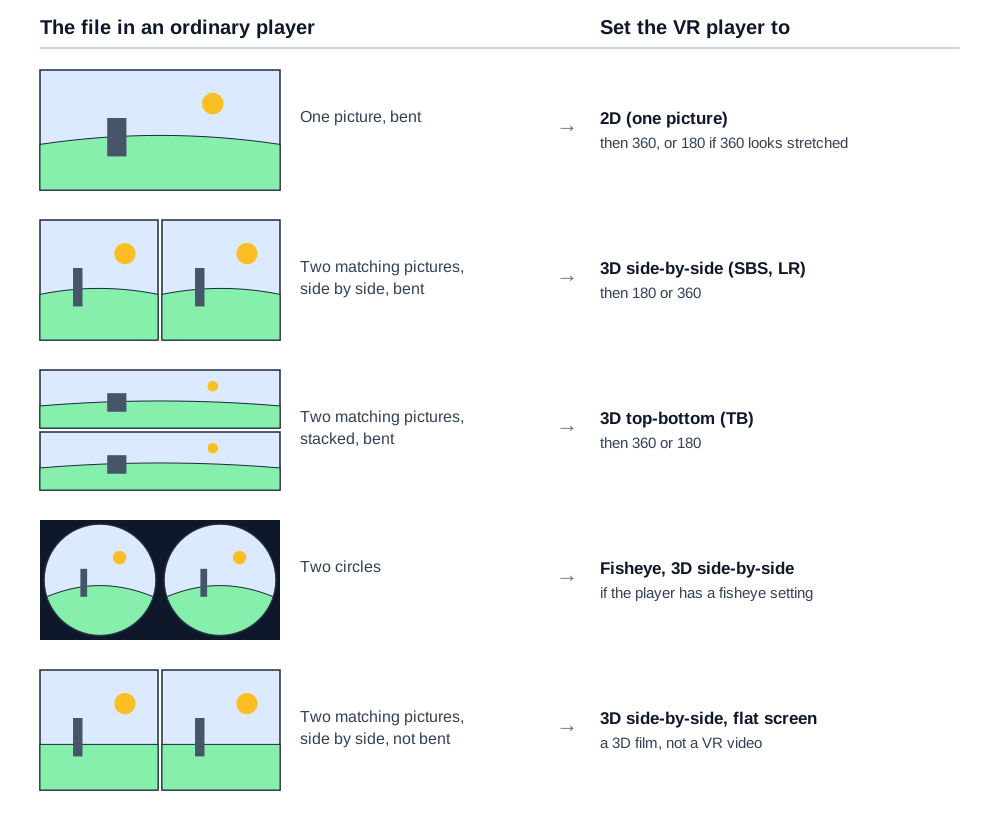
Why players have to guess: a file can carry a label that says how it is laid out. Google's open format for this stores the 3D layout (one picture, top-bottom or left-right) and the projection inside the file, and both labels are optional [26]. So a file can arrive without them.
In Skybox
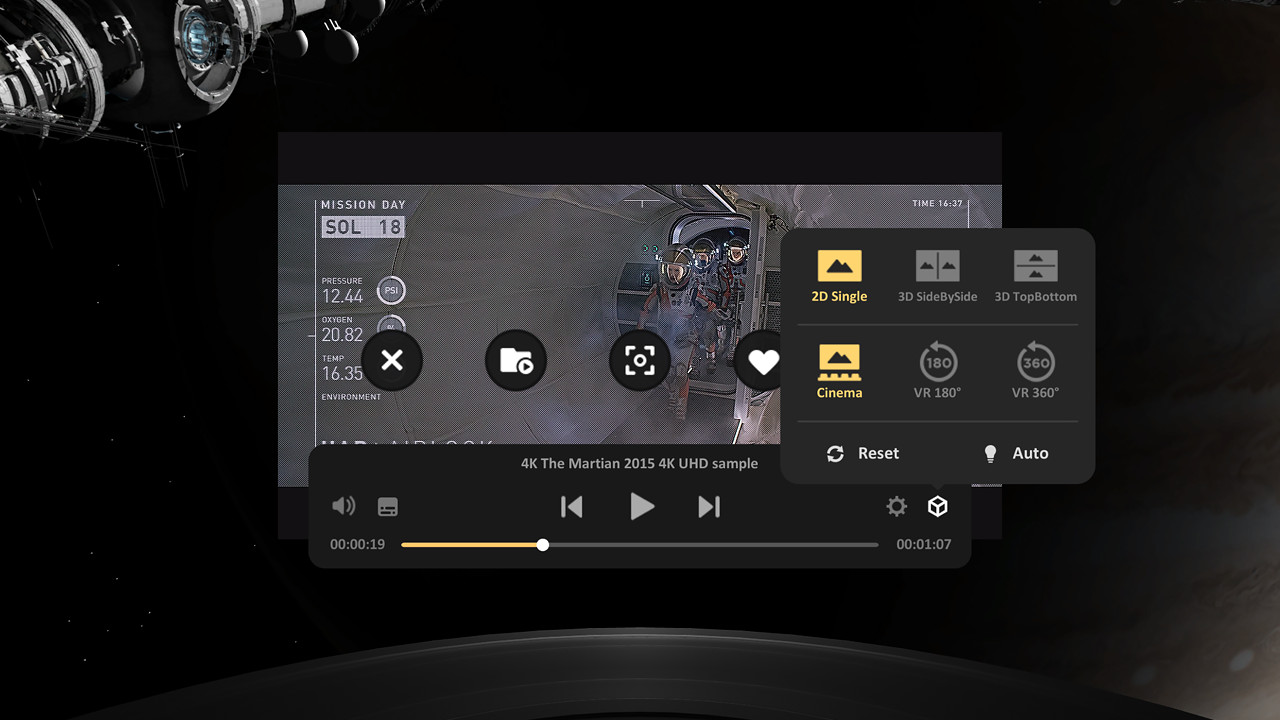
Skybox's help page gives the steps: press A, X, the trigger or the Menu button to bring up the control panel, select Stereo Mode on its right side, and pick the format. An Auto button there makes Skybox detect again [3]. For a picture that is split in two, its advice is to "choose 3D SBS if screen splits horizontally. Choose 3D TB if the screen splits vertically" [4].
Telling 180 from 360
Try both. In a 2016 thread on Whirligig's Steam forum, a user set a file to 360 and wrote back: "moving the FOV to 360 really stretches the images so i suppose the video was meant for 180 FOV". The developer replied, "That does sound like a 180." [27] The same developer's rule of thumb in that thread: "the majority of 360 degree videos are in equirectangular 360 format", the bent rectangle in the diagram, and a round picture needs the fisheye setting [27].
Name the file so the player gets it right
Skybox checks the file name first, DeoVR reads flags in it too, and both publish the words they look for. Put the words anywhere in the name.
| Your file | Skybox keyword [3] | DeoVR flags [9] |
|---|---|---|
| 180, 3D side-by-side | LR_180 | _180 and LR (or SBS) |
| 180, 3D top-bottom | TB_180 | _180 and TB |
| 360, 2D | 2D_360 | _360 |
| 360, 3D top-bottom | TB_360 | _360 and TB |
| 180 fisheye, 3D side-by-side | LR_180_FISHEYE | _fisheye and LR |
| 3D film on a flat screen, full side-by-side | Full_SBS | LR (or SBS) |
So a 180 degree side-by-side video named holiday_LR_180.mp4 opens correctly in Skybox [3]. Skybox says the keywords are not case sensitive and also work in a folder's name [3]. DeoVR's documentation lists more flags, for 190, 200 and 220 degree fisheye lenses [9].
When it looks wrong or will not play
- Two copies of the picture, side by side or stacked. The player thinks the file is 2D. Set it to 3D side-by-side or top-bottom, as in the two settings [4].
- Warped, bulging or stretched all the way round. The wrap is wrong. Switch between 180 and 360; for a round picture, pick fisheye [27].
- 3D that is hard to focus on. Skybox's help page gives two causes: the two eyes' pictures are the wrong way round, fixed with L-R Swap under Advanced Settings and 3D Adjust; or the two pictures need lining up for your eyes, with the 3D Offset slider. Its last resort is Monoscopic Mode, which shows one picture to both eyes [5].
- It surrounds you but looks flat. The file is probably a 2D (monoscopic) 360 video: one picture, shown to both eyes. Apple's Final Cut Pro guide says of that kind: "there’s no real depth perception; viewing monoscopic video is like looking around with only one eye open" [42].
- Blurry, though the file looked sharp on a monitor. A wrap-around video needs far more pixels than a film on a screen. Meta tells makers of video apps to "Aim for 30 to 60 pixels per degree (PPD)", and for a 2D 360 video at 30 that "computes to 10800x5400" [41]; a 4K video is 3840x2160. Apple's advice for its own headset: "If the video is blurry, it might have been captured or exported at low resolution." [17] Export at the highest resolution your camera's software offers.
- Stutter, or a black picture on a PC. On Windows, DeoVR needs codecs installed: "Windows OS requires correct video codecs installed for DeoVR playback to work." Its documentation names LAV Filters and Microsoft's HEVC Video Extension [9].
- Stutter on a Quest. Meta's developer page says "High bitrate and high resolution media can put a load on the device." In the Quest's browser, "For all formats, Browser supports 4K and supports 8K on h.265 and AV1", and AV1 is not hardware decoded on a Quest 2 or Quest Pro [16]. Skybox's site gives 8192x6144 as the most a Quest 2 plays in its app [2]. If one file stutters, try a lower-resolution export or the H.265 version.
- The file plays on the computer but not in the headset. Check the container: DeoVR's Quest app lists MP4, MKV, WebM and a few others, and its Windows app lists AVI, MP4 and MOV but not MKV [9].
Play a VR video without a headset
On a screen you lose the depth and the sense of being inside the video, but you can still look around.
VLC has played 360 video since version 3.0, with what VideoLAN calls "360 video and 3D audio playback with viewpoint change": you can turn the view as the video plays [20].
On Windows, one owner with a new Windows 11 PC wrote on Microsoft's Q&A site in December 2023 that 360 videos "only play the video side by side but not in 360 mode" in the new Media Player and in VLC. The accepted answer was to open the file in the Movies & TV app and, if it is not recognized, choose Play as 360 video from the three-dot menu. The asker replied: "This is exactly what i needed." [30] We have not tested it.
A 3D file shows both pictures. That is what a Super User asker met in 2020 with a downloaded VR video in VLC: "the screen appears divided in two and I cannot control the movement of the camera" [31]. A desktop player that understands both settings, such as Whirligig, which its Steam page says supports "180° and 360° 3D video in both desktop and VR modes" [21], shows one eye's picture properly. To watch a flat side-by-side 3D film as one normal picture in VLC, see how to play a 3D video in VLC.
To turn 360 footage into a normal video, use the camera maker's software. GoPro Player, for Mac and Windows, plays 360 footage and exports it as ordinary flat video with the view you choose; GoPro says everything in it is free except one stabilization feature [22].
On a phone. In a phone viewer, VaR's VR Video Player on Android lists "Stereoscopic side by side, stacked, 180º and 360º" [23]. For YouTube's own VR videos, the YouTube app has a Cardboard mode on Android; YouTube's help page says "Cardboard is not supported for iPhone and iPad." [19]
What owners report
These are people's own accounts from Steam forums, Meta's community forum and comments under YouTube tutorials. We have not tested them. YouTube shows only how long ago a comment was posted, so those dates are approximate.
Camera footage that opens as 2D. Three owners of an Insta360 EVO, on DeoVR's Steam forum in May and June 2019, found their 180 degree 3D files opening flat: "only one side of video shows on the screen". The first wrote back with what worked: "Using AVIDEMUX convert video file to the same .mp4 without recopression... but it works now!:)" A second confirmed it with a catch: "Avidemux do the trick, but i get some video freeze". DeoVR's developer told them to leave the "VR video" box unchecked when exporting from a video editor, and added: "For h265 videos you would need codecs." [28] These reports are from 2019.
Format buttons that are not there. On the same forum in March 2021, two owners said DeoVR had stopped offering the choice after an update: "The buttons to pick those choices are not there for some videos". No fix is in the thread [29]. DeoVR's file-name flags, above, are the documented way to force a mode.
Warped 180 files on a Quest 2. One commenter under a YouTube comparison of VR video apps, about 2025, on local 180 files in DeoVR: "It looks warped af, and not at all like it’s supposed to." No answer is in what we saved [32].
Does a Quest play it by itself? Under a YouTube tutorial on watching your own 360 videos on a Quest 3, one commenter, about July 2026: "so I don't need to buy a 3rd party app for 360 video playing?" [36] Under an older tutorial, an owner wrote about 2025 of playing an uploaded file on the headset and having "changed the viewpoint to 360 as described", with the Quest's menu bar still in view [35]. Against that, two Quest owners on Meta's community forum, about 2025, said downloaded VR videos had stopped playing as VR in Meta's gallery after an update: "instead of playing in VR (like they used to) they only play in a web based 3D format" [37], and "it’s like you are watching a normal video instead of 3D virtual" [38]. Neither post has a reply in what we saved.
Skybox or 4XVR. Two commenters, two views. Under a YouTube video on VR cinema apps, about June 2026: "For local file movies I much prefer Skybox over 4XVR", adding of 4XVR that "it stutters on me a lot whenever I try to use it" [33]. Under a review of NEX, about April 2026, another had the opposite luck with a USB drive: "I get constant stuttering from a USB" in NEX, against "the excellent 4XVr App which plays the exact same USB perfectly" [34].
An ordinary 2D video: what a player does with it
A VR video player also plays a normal video. It appears on a flat virtual screen; Skybox's listing calls this "normal 2D contents" [1].
Some software converts a 2D picture to 3D, which is a different thing: the video stays on a flat screen and gains depth. NEX's listing offers this inside the player: "Watch any video in NEX on Meta Quest 3 with Instant 3D. No computer or prior conversion needed." [15] Owl3D, the publisher of this guide, makes two tools for it. Both are AI conversions of a 2D picture, not footage shot with two lenses and not a studio's own 3D version.
- Instant, as it plays: Owl3D Link is a free app for Meta Quest headsets. With the Owl3D desktop app running on a Windows PC that has an NVIDIA RTX 3060 or better graphics card, it streams what is on the PC to the headset wirelessly, converted from 2D to 3D in real time. There is no file to prepare. It does not work from a Mac.
- Highest quality, as a file: the Owl3D converter, for Windows and Mac, turns a video file you have the right to use into a 3D file on your own computer. It is not instant. It exports side-by-side, half side-by-side or top-bottom 3D video, and on a Mac Spatial Video for Apple Vision Pro. For a VR headset, choose side-by-side or half side-by-side: the result is a 3D film for a flat screen, the last row of the diagram, not a wrap-around video. It has a free tier and paid plans, listed on the pricing page.
Frequently asked questions
What is the best VR video player?
It depends on the device, and we have not tested them side by side. From the makers' listings: on a Meta Quest, Skybox at $9.99, which its listing says recognizes the format automatically [1]; DeoVR to pay nothing [10]; 4XVR, whose listing names four 3D layouts and network sources such as Plex, Emby and Jellyfin [7]. Owners disagree about Skybox and 4XVR; see what owners report.
Can VLC play VR videos?
VLC plays 360 video on a computer or phone screen and lets you change the viewpoint [20]. That is on the screen, not inside a headset. For a headset, use one of the players in the table.
How do I watch a VR video on my PC with a Quest?
Two ways. Virtual Desktop's Videos tab streams 180 and 360 videos straight from the computer to the Quest [14]. Or run a PC player such as DeoVR or Skybox from Steam with the Quest connected as a PC headset; to set that up, see how to connect a Meta Quest to a PC.
Is a 3D movie file a VR video?
No. A 3D film is two flat pictures and plays on a virtual screen; a VR video wraps around you. Players handle both, with different settings. Virtual Desktop's developer described the wrap-around case on a Steam forum in 2020: "it will render them on a sphere around you" [39]. For films, see how to watch movies in VR; for where the formats differ, see 3D video formats.
Where do VR180 videos come from?
From cameras with two wide lenses side by side. See VR180 cameras for the ones on sale.
Sources (43)
- Meta Horizon Store, "SKYBOX VR Video Player". https://www.meta.com/experiences/skybox-vr-video-player/2063931653705427/ Opened 2026-10-09.
- Skybox, product page. https://skybox.xyz/ Opened 2026-10-09.
- Skybox Support, "How to Adjust 2D/3D/VR Video Formats". https://skybox.xyz/support/How-to-Adjust-2D&3D&VR-Video-Formats Opened 2026-10-09.
- Skybox Support, "Why do I See a Split Screen When Watching 3D Videos". https://skybox.xyz/support/Why-do-I-See-a-Split-Screen-When-Watching-3D-Videos Opened 2026-10-09.
- Skybox Support, "Why Some 3D Videos Are Slightly Out Of Focus". https://skybox.xyz/support/Why-Some-3D-Videos-Are-Slightly-Out-Of-Focus Opened 2026-10-09.
- Skybox Support, "How to Access Videos". https://skybox.xyz/support/How-to-Access-Videos Opened 2026-10-09.
- Meta Horizon Store, "4XVR Video Player". https://www.meta.com/experiences/4xvr-video-player/5936567899722707/ Opened 2026-10-09.
- Meta Horizon Store, "DeoVR - VR Video Player". https://www.meta.com/experiences/hyper-deovr-vr-video-player/25289867110644741/ Opened 2026-10-09.
- DeoVR, "DeoVR App documentation" (sections 3, 10 and 16). https://deovr.com/app/doc Opened 2026-10-09.
- DeoVR, "Download DeoVR app". https://deovr.com/app Opened 2026-10-09.
- Steam, "DeoVR - VR Video Streaming Platform" store page. https://store.steampowered.com/app/837380/DeoVR_Video_Player/ Opened 2026-10-09.
- Steam, "SKYBOX VR Video Player" store page. https://store.steampowered.com/app/721090/SKYBOX_VR_Video_Player/ Opened 2026-10-09.
- Meta Horizon Store, "Bigscreen Beta". https://www.meta.com/experiences/bigscreen-beta/2497738113633933/ Opened 2026-10-09.
- Meta Horizon Store, "Virtual Desktop". https://www.meta.com/experiences/virtual-desktop/2017050365004772/ Opened 2026-10-09.
- Meta Horizon Store, "NEX 3D Video Player". https://www.meta.com/experiences/nex-3d-video-player/25092971956976708/ Opened 2026-10-09.
- Meta developer documentation, "Browser Video Support". https://developers.meta.com/horizon/documentation/web/browser-video/ Opened 2026-10-09.
- Apple Support, "View 180-degree, 360-degree, and Wide FOV video on Apple Vision Pro" (published August 24, 2026). https://support.apple.com/en-us/125014 Opened 2026-10-09.
- YouTube Help, "Get started with YouTube VR". https://support.google.com/youtube/answer/7205134 Opened 2026-10-09.
- YouTube Help, "Watch VR180 and 360-degree videos with Cardboard". https://support.google.com/youtube/answer/6239930 Opened 2026-10-09.
- VideoLAN, "VLC 3.0 Vetinari". https://www.videolan.org/vlc/releases/3.0.0.html Opened 2026-10-09.
- Steam, "Whirligig Media Player" store page. https://store.steampowered.com/app/451650/Whirligig_VR_Media_Player/ Opened 2026-10-09.
- GoPro, "GoPro Player". https://gopro.com/en/us/info/gopro-player Opened 2026-10-09.
- Google Play, "VaR's VR Video Player". https://play.google.com/store/apps/details?id=com.abg.VRVideoPlayer&hl=en_US Opened 2026-10-09.
- App Store, "VR Player mw (Local Videos)". https://apps.apple.com/us/app/vr-player-mw-local-videos/id1580726816 Opened 2026-10-09.
- Moon VR Video Player, product page. https://moonvrplayer.com/ Opened 2026-10-09.
- Google, spatial-media repository, "Spherical Video V2 RFC". https://github.com/google/spatial-media/blob/master/docs/spherical-video-v2-rfc.md Opened 2026-10-09.
- Users' reports and the maker's replies: Steam Community, Whirligig discussions, thread "360 and 3d video not playing" (May 2016). https://steamcommunity.com/app/451650/discussions/0/364041517005210716 Opened 2026-10-09.
- Users' reports and the maker's replies: Steam Community, DeoVR discussions, thread "SBS Video do not working as SBS (Insta360 EVO)" (May to June 2019). https://steamcommunity.com/app/837380/discussions/0/3264459260607405358 Opened 2026-10-09.
- Users' reports: Steam Community, DeoVR discussions, thread "Cannot play videos in VR mode anymore since most recent update" (March 2021). https://steamcommunity.com/app/837380/discussions/0/3102390454980874486 Opened 2026-10-09.
- Users' reports: Microsoft Q&A, "Getting 360 videos to work with Windows Media Player on ..." (December 4, 2023). https://learn.microsoft.com/en-us/answers/questions/4079062/getting-360-videos-to-work-with-windows-media-play Opened 2026-10-09.
- Users' reports: Super User, "how to watch vr videos in my PC?" (July 5, 2020). https://superuser.com/questions/1566349/how-to-watch-vr-videos-in-my-pc Opened 2026-10-09.
- Users' reports: comments under the YouTube video "How to watch VR Videos on your VR headset (2023) | YouTube VR vs DeoVR vs Oculus TV". https://www.youtube.com/watch?v=9iV_W_Lq5zY Opened 2026-10-09.
- Users' reports: comments under the YouTube video "Theaters are Dead! These VR Apps change everything". https://www.youtube.com/watch?v=PMUBRioeguA Opened 2026-10-09.
- Users' reports: comments under the YouTube video "This VR App Feels Like IMAX.. At Home". https://www.youtube.com/watch?v=blD1ixayMXU Opened 2026-10-09.
- Users' reports: comments under the YouTube video "How To Upload & Watch 360 Videos On Quest 3". https://www.youtube.com/watch?v=2OGl7e2lFLI Opened 2026-10-09.
- Users' reports: comments under the YouTube video "How to Watch Your Own 360° VR Videos on Meta Quest 3 (Step-by-Step Tutorial)". https://www.youtube.com/watch?v=7Y66rijumBs Opened 2026-10-09.
- Users' reports: Meta Community Forums, "Downloaded VR Videos in gallery now only play in 3D/Web-like after newest update". https://communityforums.atmeta.com/discussions/OtherTroubleshooting/downloaded-vr-videos-in-gallery-now-only-play-in-3dweb-like-after-newest-update/1344596 Opened 2026-10-09.
- Users' reports: Meta Community Forums, "Meta Gallery". https://communityforums.atmeta.com/discussions/GamesApps/meta-gallery/1336852 Opened 2026-10-09.
- Maker's statement on a users' forum: reply from Virtual Desktop's developer (April 13, 2020) in Steam Community, Virtual Desktop Classic discussions, thread "Any way to play 360 videos in VR?". https://steamcommunity.com/app/382110/discussions/0/2257934448597924848 Opened 2026-10-09.
- Bigscreen, "Software". https://beyond.bigscreenvr.com/software Opened 2026-10-09.
- Meta developer documentation, "Media requirements and guidelines for streaming apps". https://developers.meta.com/horizon/documentation/android-apps/media-requirements Opened 2026-10-09.
- Apple Support, Final Cut Pro User Guide for Mac, "Intro to 360° video in Final Cut Pro for Mac". https://support.apple.com/guide/final-cut-pro/vere7590a327/mac Opened 2026-10-09.
- VideoLAN, "VLC media player". https://www.videolan.org/vlc/ Opened 2026-10-09.