3D Glasses for a Projector: DLP-Link, RF, or an Emitter
How we researched this: written by Owl3D from published sources, all 25 listed at the end.
Short answer
A home 3D projector takes active shutter glasses [23], and the pair has to use the projector's own sync system. Six of the eight makers we checked name DLP-Link, which needs no separate emitter: by Wikipedia's account, the timing signal is flashed in the picture itself [1]. Epson's Home Cinema 3200 and 3800 use RF glasses that pair with the projector [2]. JVC's need JVC's glasses and a separate emitter [3]. The 3D page of your manual names the system; buy a pair that names the same one.
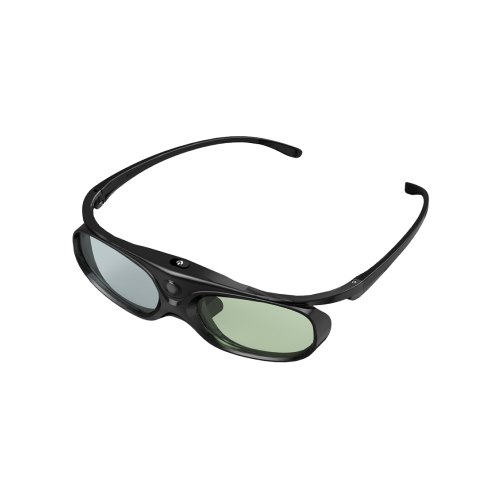
A DLP-Link pair: XGIMI's active shutter glasses, which XGIMI lists for its own and "other DLP-LINK 3D projectors". Image: XGIMI.
Key takeaways
- Not sure which kind: two steps, and what each maker names.
- A seller offers a kit with an emitter: when you need one.
- A pair from another brand or an old 3D TV: what the makers say.
- A pair that will not sync, or looks wrong: the makers' own fixes.
Which glasses your projector takes
- Read the 3D page of the manual. It names the glasses or the system. Optoma's data sheet for the HD146X: "3D content can be viewed with DLP Link active shutter 3D glasses" [4]. Epson's guide for the Home Cinema 3200 and 3800 asks for "a pair of Epson RF 3D glasses (not included with your projector)" [2].
- Or open the projector's 3D menu. An Optoma user manual (its cover names no model, only "DLP® Projector") has a setting called 3D Tech with two choices: "DLP-Link: Select to use optimized settings for DLP 3D Glasses" and "3D Sync: Select to use optimized settings for IR, RF or polarized 3D Glasses" [5].
What each maker's own page names, and the pair it sells:
| Maker | Sync system it names | Its own pair, listed price |
|---|---|---|
| BenQ | DLP-Link [6] | DGD5; no price on the page [7] |
| Optoma (HD146X) | DLP-Link [4] | None named; glasses "sold separately" [4] |
| XGIMI | DLP-Link [8] | $29.00 [8] |
| JMGO | DLP-Link [9] | $39.00 [9] |
| Valerion | DLP-Link [10] | $80 for the "2 Pack", $160 for the "4 Pack" [11] |
| NexiGo | DLP-Link [12] | $79.00, marked down from $99.00 [12] |
| Epson (Home Cinema 3200, 3800) | RF [2] | ELPGS03, marked "Discontinued" [13] |
| JVC (DLA-NZ800, DLA-NZ900) | RF, through JVC's emitter [3][24] | PK-AG3 glasses and PK-EM2 emitter ($99.95), sold separately [3][24] |
Prices are the makers' own US store listings, read from outside the United States.
Last checked : prices and listings.
Do you need an emitter?
With DLP-Link, no. Projector Reviews' technical overview says "no separate transmitter/emitter is needed" [25]. By Wikipedia's account, the projector keeps the glasses in step by "embedding briefly-flashed white frames" between pictures, "which are picked up by the LC shutter glasses" [1]. XGIMI says its pair "only turn on when it receives DLP-Link’s signal" [8].
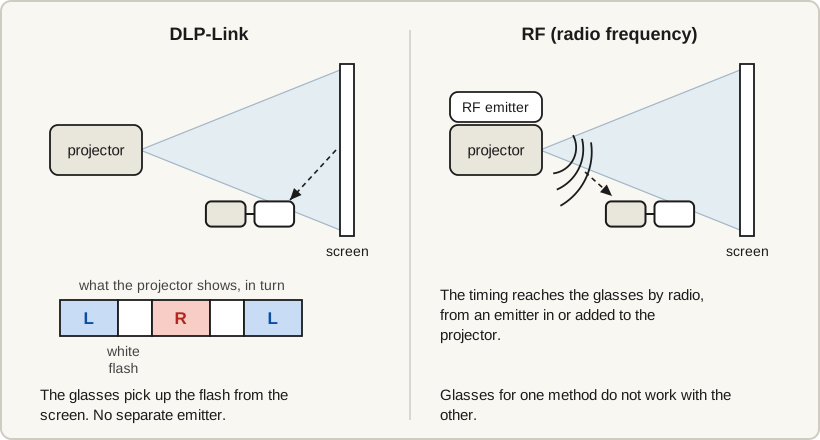
With Epson's RF models, none is listed. The guide for the Home Cinema 3200 and 3800 lists a 3D video device, an HDMI cable and the glasses, and has you pair the glasses with the projector [2].
With JVC's DLA-NZ800 and DLA-NZ900, yes. The manual: "By using the 3D Glasses (PK-AG3) and 3D Synchro Emitter (PK-EM2), both sold separately, you can enjoy 3D video images" [3]. JVC's US page calls the PK-EM2 an "Optional 3D RF Emitter" [24].
A kit with an emitter for a DLP projector. The Optoma manual has a separate setting for glasses that are not DLP-Link: 3D Sync, the choice "for IR, RF or polarized 3D Glasses" [5]. It does not say what else they need.
Glasses from another brand, or from a 3D TV
The makers tie the answer to the sync system. We have not tested any pair.
On a BenQ projector, BenQ says another brand's DLP-Link pair is compatible: "Any 3D active shutter glasses that support 96 to 144Hz frequency and synchronous DLP-Link are compatible with BenQ projectors with 3D features" [6]. XGIMI, from the glasses side, lists its pair for "other DLP-LINK 3D projectors" [8].
BenQ attaches two conditions:
- The frequency range. BenQ asks for 96 to 144 Hz [6], and the Optoma manual says a 1080p 24 Hz 3D input "will run in 144Hz" [5]. A pair whose listing stops short of 144 Hz does not meet BenQ's condition.
- Reception. BenQ adds that "there may be differences in signal reception capabilities for different brands", which affect the picture and the distance at which the glasses stay in sync [6]. Its buying article goes further and advises glasses "produced by the same manufacturer as your projector" [15].
On an Epson RF projector, Epson's answer, published in 2013 on the Home Cinema 2030's support page, is that "3D active shutter glasses with Full HD RF 3D certification are compatible", shown by a Full HD RF 3D logo, and that "Epson does not guarantee the performance of Epson compatible RF 3D active shutter glasses" [16]. Epson's own pair, the ELPGS03, is marked "Discontinued" on its product page [13].
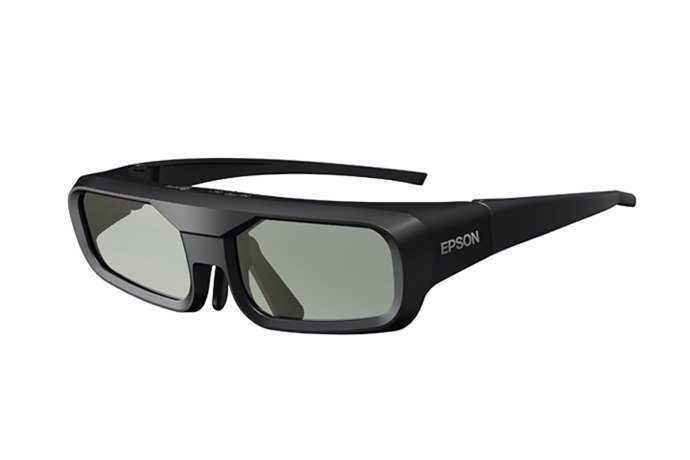
Glasses from a 3D TV face the same conditions: DLP-Link for a BenQ [6], the Full HD RF 3D logo for an Epson [16]. Which signal each TV brand used is in 3D glasses for a 3D TV.
When a pair will not sync, or the 3D looks wrong
Each fix is the named maker's, for its own projectors. Another maker's menu may differ.
| What you see | Whose fix, and what it says |
|---|---|
| A BenQ: 3D not working, or losing sync | BenQ's FAQ: press the DLP Link button on the glasses to resync; check the battery; stay in one position; keep outside light off the glasses and screen [17] |
| A BenQ: left and right views swapped | BenQ's FAQ, for seven models (HT3560, HT4550i, TK860i, V5000i, V5010i, V7050i, W5800): switch 3D Sync Invert to ON under DISPLAY: 3D [18]. The Optoma manual lists a 3D Sync Invert setting too [5] |
| An Epson Home Cinema 3200 or 3800: 3D does not display correctly | Epson's guide: use RF glasses, charged and paired; stay within 32 ft (10 m); keep the projector away from 2.4 GHz devices such as cordless phones. Last, change Inverse 3D Glasses, and change it back if that does not help [2][19] |
| A BenQ: still losing sync | BenQ's last step: "switch to another projector or 3D glasses for a try" [17] |
If the projector's 3D mode itself will not turn on, see 3D greyed out or not working.
What owners report
Three owners' own accounts from Blu-ray Forum, one person each. We have not tested any glasses.
- Swapped eyes on bright scenes (an Optoma, October 2022). An owner whose Optoma pairs were no longer available bought three cheaper ones; with each, "each time there's a big flash on screen" the 3D reversed. Two days later: "I tried changing the 3D settings on the projector last night to reverse the 3D at the source, and bingo! The glasses sync perfectly now" [20].
- Green flashes (BenQ TK700STi, March 2025). An owner sent the projector back to BenQ before finding the cause: "It turned out that it was the glasses. Several different brands of glasses did not work." XGIMI's pair "worked with almost none of the 'green flash' issue on bright images" [21].
- A lost emitter (Sony HW30ES, January 2025). An owner who "originally had the IR emitter" and lost it: "I’ve looked for a replacement online but I can’t find anything in stock". Later that month, after trying two cables another member suggested: "nothing has worked so far" [22].
Not every owner in those threads had trouble. One with an Optoma, October 2022: "my Chinesium and XPand 3D glasses all seem to come back in sync correctly" [20]. One with BenQ projectors, February 2024: "Brightness of a scene has never caused any problems" [21].
Frequently asked questions
Can a home projector use passive glasses, like the cinema's?
BenQ's answer is no: "Projectors only work with active 3D display standards" [23]. The passive routes in our 3D projectors guide take a polarizing add-on or two projectors. How each kind of glasses works is in types of 3D glasses.
Does the screen matter for the glasses?
It can. JVC warns that its PK-AG3 glasses "may not work with certain polarized/Ambient Light Rejecting screen materials", where the picture "may be excessively dark" [3].
Do the glasses come with the projector?
Not with the three we checked. Epson's guide says its RF glasses are "not included with your projector" [2], Optoma's data sheet for the HD146X says glasses "are sold separately" [4], and JVC sells both the glasses and the emitter separately [3].
Sources (25)
Opened on 2026-10-11.
- Wikipedia, "Active shutter 3D system" (last edited September 30, 2026): https://en.wikipedia.org/wiki/Active_shutter_3D_system
- Epson support, Home Cinema 3200/3800 User's Guide, "Viewing 3D Images": https://files.support.epson.com/docid/cpd5/cpd57551/source/basic_use/tasks/image_viewing_3d_active.html
- JVCKENWOOD, DLA-NZ900 / DLA-NZ800 / DLA-RS4200 / DLA-RS3200 instruction manual, "Viewing 3D Movies": https://manual3.jvckenwood.com/projector/mobile/dla/b5a-4578-01/GOUMSYbuasobor.php
- Optoma, HD146X data sheet (PDF, footer code 05272020): https://region-resource.optoma.com/products/import/Documents/9217e8bc-5b2c-4f17-9abd-8f9332f254c9.pdf
- Optoma, "User manual", cover title "DLP® Projector" (PDF, 56 pages, no model name on the cover; file 29cf1dc9-dbdf-490e-baa4-311643560c2b.pdf), "Display 3D menu" on page 34 and the 3D timing note on page 43: https://region-resource.optoma.com/products/import/Documents/29cf1dc9-dbdf-490e-baa4-311643560c2b.pdf
- BenQ US, FAQ "Which 3D glasses are recommended for BenQ projectors with 3D features?" (October 27, 2025): https://www.benq.com/en-us/support/downloads-faq/faq/product/specification/projector-faq-k-00007.html
- BenQ US, "DGD5 3D Glasses" product page: https://www.benq.com/en-us/projector/accessory/dgd5-3d-glasses.html
- XGIMI US store, "Active Shutter 3D Glasses": https://us.xgimi.com/products/3d-glasses
- JMGO US store, "Active 3D Shutter Glasses": https://global.jmgo.com/products/active-3d-shutter-glasses-2024
- Valerion, "How Do 3D Glasses Work? Active Shutter vs. Polarized Explained": https://www.valerion.com/blog/how-do-3d-glasses-work
- Valerion, "Valerion 3D Glasses (2 Pack)" product page: https://www.valerion.com/product/3d-glasses
- NexiGo, "NexiGo 3D Glasses" product page: https://www.nexigo.com/products/nexigo-3d-glasses-dlp-l02-2-pack
- Epson US, "Epson 3D Glasses (RF) ELPGS03" product page: https://epson.com/Accessories/Projector-Accessories/Epson-3D-Glasses-%28RF%29-ELPGS03/p/V12H548006
- Hisense USA, "Hisense Laser Cinema PX3-PRO TriChroma Laser Projector": https://www.hisense-usa.com/product-page/projectors-laser-cinema-trichroma-laser-projector-px3-pro
- BenQ US, "3D Projectors and Glasses: Avoid Mistakes Before You Buy" (May 14, 2024): https://www.benq.com/en-us/knowledge-center/knowledge/3d-projectors-and-3d-glasses-what-to-know-before-i-buy-them.html
- Epson US, FAQ "Which 3D glasses can I use with my Epson RF 3D projector?", on the PowerLite Home Cinema 2030 support page (published September 25, 2013): https://epson.com/faq/SPT_V11H561020~faq-243628
- BenQ US, FAQ "3D is not working or getting lost sync on my projector. How can I fix it?" (July 9, 2024): https://www.benq.com/en-us/support/downloads-faq/faq/product/troubleshooting/projector-faq-kn-00076.html
- BenQ US, FAQ "What if the views are swapped when I use 3D glasses with the projector?": https://www.benq.com/en-us/support/downloads-faq/faq/pre-sales/specifications/benq-3d-glasses-with-the-projector.html
- Epson support, Home Cinema 3200/3800 User's Guide, "Solutions When a 3D Image Does Not Display Correctly": https://files.support.epson.com/docid/cpd5/cpd57551/source/troubleshooting/reference/problem_image_3d_active.html
- Users' reports: Blu-ray Forum, thread "3D glasses for Optoma DLP projector- any recommendations?", posts of October 2 to 4, 2022: https://forum.blu-ray.com/showthread.php?t=355531
- Users' reports: Blu-ray Forum, thread "BenQ TK700STi: 3D ok? Any alternative projector at same $1,700 price with same spec?", posts of February 11, 2024 and March 23, 2025: https://forum.blu-ray.com/showthread.php?t=371086
- Users' reports: Blu-ray Forum, thread "Any Alternatives for a TMR PJ2 for Sony HW30es?", posts of January 6 and January 31, 2025: https://forum.blu-ray.com/showthread.php?t=382029
- BenQ India, FAQ "Is there a projector that supports Blu-ray 3D movie viewing with Passive Polarized Glasses, like on my TV?" (May 20, 2022): https://www.benq.com/en-in/support/downloads-faq/faq/product/application/projector-faq-kn-00087.html
- JVC USA, "Projectors", accessories list: https://www.jvc.com/usa/projectors/
- Projector Reviews, "3D Active Shutter Glasses - Technical Overview" (no date shown on the page): https://www.projectorreviews.com/home-theater-and-projectors-the-technical-side/3d-active-shutter-glasses-technical-overview/