3D Blu-ray Players in 2026: What Still Plays 3D Discs
How we researched this: written by Owl3D from published sources, all 45 listed at the end.
Short answer
Yes, you can still buy a new 3D Blu-ray player. A player or console shows the disc's 3D only on a 3D TV or 3D projector, or, from a PS4, in a PlayStation VR headset; on an ordinary TV the disc plays in 2D.
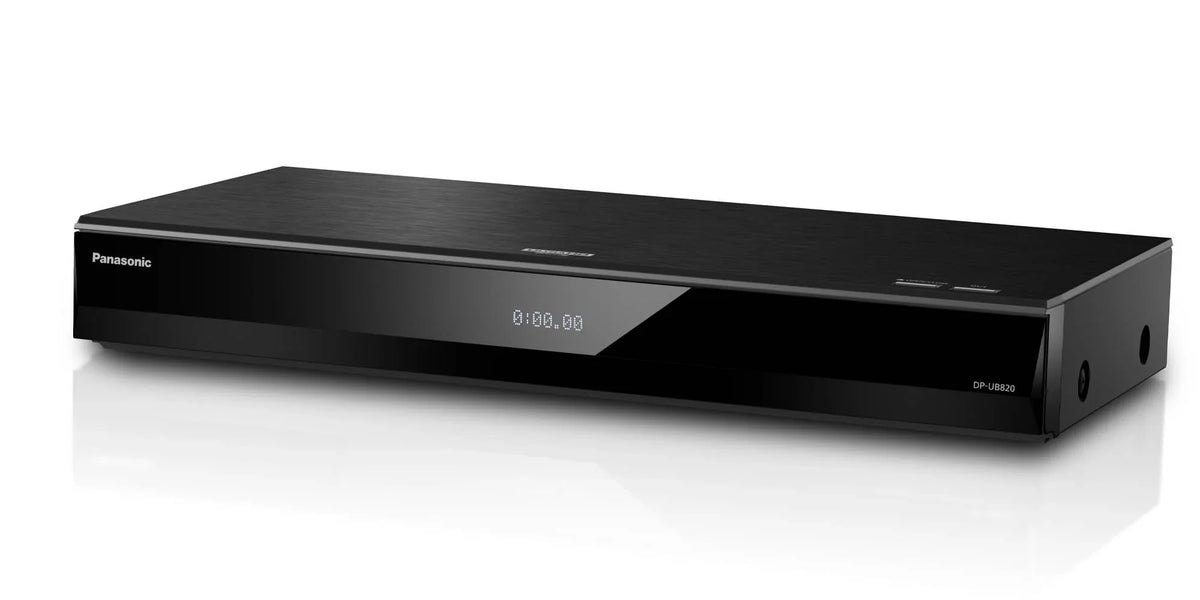
The Panasonic DP-UB820, one of the 4K players sold new that also play 3D discs. Image: Panasonic.
Key takeaways
- On October 7, 2026, Panasonic's US store listed six 4K players that all play 3D discs, from $209.99 to $1,299.99, and the Sony UBP-X700 plays them too; see new players.
- A PS4 or Xbox One also plays 3D discs; a PS5 and an Xbox Series X or S do not. See consoles.
- On a computer, CyberLink PowerDVD before version 20 is the only program we found whose maker lists Blu-ray 3D disc playback; see PC software.
- No 3D TV? On a computer, an Owl3D Shift converts an ordinary DVD or Blu-ray to 3D instantly, as it plays in a player program, with no glasses. It is an AI conversion, not the disc's own 3D; see watching on a glasses-free display.
Quick picks
- Cheapest in stock on October 7, 2026Panasonic DP-UB154, $299.99
- "Best for most people" in TechRadar's guidePanasonic DP-UB820, $649.99 [11]
- "Best budget" in TechRadar's guideSony UBP-X700, US price not confirmed [11]
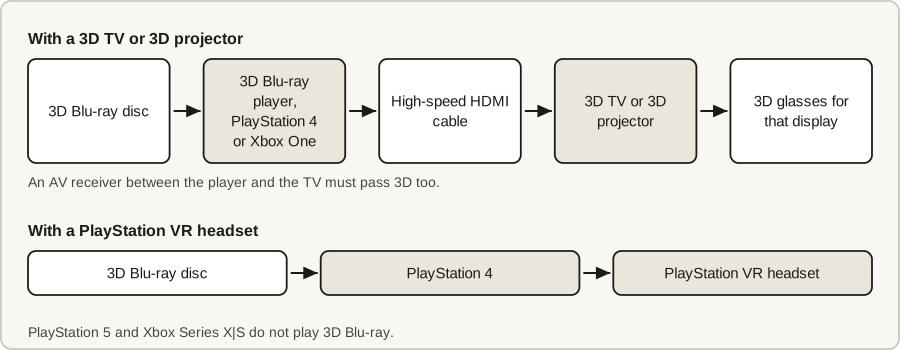
3D Blu-ray players you can buy new in 2026
Eleven players sold new are on our list as playing 3D discs, all of them 4K players. The table shows five: four Panasonic models and the Sony UBP-X700.
| Player | Type | Plays 3D discs | Price and status |
|---|---|---|---|
| Panasonic DP-UB150 | 4K | Yes [2] | $209.99, sold out at Panasonic [6] |
| Panasonic DP-UB154 | 4K | Yes [2] | $299.99, in stock [6] |
| Panasonic DP-UB420 | 4K | Yes [3] | $369.99, in stock [6] |
| Panasonic DP-UB820 | 4K | Yes [1] | $649.99, in stock [6] |
| Sony UBP-X700 | 4K | Yes [7][11] | Not confirmed |
Last checked : prices and stock.
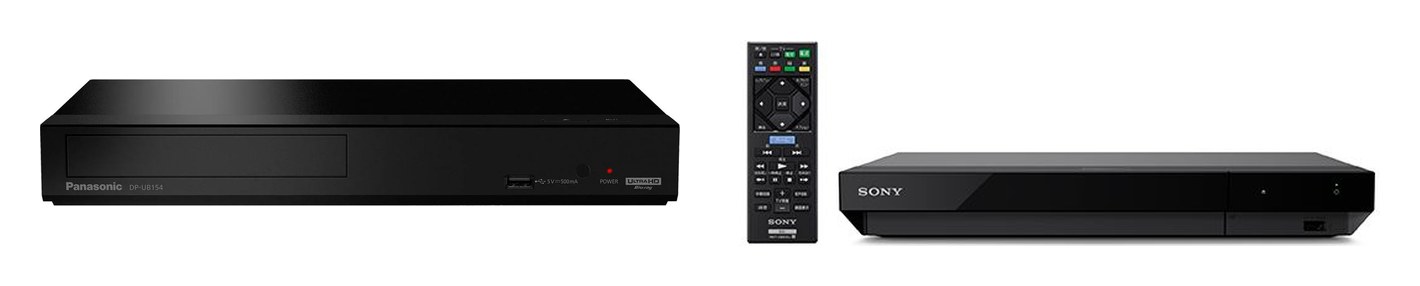
The other players sold new: Panasonic DP-UB450 and DP-UB9000, Magnetar, Krovatar and DpBlue, and two Panasonic models without 3D
| Player | Type | Plays 3D discs | Price and status |
|---|---|---|---|
| Panasonic DP-UB450 | 4K | Yes [2] | $299.99, sold out [6] |
| Panasonic DP-UB9000 | 4K | Yes [4] | $1,299.99, sold out [6] |
| Magnetar UDP800, UDP900 | 4K | Yes [13][14] | No price on Magnetar's site |
| Krovatar KBU-300 | 4K | Yes, as reported [15] | $370 [15] |
| DpBlue DP-5300 | 4K | Yes, as reported [15] | $340 [15] |
| Panasonic DMP-BD84, DMP-BD90 | 1080p | No [5] | $119.99, in stock; $99.99, sold out [6] |
Krovatar and DpBlue are newer Chinese brands; their 3D support and prices come from FlatpanelsHD's report of October 6, 2026, not from the makers [15].
How we know these players play 3D: Panasonic's manuals and Sony's Japanese specification
Panasonic. The store listings do not mention 3D [6]. Each 4K model's owner's manual does: "3D videos and 3D still pictures can be played back when this unit is connected to a 3D compatible TV using a High Speed HDMI Cable" [1][2][3][4]. The 1080p models' manual never mentions 3D [5].
What Hi-Fi's buying guide gives "SACD/DVD-A/3D Blu-ray support: No/No/No" for the UK DP-UB150EB [12]; this table follows Panasonic's US manual.
Sony UBP-X700. Sony's US pages did not load, so this rests on its Japanese site, which lists two players today [45]: the UBP-X700/K, whose specification includes Blu-ray 3D [7], and the BDP-S1700/K, whose specification does not [10]. TechRadar's guide also marks the UBP-X700 "3D support?: Yes" [11].
Older Samsung, Sony and LG players: which models play 3D
Of the 23 older Samsung, LG and Sony models in the table, 17 play 3D discs and 6 do not. Most of these are now bought used or as old stock.
| Brand | Plays 3D discs | No 3D |
|---|---|---|
| Samsung [16][17][18] | BD-F7500, BD-H5500, BD-H5900, BD-H6500, BD-J5500, BD-J5900, BD-J6300, BD-J7500, UBD-K8500 (4K) | BD-J4500R, UBD-M7500 (4K), UBD-M9500 (4K) |
| LG [19][20] | BP450, BP550, UP970 (4K), UBK80 (4K), UBK90 (4K) | BP250, BP350 |
| Sony | UBP-X800M2 (4K) [8], BDP-S6700 [9][22], BDP-S5100 [21] | BDP-S1700 [10] |
- Samsung remote. 3D is switched in a "3D Settings" menu, so buy a player with its remote. With Anynet+ (HDMI-CEC) on, "you can operate this player using a Samsung TV remote control" [16].
- LG. Set [3D Mode] to [On] in the Settings menu before playing a 3D disc [19].
Where each answer comes from, and the Sony BDP-S6700's "4K upscaling"
Samsung and LG models were checked against the makers' manuals.
- Samsung. The 3D models' manuals list "3D Blu-ray Disc" among playable discs; the other three never mention 3D [16][17][18]. These are UK editions from Samsung's support site.
- Sony UBP-X800M2 and BDP-S6700. Both come from Sony's Japanese specifications; its store there no longer sells either [8][9].
- Sony BDP-S6700 and 4K. Sold as a "4K upscaling" player, it scales 1080p discs up and is not a 4K disc player. What Hi-Fi: "don’t expect it to come close to the real thing" [22].
- Sony BDP-S5100. This rests on What Hi-Fi's 2013 review: it "can handle 3D Blu-rays" [21].
For any model not listed, look up its manual on the maker's support site before paying.
Can any Blu-ray player play 3D? 3D DVD players and 4K players
No. A Blu-ray 3D disc holds "separate views for the left and right eyes" [19], and the player has to be built to read both. The "No 3D" models above are ordinary Blu-ray players.
A "3D DVD player" is a 3D Blu-ray player: the 3D format is on Blu-ray discs, and a 3D Blu-ray player also plays DVDs [1][16].
"3D isn't featured in the Ultra HD Blu-ray spec" [30], so there are no 4K 3D discs. A "4K 3D Blu-ray player" is a 4K player that also plays Blu-ray 3D discs. Many do, but not all: Samsung's UBD-M7500 and UBD-M9500 do not [18].
Can a PS4, PS5 or Xbox play 3D Blu-ray?
A PS4 and an Xbox One play 3D Blu-ray discs; a PS5 and an Xbox Series X or S do not.
| Console | Plays 3D Blu-ray |
|---|---|
| PlayStation 4 | Yes, since system software 1.75 [29] |
| PlayStation 5 | No [26] |
| Xbox One | Yes, once the Blu-ray Player app is installed [23][24] |
| Xbox Series X, Series S | No [23] |
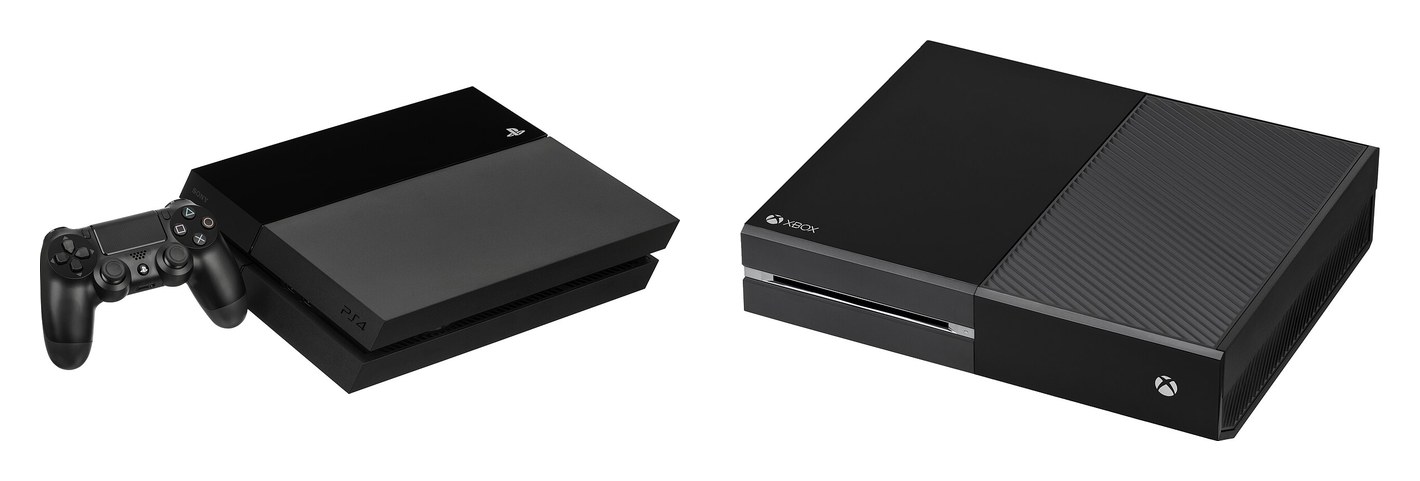
What Sony and Microsoft say in their own words, and the PlayStation VR route
In the makers' words:
- PlayStation 4. PlayStation in July 2014: "PS4 system software update 1.75 adds 3D Blu-ray film support" [29]. With a PlayStation VR headset and a 2D TV connected, it can show a 3D disc in the headset [27][28].
- PlayStation 5. Sony's launch FAQ: "Does PS5 support 3D Blu-ray movies? No, 3D stereoscopic output is not supported on PS5." The Digital Edition takes no discs [26].
- Xbox One. Microsoft: "Xbox supports 3D Blu-ray discs when played on 3D TVs" [23]. It was announced for the Xbox One's August 2014 update [25]; install the Blu-ray Player app first [24].
- Xbox Series X and Series S. Microsoft: "Xbox Series X|S consoles do not support 3D Blu-ray" [23].
Do you need a 3D TV, and what about the glasses?
Yes: you need a 3D display. Samsung's manual puts it this way: "connect a 3D device (3D compliant AV receiver or TV) to the player's HDMI OUT port using a high-speed HDMI cable. Put on 3D glasses before playing the 3D content" [16].
| Screen | 3D from a disc player? |
|---|---|
| 3D TV | Yes; usually a used set |
| 3D projector | Yes |
| PlayStation VR headset | Yes, on a PS4 [27] |
| Ordinary TV | No: the disc plays in 2D |
| Glasses-free 3D display (Owl3D Shift) | Not directly: through a computer only |
- Glasses-free 3D display. The Owl3D Shift, a 14-inch glasses-free 3D display made by the publisher of this guide, does not work with a disc player or game console plugged in directly. Through a computer it does: see the next section.
- Glasses. Not in the player's box: Samsung's BD-J5900 comes with a remote, batteries and a manual [16]. Use the glasses made for your TV or projector; LG's manual points to "the owner’s manual of your 3D-ready TV" [19].
Notes on each screen, and two set-up traps: AV receivers and players with two HDMI outputs
- 3D TV. What Hi-Fi wrote in 2021 of "the majority of TV manufacturers having abandoned 3D ages ago" [30]. See 3D TVs in 2026.
- 3D projector. BenQ lists "Frame Packing (Blu-ray)" among the 3D formats its TK710 supports [31]. See 3D projectors.
- Ordinary TV. With LG's [3D Mode] off, a 3D disc "will output as 2D mode like a normal BD-ROM disc playback" [19].
- AV receiver. It must pass 3D: "When a non-3D compatible amplifier/receiver is connected between this unit and a TV, 3D video is not output" [1].
- Two HDMI outputs. The Panasonic DP-UB820 has one for the TV and one for sound to an amplifier. Its manual says 3D is not output while the audio output's mode is "Video+Audio", so leave it on "Audio Only" [1].
For the glasses, see types of 3D glasses. For every route, see how to watch 3D movies at home.
Playing 3D Blu-ray on a computer: PowerDVD, PotPlayer and other software
A computer needs a Blu-ray drive, software that decodes the disc's 3D video, and a 3D screen. Blu-ray 3D video uses a coding called MVC; player documentation calls it "H.264 MVC 3D" [37].
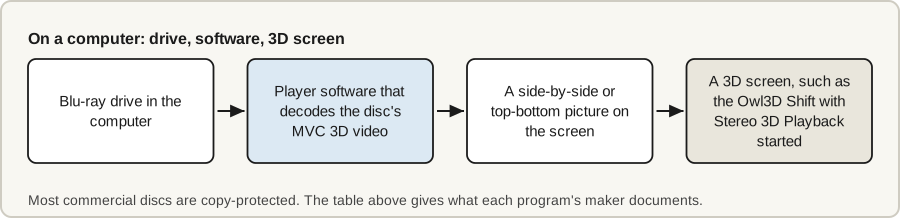
The table gives what each program's own documentation says, as of October 7, 2026. Four programs are shown; three more open underneath.
| Program | Decodes MVC 3D | Shows side-by-side or top-bottom | Plays copy-protected discs by itself |
|---|---|---|---|
| CyberLink PowerDVD | Before version 20 [32] | Not documented | Blu-ray 3D discs: before version 20 [32] |
| PotPlayer | Yes, since version 1.6.63638 (October 2016) [35] | Yes, both [34] | Not documented |
| Stereoscopic Player | Yes, since version 1.7 [39] | Yes, both [40] | No, per its maker [39] |
| VLC | Not documented | Not documented | No [42] |
MPC-BE, MPC-HC and Kodi, and what each program's documentation says
| Program | Decodes MVC 3D | Shows side-by-side or top-bottom | Plays copy-protected discs by itself |
|---|---|---|---|
| MPC-BE | Yes, since version 1.5.0 (December 2016) [36] | Top-bottom, named "OverUnder" [36]. Side-by-side: not documented | Not documented |
| MPC-HC with LAV Filters | Yes, with LAV Filters 0.68 (March 2016) [37] | Not documented | No, per its release notes [38] |
| Kodi | Not documented | Yes, both [41] | Not documented |
What each program's documentation says:
- PowerDVD. From version 20, 3D playback "(including 3D video files playback, Blu-ray 3D playback, etc.) is NO longer supported" [32]. The current version, 24, lists no 3D [33].
- PotPlayer. MVC decoding needs Intel's Media SDK library [35]. Its 3D modes are "Side by Side, Top and Bottom, Page Flipping" [34].
- MPC-HC with LAV Filters. LAV Filters reads MVC from "MKV 3D, Blu-ray discs and Blu-ray SSIF files" and needs the madVR renderer to decode it [37].
- Stereoscopic Player. It plays 3D Blu-ray "provided that the disk is not encrypted (copy protected)" [39]. It shows "Side by Side" and "Over/Under" [40].
- Kodi. Its display modes include "Side by side" and "Over / Under" [41].
- VLC. VideoLAN says its Blu-ray library "is not enough to playback" most commercial discs [42].
Watching on a glasses-free display
Owl3D, the publisher of this guide, makes the Shift, a 14-inch glasses-free 3D display for a computer. It shows a film in 3D, without glasses, in three ways; the first two start from a disc in the drive.
The disc's own 3D. The Shift's Stereo 3D Playback shows in 3D any Full side-by-side, Half side-by-side or top-bottom picture on its screen, whichever player puts it there. So if a program from the table plays your disc and shows it side-by-side or top-bottom, you can watch it on a Shift: press Start on the Stereo 3D Playback tab in the Owl3D app and leave the format on Auto, or choose Side-by-side or Top-bottom. It needs an NVIDIA GTX 1650 or Radeon RX 570 graphics card or better; on AMD and Intel graphics it works in fullscreen only. For a copy-protected disc, no program in the table is documented as doing both, so check your player first.
Any disc your computer plays, converted instantly. Play a DVD or Blu-ray in a player program and drag its window onto the Shift: Live 3D Screen converts the picture from 2D to 3D in real time, as it plays, with no waiting and no file to prepare. The same goes for any 2D film in a video file or a browser. It needs a Windows PC with an NVIDIA RTX 30-series graphics card or newer, or a Mac with Apple Silicon. Owl3D Link does the same instant conversion for ordinary 2D video on a Meta Quest headset, from a Windows PC.
A file, for the highest quality. Owl3D's converter is not instant, and it opens video files, not discs: it turns a file you have the right to use into a side-by-side or top-bottom 3D file. It is where Owl3D's best 3D comes from. Its highest-quality model, StereoGen, is coming soon; it takes hours to convert a film on an NVIDIA RTX graphics card, and Owl3D describes the result as "Hollywood-grade 3D at the highest quality".
The last two are AI conversions of a 2D picture, not the 3D version on a 3D disc.
The Shift costs $499 and shows 3D to one viewer at a time. A native 3D video player for it is coming soon.
From Owl3DOwl3D ShiftA 14-inch glasses-free 3D display that sits beside your computer.Region-free and portable 3D Blu-ray players
A 3D disc is a Blu-ray disc, so region codes apply. The code is A, B or C on the packaging, and some discs are not region-coded at all [23]. Panasonic's, Samsung's and LG's manuals each describe a player set to one region code [1][16][19].
Third-party retailers sell modified players as "region free". One US store lists a "Sony UBP-X700 Region Free 4K UHD Blu-ray Player" and says it "has been professionally modified" [43]. These are not the makers' products. We have not tested one, and this is not a recommendation.
Frequently asked questions
What is the best 3D Blu-ray player?
We have not tested players side by side. TechRadar's buying guide, updated August 28, 2026, ranks the Panasonic DP-UB820 "Best for most people" and the Sony UBP-X700 "Best budget", and marks both as supporting 3D [11]. For the lowest price, the Panasonic DP-UB154 was the cheapest 3D-capable player in stock at Panasonic on October 7, 2026, at $299.99 [6].
Can you still buy 3D DVD players?
Yes, as 3D Blu-ray players, which also play DVDs: the list of new players has eleven models, and the section above explains the name. 3D with colored glasses is a different method: see anaglyph 3D.
Does 3D Blu-ray still exist, and is it worth it?
Yes. Disney released Avatar: Fire and Ash on Blu-ray 3D in the US on May 19, 2026 [44]. It is worth it only if you have a 3D TV or projector to show the discs on. For what is released and where to buy or rent, see 3D Blu-ray in 2026 and the best 3D movies.
Has Samsung stopped making Blu-ray players?
Yes. FlatpanelsHD reported in October 2026 that "LG, Samsung, Oppo, Pioneer and Reavon pulled out of the optical disc player market" [15]. Samsung's support site still carries the manuals [16].
Sources (45)
- Panasonic, "Owner's Manual, Blu-ray Disc Player, Model No. DP-UB820" (TQBS0258). https://help.na.panasonic.com/wp-content/uploads/2023/02/DPUB820_TQBS0258_ENG_ESP.pdf (opened 2026-10-07)
- Panasonic, "Owner's Manual, Blu-ray Disc Player, Model No. DP-UB450, DP-UB150, DP-UB154" (TQBS0382). https://help.na.panasonic.com/wp-content/uploads/2024/05/DPUB150_UB154_UB450_TQBS0382_ENG_ESP.pdf (opened 2026-10-07)
- Panasonic, "Owner's Manual, Model No. DP-UB420" (TQBS0234). https://help.na.panasonic.com/wp-content/uploads/2023/02/DPUB420_TQBS0234_ENG_ESP.pdf (opened 2026-10-07)
- Panasonic, "Owner's Manual, Model No. DP-UB9000" (TQBS0286). https://help.na.panasonic.com/wp-content/uploads/2023/02/DPUB9000_TQBS0286_ENG_ESP.pdf (opened 2026-10-07)
- Panasonic, "Owner's Manual, Model No. DMP-BD90, DMP-BD84" (TQBS0470). https://help.na.panasonic.com/wp-content/uploads/2023/04/DMPBD84_BD90_TQBS0470-2_ENG_ESP.pdf (opened 2026-10-07)
- Shop Panasonic USA, "Blu-Ray & DVD Players" (listings, prices and stock status). https://shop.panasonic.com/collections/blu-ray-players-dvd-players (opened 2026-10-07)
- Sony Japan, "UBP-X700/K 主な仕様" (main specifications). https://www.sony.jp/bd-player/products/UBP-X700_K/spec.html (opened 2026-10-07)
- Sony Japan, "UBP-X800M2 主な仕様" (main specifications). https://www.sony.jp/bd-player/products/UBP-X800M2/spec.html (opened 2026-10-07)
- Sony Japan, "BDP-S6700 主な仕様" (main specifications). https://www.sony.jp/bd-player/products/BDP-S6700/spec.html (opened 2026-10-07)
- Sony Japan, "BDP-S1700/K 主な仕様" (main specifications). https://www.sony.jp/bd-player/products/BDP-S1700_K/spec.html (opened 2026-10-07)
- TechRadar, "The best 4K Blu-ray players: Ultra HD marvels chosen by our experts", last updated August 28, 2026. https://www.techradar.com/news/video/the-best-4k-blu-ray-players-you-can-buy-right-now-1321481 (opened 2026-10-07)
- What Hi-Fi?, "Best Blu-ray and 4K Blu-ray players 2026: budget to premium disc players", last updated January 28, 2026. https://www.whathifi.com/best-buys/home-cinema/best-blu-ray-and-4k-blu-ray-players (opened 2026-10-07)
- Magnetar, "MAGNETAR UDP800 Blu-ray player" (technical specifications). https://magnetar-audio.com/bluray-player-udp-800/ (opened 2026-10-07)
- Magnetar, "UDP900" (technical specifications). https://magnetar-audio.com/bluray-player-udp900/ (opened 2026-10-07)
- FlatpanelsHD, "UHD Blu-ray player market sees new wave of brands", by Rasmus Larsen, October 6, 2026. https://www.flatpanelshd.com/news.php?subaction=showfull&id=1791268673 (opened 2026-10-07)
- Samsung, "BD-J5900 Blu-ray Disc Player user manual", from Samsung UK support. https://www.samsung.com/uk/support/model/BD-J5900/XU/ (opened 2026-10-07)
- Samsung, "BD-H5900 Blu-ray Disc Player user manual", from Samsung UK support. https://www.samsung.com/uk/support/model/BD-H5900/XU/ (opened 2026-10-07)
- Samsung UK support, user manuals for the BD-F7500, BD-H5500, BD-H6500, BD-J5500, BD-J6300, BD-J7500, BD-J4500R, UBD-K8500, UBD-M7500 and UBD-M9500. Each at https://www.samsung.com/uk/support/model/ followed by the model number and /XU/ (opened 2026-10-07)
- LG, "Owner's Manual, Ultra HD Blu-ray Disc Player, Model UBK90". https://gscs-b2c.lge.com/downloadFile?fileId=icfkIC4Ijh3ZnzAA9UUg, listed at https://www.lg.com/uk/support/product-support/cs-UBK90/ (opened 2026-10-07)
- LG UK support, owner's manuals for the UBK80, UP970, BP550, BP450, BP350 and BP250. Each at https://www.lg.com/uk/support/product-support/cs- followed by the model number (opened 2026-10-07)
- What Hi-Fi?, "Sony BDP-S5100 review", June 12, 2013. https://www.whathifi.com/sony/bdp-s5100/review (opened 2026-10-07)
- What Hi-Fi?, "Sony BDP-S6700 review", July 22, 2016. https://www.whathifi.com/sony/bdp-s6700/review (opened 2026-10-07)
- Xbox Support, "Supported regions and formats for Blu-ray and DVD movies on Xbox". https://support.xbox.com/en-US/help/games-apps/apps-help/watch-bluray-dvd-movies (opened 2026-10-07)
- Xbox Support, "Set up and install the Blu-ray and DVD player app on Xbox". https://support.xbox.com/en-US/help/games-apps/apps-help/dvd-blu-ray-setup (opened 2026-10-07)
- Engadget, "Xbox One's next update makes it easier to keep up with friends, and play Blu-ray 3D", by Richard Lawler, July 18, 2014. https://www.engadget.com/2014-07-18-xbox-one-august-update-friend-feed-blu-ray-3d.html (opened 2026-10-07)
- PlayStation.Blog, "PS5: The Ultimate FAQ", November 9, 2020. https://blog.playstation.com/2020/11/09/ps5-the-ultimate-faq/ (opened 2026-10-07)
- PlayStation 4 User's Guide, "Basic functions for disc playback". https://manuals.playstation.net/document/en/ps4/videos/operation.html (opened 2026-10-07)
- PlayStation.Blog, "PS4 System Software Update 4.50 Features Detailed", February 3, 2017. https://blog.playstation.com/2017/02/03/ps4-system-software-update-4-50-features-detailed/ (opened 2026-10-07)
- Engadget, "PS4 will add Blu-ray 3D support next week (update)", by Richard Lawler, July 23, 2014. https://www.engadget.com/2014-07-23-ps4-blu-ray-3d.html (opened 2026-10-07)
- What Hi-Fi?, "Ultra HD Blu-ray: everything you need to know", July 19, 2021. https://www.whathifi.com/advice/ultra-hd-blu-ray-everything-you-need-to-know (opened 2026-10-07)
- BenQ US, "TK710 Specifications". https://www.benq.com/en-us/projector/home-projectors/tk710/spec.html (opened 2026-10-07)
- CyberLink Support, "Why is 3D media playback NOT supported in CyberLink PowerDVD 20 or later versions, and PowerPlayer 365". https://support.cyberlink.com/faq/3d-playback-not-supported-powerdvd-20 (opened 2026-10-07)
- CyberLink, "PowerDVD 24" (system requirements). https://www.cyberlink.com/products/powerdvd-ultra/spec_en_US.html (opened 2026-10-07)
- PotPlayer (Kakao Corp.), "Global Potplayer" home page. https://potplayer.tv/ (opened 2026-10-07)
- PotPlayer (Kakao Corp.), "Update history". https://t1.daumcdn.net/potplayer/PotPlayer/v4/Update2/UpdateEng.html (opened 2026-10-07)
- MPC-BE, "Changelog". https://raw.githubusercontent.com/Aleksoid1978/MPC-BE/master/docs/Changelog.txt (opened 2026-10-07)
- LAV Filters, "CHANGELOG". https://raw.githubusercontent.com/Nevcairiel/LAVFilters/master/CHANGELOG.txt (opened 2026-10-07)
- MPC-HC, release notes for version 2.8.2, September 17, 2026. https://github.com/clsid2/mpc-hc/releases/tag/2.8.2 (opened 2026-10-07)
- 3dtv.at, "3D Blu-ray Playback" (Stereoscopic Player). https://www.3dtv.at/Products/Player/Bluray_en.aspx (opened 2026-10-07)
- 3dtv.at, "Stereoscopic Player Features". https://www.3dtv.at/Products/Player/Features_en.aspx (opened 2026-10-07)
- Kodi, English interface text in its source repository (strings.po). https://raw.githubusercontent.com/xbmc/xbmc/master/addons/resource.language.en_gb/resources/strings.po (opened 2026-10-07)
- VideoLAN, "libbluray". https://www.videolan.org/developers/libbluray.html (opened 2026-10-07)
- 220-Electronics, "Sony UBP-X700 Region Free 4K UHD Blu-ray Player" (retailer listing). https://www.220-electronics.com/products/sony-ubp-x700-region-free-4k-uhd-blu-ray-player (opened 2026-10-07)
- Blu-ray.com, "Avatar: Fire and Ash 3D Blu-ray" (US edition). https://www.blu-ray.com/movies/Avatar-Fire-and-Ash-3D-Blu-ray/409224/ (opened 2026-10-07)
- Sony Japan, "ブルーレイディスクプレーヤー/DVDプレーヤー" (Blu-ray and DVD player range). https://www.sony.jp/bd-player/ (opened 2026-10-07)