Sharp AN-3DG40 3D Glasses: Which AQUOS TVs Take Them, and How to Pair Them
How we researched this: written by Owl3D from published sources, all 9 listed at the end.
Short answer
The AN-3DG40 is Sharp's active shutter 3D glasses for the 2013 AQUOS 3D TVs sold in the US: the LE857U, LE757U, LE755U, LE657U and LE655U series [1]. They must be paired with the TV: with the glasses off, hold the power button for 2 seconds or more [2]. Older AQUOS 3D TVs, such as the 2010 LE925UN, came with infrared glasses that take a signal from the TV. That manual has no pairing step [3]. Owl3D, the publisher of this guide, makes a 2D-to-3D converter.
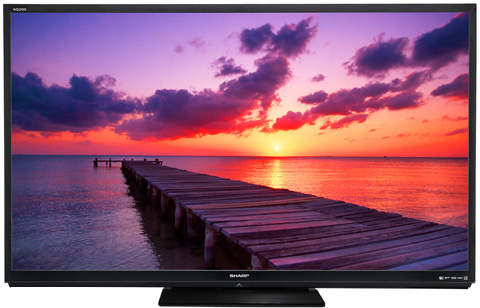
The Sharp AQUOS LC-70LE745U, a 2012 70-inch "Full HD Active 3D" TV. Its spec sheet lists "3D Glasses (optional)" without a model. Image: Sharp spec sheet [5].
Key takeaways
- Check your TV's model number first: the AN-3DG40 is listed for five 2013 series, and the LE650U, C7500U and C6500U have no 3D. See which glasses fit.
- A used pair runs on one CR2025 coin battery. A pair that does not turn on may only need a new battery. See before you buy.
- Pairing takes one long press, 50 cm to 2 m from the TV. See pair the glasses.
- Our Half SBS test clip checks the TV's side-by-side 3D mode before you look for 3D videos.
Which Sharp 3D glasses fit your AQUOS TV
Start with the model number on the back of the TV. Sharp's 2013 US manual lists the AN-3DG40 as the optional 3D glasses "for the LE857U, LE757U, LE755U, LE657U and LE655U models" [1]. The LE857U, LE757U, LE755U and LE657U came with two pairs in the box [1]. The same manual covers the LE650U, C7500U and C6500U, and on those sets "3D images are always displayed in 2D mode" [6]. They are not 3D TVs.
| Glasses | Year, from Sharp's papers | How they talk to the TV | Battery |
|---|---|---|---|
| AN-3DG10 | 2010, supplied with the LC-52LE925UN and LC-60LE925UN | Infrared signal from the TV, no pairing step in the manual | CR2032 coin, about 75 hours [3] |
| AN-3DG30 | 2012 spec sheet | Not stated on the spec sheet | CR2032 coin, about 50 hours [7] |
| AN-3DG40 | 2013: LE857U, LE757U, LE755U, LE657U, LE655U | Paired with the TV | CR2025 coin, about 100 hours [2] |
Sharp Japan's page for its own AQUOS glasses states the rule for both kinds. Its AN-3DG50 uses Bluetooth and cannot be used with 3D AQUOS TVs that use infrared. Its AN-3DG20 uses infrared and cannot be used with 3D AQUOS TVs that use Bluetooth [4]. Sharp's 2012 spec sheet for the AN-3DG30 does not name the TVs it fits [7]. For a 2011 or 2012 set, check the TV's own manual for its glasses.
The AN-3DG40 manual also says: "These 3D Glasses are only for use with SHARP LCD TVs supporting 3D" [2]. For Samsung, LG and Sony sets, see 3D glasses for a Samsung, LG or Sony 3D TV.
Before you buy a used pair
On Google's first page in November 2026, AN-3DG40 pairs were listed on eBay and other resale sites, some of them open box. Four checks:
- The model number. Ask for a photo of the label with the model and serial number.
- The date. The first three digits of the serial number give the date of manufacture [2].
- The battery. The AN-3DG40 takes one CR2025 lithium coin battery that you replace yourself [2]. A pair that does not turn on may only need a new battery. A new pair has an insulating sheet that you remove before the first use [2].
- The lenses. Scratching the lenses may "reduce the quality of the 3D image" [2]. Ask for a close photo.
Pair the AN-3DG40 with the TV
"To view 3D images, it is necessary to pair the 3D glasses and TV." [2]
- Sit 50 cm to 2 m (1.64 to 6.56 ft) from the TV. "If too close, pairing cannot be performed." [2]
- Turn the TV on.
- With the glasses off, hold the power button for 2 seconds or more. The LED blinks red and green while the glasses pair [2].
- When pairing works, the LED blinks green for 3 seconds. Sharp's check: 3D images show on the screen [2].
After pairing, a short press on the power button switches the glasses between 3D and 2D [2]. The glasses then work up to about 17 ft (5 m) from the TV, within approx. 30° horizontally and 20° vertically [2]. To change the battery, press the lock with the tip of a ballpoint pen and pull out the battery holder. Put the new battery in with the negative side up [2].
When the glasses do not show 3D
| What you see | What to do |
|---|---|
| Two overlapping pictures | The glasses are off. Hold the power button for at least 2 seconds [2] |
| A flat picture through the glasses | The glasses are in 2D mode. Press the power button briefly: the LED blinks green [2] |
| The glasses turn off by themselves | They turn off after 15 seconds with no signal from the TV. Stay within about 17 ft (5 m) of the TV, in front of it [2] |
| The LED blinks 3 times every 3 seconds (green in 3D mode, red in 2D mode) | Low battery [2]. Fit a new CR2025 |
| The room seems to flicker | Fluorescent lights. Dim them or turn them off [2] |
| Two side-by-side pictures, glasses on | The TV is not in 3D mode. Press 3D, choose 3D, then Side by Side [8] |
Phones and other 3D products near the glasses can stop them working [2]. Worn upside down, or while you lie on your side, the picture can look wrong or dark [2].
What to watch in 3D on an AQUOS 3D TV
A 3D Blu-ray disc needs a 3D Blu-ray player: see 3D Blu-ray players in 2026. The 2013 sets take 3D in two layouts: side by side and top and bottom [8].
Sharp's 2013 manual gives the steps for a 3D picture that the TV does not detect by itself [8]:
- Press 3D on the remote and choose 3D.
- Choose the layout of the picture: Side by Side or Top and Bottom.
- Turn on the glasses and put them on.
Test the TV first. Our test clip is a Half SBS video at 1920×1080: download the clip (MP4, 8 seconds, 2.7 MB), or the still frame (JPG, 1920×1080). Play it from a computer by HDMI, or from a USB drive if the TV plays MP4 files. Then choose Side by Side. The tree trunk at the left should look closer than the fountain. We have not tested the clip on a Sharp TV. To play other files, see how to play 3D files on a TV.


How we made the clip. We took 8 seconds of a public-domain video of a fountain [9]. The Depth Anything V2 Small model worked out the depth of every frame. From it we made a view for each eye and put both in one 1920×1080 frame.

The TV's own 2D-to-3D mode. Press 3D and choose 2D ➝ 3D to convert normal 2D images to 3D [8]. The 2013 manual notes that "the TV returns to 2D mode after 1 hour has passed" [8].
Your own videos in 3D. The Owl3D desktop app converts your own 2D videos to 3D on your computer and writes Half Side-by-Side, the layout older 3D TVs read. File conversion is on the free plan, at 1080p. Play the file on the TV as above and choose Side by Side. The result is an AI conversion, not a studio 3D master. More on making files for a TV: 2D to 3D converter for TV.
From Owl3DOwl3D converterA desktop app for Windows and Mac that turns 2D videos and photos into 3D.Frequently asked questions
Do Sharp AN-3DG40 glasses work with a Samsung, LG or Sony TV?
Sharp's manual says the AN-3DG40 is "only for use with SHARP LCD TVs supporting 3D" [2]. For other brands, see 3D glasses for TV.
Does my Sharp AQUOS TV have 3D?
Look up its series. In Sharp's 2013 US manual for these series, the LE857U, LE757U, LE755U, LE657U and LE655U have 3D. The LE650U, C7500U and C6500U do not [1][6]. For other brands and years, see which TVs have 3D, by brand and 3D TVs today.
Sources (9)
- Sharp, operation manual of the LC-60/70/80LE857U, LE757U, LE755U, LE657U, LE655U, LE650U, C7500U and C6500U (2013), page "Supplied Accessories, Optional Accessories". https://manualsdump.com/en/manuals/sharp-lc70le655u/176183/6 (opened 2026-11-29)
- Sharp, AN-3DG40 3D Glasses operation manual (US). https://www.manualslib.tech/guide/408173/sharp-an-3dg40-3d-glasses-manual.html (opened 2026-11-29)
- Sharp, LC-52LE925UN and LC-60LE925UN operation manual (2010), 3D Glasses pages and specifications. https://files.sharpusa.com/Downloads/ForHome/HomeEntertainment/LCDTVs/Manuals/tel_man_LC52_60LE925UN.pdf (opened 2026-11-29)
- Sharp Japan, AQUOS support, "専用3Dメガネ" (3D glasses, in Japanese). https://jp.sharp/support/aquos/option/3d_glasses/ (opened 2026-11-29)
- Sharp, LC-70LE745U spec sheet (2012). https://files.sharpusa.com/Downloads/ForHome/HomeEntertainment/LCDTVs/SpecSheets/mon_dow_LC70LE745U_ss.pdf (opened 2026-11-29)
- Sharp, 2013 operation manual as [1], "Playing Back Files on a USB Memory Device". https://manualsdump.com/en/manuals/sharp-lc70le655u/176183/39 (opened 2026-11-29)
- Sharp, AN-3DG30 spec sheet (2012). https://content.abt.com/documents/45863/AN3DG30_specs.pdf (opened 2026-11-29)
- Sharp, 2013 operation manual as [1], "Enjoying 3D Image Viewing". https://manualsdump.com/en/manuals/sharp-lc70le655u/176183/35 and https://manualsdump.com/en/manuals/sharp-lc70le655u/176183/36 (opened 2026-11-29)
- Cbaile19, "Point Fountain.webm", Wikimedia Commons, CC0. https://commons.wikimedia.org/wiki/File:Point_Fountain.webm (opened 2026-11-29)