VR Photos: How to View Your Own Photos in a Headset
How we researched this: written by Owl3D from published sources, all 23 listed at the end.
Short answer
Start with the app already on your headset. Gallery on a Meta Quest, Photos on an Apple Vision Pro and Google Photos on a Galaxy XR all show your ordinary photos, and all three can add depth to them [1][2][3][23]. For 360 photos and side-by-side 3D photos on a Quest, PICO or PC headset, use a viewer app such as immerGallery, which has a free demo [4]. On a Quest, send phone photos with the Meta Horizon app, and copy files from a computer over a USB cable [1][9][10]. Owl3D, the publisher of this guide, makes 2D-to-3D conversion software, which appears in one section below.
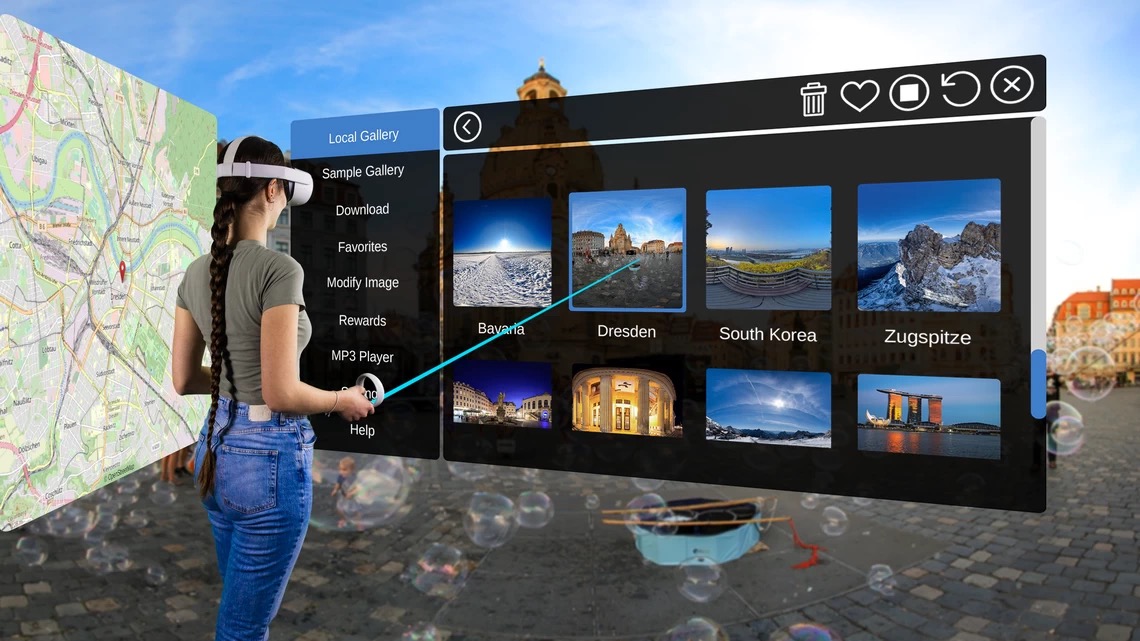
A viewer app's photo gallery in a headset: immerGallery's Local Gallery. This is the maker's marketing image, not a view through a lens. Image: immerVR, from immervr.com.
Key takeaways
- Which app to open, by headset and photo type: see the table.
- Your phone photos are not on the headset yet? See how to move them over.
- Two side-by-side pictures, or a stretched 360 photo? See what goes wrong.
- Flat photos can become 3D, inside the headset or as a file you keep: see turning 2D photos into 3D.
Which app to open on your headset
| Headset | Ordinary photos | Add depth to a flat photo | 360 photos | 3D photos |
|---|---|---|---|---|
| Meta Quest 3, 3S, Pro, 2 | Gallery app [1][6] | Automatic in Gallery, from version 2.5 [1] | immerGallery [4]; see the box below | immerGallery [4] |
| Apple Vision Pro | Photos app [2] | Create Spatial Photo, or a spatial scene [7] | Horizontal panoramas in Photos [2]; for 360 stills see the box below | Photos, Spatial tab [2] |
| Galaxy XR and other Android XR headsets [23] | Google Photos [3] | Spatial button, inside Go immersive [3] | Google Photos, Spatial tab [3] | Google Photos lists native 3D photos [3] |
| PICO 4 Ultra | Gallery; PICO names Apple spatial photos only [8] | Not stated | immerGallery [4] | Gallery, for Apple spatial photos [8]; immerGallery [4] |
| PC headsets, Steam Frame, PS VR2 with PC adapter | immerGallery for Windows [4] | immerGallery [4] | immerGallery [4] | immerGallery [4] |
Last checked : features and the immerGallery price, from each maker's website, not hands-on tests. The price was checked from outside the US.
immerGallery's free demo shows your own images, up to 10 files per folder. Folder browsing and 2D-to-3D conversion need the full version, which is $29.99 or 29.99€ depending on location [4]. The maker's table lists one free conversion a day [4].
How to get your photos onto the headset
Meta Quest, from a phone. Meta's notes say you can upload photos to your headset from the Horizon app [1]. UploadVR's walkthrough from May 2026 gives the path: open the app menu, tap Gallery, pick photos from the camera roll and tap upload [5]. Meta then processes them into 3D photos for the headset [5].
Meta Quest, from a Windows PC. Follow these steps:
- Connect the cable. Use a USB cable made for data; some carry charge only [9].
- Put the headset on. Select Allow on the prompt. If you see no prompt, open the notifications from the bell icon on the universal menu [9].
- Copy the files. The Quest shows up as a drive on your computer [10].
For movies, see how to watch movies in VR.
Meta Quest, from a Mac. Meta's page still names Android File Transfer [10]. If the photos are also on your phone, you can send them with the Horizon app instead [1]. Owners' reports are below.
Apple Vision Pro. Turn on iCloud Photos: Settings, your name, iCloud, Photos, then turn on "Sync this Apple Vision Pro". Use the same Apple Account on your iPhone or Mac [14].
Galaxy XR. Sign in to Google Photos with your Google Account. It reads your existing backup and anything saved on the headset, so nothing needs uploading again [3].
PICO 4 Ultra. PICO says to import Apple spatial photos into the headset's photo gallery [8]. That page gives no steps.
What Quest owners report about moving files
We have not tested these. They come from Meta's forum, about March 2026, and a YouTube comment from October 2026.
- The prompt: "I never realized that I had to be on the headset while connecting to the PC." [11]
- The folder: an expert contributor on Meta's forum wrote, "The name of the folder doesn't matter." [12]
- A Mac: a MacBook Air owner wrote that Android File Transfer "is no longer supported by the developer and is known to crash", and that MacDroid "requires a paid account". The owner then got OpenMTP working: "it actually did work earlier; I just didn't understand what I was doing" [13].
- No copying: another owner runs Skybox, a paid player whose streaming app shares computer folders over Wi-Fi [13].
How to view 360 photos in VR
A 360 photo is one flat image that a viewer wraps around you. Most 360 cameras save an equirectangular JPG or PNG, which is ready to view [15]. The shape to look for is 2:1, twice as wide as it is tall [15][16].
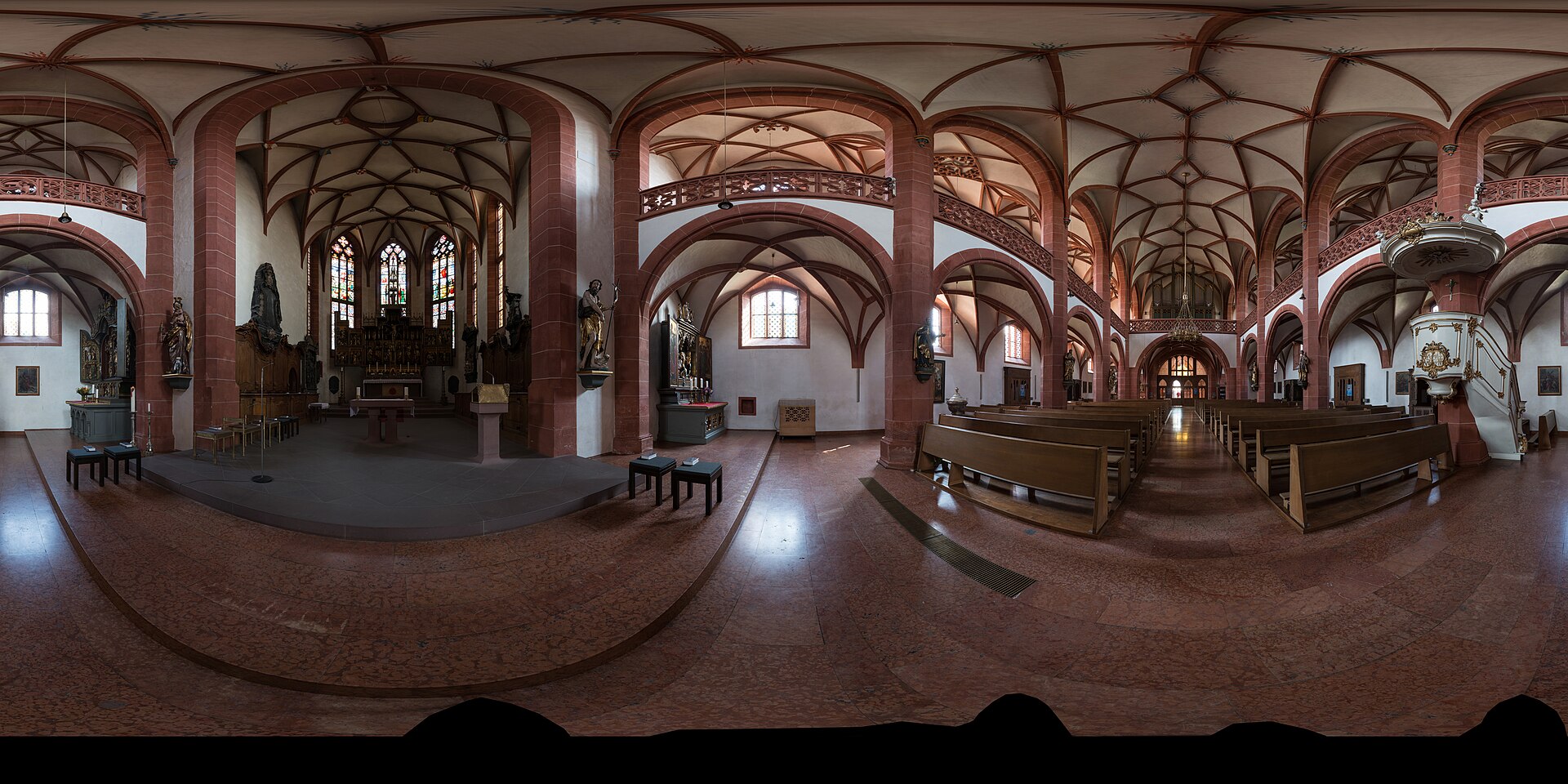
What a 360 photo looks like before a viewer wraps it around you: a 2:1 equirectangular image of the Rheingauer Dom in Geisenheim. Photo: DXR, CC BY-SA 4.0, via Wikimedia Commons. Scaled down.
On a Quest, copy the file over, open immerGallery and pick it. On a Galaxy XR, open Google Photos, select Spatial on the left, then pick the photo [3].
How to view 3D and spatial photos
A 3D photo holds a different picture for each eye. Three kinds turn up:
- Side-by-side or top-bottom: one image with both eyes' pictures in it. immerGallery reads these [4].
- MPO: the file type many older 3D cameras save. A 2025 blog lists .mpo among immerGallery's formats [18], and a Quest 3 owner reported in 2024 that it "found and displayed the images with no trouble" [19].
- Apple spatial photo (.heic): Vision Pro shows it in the Spatial tab [2]. immerGallery lists iPhone spatial photos [4], and PICO 4 Ultra accepts them too [8].
One 3D picture, four ways to pack it
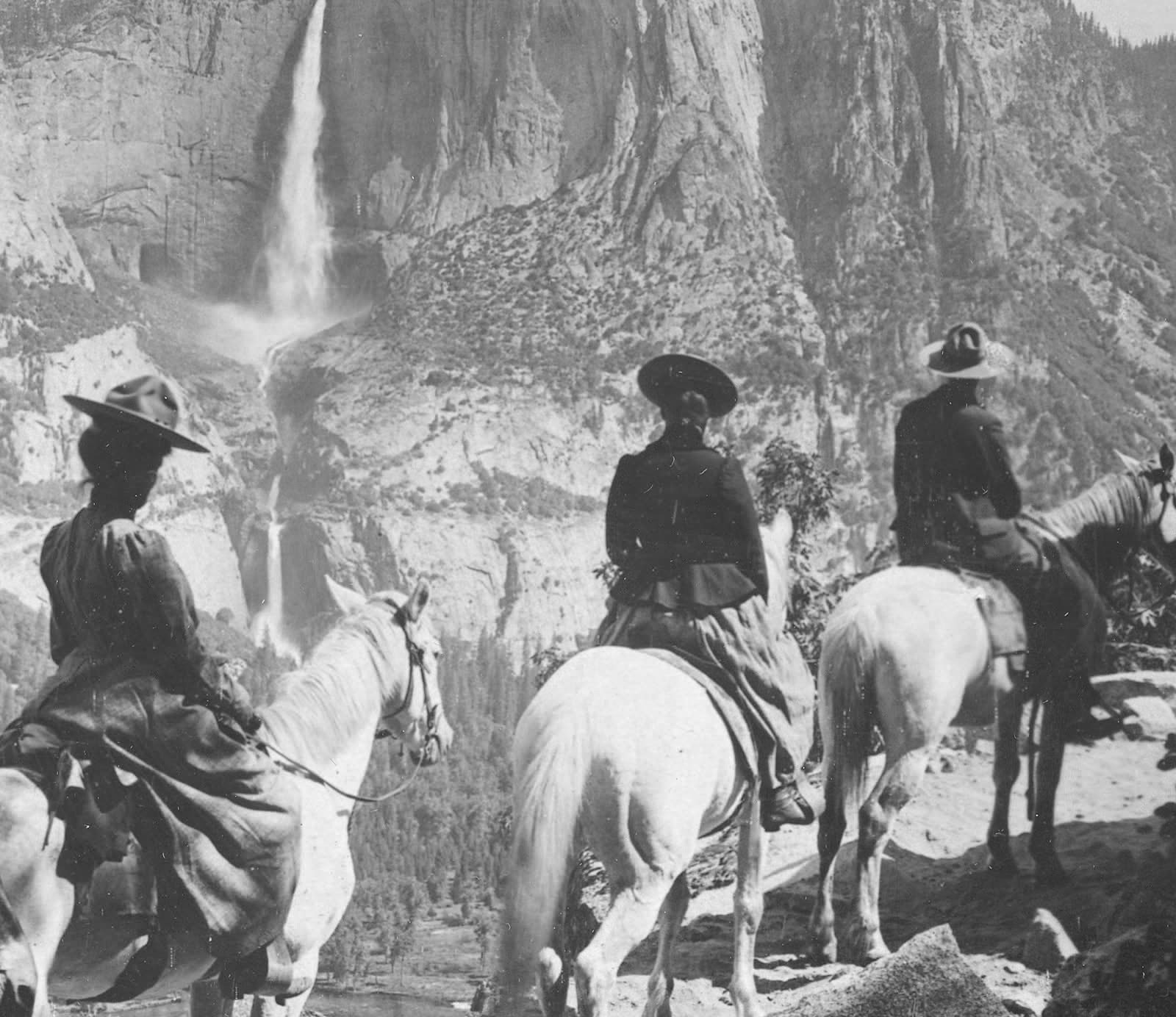
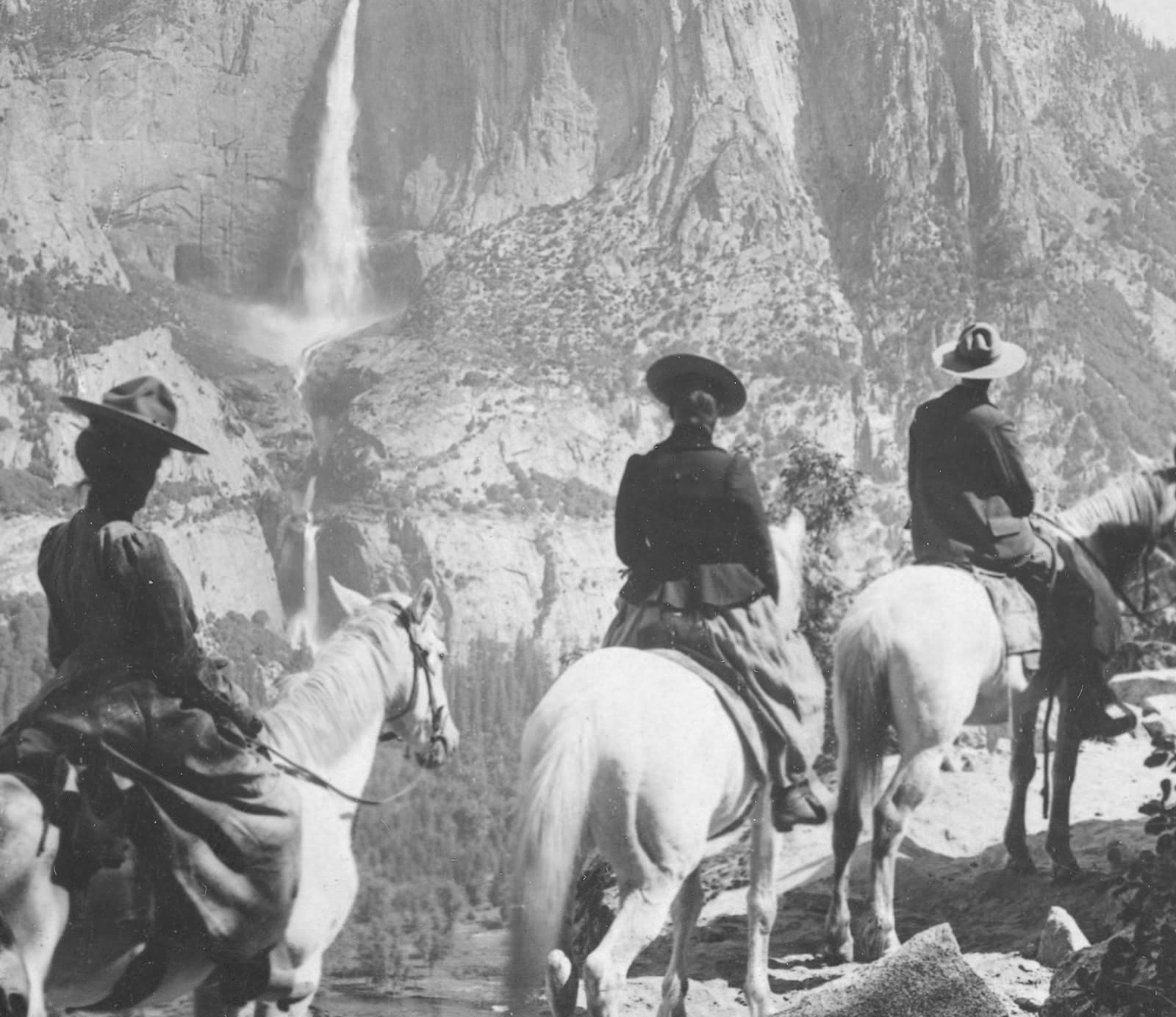
To take them, see 3D photo apps. For what an iPhone's spatial photo is, see spatial photos.
Turn 2D photos into 3D for VR
First, try your headset's built-in option:
- Quest: photos in Gallery open in 3D automatically, and you can switch back to 2D [1]. The notes say this reaches Quest 3, 3S, Pro and 2 gradually [1].
- Vision Pro: open a 2D photo, tap the button at the top, then Create Spatial Photo [7].
- Galaxy XR: open the photo, select Go immersive, then Spatial. Google says results vary, conversion happens in the cloud, and sharing or backing up the result isn't supported yet [3].
These stay in that headset's app. If you want a 3D file you can keep and open in a viewer app on other headsets or 3D screens, convert it on a computer. The Owl3D converter takes ordinary JPG or PNG photos and saves a side-by-side or top-bottom image, working on your own computer, not in the cloud. It is an AI conversion: the depth is estimated from one picture, not captured by two lenses. It works with NVIDIA, AMD or Intel graphics on Windows, or on a Mac. Steps are in turning a photo into a stereoscopic 3D image.
From Owl3DOwl3D converterA desktop app for Windows and Mac that turns 2D videos and photos into 3D.What goes wrong, and what to do
| What you see | Why | What to do |
|---|---|---|
| Two photos side by side, both flat | The file is a 3D pair, or you loaded two separate files. As one forum contributor put it: "3D photos need to be a single image in a supported stereoscopic format" [20] | Combine the pair into one side-by-side image, then open it in a viewer app |
| A 360 photo looks stretched or grainy | It is not 2:1 equirectangular [16] | Export it again from the camera's app as a 360 JPG |
| The computer does not show the Quest | The prompt was missed, or the cable is charge-only [9] | Open the headset's notifications, select Allow, try a data cable [9] |
| Depth vanished after an update | Unknown. Two owners on Meta's forum reported it in spring 2026, after the headset's version 2.1 update [21] | Check for a newer version. The thread shows no fix |
| A photo will not convert on Galaxy XR | Google names format, size and resolution limits [3] | Try a different photo |
FAQ
Can I see my iPhone photos on a Meta Quest?
Probably. Meta says you can upload photos from the Meta Horizon app [1]. UploadVR describes choosing them from your phone's camera roll [5]. Neither source mentions the iPhone, so try one photo first.
Is there a free VR photo viewer?
Yes. The built-in apps above are free with the headset. immerGallery's demo is also free, with the 10-file limit per folder [4].
Where can I find VR photos to look at?
DeoVR's photo page lists more than 8,000 VR photos [22]. immerGallery's demo includes 80 sample images, and the full version more than 250 [4]. For VR video rather than photos, see VR video players.
Sources (23)
- Meta, "Meta Quest release notes", Version 2.5, week of June 22, 2026. https://www.meta.com/help/quest/172903867975450/ Opened 2026-11-02.
- Apple Support, "View photos, videos, and memories in Photos on Apple Vision Pro". https://support.apple.com/guide/apple-vision-pro/view-photos-and-videos-tanf794e3fef/visionos Opened 2026-11-02.
- Google Photos Help, "Use Google Photos on your Android XR device". https://support.google.com/photos/answer/16667814?hl=en Opened 2026-11-02.
- immerVR, "immerGallery" (product page with feature and price table). https://www.immervr.com/ Opened 2026-11-02.
- Alan Truly, UploadVR, "Quest's Latest PTC Update Turns Web Photos Into 3D" (May 14, 2026). https://www.uploadvr.com/quests-latest-ptc-update-turns-web-photos-into-3d/ Opened 2026-11-02.
- Meta, "Manage media with the Horizon OS Gallery app". https://www.meta.com/help/quest/410354522069898/ Opened 2026-11-02.
- Apple Support, "Create a spatial photo or view a spatial scene in Photos on Apple Vision Pro". https://support.apple.com/guide/apple-vision-pro/create-a-spatial-photo-view-scene-tan1be9a3a0b/visionos Opened 2026-11-02.
- PICO newsroom, "PICO launches its first all-in-one VR & Mixed Reality headset: PICO 4 Ultra". https://www.picoxr.com/global/about/newsroom/pico-4-ultra-mixed-reality-headset Opened 2026-11-02.
- Meta, "Transfer media from your Meta Quest headset to your computer". https://www.meta.com/help/quest/308605304163937/ Opened 2026-11-02.
- Meta, "How do I transfer files between Meta Quest devices?". https://www.meta.com/help/quest/310926493766802/ Opened 2026-11-02.
- Users' reports: comments under a YouTube tutorial on Quest file transfer. https://www.youtube.com/watch?v=UJHc6VNMubo Opened 2026-11-02.
- Users' reports: Meta Community Forums, "Where to put 360 degree photos and videos on the Quest3?". https://communityforums.atmeta.com/other-troubleshooting-14/where-to-put-360-degree-photos-and-videos-on-the-quest3-176712 Opened 2026-11-02.
- Users' reports: Meta Community Forums, "Help! Uploading jpg and mp4 files into Quest3??". https://communityforums.atmeta.com/other-troubleshooting-14/help-uploading-jpg-and-mp4-files-into-quest3-176660 Opened 2026-11-02.
- Apple Support, "Use iCloud Photos on Apple Vision Pro". https://support.apple.com/guide/apple-vision-pro/use-icloud-photos-tan7feac733b/visionos Opened 2026-11-02.
- SENTIO VR, "How to View 360 Photos in VR Using Meta Quest [2026]". https://www.sentiovr.com/post/how-to-view-360-photos-in-vr-using-meta-quest Opened 2026-11-02.
- Apps for Apple Vision, "A 360 Viewer" (developer's listing text). https://appsforapplevision.com/apps-directory/a-360-viewer Opened 2026-11-02.
- Apple Support, "View 180-degree, 360-degree, and Wide FOV video on Apple Vision Pro". https://support.apple.com/en-us/125014 Opened 2026-11-02.
- The Stereoscopy Blog, "How to View Almost Any Stereoscopic (3-D) Image in VR, with ImmerGallery" (October 19, 2025). https://stereoscopy.blog/2025/10/19/stereoscopicimagesinvr/ Opened 2026-11-02.
- Users' reports: Photo-3d group, "Immergallery" (March 25, 2024). https://photo-3d.groups.io/g/main/topic/immergallery/105123414 Opened 2026-11-02.
- Users' reports: Meta Community Forums, "Trouble viewing my 3d photos". https://communityforums.atmeta.com/other-troubleshooting-14/trouble-viewing-my-3d-photos-175156 Opened 2026-11-02.
- Users' reports: Meta Community Forums, "3D View Effect stopped working after v.2.1.1034 update". https://communityforums.atmeta.com/other-troubleshooting-14/3d-view-effect-stopped-working-after-v-2-1-1034-update-176781 Opened 2026-11-02.
- DeoVR, "VR Photos". https://deovr.com/photos Opened 2026-11-02.
- Samsung, "Galaxy XR" product page ("Powered by the new Android XR operating system"). https://www.samsung.com/us/xr/galaxy-xr/galaxy-xr/ Opened 2026-11-02.