3D Photo Apps for iPhone and Android: What Each One Makes
How we researched this: written by Owl3D from published sources, all 19 listed at the end.
Short answer
Check the phone first. An iPhone whose Camera has a Spatial mode takes a 3D photo by itself [15]. Samsung's free Camera Assistant app lists "3D capture" for the Galaxy Flip7, Fold7 and S25 (Galaxy Store, read October 10, 2026) [11]; a SamMobile report of October 2025 says perhaps only in Korea and the US [12]. On any other phone, an app such as CrossCam (free, iPhone and Android) makes a 3D photo from two shots taken a little apart [1][2]. To see the depth you need a headset, a 3D screen, red-cyan glasses or the knack of crossing your eyes [1][3][16]. Owl3D, the publisher of this guide, makes 2D-to-3D conversion software and the Shift display, which appear in one passage below beside other makers' products.
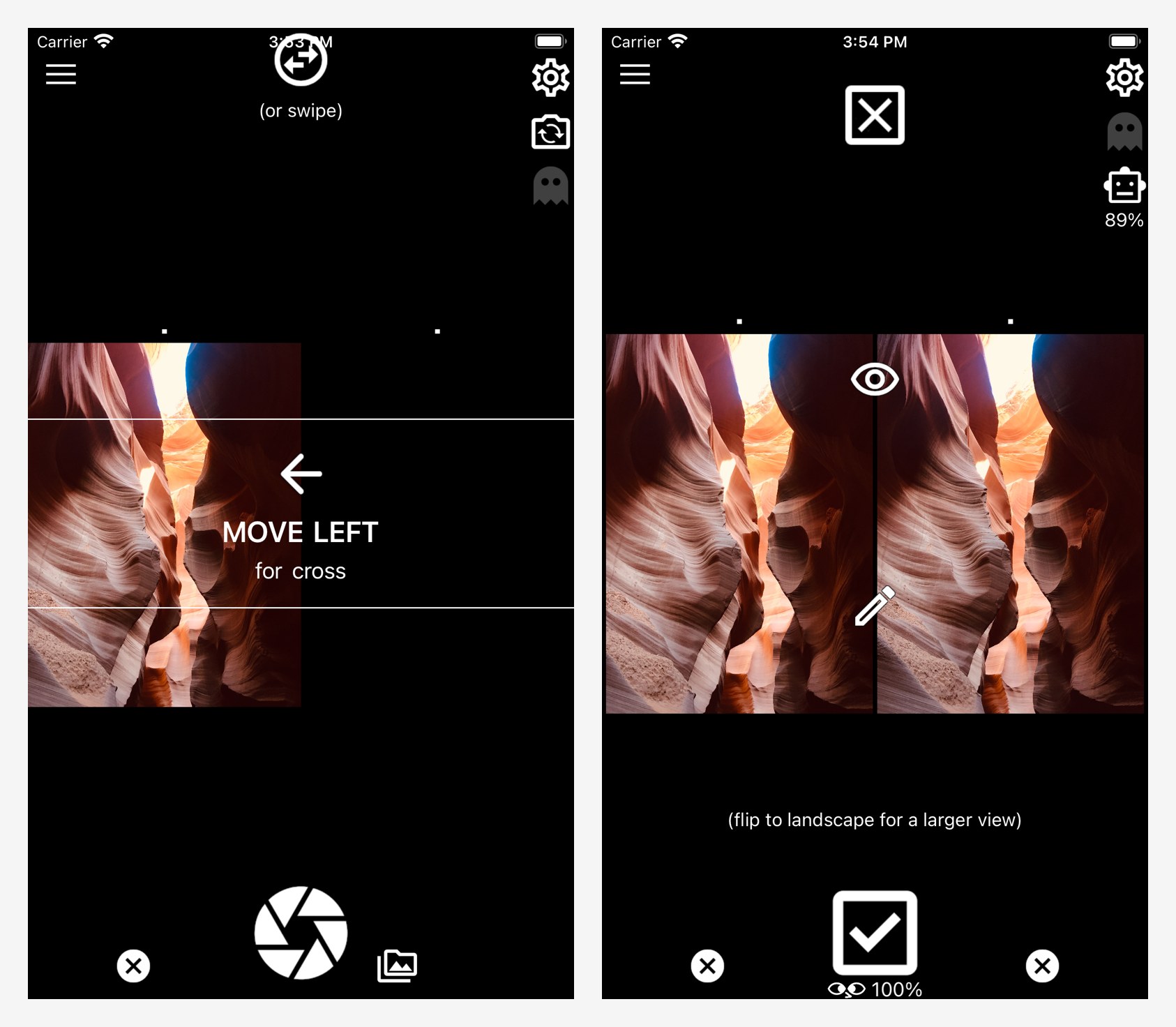
CrossCam, the one app in the table below that is free on both iPhone and Android, asks for the second shot, then shows the finished pair. Screenshots: Kevin Anderson, the app's developer, from its App Store listing.
Key takeaways
- "3D photo" means three different things in app stores, and only two give each eye its own picture; see the three kinds.
- Five apps, from free to $2.99, with how each one shoots and what it saves; see the apps.
- A photo you already took can be converted, with depth worked out by software; see converting and where to look at the result.
This page is about photos that show depth to your eyes, not apps that scan a room or an object into a 3D model.
The three things an app means by "3D photo"
| Kind | What it is | Where the depth shows |
|---|---|---|
| Tilt effect | The picture shifts as you tilt or move the phone | On the phone's own screen: the iPhone's 3D effect in Photos [9], PopPic [8], Scopi's Tilt View [5] |
| Stereo pair, captured | A left-eye and a right-eye picture, from two lenses or two shots | A headset, a 3D screen, red-cyan glasses, or free-viewing |
| Stereo pair, converted | Software builds the second view from one photo | The same places; the depth is computed, not captured |
Does your phone already do it?
- An iPhone with Spatial mode in the Camera. Swipe to Spatial mode, rotate the phone to landscape and shoot [15]. The result is a spatial photo: the pictures from two cameras, left and right, saved in one file [6]. Apple offers it "On supported models" [15]; the list and the full steps are in spatial photos on iPhone.
- Any iPhone 12 or later. In Photos, a button gives a photo you already have a 3D effect as you move the phone [9]. That is the tilt effect, not a pair; see how to do a spatial scene.
- A Samsung Galaxy Flip7, Fold7 or S25, perhaps. The Galaxy Store listing of Samsung's free Camera Assistant app, read October 10, 2026, has "3D capture" under "Capture for Galaxy XR", marked "Flip7/Fold7/S25", and warns: "Some features may not be available on all models." [11] SamMobile wrote in October 2025 that the app "may offer 3D Capture in only these two regions", Korea and the US, the only places the Galaxy XR headset was then sold [12]. We have not tested it. One person's report, from an owner of a Galaxy S24 Ultra (a model the listing does not mark), in a comment under a YouTube video about the feature, about a year before October 2026: "Installed it on my S24 Ultra running one ui 8 beta and 3d mode was not there" [19].
- Any other phone. Use one of the apps below.
Apps that take a 3D photo with any phone
| App | Phone | Price (US store) | How it shoots | What you get |
|---|---|---|---|---|
| CrossCam | iPhone, Android | Free [1][2] | Two shots, aligned automatically [1] | A pair for cross-eyed viewing [1] |
| i3DSteroid | iPhone | $2.99 [3] | Two shots, aligned automatically [3] | Side-by-side, anaglyph or wiggle picture [3]; can save a spatial photo [17] |
| 3DSteroid Pro | Android | $2.49 [4] | Two shots, aligned automatically [4] | Side-by-side, anaglyph or wiggle picture [4] |
| Scopi | iPhone | Free, with in-app purchases [5] | Two shots with a ghost overlay of the first; one press on phones with a compatible pair of rear cameras [5] | Parallel, cross-eyed, anaglyph or wigglegram picture [5] |
| i3DMovieMaker | iPhone | Free for photos [7] | Both rear cameras at once, on the models its maker names [6] | Side-by-side picture [6], or a spatial photo [7] |
Last checked : prices on the US App Store and US Google Play, in US dollars.
i3DMovieMaker's maker names the "iPhoneXS/11/12 series and 13Pro series or later" for its two-camera mode, and says the iPhone 13, 14 and 15 cameras "are positioned at an angle, so correct 3D shooting is not possible" [6]. Scopi's listing does not name the iPhones whose two cameras its one-press mode uses; on other phones, it says, that mode builds the second view from one photo. It does not say what the in-app purchases unlock [5].
The two-shot method, and what goes wrong
These are i3DSteroid's steps, from its maker's help page [17]. The advice on spacing is The Stereoscopy Blog's [14].
- Take the left picture. Press the Left button [17]. The blog says to keep the phone as level as possible between the two shots [14].
- Shift the phone to the right and take the second, with the Right button [17]. The blog's rule of thumb is 1/30th of the distance to the subject: 0.5 cm for an object 15 cm away. Moving closer or skewing the camera "can sometimes cause a stereoview to be unusable" [14].
- Let the app align the pair, then save it [3]. For cross-eyed viewing the two pictures change sides: the Swap button does that [14][17].
CrossCam's listing promises "on screen help to make sure you get the images on the right sides every time" [1], and Scopi's Manual Mode shows "a ghost overlay of your first shot while taking the second" [5].
Whatever the app, the two shots are taken one after the other, so pick a subject that keeps still. The Stereoscopy Blog, which shoots this way with both Steroid apps, calls it quick, inexpensive and easy to use, and lists two weak points: "squirmy cat/kid/crowd movement in the scene", and "skew" between the two images [13].
Turn a photo you already took into a 3D photo
Here the depth is computed from one flat picture. It is not a second real viewpoint.
- On the iPhone. Scopi's listing says: "Convert shots from your gallery into stereo" [5]. i3DMovieMaker has a "2D (AI conversion)" option, which its maker says is "Compatible with iPhone 12Pro or later Pro/Pro Max models + some other models" [6].
- On an Apple Vision Pro. Open the photo in Photos and tap Create Spatial Photo [10].
- On a computer. Owl3D's desktop app for Windows and Mac converts ordinary photos, such as JPG and PNG files, with AI on your own computer and saves a side-by-side, half side-by-side or top-bottom picture. It has a free tier, and it is not instant. On the Owl3D Shift, a 14-inch glasses-free 3D display (499 US dollars) used beside a computer, the app's 3D Photo Viewer picks up a photo shown on the main screen, rebuilds its depth and shows it so that the view changes as you move your head. Owl3D's app calls the result a hologram; it is a 3D reconstruction of the picture's depth on a lenticular screen, not optical holography. The Shift also shows a side-by-side pair from the apps above in 3D, to one viewer at a time. It needs a computer running the Owl3D app, and the 3D Photo Viewer needs a supported graphics card and a one-time download of about 1.3 GB.
Where to look at a 3D photo
| Where | What you need |
|---|---|
| The phone, no equipment | A pair for cross-eyed or parallel viewing; CrossCam has a built-in tutorial for crossing your eyes [1] |
| The phone, with red-cyan glasses | An anaglyph picture from i3DSteroid, 3DSteroid Pro or Scopi [3][4][5]; see anaglyph 3D |
| Meta Quest, Pico or a PC VR headset | immerGallery: free demo; full version $29.99 on its maker's site, which says the price depends on location. The maker lists side-by-side pictures, Apple spatial photos and Samsung "3D Capture" photos [16] |
| Apple Vision Pro | A spatial photo, which i3DSteroid and i3DMovieMaker can save [17][7]; Scopi's listing names "Apple Vision Pro and other headsets" without naming a file [5] |
| AR glasses | i3DSteroid lists "XREAL Air2/VITURE One" [3] |
| 3D TV, 3D projector or glasses-free 3D screen | A side-by-side picture |
Last checked : immerGallery's price, on immervr.com.

For dedicated two-lens cameras, see 3D cameras.
Frequently asked questions
Is there a free 3D photo app?
Yes. CrossCam is free on iPhone and Android [1][2]. i3DSteroidbasic is free too, but its listing lacks the "Save displayed image" line of the paid version [18][3]. PopPic and Scopi are free to download with in-app purchases [8][5], and i3DMovieMaker charges only for saving video [7].
Can I take a 3D photo of something that moves?
Not well with two shots [13]. Shoot both views at once: with the iPhone's Spatial mode [6], with i3DMovieMaker or Scopi on an iPhone they support [6][5], or with two phones in CrossCam, whose listing says "you can connect them using CrossCam to capture from both simultaneously" [1].
Sources (19)
- Apple App Store, "CrossCam" (version 1.128), seller Kevin Anderson. https://apps.apple.com/us/app/crosscam/id1436262905 (opened 2026-10-10)
- Google Play, "CrossCam", KRA2008. https://play.google.com/store/apps/details?id=com.kra2008.crosscam&hl=en_US&gl=US (opened 2026-10-10)
- Apple App Store, "i3DSteroid" (version 6.92), seller Masuji Suto. https://apps.apple.com/us/app/i3dsteroid/id467945370 (opened 2026-10-10)
- Google Play, "3DSteroid Pro", StereoMaker. https://play.google.com/store/apps/details?id=jp.suto.stereoroidpro&hl=en_US&gl=US (opened 2026-10-10)
- Apple App Store, "Scopi: 3D Spatial Camera" (version 1.2.0), Adrix Corporation. https://apps.apple.com/us/app/scopi-3d-spatial-camera/id6447545140 (opened 2026-10-10)
- Masuji Suto, "i3DMovieMaker HELP". https://stereo.jpn.org/eng/iphone/i3dmoviemaker/index.html (opened 2026-10-10)
- Apple App Store, "i3DMovieMaker" (version 3.10), seller Masuji Suto. https://apps.apple.com/us/app/i3dmoviemaker/id1560663523 (opened 2026-10-10)
- Apple App Store, "PopPic - 3D Photo Camera" (version 1.12.1), PopPic 3D LLC. https://apps.apple.com/us/app/poppic-3d-photo-camera/id1368935143 (opened 2026-10-10)
- Apple Support, iPhone User Guide, "View photos and videos on iPhone". https://support.apple.com/guide/iphone/view-photos-and-videos-iph3d267610/ios (opened 2026-10-10)
- Apple Support, Apple Vision Pro User Guide, "Create a spatial photo or view a spatial scene in Photos on Apple Vision Pro". https://support.apple.com/guide/apple-vision-pro/tan1be9a3a0b/visionos (opened 2026-10-10)
- Samsung Galaxy Store, "Camera Assistant", Good Lock Labs. https://galaxystore.samsung.com/detail/com.samsung.android.app.cameraassistant (opened 2026-10-10)
- SamMobile, "After Galaxy XR launch, Samsung brings back 3D Capture to Camera Assistant app", last updated October 23, 2025. https://www.sammobile.com/news/after-galaxy-xr-launch-samsung-brings-back-3d-capture-camera-assistant-app/ (opened 2026-10-10)
- The Stereoscopy Blog, "Stereoscopic (3D) Cameras & Their Stereoviews", June 21, 2022, updated since. https://stereoscopy.blog/2022/06/21/stereoview-stereo-3d-camera/ (opened 2026-10-10)
- The Stereoscopy Blog, "How to Make Your Own iPhone Stereoviews: Basic Tutorial", June 5, 2020. https://stereoscopy.blog/2020/06/05/how-to-make-your-own-iphone-stereoviews-basic-tutorial/ (opened 2026-10-10)
- Apple Support, iPhone User Guide, "Take spatial photos and record spatial videos for Apple Vision Pro with your iPhone camera". https://support.apple.com/guide/iphone/spatial-photos-record-videos-apple-vision-iph6e3a6d4fe/ios (opened 2026-10-10)
- immerVR, "immerGallery". https://immervr.com/ (opened 2026-10-10)
- Masuji Suto, "i3DSteroid HELP". https://stereo.jpn.org/eng/iphone/help/index.html (opened 2026-10-10)
- Apple App Store, "i3DSteroidbasic" (version 6.92), seller Masuji Suto. https://apps.apple.com/us/app/i3dsteroidbasic/id500514895 (opened 2026-10-10)
- Users' reports: comments under the YouTube video "Samsung Camera Adds Hidden 3D Photo and Video Capture To Galaxy Smartphones", channel Jeff Springer. https://www.youtube.com/watch?v=ZvmFY508e2o (opened 2026-10-10)