How to Turn One Photo Into a Stereoscopic 3D Image
How we researched this: written by Owl3D from published sources, all 19 listed at the end.
Short answer
One photo has no second view, so an AI model estimates how far away each part is (a depth map), and software redraws the photo once for each eye. For a red-cyan picture, use a free browser tool such as Owl3D's Anaglyph Maker in "One normal photo" mode [1]. For a side-by-side image for a VR headset or 3D TV, use free software such as iw3 [5], a desktop converter or an online service. Edges are where the estimated depth goes wrong. Owl3D, the publisher of this guide, makes the Anaglyph Maker, the Owl3D converter and the Shift named here; the other tools are described from their makers' pages.
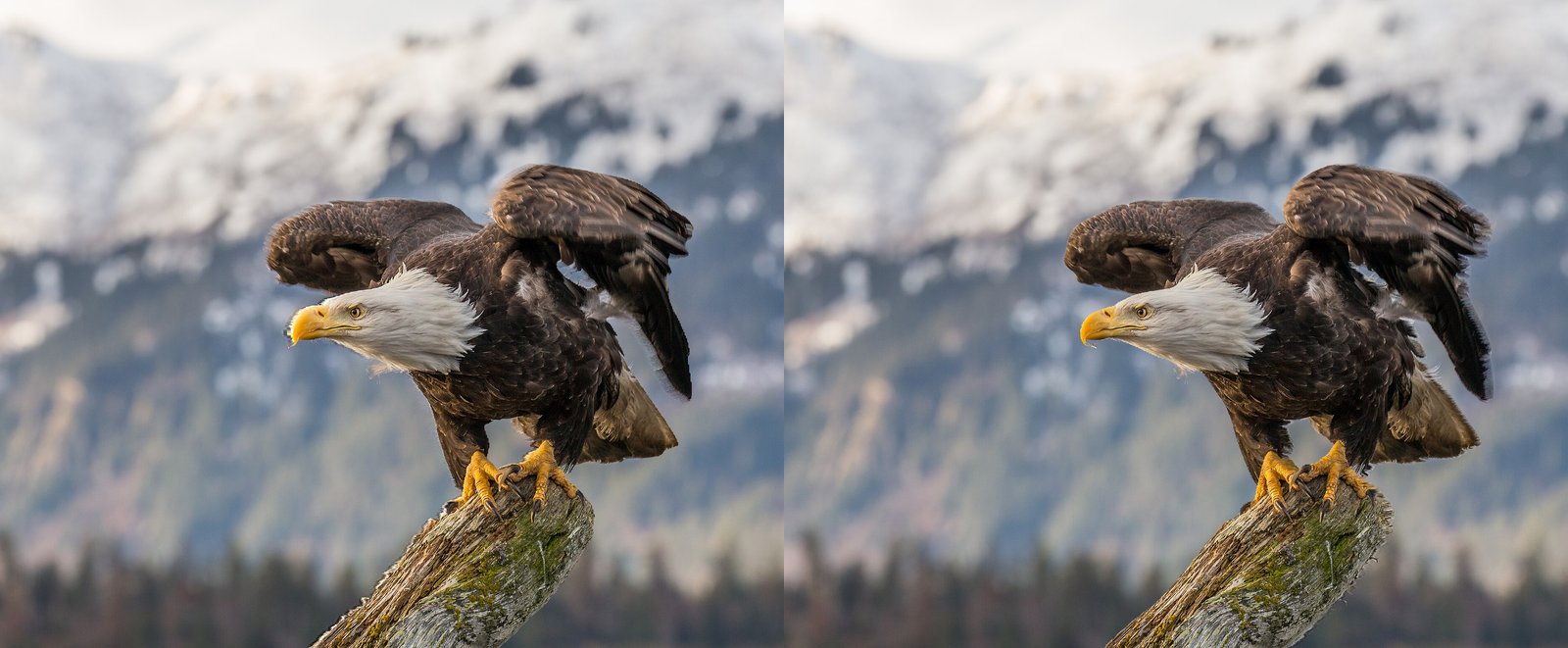
One ordinary photo turned into a stereo pair by AI, left-eye view on the left. Photo: Andy Morffew, CC BY 2.0, via Wikimedia Commons; converted to a stereo pair by Owl3D.
Key takeaways
- Red-cyan picture, nothing to install: the Anaglyph Maker works in your browser and does not upload your photo [1].
- Side-by-side for a headset or 3D TV: iw3 is free on your own computer [5]; a desktop converter or Immersity are the others.
- Choose the layout by how you will look at it: parallel side-by-side for headsets and 3D TVs, cross-eyed for viewing without a device, anaglyph for red-cyan glasses [8].
- Inside-out depth, halos round the subject, a flat "cardboard" look: see when the 3D looks wrong.
Which route fits you
| Route | What you get | What it needs | Cost |
|---|---|---|---|
| Anaglyph Maker (Owl3D) | Red-cyan picture [1] | A browser [1] | Free [1] |
| iw3 (open source) | Full or Half SBS, top-bottom, cross-eyed, anaglyph, VR180 [5] | Your own computer; Windows has a ready-made launcher [5] | Free [5] |
| Owl3D converter | Side-by-side, Half SBS, top-bottom | Your own Windows PC or Mac | Free plan; paid plans on the pricing page |
| Immersity for Web (Leia) | Parallel, cross-eyed or anaglyph 3D image [7] | A browser | Free plan watermarked, up to 720p; paid plans [9] |
| Depth models yourself | A depth map, then a pair from a script [6] | Python, and a graphics card or Google Colab [3][10] | Free [3][10] |
Last checked : makers' pages, read from outside the US.
How one photo becomes two views
A depth map is a grey picture of how far away each part of the photo is, usually with near as white and far as black [2]. It gives relative depth, not distances in metres [2].
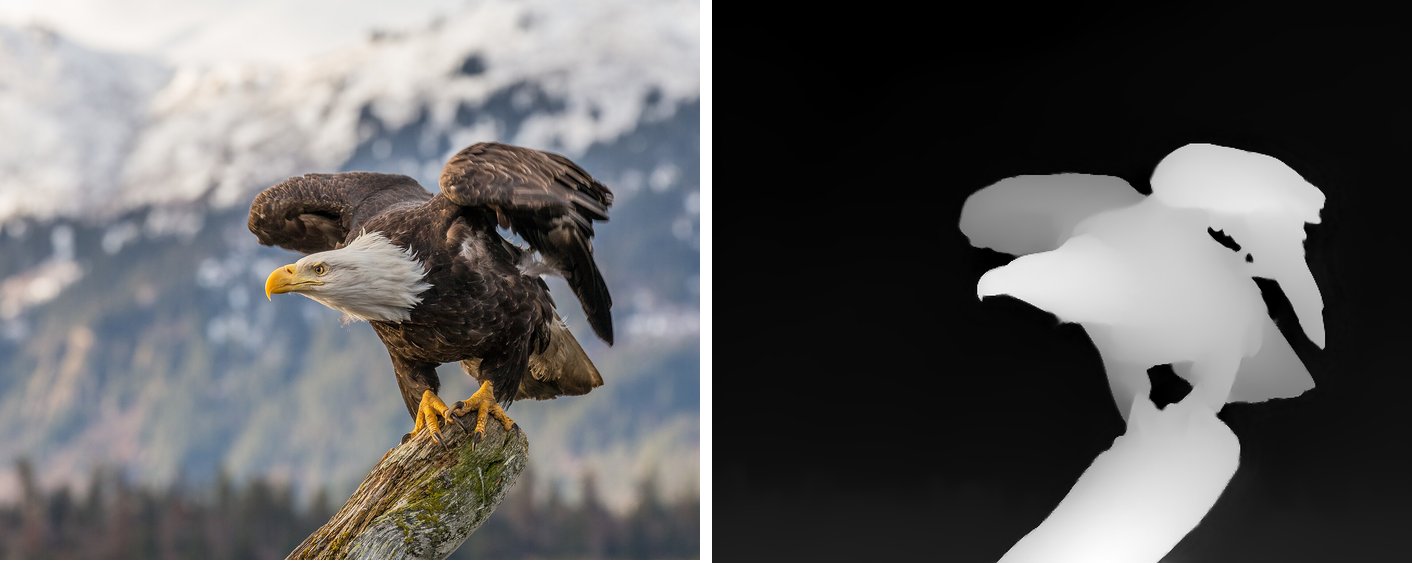
The software then shifts each pixel sideways by its depth, near things more than far ones, one way for each eye. Where two pixels land on the same spot, the nearer one wins, so the subject covers the background. Behind each edge the shift uncovers background the camera never saw; filling it in causes distortion at those edges [5][6].
If you only need the depth map, for engraving, Blender or ControlNet, use the Depth Map Generator.
Free in your browser: a red-cyan picture
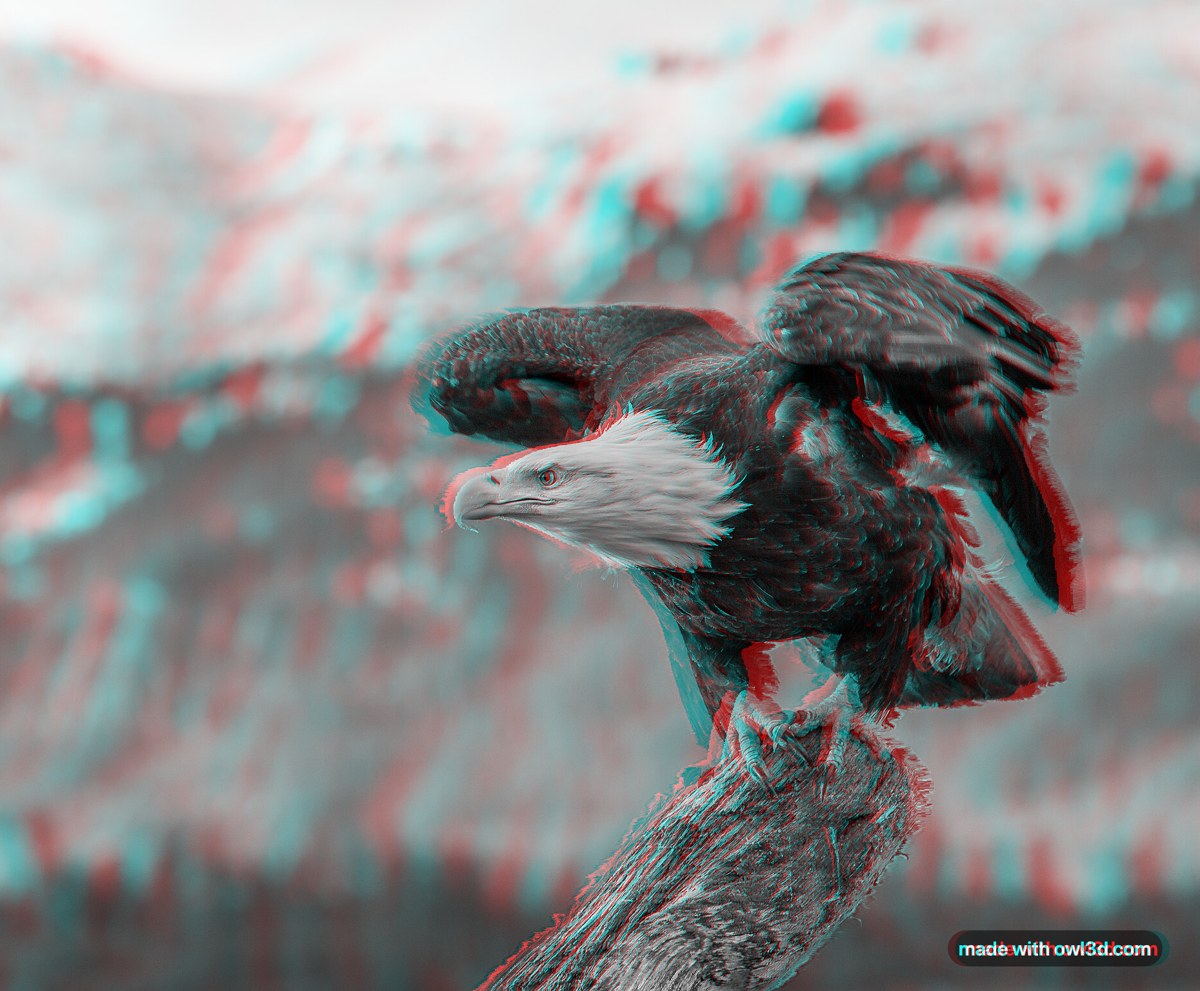
- Open the Anaglyph Maker and choose "One normal photo". The first time, your browser downloads the depth model (27 to 50 MB) and keeps it [1].
- Upload your photo. JPEG or PNG, and HEIC where your browser can open it; the photo stays on your device [1].
- Look through red-cyan glasses, red over the left eye. If near things look far, turn on "Swap left and right" [1].
- Press "Download PNG". It carries a small "made with owl3d.com" mark [1].
From one photo the tool puts the nearest thing at the screen and everything else behind it, at a fixed, moderate strength [1]. The "Horizontal offset" slider moves the whole scene forward or back; it does not add depth [1].
A side-by-side image for a VR headset or 3D TV
iw3 is a free, open-source program that can "convert any 2D image/video into side-by-side 3D image/video" [5]. On Windows you start it with "Run iw3 GUI.bat"; the first run "may take some time as it needs to download large model files" [5]. Tip: add _LRF_Full_SBS to the file name so VR players such as SKYBOX and DeoVR recognise the layout [5].
The Owl3D converter is a desktop app for Windows and Mac that turns ordinary photos (JPG, PNG) and videos into side-by-side, half side-by-side or top-bottom 3D with AI, on your own computer. It is not instant; it is the route to the best 3D Owl3D makes, and the depth is still an AI estimate. It has a free plan; for video that is 60 seconds per conversion, with no watermark. It does not save anaglyphs: load its side-by-side result into the Anaglyph Maker for that [1].
From Owl3DOwl3D converterA desktop app for Windows and Mac that turns 2D videos and photos into 3D.Immersity for Web, from Leia Inc., saves 3D images "with parallel, cross-eyed or anaglyph" layouts [7]. More on these tools: 2D-to-3D converters compared.
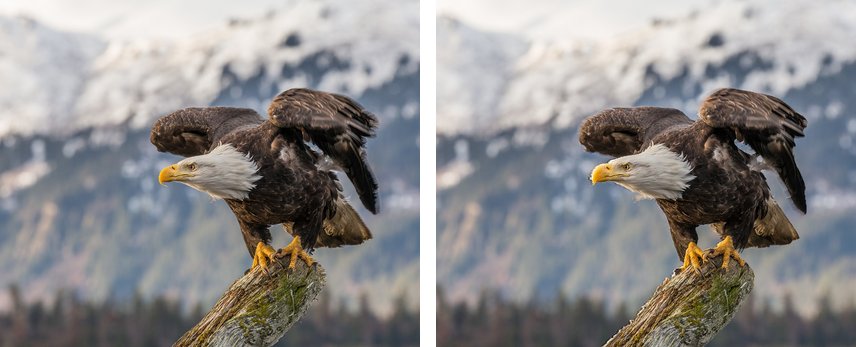
Parallel or cross-eyed? Parallel puts the left eye's picture on the left, "suitable for most digital viewers"; cross view swaps them, for merging by crossing your eyes [8]. Try it below: cross your eyes until a third eagle appears between the two.
If you write code: open-source depth models
- Depth Anything V2 (2024): the Small model is under the Apache-2.0 licence, Base and Large under CC-BY-NC-4.0, a non-commercial licence [3]. Its makers link an online demo [3].
- Depth Anything 3, released in November 2025, includes models that predict depth from a single image [4].
- ZoeDepth and MiDaS, named in older guides, were archived in 2025 and are read-only [11][12].
- stable-diffusion-webui-depthmap-script turns a generated or your own depth map into side-by-side or anaglyph images, also without Stable Diffusion, with a choice of how gaps are filled [6].
- Google Colab, a hosted notebook service used in a browser, is free of charge, but in the free version "access to expensive resources like GPUs is heavily restricted" [10].
When the 3D looks wrong
| What you see | Why | What to do |
|---|---|---|
| Near things look far | Left and right are swapped, or a cross-eyed pair is viewed as parallel [1][8] | Swap left and right, or export the other layout |
| Halos or smeared strips at the subject's edges | The background behind edges had to be filled in [5][6] | In iw3, raise "Edge Fix"; 4 is "the most eye-friendly" but less accurate [5] |
| People outdoors look flat | Common with outdoor photos [5] | In iw3, set a foreground scale of 1 to 3 [5] |
| Glass, reflections or fog at the wrong depth | The model judges depth by how things look [2] | Paint over the error on the depth map [2], then build the pair from it [6]; for iw3, save it as a 16-bit greyscale PNG [14] |
| Smeared strips at the left and right edges | "inherent to the stereo mechanism", says iw3's developer [15] | In iw3, turn on "Preserve Screen Border", which makes the edges flat [15] |
| Faults very visible, depth too strong | A strong 3D setting: "with higher value, artifacts are more visible" [5] | Lower the 3D strength |
| Only one half shows | The viewer does not read side-by-side, as with Windows Photos [5] | Open it in a 3D or VR player |
| iw3 stops with "cannot import name Mlp from dinov2.layers" | Windows' long-path limit, says iw3's developer [13] | Run his enable_long_path.reg and restart; the asker said "it solved it" [13] |
What people who tried it report
Users' words on GitHub; we have not tested them.
- Flat foreground. April 2024, on why some conversions pop out more: "The type of depth map used: Depth Anything. Res101 Boost flattens foreground elements while providing detailed backgrounds." [16]
- Gaps in the code route. September 2024, on the depthmap script: "The fill is choppy and makes the stereo image look bad." A project collaborator replied: "Stereoscopic functionality is indeed comparatively primitive." [17]
- Cross-eyed can be easier. February 2023: "I can't parallel view to save my life". A second user, March 2023: "I can do both but parallel is much harder." [18]
- In a headset. November 2023: "The side-by-side images work in my VR viewer (GizmoVR) but the image isn't "immersive."" [19]
Frequently asked questions
Can AI make a real 3D image from one photo?
It makes a convincing stereo image, but the depth is estimated. Two photos taken a few centimetres apart give true depth [1].
Is a "2D to 3D image converter" the same thing?
Usually not. On October 17, 2026, most top US results for that phrase were tools that build a 3D model from a photo. This guide is about stereo pictures, one view for each eye.
How do I view a side-by-side 3D picture?
In a VR player on a headset, on a 3D TV set to side-by-side, or on a glasses-free 3D screen. The Owl3D Shift, with the Owl3D app running on the computer, shows a side-by-side still on its screen in 3D.
I have two photos, an MPO file or a 3D camera picture. What then?
That is a real stereo pair: line it up and save it with the Stereo Photo Maker. For iPhone spatial photos, see spatial photos.
Sources (19)
- Owl3D, "Anaglyph Maker" (sections "How to use it", "What this anaglyph maker does", "Frequently asked questions"). https://www.owl3d.com/tools/anaglyph-maker (opened 2026-10-17)
- Owl3D, "Depth Map Generator". https://www.owl3d.com/tools/depth-map-generator (opened 2026-10-17)
- Lihe Yang et al., "Depth-Anything-V2" repository (README, "LICENSE" section), GitHub. https://github.com/DepthAnything/Depth-Anything-V2 (opened 2026-10-17)
- ByteDance Seed, "Depth-Anything-3" repository, GitHub. https://github.com/ByteDance-Seed/Depth-Anything-3 (opened 2026-10-17)
- nagadomi, "iw3" README, nunif repository, GitHub. https://github.com/nagadomi/nunif/blob/master/iw3/README.md (opened 2026-10-17)
- thygate and contributors, "stable-diffusion-webui-depthmap-script" repository, GitHub. https://github.com/thygate/stable-diffusion-webui-depthmap-script (opened 2026-10-17)
- Leia Inc., "immersity for Web". https://www.leiainc.com/for-web (opened 2026-10-17)
- Leia Inc., "immersity FAQs". https://www.leiainc.com/faqs (opened 2026-10-17)
- Leia Inc., "Immersity for Web Pricing", Image tab. https://www.leiainc.com/pricing (opened 2026-10-17, from outside the US)
- Google, "Colab FAQ". https://research.google.com/colaboratory/faq.html (opened 2026-10-17)
- isl-org, "ZoeDepth" repository (archived May 5, 2025), GitHub. https://github.com/isl-org/ZoeDepth (opened 2026-10-17)
- isl-org, "MiDaS" repository (archived Aug 25, 2025), GitHub. https://github.com/isl-org/MiDaS (opened 2026-10-17)
- nagadomi (iw3's developer) and a user, nunif Discussions #469, "just started" (August 2025). https://github.com/nagadomi/nunif/discussions/469 (opened 2026-10-17)
- nagadomi (iw3's developer) and a user, nunif Discussions #697, "depth folder why is it not convert in to 3d" (June 2026). https://github.com/nagadomi/nunif/discussions/697 (opened 2026-10-17)
- nagadomi (iw3's developer) and a user, nunif issue #289, "Stretchy Artifacting with 'Your Own Size' Option" (January to April 2025). https://github.com/nagadomi/nunif/issues/289 (opened 2026-10-17)
- Users' reports: stable-diffusion-webui-depthmap-script Discussions #412, "Stereoscopic images should pop out" (February to April 2024). https://github.com/thygate/stable-diffusion-webui-depthmap-script/discussions/412 (opened 2026-10-17)
- Users' reports: stable-diffusion-webui-depthmap-script Discussions #468, "Is there any way to improve the gap fill in this app." (September 2024). https://github.com/thygate/stable-diffusion-webui-depthmap-script/discussions/468 (opened 2026-10-17)
- Users' reports: stable-diffusion-webui-depthmap-script Discussions #105, "Side by Side both ways" (February to April 2023). https://github.com/thygate/stable-diffusion-webui-depthmap-script/discussions/105 (opened 2026-10-17)
- Users' reports: stable-diffusion-webui-depthmap-script Discussions #373, "SBS 180VR Image output?" (November 2023). https://github.com/thygate/stable-diffusion-webui-depthmap-script/discussions/373 (opened 2026-10-17)