Sony HMZ Personal 3D Viewer: Is There an HMZ-T4, and How to Watch 3D Today
Short answer
We found no HMZ-T4. Sony's HMZ "Personal 3D Viewer" headsets we found are the HMZ-T1, HMZ-T2, HMZ-T3 and HMZ-T3W. On November 21, 2026, Google (US) page one for "sony hmz-t4", "sony hmz" and "sony hmz-t3 3d" showed only these four models. Google suggests "sony hmz t4 manual" and "sony hmz t4 review", but no result names an HMZ-T4. The HMZ-T3 and HMZ-T3W take 3D over HDMI as frame packing, side-by-side and top-and-bottom [1]. The HMZ-T1 takes the same three 3D formats [2]. A file without a 3D flag needs "3D Display" set by hand [1][2]. The HMZ-T3 and HMZ-T3W do not turn 2D into 3D: Sony says so in their manual [1]. Owl3D, the publisher of this guide, makes a 2D to 3D video converter.
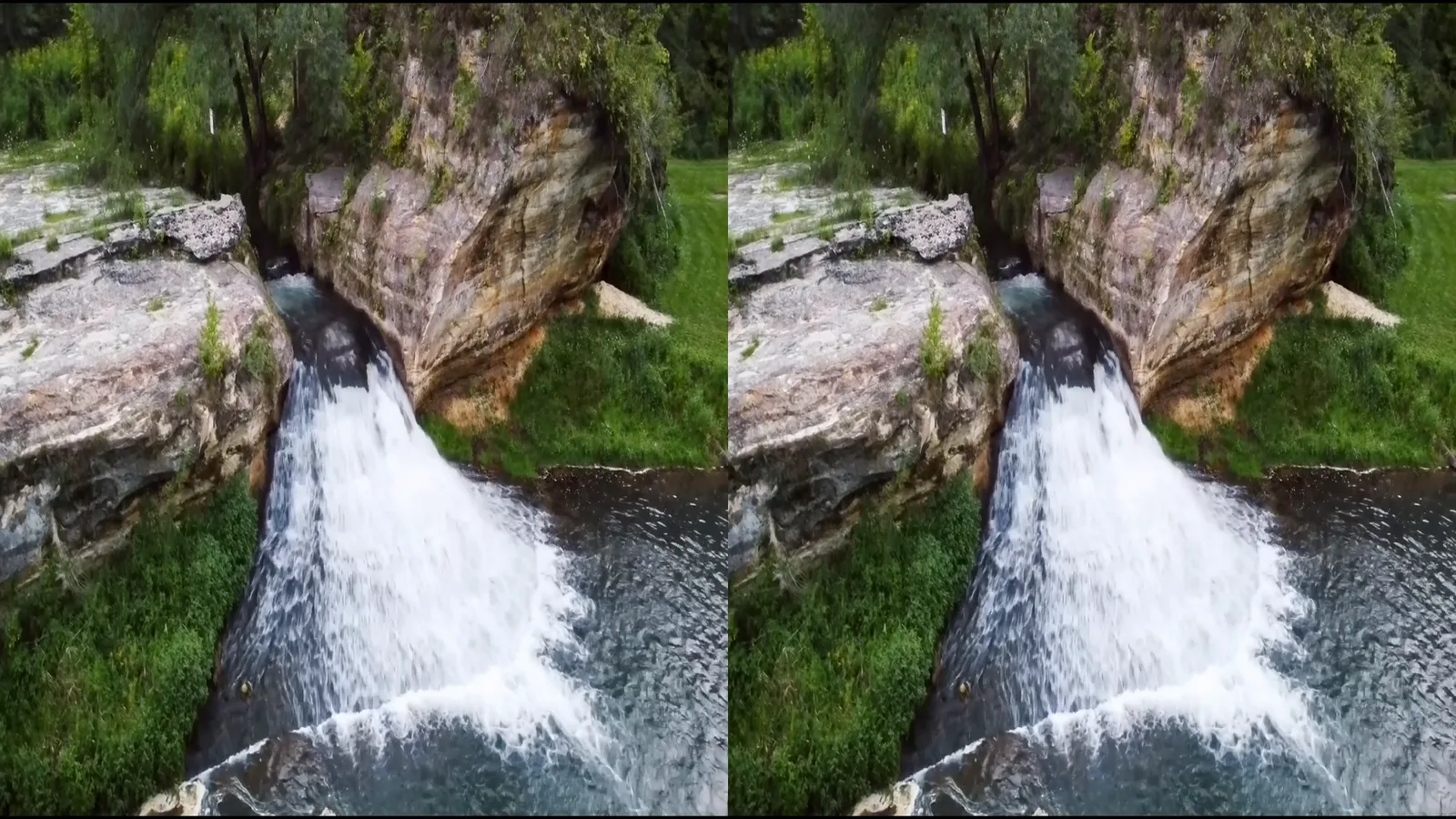
A half side-by-side 3D frame: one picture for each eye, each at half width, in one 1920 x 1080 frame (shown smaller). On the HMZ, this layout is "Side-by-Side" [1]. We made it on November 21, 2026 with the Owl3D app from a flat 2D clip, and have not shown it on an HMZ. It is an AI conversion, not footage from two lenses. Source clip: Como Falls in Hokah, Minnesota, CC0, from Wikimedia Commons [3].
Key takeaways
- The newest HMZ models we found are the HMZ-T3 and HMZ-T3W. See the models.
- 3D goes in over HDMI on the processor unit, not over MHL [1]. See 3D signals.
- A signal without a 3D flag needs a manual 3D setting [1]. See set 3D.
- No 3D version of your video? You can make one on a computer. See 3D sources.
The HMZ models: T1, T2, T3, T3W
We searched for an HMZ-T4 on November 21, 2026. Google (US) page one for "sony hmz-t4" showed the HMZ-T1, HMZ-T2, HMZ-T3 and HMZ-T3W: reviews and forum threads from 2011 and 2012, used listings on eBay, and videos. In the results for "sony hmz-t3 3d", Sony's support page lists the HMZ-T3W and HMZ-T3. We found no Sony page for an HMZ-T4.
From the two Sony manuals we read:
| HMZ-T1 | HMZ-T3 / HMZ-T3W | |
|---|---|---|
| 3D input formats | Frame packing, side-by-side, top-and-bottom [2] | Frame packing, side-by-side, top-and-bottom [1] |
| 3D input resolutions | 720/50p, 720/60p, 1080/50i, 1080/60i, 1080/24p [2] | Depends on the format, see the table below [1] |
| Display resolution | Not in our source | 1,280 x 720 [1] |
| Head unit weight | About 420 g (15 oz) [2] | About 320 g (12 oz) [1] |
| Eye distance range | 55 to 72 mm [2] | 53.0 to 76.7 mm [1] |
| Wireless | Not in our source | WirelessHD 1.1, about 7 m (23 ft). The manual covers both models in one spec list [1] |
We have not read the HMZ-T2 manual, so this guide gives no HMZ-T2 specs.
Which 3D signals the HMZ-T3 takes
Sony's HMZ-T3W and HMZ-T3 manual lists the 3D formats per input resolution [1]:
| Input | Frame packing | Side-by-side | Top-and-bottom |
|---|---|---|---|
| 1080/24p | Yes [1] | Yes [1] | Yes [1] |
| 720/50p, 720/60p | Yes [1] | Yes [1] | Yes [1] |
| 1080/50p, 1080/60p | No [1] | Yes [1] | Yes [1] |
| 1080/50i, 1080/60i | No [1] | Yes [1] | No [1] |
The MHL input on the battery unit takes none of these 3D formats [1]. For 3D, connect the source to one of the three HDMI inputs on the processor unit [1]. The battery unit's HDMI IN/MHL input takes no 3D [1].
The HMZ-T1 list has no 1080/50p or 1080/60p for 3D [2]. On a T1, set the PC or player to 1080/24p, 720/60p or 720/50p for 3D.
How to set 3D on the HMZ
When "Auto 3D" is on, the headset switches to 3D by itself for a signal with a 3D flag [1]. A side-by-side or over-under signal without a 3D flag stays 2D: Sony says such content "is not automatically displayed in 3D" [1]. Then set the format by hand:
- Press MENU and open "3D Settings" [1].
- Under "3D Display", select "Side-by-Side" for two pictures next to each other. Select "Over-Under" for two pictures one above the other [1].
- If the 3D picture looks wrong, try the other setting [1][2].
- After the film, set "3D Display" back to "Off" [1][2].
Buying a used HMZ: what to check
The three HDMI inputs for 3D are on the processor unit [1]. Make sure the listing includes it. Newer headsets and glasses for films are in 3D movies on video glasses.
Frequently asked questions
Is there a Sony HMZ-T4?
We found none. On November 21, 2026, Google (US) page one for "sony hmz-t4", "sony hmz" and "sony hmz-t3 3d" showed the HMZ-T1, HMZ-T2, HMZ-T3 and HMZ-T3W only. Sony's support page in those results lists the HMZ-T3W and HMZ-T3.
Can the Sony HMZ convert 2D to 3D?
No, for the HMZ-T3 and HMZ-T3W. Sony: "The system does not support 2D to 3D conversion (simulated 3D)." [1] We did not find this in the HMZ-T1 pages we read. Convert the video first, on a computer (3D sources).
Sources
- Sony, "HMZ-T3W / HMZ-T3 Reference Guide", pages 28 to 30, 41, 45, 48 and 49. https://www.manualsdir.com/manuals/442531/sony-hmz-t3w-hmz-t3.html Opened 2026-11-21.
- Sony, "HMZ-T1 Reference Guide", pages 19 and 30. https://www.manualsdir.com/manuals/155902/sony-hmz-t1.html Opened 2026-11-21.
- Wikimedia Commons, File:Como Falls in Hokah, Minnesota.webm (CC0). https://commons.wikimedia.org/wiki/File:Como_Falls_in_Hokah,_Minnesota.webm Opened 2026-11-21.
Sources (0)
A 3D Blu-ray player
A 3D Blu-ray player is one source. Connect the player to the processor unit over HDMI. At 1080/24p, the HMZ-T3 takes all three 3D formats, frame packing too [1].
3D files from a PC
Connect the PC to the processor unit over HDMI. Play the side-by-side or top-and-bottom file full screen. Then set "3D Display" to match. The layouts are explained in VR video player settings.
Your own 2D video, converted to 3D first
Sony's HMZ-T3W/T3 manual: "The system does not support 2D to 3D conversion (simulated 3D)." [1] The Owl3D app does it on your Windows PC or Apple silicon Mac. It turns a 2D video that you have the right to use into a 3D file. Two of its outputs fit the HMZ:
- Half Side-by-Side: two pictures next to each other, each at half width. Select "Side-by-Side" on the HMZ. The frame at the top of this page is this output (model Balanced, 1080p, 3D strength Standard, the 3rd of 5 levels).
- Top-Bottom: two pictures one above the other. Played full screen from the PC, select "Over-Under" on the HMZ.
Play the file from the PC as above. It is an AI conversion, not a studio's 3D version. More on this: 2D to 3D video.
From Owl3DOwl3D converterA desktop app for Windows and Mac that turns 2D videos and photos into 3D.