PSVR2 PC Adapter: Does PSVR2 Work on PC, and What You Need
How we researched this: written by Owl3D from published sources, all 49 listed at the end.
Short answer
Yes. A PlayStation VR2 plays SteamVR games on a Windows 10 or 11 PC through Sony's PlayStation VR2 PC adapter ($59 at Sony's US store on October 9, 2026), a DisplayPort 1.4 cable that is not in the box, a USB 3.0 port, and Bluetooth for the two Sense controllers [1][2]. On PC you lose HDR, eye tracking, headset vibration, adaptive triggers and the controllers' fine haptics; you keep the 2000 x 2040-per-eye picture, the 110-degree view, finger touch and see-through [7]. Most of the trouble owners report is the controllers' Bluetooth link, and they report fixes for it too.
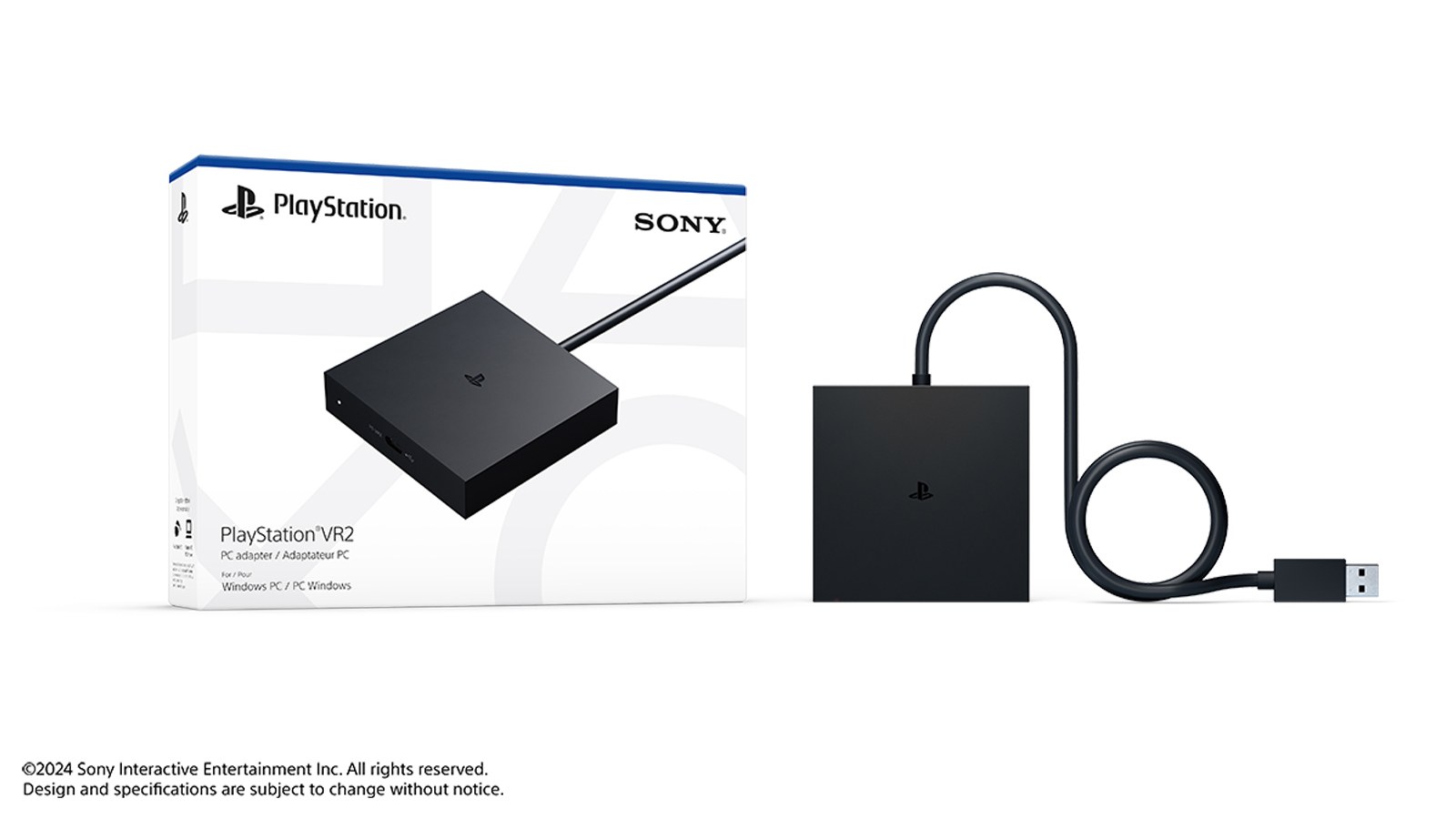
Sony's PC adapter and its box. The DisplayPort cable is not in there. Image: Sony Interactive Entertainment.
Key takeaways
- You need four things besides the headset: the adapter, a DisplayPort 1.4 cable, a free USB 3.0 port and Bluetooth 4.0 or newer; see what you need and Sony's minimum PC.
- A laptop or card with only USB-C, Thunderbolt or HDMI does not qualify: Sony says USB-C-to-DisplayPort and HDMI-to-DisplayPort converters are not supported, and the adapter does not take DisplayPort over USB-C. Mini DisplayPort is fine; see laptops.
- Some graphics cards with a VirtualLink USB-C port (RTX 20-series Founders Editions among them) are reported to run the headset with no adapter; see without the adapter.
- Controllers at "59/100", floating off or refusing to pair: Sony's own checks are under when it does not work, and what owners found is under Bluetooth fixes owners report.
- An unofficial driver mod adds eye tracking and adaptive triggers on PC, but not HDR; see the community toolkit. Weighing it against Valve's Steam Frame: see PS VR2 or Steam Frame.
Quick picks
- You own a PS VR2 and just built a PCwhat you need, then set it up
- Gaming laptop with no full-size DisplayPortlaptops, a yes or no before you buy anything
- It is plugged in and something failswhen it does not work, by symptom
- Choosing a PC VR headset in 2026what owners say and PS VR2 or Steam Frame
- Sim racing or flight sims, no controllersplaying without the controllers
What you need
Four things, plus the headset and its two Sense controllers.
- The PlayStation VR2 PC adapter. Sony's US store listed it at $59.00 on October 9, 2026 (seen from outside the US). In the box: the adapter, an AC adapter, an AC power cord and a manual [1]. Sony's announcement put the estimated retail price at $59.99 [7].
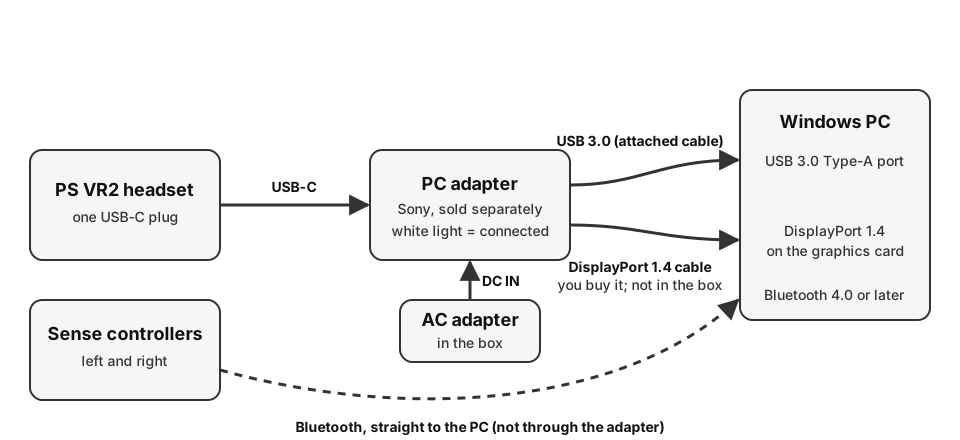
- A DisplayPort 1.4 cable. Not included: "Use of this product requires a commercially available DisplayPort™ cable (sold separately) that is compatible with DisplayPort 1.4" [1]. It goes straight from the adapter to the DisplayPort output on your PC, with no converter in between [2][5]. Buy it with the adapter.
- A free USB 3.0 port on the PC itself. The adapter's attached USB cable must go "directly to the USB port on your PC. Do not use an extension cable or USB hub, as it may cause it to malfunction" [2].
- Bluetooth 4.0 or later for the controllers. They pair with the PC, not with the adapter [3]. Sony's pages allow for a PC's built-in Bluetooth and also list four tested USB adapters, with the warning that operation is not guaranteed [4]. More on this under the controllers.
Then two free downloads from Steam: SteamVR and Sony's PlayStation VR2 App [2]. The app is where you set the headset up, change the play area and update the firmware [2]; you do not have to open it every session afterwards [6].
Last checked : adapter price at Sony's US store.
Sony's minimum PC
| Part | Minimum, per Sony [2] |
|---|---|
| OS | Windows 10 64-bit or Windows 11 64-bit |
| Processor | Intel Core i5 7600, or AMD Ryzen 3 3100 (Zen 2 or later) |
| RAM | 8 GB or more |
| Graphics card | NVIDIA GeForce GTX 1650 or later (Turing or later), any NVIDIA RTX; AMD Radeon RX 5500XT or later, RX 6500XT or later |
| Video output | A dedicated standard DisplayPort or Mini DisplayPort 1.4 output |
| USB | USB 3.0 |
| Bluetooth | 4.0 or later |
For "best performance" Sony recommends an RTX 3060 or later, or a Radeon RX 6600XT or later [2]. So a GTX 970, a GTX 1070 or a GTX 1080 is below the line: Sony's floor on the NVIDIA side is the GTX 1650, and its footnote adds "Turing or later architecture is required" [2]. A PC with only integrated graphics has no card from Sony's list and is below the line too. Any RTX card, including the 5060 people ask about, is on the list; how well a given game runs is then the game's own requirement, which Sony says to read on each game's Steam page [7].
Two more rules from Sony's pages that catch people: keep your graphics driver current, and if the newest one misbehaves, go back one version [2]; and if the PC's monitor is on the motherboard's DisplayPort while the headset is on the graphics card, "you may not be able to start some games" [5].
Gaming laptops: Mini DisplayPort yes, USB-C and HDMI no
A laptop with a Mini DisplayPort output works. Sony's requirement is "a dedicated Mini DisplayPort™ or standard DisplayPort™ output port" [2]. The laptop end then needs a Mini DisplayPort plug: CNET's reviewer wrote that the Alienware laptop used for the review had "only a mini DisplayPort, which meant I needed an adapter" [16].
A laptop with only USB-C, Thunderbolt or HDMI does not, by Sony's rules. Two statements settle the questions people ask most:
- "DisplayPort™ over USB Type-C® is not compatible with your PlayStation®VR2 PC adapter" [2].
- "PS VR2 does not support the use of HDMI-to-DisplayPort™ conversion adapters or USB Type-C-to-DisplayPort™ conversion adapters" [5].
One commenter under a YouTube setup guide (about 2024) bought a DisplayPort-to-HDMI and a DisplayPort-to-USB-C cable for a gaming laptop and reported that "neither work" [41]. If your laptop's USB-C port is the only video output, the official route is closed. A different, unofficial route, plugging the headset's own USB-C plug into a port that carries VirtualLink, is the next section; nobody in the reports we read had it working on a laptop.
All the DisplayPorts on your card are taken by monitors. Move one monitor to HDMI and give the headset the freed DisplayPort. One owner on the Steam forum with an RTX 4090 wrote: "I connected my Monitor via HDMI Cable and PSVR 2 Adapter via DisplayPort Cable and it worked immediately" (October 2024) [31].
Do you need the adapter at all?
For the route Sony supports, yes: the adapter is on its list of required hardware [2]. Without it, the reports are all about graphics cards whose USB-C port carries VirtualLink, a standard announced in 2018 to run a VR headset from a single cable and abandoned in later cards [14].
Road to VR reported on the adapter's launch day, August 7, 2024, that "some graphics cards with USB-C ports allow PSVR 2 users to directly hook into their GPUs and play SteamVR games. All you need to do is download the PlayStation VR 2 App on Steam, no adapter required" [14]. Its list of candidates: the NVIDIA GeForce RTX 2060, 2070, 2070 SUPER, 2080, 2080 SUPER and 2080 Ti, the Quadro RTX 4000 to 8000, and AMD's Radeon VII, RX 6000 and RX 7000, with the caveat that it was the Founders Edition and reference-design cards that had the port, "as partner cards didn’t include VirtualLink" [14]. TheSixthAxis adds that "Nvidia ditched USB-C for the 30 Series, so the adapter is still very relevant" [15].
Owners' reports, which we have not tested: under one YouTube review, one owner wrote "I'm lucky I have a 2080Ti to avoid having to connect the PSVR2 to the adapter" and another "did not know it would work with my 2080 without the adaptor, so far it’s alright, started out kinda choppy during the setup" (both about 2024) [42]. A third asked: "I have a 2060 super but it doesn't have a usb type c port, so I guess it only works with founders edition cards?" (about 2025) [41]. That matches Road to VR's note.
Set it up, step by step
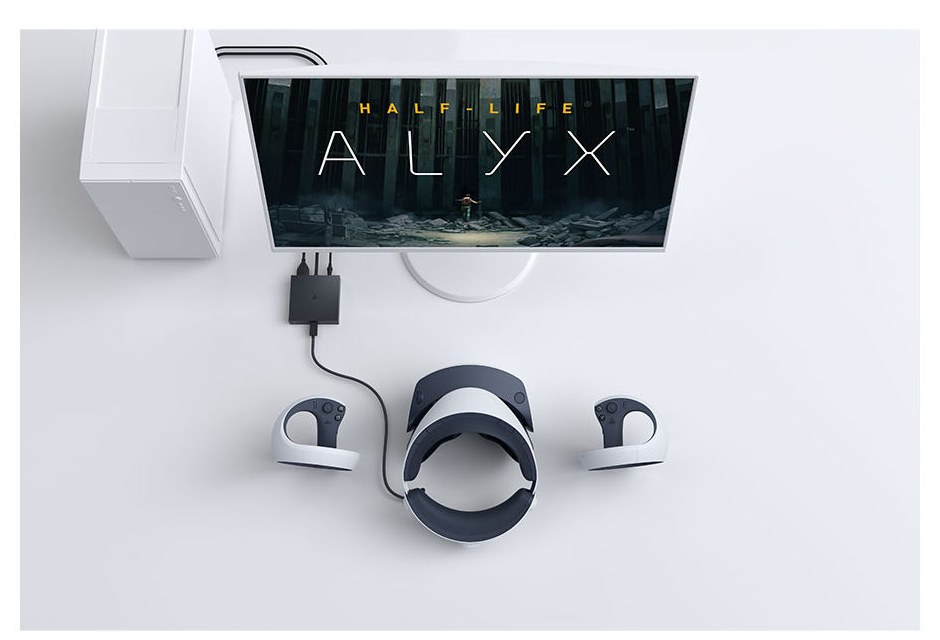
Sony's order, from its set-up page [3]:
- Install Steam, then SteamVR and the PlayStation VR2 App. Both apps are free on the Steam store. Open the PlayStation VR2 App once it is installed and follow it [3].
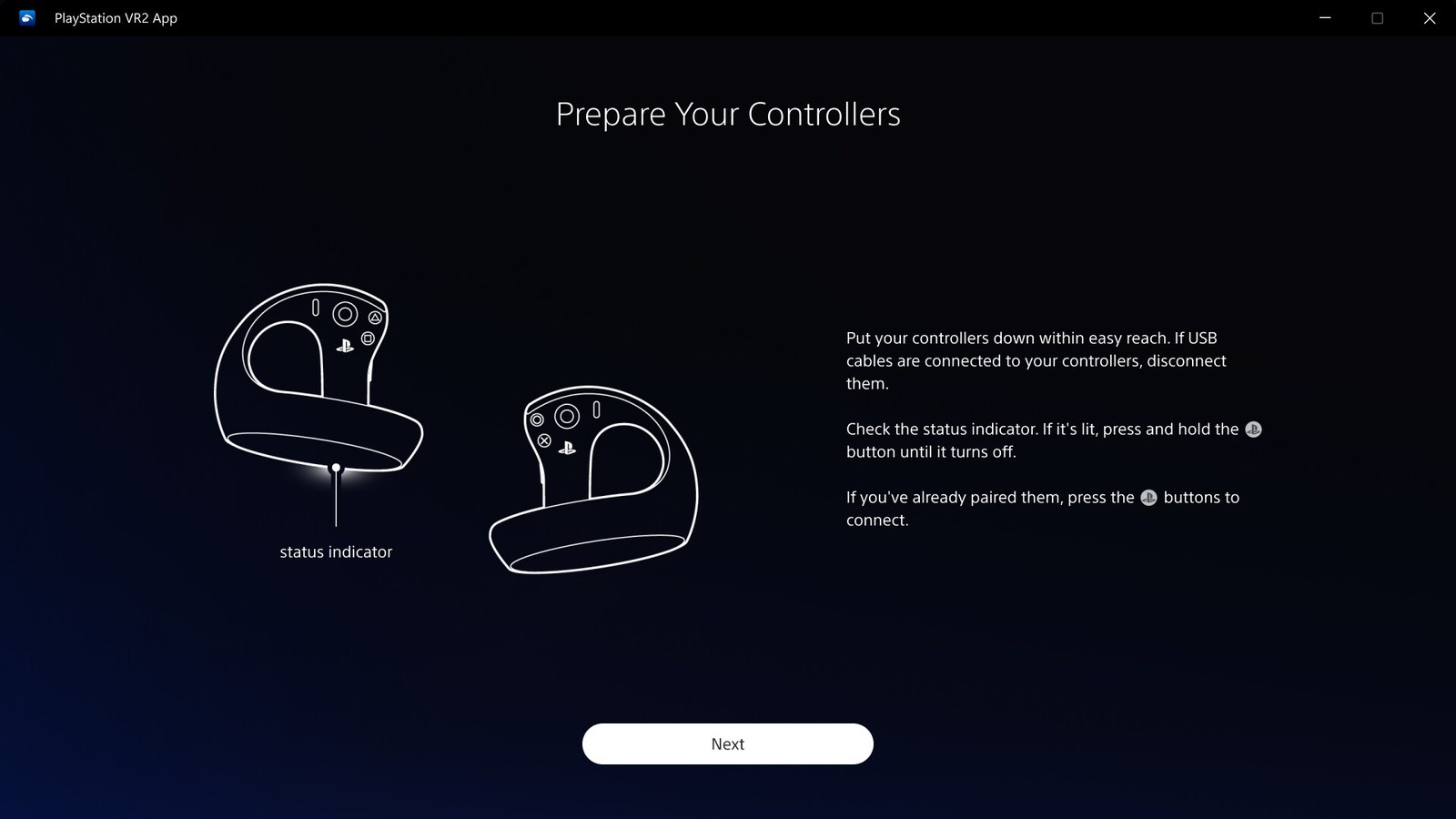
- Pair the controllers over Bluetooth. Unplug any USB cables from them. Turn Bluetooth on in Windows. Hold PS and create on the left controller, PS and options on the right, until the status light blinks; add each one from the PC's Bluetooth settings while it is still blinking. Pair both, one at a time [3]. If they were paired with a PS5, turn the console off first: Sony's tracking checklist says "If you’ve paired your controller with a PlayStation®5 console, make sure the console is turned off" [5].
- Connect the adapter. Its attached USB cable into a USB 3.0 Type-A port on the PC; your DisplayPort 1.4 cable from the adapter to the graphics card; the AC power cord into the AC adapter and the AC adapter into the adapter's DC IN, making all connections before plugging into the wall [3].
- Plug in the headset and turn it on. The headset's USB-C plug goes into the adapter. Press the headset's power button; the adapter's light and the headset's light turn solid white [3]. A solid red light on the adapter means it is powered but the headset is not connected [5].
- Finish in the app. Open the PlayStation VR2 App and follow the on-screen steps: headphones in, press the function button on the headset, clear the space, turn the room lights on, put the headset on, set the lens distance, pick up the controllers, scan the room to set the play area [3].
After that, press the PS button on a controller to open the SteamVR dashboard and launch games from there [6]. Three things from Sony's play page that owners ask about: the function button on the headset gives you see-through view of the room (the game does not pause); holding options on the right controller resets which way is forward; the create button takes a screenshot, and "You can't take video clips using PS VR2 on PC" [6].
Two settings worth changing on day one
- Render resolution. With SteamVR's resolution left on automatic, the headset can render far above its panels, by one owner's report. An RTX 4080 owner on the Steam forum (August 2024): "If the resolution is set to automatic, the PSVR2 renders at 4000x4000 per eye, which is a massive supersampling that even causes issues with a 4080 GPU. Many forum users are resolving this by manually lowering the resolution to 68%" [48]. Sony's own advice for stutter and crashes is to lower the image quality setting and turn off Motion Smoothing in SteamVR [5].
- Refresh rate. The headset runs at 90 or 120 Hz on PC [17]. On AMD cards the choice is made in SteamVR's General settings; Sony added that in app version 2.0.0 (September 2024) [9].
Playing without the controllers
Not through Sony's set-up: it has you pair both controllers and pick them up before you set the play area [3], and the Sony pages cited here give no way to skip that [3][5]. A flight and racing sim player put it this way in a Steam review in August 2026: "the option to skip controller setup would be highly logical if they wanted less salty reviews" and "On PC a lot of us prefer flight and racing sims with out using controllers" [25]. One owner with a headset and no controllers wrote in October 2026 that they had tried guides for the community toolkit and were "still unable to make the app work" [40]. We have not tested any way round it.
What you lose on PC, and what you keep
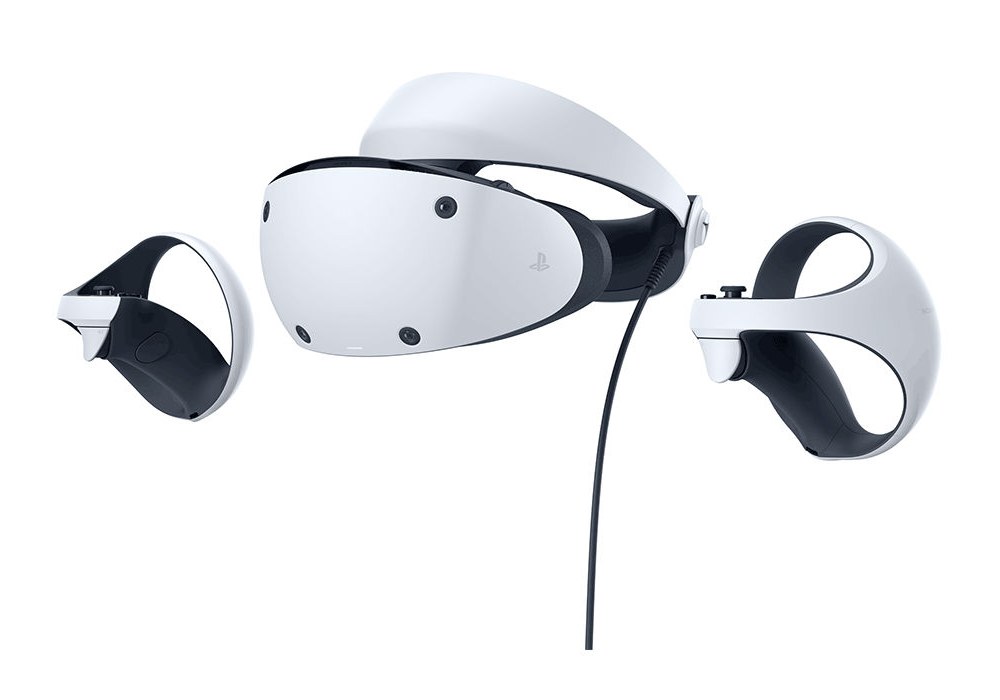
Sony's words: "some key features, like HDR, headset feedback, eye tracking, adaptive triggers, and haptic feedback (other than rumble), are not available when playing on PC. However, other high-fidelity and sensory immersion features of PS VR2 are supported, including 4K visuals (2000 x 2040 per eye), 110-degree field of view, finger touch detection, and see-through view, as well as foveated rendering (without eye tracking) and 3D Audio in supported games" [7]. The 3D audio on PC uses SteamVR's audio, not the PS5's Tempest engine [7].
| Feature | On PS5 | On PC with Sony's app |
|---|---|---|
| Picture: 2000 x 2040 per eye, 110-degree view | Yes | Yes [7] |
| Eye tracking | Yes | No [7] |
| Foveated rendering | Yes | Yes, "without eye tracking" [7] |
| HDR | Yes | No [7] |
| Headset feedback (vibration) | Yes | No [7] |
| Adaptive triggers | Yes | No [7] |
| Controller haptics | Yes | "basic rumble" only [1] |
| Finger touch detection, see-through view | Yes | Yes [7] |
| 3D audio | Tempest 3D AudioTech | SteamVR's audio [7] |
Read the foveated rendering line closely: it is supported "without eye tracking" [7], so on PC it does not follow your eyes.
The community toolkit: eye tracking and triggers, unofficially
PlayStation VR2 Toolkit (PSVR2Toolkit) is a free "Unofficial modification for the official PlayStation VR2 driver/app", published on GitHub under the MIT licence by a group called Bnuuy Solutions, which states it "is not affiliated with Sony Interactive Entertainment" [19]. UploadVR reported its release on August 14, 2025: it "includes eye tracking, adaptive triggers for the Sense controllers, and 10-bit color depth support" and improves controller tracking "by implementing better prediction" [18]. The project's feature list on October 9, 2026 also names "Improved controller haptics (PCM haptics)", "Linux support (w/ Ignition)" and "runtime refresh rate switching (NVIDIA-only)" [19].
What it did not do, by UploadVR's report: HDR, because according to the developers SteamVR does not support what HDR brightness needs, and even 10-bit colour "does not work on newer AMD cards"; and its eye tracking "currently isn't routed to OpenXR, so can't be used for eye-tracked foveated rendering in titles like Microsoft Flight Simulator 2024 and DCS" [18].
Three things to weigh. It is not Sony's, and Sony's troubleshooting page starts from the other end: "If you've installed any unofficial PS VR2 drivers, please remove all PS VR2 devices, and uninstall any unofficial drivers. Then, uninstall and reinstall the PS VR2 App" [5]. Its makers give it "without warranty of any kind", and warn "If you have paid for PlayStation VR2 Toolkit, you have been scammed" [19]. And owners report both outcomes: a Steam reviewer in August 2026 wrote "I recommend getting the community mods for the psvr2" [25], while a commenter under a 2026 setup video wrote that after each attempt to install it "I have to uninstall the PSVR2 app and do a fresh install" [45]. We have not installed it; the files and instructions are on the project's own page.
When it does not work
Each entry: what you see, why, what to do. The "what to do" lines are Sony's own steps from its troubleshooting page [5] unless marked as an owner's report. Sony's first move for everything is: unplug every cable and reconnect in the order above, confirm the DisplayPort cable is 1.4 or higher, then in SteamVR go to Settings, Developer, and turn on Direct Mode [5].
- "Check USB Connection" during setup, on a port that is USB 3.0. The adapter must be on a USB 3.0 port on the PC itself. Sony says that even then "there might be compatibility issues": reconnect to the same port, try another USB 3.0 port, or turn the headset off, reconnect the adapter, and turn it on again [5]. Owners' reports: one fixed a port that had worked the day before by uninstalling the app in Windows and reinstalling it from Steam, which "gives you the opportunity to 'start over'" (August 2026) [32]; a user of a Globular Cluster adapter with the DisplayPort error below wrote "When I switched USB ports, everything finally started working" and "I recommend using a dedicated PCIe USB 3 card to help" (December 2025) [31]. One owner with "a Z790 motherboard with all USB 3.2 ports" switched ports, changed a BIOS setting and bought new cables, and reported it still unrecognised (August 2026) [25].
- "Check DisplayPort Connection", with the cable plugged in. Sony: the cable must be DisplayPort 1.4 or higher and go directly to the DisplayPort output on the PC; no converters [2][5]. Owners add: a DisplayPort 2.1 cable did not help one owner (August 2024) [31]; one found "my display port cable wasn't fully plugged in" because the plug's casing was catching on the PC case (September 2024) [31]; one had put the cable into the motherboard's DisplayPort instead of the graphics card's: "Plug it in directly to the gpu slot. Took me an hour to figure that out!" (about 2024) [41].
- The game shows on the monitor and the headset shows only SteamVR Home. Sony's set-up ends with setting the play area in the app [3], and its sleep-mode note says resuming from PC sleep can cause an error: turn the headset and monitor off, the monitor on, then the headset on [5]. Owners' reports: deleting the SteamVR and PlayStation app folders and reinstalling fixed it for one (September 2024) [33]; "Delete everything inside the psvr2 folder" fixed another whose play area would only show on the monitor after moving to a racing rig (August 2026) [34]; an October 2026 owner with error FW-500001-0 was told to disable OpenXR add-ons in SteamVR's settings, found that option only in the settings window on the desktop and not in the headset, and wrote "This worked, thank you soooooo much! Straight onto the play area!" [35].
- "Cannot track surroundings", or the app complains whenever you sit at your desk. Sony's headset-tracking list: close SteamVR, open the app and "Delete play area data"; wipe the tracking cameras with a lens cloth; close blinds against direct sun; light the room well; look at every part of the room including ceiling and floor when scanning; put posters on plain walls [5]. Two Steam reviewers in September and October 2026 could not use it seated at a PC: "Every time i get to close to my PC, basically how i usually sit, i get huge popup that i cannot play the game because headset can't truck the surroundings" [25]; another, who refunded, wrote "its near imposible to sit at a desk and use this as the headset will state that it cant track your suroundings" [25]. A third fixed tracking by "putting tape around the play area" (October 2026) [25]. On an AMD CPU, a black or frozen screen during the play-area scan is a USB 3.0 port problem, per Sony [5].
- Stutter, dropped frames, or crashes. Sony: lower the SteamVR image quality, turn off Motion Smoothing, and for stutter turn off Hardware-accelerated GPU scheduling in Windows' graphics settings [5]. Owners: set the render resolution by hand (see the two settings); an RTX 4090 owner reverted to an older NVIDIA driver after one "introduced all these dropped frames" (about 2025) [43]; Gaming Trend's reviewer, whose first attempts gave "severe screen tearing, latency issues, and worse", found the adapter "very dependent on your CPU speed" after a move from an Intel 12900K to a newer processor and board cured it [17].
- AMD card: 90 Hz or 120 Hz option gone after a driver update. Reported by an owner on AMD driver 26.5.1 (May 2026): choosing 120 Hz "just sets 90Hz" [47]; by a Radeon 9070 XT owner, the other way round, whose drivers "kind of broke the 90 hz option so i have to stick with 120 hz" (about 2025) [43]; and one who stayed on AMD software 25.3.2 "to keep the 90Hz option" (about 2025) [44]. Sony's general advice applies: if the newest driver misbehaves, go back a version [2].
- The PlayStation VR2 App will not launch after a graphics-card change. Uninstall the old GPU driver; enabling the integrated GPU in the BIOS may also help [5].
- A controller's buttons do nothing in a game. Check the bindings in SteamVR's controller settings; "some games may not correctly reflect VR controller buttons" [5].
- Wrong edition of Windows. One owner under a YouTube review (about 2025): "The N Editions of Windows don't work unless the Media Feature Pack is enabled manually in the Optional features" [43]. One report, not in Sony's pages.
The controllers and Bluetooth
This is where most owners get stuck, so it has its own section. The Sense controllers connect to the PC's Bluetooth, not to the adapter [3]. Sony's compatibility page lists four USB adapters "tested for compatibility on 07/20/2024, but operation is not guaranteed": TP-Link UB500, Buffalo BSBT5D205BK, ASUS USB-BT500 and IO-DATA USB-BT50LE [4]. On September 13, 2024, Sony posted that it had "discovered compatibility issues with PS VR2 in certain environments" with the TP-Link UB500 and pointed to a TP-Link driver [10]; the compatibility page now links that driver [4]. App version 2.5.0 (December 2024) added a warning when the controllers' Bluetooth link is poor [11], and version 3.0.0 (March 2025) added the check owners quote as a score: "You can now check the Bluetooth connection quality of your PS VR2 Sense controllers" under [Check Bluetooth Connection Quality] [12]. The newest update on the app's Steam news page on October 9, 2026 was 3.2.0, from September 18, 2025 [13].
Sony's own checklist for a poor link or lost tracking [4][5]:
- Install the adapter maker's latest Bluetooth driver.
- Put a USB Bluetooth adapter in a USB 2.0 port "as far away as possible from the USB 3.0 port", on a USB 2.0 extension cable, somewhere with line of sight to you.
- If you add an external adapter, disable the built-in one in Device Manager first.
- Charge the controllers; turn off a PS5 they were paired with; turn off other Bluetooth devices ("PS VR2 Sense controller requires faster and more stable Bluetooth communication than other Bluetooth devices").
- Keep Wi-Fi on the 5 GHz band.
- Still stuck: uninstall the Bluetooth driver, shut down, reinstall; then in Device Manager, with hidden devices shown, uninstall the PS VR2 Sense controller driver and unused Bluetooth drivers, and pair again.
- If a controller's firmware update fails, update it over a USB cable instead.
Bluetooth fixes owners report (we have not tested them)
These are owners' own words from the Steam forum of Sony's app, Steam reviews and comments under YouTube reviews, 2024 to October 2026, with counts. Several contradict each other: the fix depends on the PC.
- The motherboard's own antenna, screwed on. A comment with 1.2K likes under one YouTube review (about 2024): "I suspect the Bluetooth issues are mostly caused by people not realising they must have the Wifi antenna connected to their PC for Bluetooth to work properly" [42]. A Steam reviewer in August 2026 who had left the Wi-Fi antenna unplugged: "oops, bluetooth shares the same antenna! Plugged that back in and smooth sailing" [25]. An owner on a second PC (June 2026): "use the bluetooth on your mainboard and connect the antenna that comes with it. dont use adapters if you have mainboard BT" [29]. Two more reviewers in September and October 2026 report built-in Bluetooth at 98/100 and 100/100 [25]. Against this, one owner replied in July 2026: "Mainboard didn't work, yes antennas are installed" [29].
- A PCIe Wi-Fi/Bluetooth card. Three owners say this ended it. October 2026: after both Sony-listed USB adapters failed, "Finally I bought a pci wifi/bt card to plug direcly into the motherboard the (TP-Link Archer TX55E AX3000 WIFI 6 and BT 5.3 adaptor) installed official drivers and I havent had any issues with my two controllers since" [26]. April 2026: "the Asus AX3000 (Pce-AX58BT) Next-Gen WiFi 6 Dual Band PCIe Wireless Adapter with Bluetooth 5.0 with the antenna sitting on the desk was the thing that fixed it" [27]. About 2025, under a YouTube review: "Just get a pcie bluetooth and the problems are none existence" [44]. One owner with a PCIe card still had tracking loss (November 2024) [49].
- A USB dongle with external antennas (ZEXMTE named by three). September 2026: "Don't go with the recommended BT adapters; they did not work at all. The app started working fine and detecting the controllers when I used a dongle with external antennas by ZEXMTE" [25]. July 2026: "Getting ZEXMTE Bluetooth 6.0 Adapter fixed the controllers and they now perform similar to PS5 VR" [29]. October 2025, from an owner done with the ASUS dongle: "ZEXMTE brand is what I'd go with" [27].
- Both controllers stuck at 59/100, each alone at 97 to 100. Four owners on the ASUS USB-BT500 describe exactly this between October 2025 and April 2026, and one Steam reviewer in September 2026 ("forever stuck at 59 (poor) when both controllers are on") [27][25]. The PCIe card above is the one reported fix in that thread; the reviewer gave up.
- The ASUS USB-BT500 driver version. One owner (June 2026) whose year of trouble-free use ended with a Windows update: "DR_USB-BT500_v1011: Broken junk that will make your hands freeze in space every 3 minutes. DR_USB-BT500_v1009: Good, rock-solid driver that works consistently" [27]. Another, August 2026, with the same version: "download version 1.0.0.9 for the dongle. After that go in device manager and delete the driver for the bluetooth device then install the new driver" [30]. Two owners say the BT500 worked for them without that (about 2025) [44].
- Controllers will not pair again the next day, or after a PS5 session. Sony's step is to turn the PS5 off [5]. Owners: "Yes unplugging the PS5 worked!" (about 2025) [41]; "go to bluetooth settings and delete your controllers from the list and then pair them it worked for me" (December 2024) [28]; one removed the stale pairings by "uninstalling the enumerator connections" in Device Manager (May 2025) [20]. One owner who asked about the same thing after a PS5 session had no fix in the thread (November 2024) [38].
- Test before you buy the adapter. A reviewer who could not get both controllers connected at once (August 2026): "just try connecting BOTH of your Sense controllers to your PC's bluetooth to see if it's even worth it for you" [25]. Sony's pairing steps come before the adapter is plugged in [3].
Four more fixes, one owner each
- Older Bluetooth drivers. "just delete new bluetooth drivers and do not update, use old ones (fixed for me)" (November 2024) [39].
- An older Bluetooth 4.0 dongle. "use an earlier Bluetooth adaptor 4.0 , found one sat in my draw for years it runs flawless" (June 2026) [27].
- The dongle on USB 2.0. "I got the asus adapter and I also go a USB 2 hub. Supposedly usb 2 works better than usb 3" (November 2024) [28]. Sony's own checklist says USB 2.0 as well [4].
- USB power management. "in device manager, for every USB controller, in Properties/Power Management, I unchecked the option "Allow the computer to turn off this device to save power"" (August 2026) [30].
And the other outcome, so you can weigh it: after a year, "I just can not get the controllers to remain tracked, one or the other always floats off every couple of minutes" (September 2026) [36]; "Do NOT recommend another dongle, it's the only solution you people ever give" (September 2026) [37]; one Steam reviewer returned the headset over Bluetooth in September 2026 [25]. Sony's app page shows "Mixed" reviews, 1,786 of them on October 9, 2026 [8].
Is PS VR2 any good on a PC? What owners say
Press reviews from the launch month agree on the hardware and differ on the setup. CNET (August 2024): "a Steam VR headset, but you need DisplayPort and USB 3 ports to connect", with an adapter box that "feels clunky compared with the single-cable USB-C solution" for a Quest, and "the clunky setup isn't as easy as the Quest's is" [16]. TheSixthAxis (August 2024): "Compared to the alternatives, PSVR 2 is perhaps now the go-to PC VR headset, and especially if you can get it for a reduced price" [15]. Gaming Trend (January 2025, score 85): "Single cable and you're in VR. Simple!" against "No eye tracking" and "No foveated rendering" [17].
Owners' reports, which we have not tested, from Steam reviews and comments under four YouTube videos, 2024 to 2026. Seventeen owners in all: nine glad, five disappointed, three in between. The clearest of each:
Glad they did
- "Used my psvr2 about 300 hours in gran tourismo and with the pc-adapter on a 4080super for 700 hours on pc simracing (ac, ams2, lmu). I love it!" (YouTube, about 2025) [44]
- "Comparing this to using virtual desktop for my old quest 2 and pro, way more stable, less random hiccups and about 25fps more solo" (Steam review, August 2026) [25]
- "I can confirm that mura is way less on PC. I think it has to do with bandwidth and color compression on PS5." (YouTube, about 2025); a second viewer: "Mura was far less noticeable on PC" [44]
Disappointed
- "I managed after many days of messing about to get the tracking working, and it running smoothly, however.... the lack of eye tracking makes it unplayable for me." (YouTube, about 2025) [41]
- "Personally I have the PSVR2 and I generally would not recommend it to much of anyone. The thing is finnicky, has controller connectivity issues, the play area constantly wipes itself, the lenses have bas god rays, the mura is really poor" (YouTube, about December 2025) [43]
- "Don't waste your time. The controllers wil not stay connected, and it's laggy anyway." (Steam review, September 2026) [25]
Ten more accounts from owners
Glad they did
- "the app has been flawless since day 1 for me. using the warrky adapter (amazon)" (Steam review, August 2026, 587.9 hours on record) [25]
- "I just got a new Pc with 5060ti 16gb card and bought Half life Alex for my first game on Psvr2 on Pc. Brilliant! Runs smooth and looks amazing." (YouTube, about January 2026) [43]
- "I mostly play sim racing and I may be one of a few who prefers the PSVR2 for sim racing. I keep on coming back using my PSVR2 than my Quest 3 or Pico 4. I love this headset. Feels light and no compression at all!" (YouTube, about 2025) [43]
- "Just got my adapter today it was all set up in under ten mins . my desktops bluetooth is fine even at 5 feet back from my system." (YouTube, about 2025) [41]
- "all reviews scared me but this 4 me was flawless" (Steam review, September 2026) [25]
Disappointed
- "I've had a terrible experience with using my PSV2 for PC. Bad tracking and having to recalibrate my boundries every time I restart my computer. I think I'll be selling it and getting a Quest 3." (YouTube, about 2025) [43]
- "Sold the PS VR2 , small sweet spot with the fresnel lenses make it very blurry. Q3 is the way to go here" (YouTube, about 2024) [42]
In between
- "At first I felt it was a bit cumbersome but once I settled into a rhythm of using the same boundary and remembering to make sure the PSVR2 (device) was turned on and connected to the app before turning on Steam VR... it turned into a pretty frictionless experience" (Steam review, August 2026) [25]
- "The PSVR2 is best on Desktop PC's. If you have a laptop you're probably better off using a Meta Quest 3" (YouTube, about 2025) [43]
- An owner on Lenovo's community forum called the setup "like rolling dice from my experience" and found "my pc's bluetooth is better" than the dongle Sony lists (about 2024) [46]
Third-party adapters: Warrky, Globular Cluster, Sedicoca and others
Several makers sell a box that does the adapter's job, often with the DisplayPort cable in the kit. Warrky's own store listed its "PSVR2 PC Adapter Included DP 1.4 Cable&15W Power Supply Cable" at $35.99 on October 9, 2026 (seen from outside the US) [23]. Amazon lists others, among them Sedicoca's kit, whose page showed 15 ratings averaging 3.8 stars [24]; we could not read Amazon's US prices from here.
Last checked : Warrky's price.
What owners report, both ways; we have tested none, and this is not a recommendation of any of them:
- Warrky. One Steam reviewer with 587.9 hours on record: "the app has been flawless since day 1 for me. using the warrky adapter (amazon)" (August 2026) [25]. One commenter under a 2026 setup video had "issues" on a USB 3.2 port and wrote "The biggest issue was the passthrough cameras wouldn't work at all" (about July 2026) [45].
- Sedicoca, three Amazon reviewers. March 2026: "So far I haven't had any issues with frame rate lag, video drop out". August 2025: "when it is connected, it works wonderfully. My problem is that after 10 minutes or so, it starts disconnecting, so I have to cycle the headset's power to reconnect". The same month, another: "Does not work. Have tried multiple cables and multiple computers" [24].
- Globular Cluster, one owner on the Steam forum (December 2025), who got past a DisplayPort error by changing USB ports: "everything is working great since changing the USB port" [31].
- Maker not named, two Steam reviewers in August 2026: "Yeah it works, just get a cheap adapter save yourself some money", and "I'm using an unofficial adapter and the app complained about not having enough bandwidth. I just ignored this and I am getting a solid 90fps in games I play" [25].
Sony's troubleshooting page is written for its own adapter [5].
PS VR2 or Steam Frame?
They are different kinds of headset, and this page does not compare them in depth. Valve describes the Steam Frame as "a streaming-first, wireless VR headset" that also plays some games on its own, and that uses eye tracking to put the best picture quality where you are looking [21]. Road to VR reported on September 14, 2026 that pre-orders opened that day at 1,059 USD for the 256 GB model and 1,299 USD for 1 TB [22]. A PS VR2 on a PC is the wired route: a DisplayPort cable, Sony's adapter, OLED panels [17], and no eye tracking through Sony's app [7].
Last checked : Steam Frame prices as reported by Road to VR on September 14, 2026.
One Steam reviewer whose right controller kept disconnecting came back to edit the review (August 2026): "After watching Steam Frame reviews, decided against purchasing. Was able to utilize the motherboard's Bluetooth with antennas and the controllers work much better" [25]. We have not tried a Steam Frame.
Frequently asked questions
Is the PSVR2 PC adapter necessary?
For Sony's supported route, yes: the adapter and a DisplayPort 1.4 cable are the two hardware items on Sony's requirements page [2]. The exception owners report is a graphics card with a VirtualLink USB-C port, which Road to VR says means RTX 20-series Founders Editions and some AMD reference cards [14]; see without the adapter.
Does the PSVR2 work on Steam?
Yes. On PC it is a SteamVR headset and nothing else: Sony's app and SteamVR are the two required programs, and games come from Steam's VR catalogue [2][16]. Half-Life: Alyx, Fallout 4 VR and War Thunder are the titles Sony named in its announcement [7].
Can I use PSVR2 on PC without controllers?
Not through Sony's set-up, which has you pair and pick up both controllers before the play area is set [3]; see playing without the controllers.
Does PSVR2 work on Linux or a Steam Deck?
Not officially: Sony's requirements list Windows 10 and Windows 11 only [2]. The unofficial toolkit's feature list includes "Linux support (w/ Ignition)" [19], and one Steam reviewer wrote in July 2026: "A pretty decent PCVR headset on Linux through the new open source utility Ignition" [25]; we have not tried it. Sony's pages cited here do not mention the Steam Deck, and none of the owners' reports we read describes a Deck running the headset.
Can I play the first PlayStation VR on a PC?
That is a different headset, and this guide does not cover it. Where the first PlayStation VR still has a use for 3D films, on a PS4, is in our guide to 3D Blu-ray players.
Can I watch movies on PSVR2 on PC?
We have not tested films on a PS VR2 connected to a PC, where it runs through SteamVR [2]. Our guide to watching movies in VR covers Meta Quest and Apple Vision Pro, not the PS VR2.
Does the PSVR2 PC adapter work on a Mac?
No. Sony's requirements list Windows 10 and 11 64-bit only [2].
Sources (49)
- Sony Interactive Entertainment, PlayStation Direct (US), "PlayStation®VR2 PC Adapter". https://direct.playstation.com/en-us/buy-accessories/playstationvr2-pc-adapter (opened 2026-10-09, from outside the US)
- PlayStation Support, "How to prepare for using PS VR2 with PC". https://www.playstation.com/en-us/support/hardware/pc-prepare-ps-vr2/ (opened 2026-10-09)
- PlayStation Support, "How to set up PS VR2 on PC". https://www.playstation.com/en-us/support/hardware/pc-ps-vr2-set-up/ (opened 2026-10-09)
- PlayStation Support, "Bluetooth adapters compatible with PS VR2 on PC". https://www.playstation.com/en-us/support/hardware/pc-ps-vr2-bluetooth/ (opened 2026-10-09)
- PlayStation Support, "How to troubleshoot your PS VR2 on PC". https://www.playstation.com/en-us/support/hardware/pc-ps-vr2-troubleshoot/ (opened 2026-10-09)
- PlayStation Support, "How to use PS VR2 to play VR games on PC". https://www.playstation.com/en-us/support/hardware/pc-play-ps-vr2/ (opened 2026-10-09)
- PlayStation.Blog, "PlayStation VR2 players can access games on PC with adapter starting on August 7", June 3, 2024. https://blog.playstation.com/2024/06/03/playstation-vr2-players-can-access-games-on-pc-with-adapter-starting-on-august-7/ (opened 2026-10-09)
- Steam, "PlayStation®VR2 App" store page. https://store.steampowered.com/app/2580190/PlayStationVR2_App/ (opened 2026-10-09)
- Steam news, "PlayStation VR2 App 2.0.0 Released", September 13, 2024. https://store.steampowered.com/news/app/2580190/view/4346620828133311753 (opened 2026-10-09)
- Steam news, "Compatibility issue between PlayStation VR2 and TP-Link UB500", September 13, 2024. https://store.steampowered.com/news/app/2580190/view/4607834045439094017 (opened 2026-10-09)
- Steam news, "PlayStation VR2 App 2.5.0 Released", December 5, 2024. https://store.steampowered.com/news/app/2580190/view/4452466204163964942 (opened 2026-10-09)
- Steam news, "PlayStation VR2 App 3.0.0 Released", March 12, 2025. https://store.steampowered.com/news/app/2580190/view/515199938040169694 (opened 2026-10-09)
- Steam news, "PlayStation VR2 App 3.2.0 Released", September 18, 2025. https://store.steampowered.com/news/app/2580190/view/502832157038741220 (opened 2026-10-09)
- Road to VR, "PSVR 2 Works on PC Without the Adapter If You Have the Right Graphics Card", August 7, 2024. https://www.roadtovr.com/psvr-2-no-pc-adapter-required-gpu-specs/ (opened 2026-10-09)
- TheSixthAxis, "PSVR 2 PC Adapter Review – Is Sony’s headset now the go-to for PC VR?", August 15, 2024. https://www.thesixthaxis.com/2024/08/15/psvr-2-pc-adapter-review-is-sonys-headset-now-the-go-to-for-pc-vr/ (opened 2026-10-09)
- CNET, "Sony’s PSVR 2 Adapter for PC Makes It a Good PC VR Headset, but Not Better Than Quest", August 12, 2024. https://www.cnet.com/tech/gaming/sonys-psvr-2-adapter-for-pc-makes-it-a-good-pc-vr-headset-but-not-better-than-quest/ (opened 2026-10-09)
- Gaming Trend, "PlayStation VR2 PC Adapter review — Simplicity personified", January 7, 2025 (updated February 6, 2025). https://gamingtrend.com/reviews/playstation-vr2-pc-adapter-review-simplicity-personified/ (opened 2026-10-09)
- UploadVR, "PlayStation VR2's Eye Tracking Now Works On SteamVR Via Open-Source Driver Mod", August 14, 2025. https://www.uploadvr.com/playstation-vr2-eye-tracking-now-works-on-pc-via-open-source-driver-mod/ (opened 2026-10-09)
- GitHub, BnuuySolutions, "PSVR2Toolkit" README. https://github.com/BnuuySolutions/PSVR2Toolkit (opened 2026-10-09)
- Steam discussion, "Controllers won't pair the next time I use PSVR2 on PC - attempting new setup.", January to May 2025 (users' reports). https://steamcommunity.com/app/2580190/discussions/0/592887534192734167/ (opened 2026-10-09)
- Valve, "Steam Frame" (Steam Hardware). https://store.steampowered.com/hardware/steamframe (opened 2026-10-09, from outside the US)
- Road to VR, "Valve Announces Steam Frame Price, Release Date, and Accessories – Pre-orders Now Open", September 14, 2026. https://www.roadtovr.com/valve-steam-frame-price-release-pre-orders/ (opened 2026-10-09)
- Warrky, "PSVR2 PC Adapter Included DP 1.4 Cable&15W Power Supply Cable". https://warrky.com/products/psvr2-pc-adapter-included-dp-1-4-cable-15w-power-supply-cabl (opened 2026-10-09, from outside the US)
- Amazon, "Sedicoca PSVR2 PC Adapter", customer reviews (users' reports). https://www.amazon.com/dp/B0DR56PJGC (opened 2026-10-09)
- Steam, user reviews of the PlayStation®VR2 App, most recent (users' reports, July to October 2026). https://steamcommunity.com/app/2580190/reviews/?browsefilter=mostrecent&p=1 (opened 2026-10-09)
- Steam discussion, "HOW I FINALLY FIXED MY BLUETOOTH ISSUES!", October 7, 2026 (users' reports). https://steamcommunity.com/app/2580190/discussions/0/586188069723460566/ (opened 2026-10-09)
- Steam discussion, "This Bluetooth crap is driving me bonkers", January 2025 to June 2026 (users' reports). https://steamcommunity.com/app/2580190/discussions/0/592886359937537795/ (opened 2026-10-09)
- Steam discussion, "Controllers won't pair?", August to December 2024 (users' reports). https://steamcommunity.com/app/2580190/discussions/0/6015206719887395527/ (opened 2026-10-09)
- Steam discussion, "for flawless tracking:", June to July 2026 (users' reports). https://steamcommunity.com/app/2580190/discussions/0/658233956736723550/ (opened 2026-10-09)
- Steam discussion, "PSVR 2 App Wont Track Controllers - Cannot Create Play Area", August 2026 (users' reports). https://steamcommunity.com/app/2580190/discussions/0/585056732983625539/ (opened 2026-10-09)
- Steam discussion, "Need Help "Check DisplayPort Connection"", August 2024 to December 2025 (users' reports). https://steamcommunity.com/app/2580190/discussions/0/4766584846445404310/ (opened 2026-10-09)
- Steam discussion, ""Check USB Connection" error even yesterday lall was OK", July to August 2026 (users' reports). https://steamcommunity.com/app/2580190/discussions/0/574921762383460219/ (opened 2026-10-09)
- Steam discussion, "VR games only on computer screen but not on VR headset", September 2024 (users' reports). https://steamcommunity.com/app/2580190/discussions/0/4852154959745427270/ (opened 2026-10-09)
- Steam discussion, "Cannot change play area", August 2026 (users' reports). https://steamcommunity.com/app/2580190/discussions/0/585056462065283743/ (opened 2026-10-09)
- Steam discussion, "Getting Error Message FW-500001-0", October 2026 (users' reports). https://steamcommunity.com/app/2580190/discussions/0/586188069723507813/ (opened 2026-10-09)
- Steam discussion, "I sadly give up", September 2026 (users' reports). https://steamcommunity.com/app/2580190/discussions/0/500617242799713909/ (opened 2026-10-09)
- Steam discussion, "Only one controller tracks.", September 2026 (users' reports). https://steamcommunity.com/app/2580190/discussions/0/500617242799730373/ (opened 2026-10-09)
- Steam discussion, "Controllers Not Reconnecting To PC", November 2024 (users' reports). https://steamcommunity.com/app/2580190/discussions/0/6660355571253825484/ (opened 2026-10-09)
- Steam discussion, "Tracking was working fine and now it isn't.", August 2024 to February 2025 (users' reports). https://steamcommunity.com/app/2580190/discussions/0/6015206955930776430 (opened 2026-10-09)
- Steam discussion, "PSVR2 without controllets", October 2026 (a user's report). https://steamcommunity.com/app/2580190/discussions/0/586187435308805035/ (opened 2026-10-09)
- YouTube, Nathie, "How To Use PSVR2 On PC: Adapter Setup Guide", comments (users' reports, 2024 to 2026). https://www.youtube.com/watch?v=2WDKuFGsX3s (opened 2026-10-09)
- YouTube, Virtual Reality Oasis, "PSVR 2 PC Adapter Review! Is PSVR 2 A Good PCVR Headset?", comments (users' reports, 2024 to 2025). https://www.youtube.com/watch?v=XHcyak8Ly3o (opened 2026-10-09)
- YouTube, MartydudeVR, "PSVR2 on PC: The Good, Bad & Ugly (1 Year Review)", comments (users' reports, 2025 to 2026). https://www.youtube.com/watch?v=g9ysKYUiXpE (opened 2026-10-09)
- YouTube, Jammyhero, "Is PSVR2 on PC WORTH IT? | 1 Year Later REVIEW", comments (users' reports, 2025 to 2026). https://www.youtube.com/watch?v=IGj2yWoZC14 (opened 2026-10-09)
- YouTube, SpriteVR, "How to Use PSVR2 On PC! - Comprehensive Guide (2026)", comments (users' reports, 2026). https://www.youtube.com/watch?v=XApzVtxtPC8 (opened 2026-10-09)
- Lenovo Legion community, "PSVR2 PC ADAPTER PERSONAL REVIEW" (a user's report, about 2024). https://gaming.lenovo.com/general/post/psvr2-pc-adapter-personal-review-vLXIl2H3dU9rkQ5 (opened 2026-10-09)
- Steam discussion, "[BUG] 120 Hz broken at latest AMD driver 26.5.1", May 2026 (users' reports). https://steamcommunity.com/app/2580190/discussions/0/844005195821157382/ (opened 2026-10-09)
- Steam discussion, "Urgent issue with automatic resolution that needs fixing", August 2024 (users' reports). https://steamcommunity.com/app/2580190/discussions/0/4422058023931247385/ (opened 2026-10-09)
- Steam discussion, "Right controller loses tracking", November 2024 (users' reports). https://steamcommunity.com/app/2580190/discussions/0/4638239892706528911/ (opened 2026-10-09)