Wigglegram Maker
Make a wigglegram from two photos, a 3D camera file, or a single photo, and save it as a GIF or MP4.
Make a wigglegram
Turn a 3D photo, or one ordinary photo, into a wiggling 3D GIF or video. It is made in your browser. Your pictures are not uploaded.
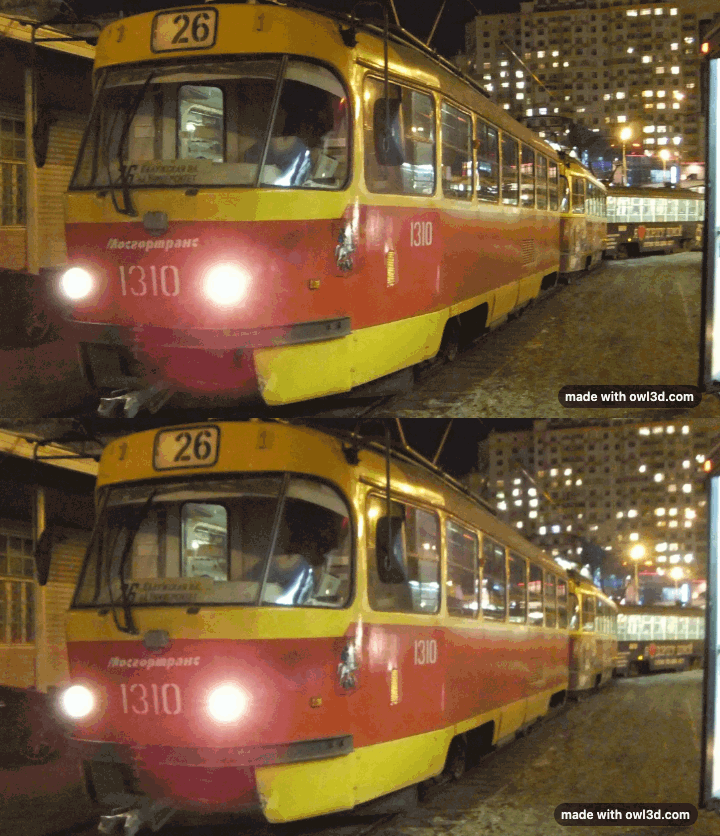
A tram, from a Fujifilm 3D camera.
Your wigglegram appears here.
For 3D video, and for higher-quality depth, there is the Owl3D converter, a desktop app.
How to use it
- Pick what you have. "A stereo pair or 3D photo file" (two photos of the same scene, left then right, a side-by-side image, or an MPO or JPS file from a 3D camera) or "One normal photo", for which the tool makes the in-between views with AI. No pictures yet? Press "Load an example".
- Add your pictures. A stereo pair is lined up automatically, so only the depth moves. A single photo waits for the depth model (about 27 MB, or 50 MB on WebGPU, downloaded once).
- Tap the pivot point. Tap the thing that should stay still, usually your main subject. Everything nearer and farther then rocks around it.
- Set the speed and shape, then download. Pick Original, Square 1:1, Portrait 4:5 or Vertical 9:16, and save a GIF or a video (MP4, or WebM where the browser cannot make MP4).
What this wigglegram maker does
A wigglegram flips quickly between two or more views of the same scene, taken from slightly different places. The depth comes from parallax, the way near and far things shift against each other, so you see it with no glasses and on any screen [1]. It is also called wiggle 3D, wobble 3D or wiggle stereoscopy [1].
It takes two kinds of input:
- A stereo pair or stereo file. Two photos, a side-by-side image, an MPO from a 3D camera such as the Fujifilm W1 or W3 [5] or a Nintendo 3DS [6], or a JPS. Automatic alignment corrects differences in height, tilt and size between the views, so the picture rocks smoothly instead of jumping.
- One normal photo. An AI depth model estimates how far away each part of the picture is, and the tool renders views from slightly to the left and right. The depth is the model's estimate, not a second photograph.
Everything happens in your browser: your pictures are not uploaded.
The mark. Every export carries a small 3D "made with owl3d.com" mark that sits just in front of the scene.
The controls, explained
| Control | What it does |
|---|---|
| Speed | Time for one swing there and back. One Photoshop tutorial uses a tenth of a second per frame [2] |
| Amount (one photo) | How far the view moves. More looks deeper, but edges can stretch |
| Pivot point | The part of the scene that stays still |
| Smooth in-between frames (one photo) | Adds views between the two ends, so it sways instead of flicking |
| Shape | Original, Square 1:1, Portrait 4:5 or Vertical 9:16 |
| Download | "GIF" or "Video" (MP4, or WebM where your browser cannot make MP4) |
A stereo pair always flips between your two real photos: the jerky, flicking look many people like. From one photo the tool adds frames in between by default, for a smoother sway [1]; switch "Smooth in-between frames" off for the classic flick.
Frequently asked questions
What is a wigglegram?
An animation that alternates between views of a scene taken from slightly different positions. Your brain reads the way objects move relative to each other as depth, the same cue a sideways camera move in a film gives [1]. Both eyes see the same picture, so it is not true stereoscopic 3D, but it needs nothing but a screen [1].
What camera do I need?
None in particular. The classic wigglegram cameras are 35mm film cameras with several lenses side by side: the Nimslo and the Nishika N8000 from the 1980s each take four half-frame pictures at once, and the newer RETO3D has three lenses [2][3]. A Nintendo 3DS takes two views at once with its two outer cameras [3][6]. A phone works too (next question), and so does one photo here.
How do I make a wigglegram with my phone?
Take a photo, step or slide sideways a short way while keeping the phone level and pointed at the same thing, and take another. Wigglegrams are also made from three or four frames [1][3]; this tool uses two, or makes the in-between views itself from one photo. The scene has to stay still between shots [3]. Then add the photos here, left first; they are lined up automatically. Or add a single photo and let the tool make the views.
I have three or four frames from a Nishika, Nimslo or RETO3D. Can I use them all?
No: this tool flips between two views. Add two of your frames, left one first. The two outer frames are furthest apart, so they give the strongest depth; two neighbouring frames give a gentler wiggle. Scan each frame as its own picture, or crop them apart, before adding them.
What speed should I use?
A Photoshop tutorial finds a tenth of a second per frame works well [2]. "Speed" here is the time for one swing there and back, so with two views 0.2 seconds gives a tenth of a second each. If it feels too fast, slow it down: a slower wiggle is easier to look at.
Why does the pivot point matter?
The pivot is the one place that does not move: everything in front of it swings one way and everything behind it the other. Most people put it on the main subject, so the subject stays put while the scene rocks around it. A Photoshop tutorial uses a point in the middle of the picture and says to try a different point if it does not look right [2]. Here that means tapping another point.
GIF or MP4 for Instagram and TikTok?
MP4. A GIF is the classic format for websites and messages, but Meta's developer specification for publishing to Instagram lists MP4 or MOV for Reels and stories, and no GIF [7], and TikTok's developer guide lists MP4, WebM and MOV [8]. The tool's MP4 repeats the wiggle until the clip is at least four seconds long. For TikTok and Reels, use the Vertical 9:16 shape.
Why does my wigglegram jump or wobble?
Usually because the two photos differ in height or tilt, or something moved between them. The tool lines them up automatically, so set the pivot on the main subject: it then stays still while the rest rocks around it. People or leaves that moved between shots cannot be fixed by alignment; take the pair again, or use one photo.
Can I make one from a single photo?
Yes. Add one photo and the AI depth model makes the in-between views. Turn "Amount" down if the edges of the subject stretch or smear: the model has to fill in a little of what the camera never saw.
Seeing your 3D photos without wiggling
A wigglegram is one way to show depth without glasses. If you have stereo pairs and want them to stand still in real 3D, save them as side-by-side images with our Stereo Photo Converter. The Owl3D Shift, a 14-inch glasses-free 3D display used beside a computer, shows a side-by-side picture on its screen in 3D, for one viewer at a time. For video, the Owl3D converter, a desktop app for Windows and Mac, turns 2D videos and photos into side-by-side or top-bottom 3D with AI.
Learn more
How stereo photos work: Stereoscopic 3D. Cameras that take them: 3D cameras.