Video Depth Map: AI Tools and Why Per-Frame Depth Flickers
How we researched this: written by Owl3D from published sources, all 8 listed at the end.
Short answer
A video depth map is a grayscale picture for every frame that shows what is near the camera and what is far. AI makes one from an ordinary video. Image models such as Depth Anything V2 estimate one picture at a time [3]. Run them frame by frame and the depth flickers [1][4][5]. Video models such as Video Depth Anything keep the depth steady over the whole clip [1]. For a steady depth video you run yourself, use Video Depth Anything [1]. Inside an edit, use DaVinci Resolve Studio [7]. To make the video 3D, the Owl3D app does the depth and the 3D in one step. Owl3D, the publisher of this guide, makes the Owl3D app named here.
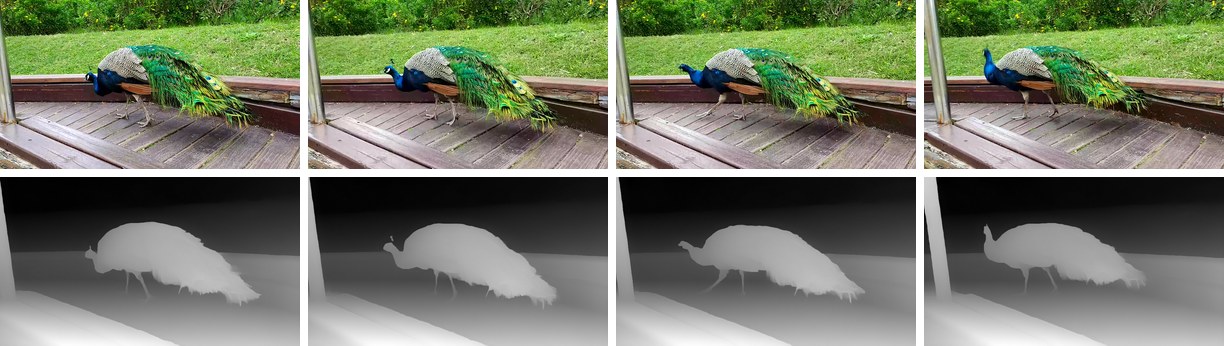
Our test: frames 1, 16, 32 and 48 of a 1.6-second clip, each over its own AI depth map (lighter is nearer). Made by Owl3D with Depth Anything V2 Small, the model of our Photo to 3D tool, one frame at a time. Video: Mx. Granger, CC0, via Wikimedia Commons [8].
Key takeaways
- A depth map from one frame at a time flickers. A video depth model makes it steady. A smoothing step makes it steadier but adds lag. See why it flickers.
- Four routes: a desktop app, an editor effect, an open model you run yourself, or a script. See the tools.
- Check every depth video on a still shot and after a cut before you use it. See how to check.
- To make the video 3D, you may not need a separate depth map at all. See make it 3D.
What a video depth map is
A depth map is a grayscale image the same size as the frame. Each pixel's grey level says how far that point is from the camera. A video depth map is one such image per frame, saved as a video or an image sequence.
Many AI models give relative depth, not distance in metres [4]. Depth Anything V2 was fine-tuned "with metric depth labels to obtain our metric depth models" [3], and its README offers four models "for robust relative depth estimation" [3]. Video Depth Anything ships separate metric models too [2]. DepthCrafter's authors name "depth-based visual effects and conditional video generation" as uses [4].
Why a per-frame depth map flickers
Image models were "tailored for static images, without considering the temporal information in videos" [4]. Each frame is estimated on its own. In our test, as in our Photo to 3D tool, each frame's map is also stretched on its own to the full black-to-white range. So the same wall can come out one grey in one frame and a slightly different grey in the next. Video models fix this by sharing "the same scale and shift across the entire video" [1], instead of a per-frame normalization [4].
We measured it. We took 48 frames of the clip above (960 × 540 px) and made a depth map of each with Depth Anything V2 Small, one frame at a time. Then we looked only at "still" pixels: pixels whose colour changed by less than 4 of 255 levels from one frame to the next. The depth there should not change.
| On still pixels, from one frame to the next | Per-frame depth | Smoothed depth |
|---|---|---|
| Mean change in depth (of 255 grey levels) | 1.62 | 0.50 |
| Worst pair (frames 46 to 47) | 4.30 | 0.67 |
| Cost: gap from the frame's own depth on changing pixels, last frame | none | 3.95 levels |
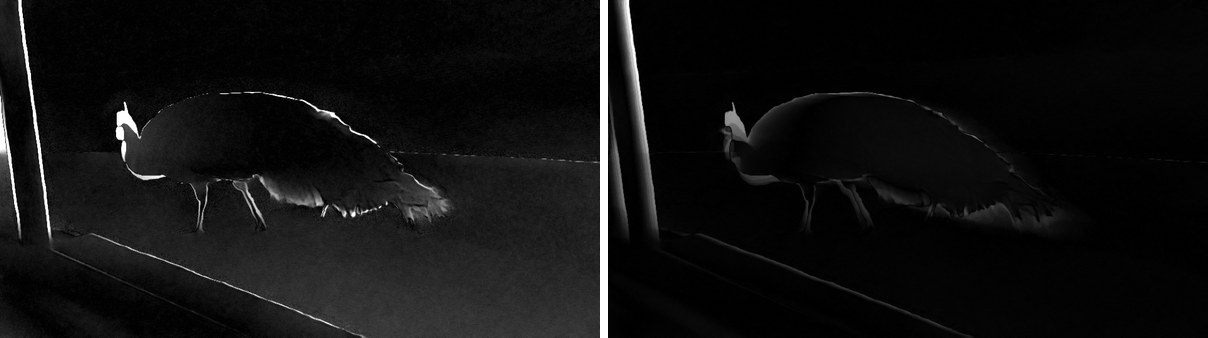
The "smoothed" column is the simplest fix: each frame's map is 25% its own and 75% the frame before. It cut the change on still pixels by about two thirds. The price is lag: the smoothed depth trails the moving bird. In two frame pairs no pixel changed by 4 levels or more, and the per-frame depth did not change either.
Video-Depthify, a script set, has an optional step to "Run the frame average to reduce the flicker" [6].
Ways to make a video depth map
| Route | What it is | What it needs | What you get |
|---|---|---|---|
| Owl3D app | Desktop app for Windows and Mac | Your video file. The "Balanced" model runs on any GPU and works offline | A grayscale depth map video. Or "RGBD": the video beside its depth map. Smoothing over time: not stated |
| DaVinci Resolve Studio | Video editor. Its page lists "3D Depth Map" with the AI tools of its Neural Engine [7] | The paid Studio version. Blackmagic says "Studio includes DaVinci AI Neural Engine" [7] | A depth map inside your edit |
| Video Depth Anything | Open model from the Depth Anything team [1] | Python and a GPU. Small model: Apache-2.0. Base and Large: CC-BY-NC-4.0, non-commercial [2] | Steady depth for "super-long videos (over several minutes)" [1] |
| Video-Depthify | Open scripts: ffmpeg plus MiDaS, per frame [6] | Python, PyTorch, ffmpeg; "Unix system recommended (WSL on Windows)" [6] | Per-frame depth with optional averaging [6] |
Speed. The Video Depth Anything README lists 9.1 ms latency for the Small model (FP32). It measured this on one A100 data-centre GPU, with input of shape 1 × 32 × 518 × 518 [2]. The paper says the smallest model runs "at 30 FPS" in real time [1]. For comparison, our per-frame test ran on a laptop's CPU: about 1.6 seconds of model time per frame (8-bit Small model, input 924 × 518). A 10-second, 30 fps clip would take about 8 minutes that way.
Other research models. DepthCrafter makes depth "up to 110 frames" at a time from a video diffusion model, and stitches longer videos [5]. Consistent Video Depth Estimation (2020) fine-tunes a network to each video [5]. It handles "a moderate degree of dynamic motion" [5], but "still breaks down for extreme object motion" [5].
Check a depth video before you use it
- Watch a still shot. Play the depth video on a shot where the camera does not move. Walls and floors should stay one grey. If they pump brighter and darker, the depth flickers.
- Watch a cut. At a scene cut, see whether the depth of the new shot appears at once or fades in over several frames. A fade comes from smoothing.
- Watch a moving subject. Look for a light halo trailing it. That is lag from smoothing, as in the right half of our picture above.
- Check the polarity. Find out whether the next tool wants near as white or near as black. Invert the map if it does not match.
What to save
Save more grey levels than you think you need. The Owl3D app's own depth import says: "Near is white, far is black. 16-bit grayscale (PNG, FFV1) keeps the most detail." An 8-bit video has only 256 grey levels. Keep the depth map the same size and frame rate as the video, so each frame matches its map.
Use the depth map to make the video 3D
If your goal is a 3D video for a VR headset or a 3D screen, you do not need to make the depth map yourself. The Owl3D app estimates the depth and draws the second eye's view in one step. It saves side-by-side 3D, and Spatial Video on a Mac. The free plan converts the first 60 seconds of each video.
You can also bring your own depth. The app can use "your own depth video or image in place of Owl3D's" for each file. That way a depth map from Video Depth Anything or Resolve drives the 3D. Either way it is an AI conversion: the depth is estimated, not filmed with a second camera.
From Owl3DOwl3D converterA desktop app for Windows and Mac that turns 2D videos and photos into 3D.For a depth map of a single photo, use our free depth map generator in your browser. For the RGBD format, see RGBD video. For how to judge a 3D conversion, flicker included, see 2D to 3D conversion quality.
Frequently asked questions
Why does my depth map video flicker?
Most likely each frame was estimated on its own, by an image model. Each frame's depth is also scaled on its own, so the same surface changes grey from frame to frame [4][5]. Use a video depth model, or smooth the maps over time and accept some lag.
Is an AI depth map in real distances?
Usually not. Many models give relative depth: nearer and farther, not metres [4]. Video Depth Anything has separate metric models for distances [2].
Can I use Video Depth Anything in a commercial project?
The Small model is under the Apache-2.0 license. The Base and Large models are under CC-BY-NC-4.0, a non-commercial license [2]. Check the license of any model before you use its output in paid work.
Can I make a depth map of a video for free?
Yes. The open models and scripts above are free to run on your own computer, under their licenses [2][6]. The Owl3D app's free plan also makes a depth map, of the first 60 seconds of each video.
Sources (8)
- "Video Depth Anything: Consistent Depth Estimation for Super-Long Videos", arXiv 2501.12375 (abstract; HTML v4). https://arxiv.org/abs/2501.12375 (opened 2026-11-28)
- Video-Depth-Anything README, GitHub (models, speed table, license). https://github.com/DepthAnything/Video-Depth-Anything (opened 2026-11-28)
- "Depth Anything V2", arXiv 2406.09414 (abstract) and README (license). https://arxiv.org/abs/2406.09414 (opened 2026-11-28)
- "DepthCrafter: Generating Consistent Long Depth Sequences for Open-world Videos", arXiv 2409.02095 (HTML v2). https://arxiv.org/abs/2409.02095 (opened 2026-11-28)
- Luo et al., "Consistent Video Depth Estimation", arXiv 2004.15021 (abstract; HTML v2). https://arxiv.org/abs/2004.15021 (opened 2026-11-28)
- jankais3r, Video-Depthify README. https://github.com/jankais3r/Video-Depthify (opened 2026-11-28)
- Blackmagic Design, "DaVinci Resolve Studio" (section on the DaVinci Neural Engine). https://www.blackmagicdesign.com/products/davinciresolve/studio (opened 2026-11-28)
- Mx. Granger, "Peacock walking and eating.webm", Wikimedia Commons, CC0. https://commons.wikimedia.org/wiki/File:Peacock_walking_and_eating.webm (opened 2026-11-28)