RGBD Video: What It Is and How to Make One From 2D
How we researched this: written by Owl3D from published sources, all 3 listed at the end.
Short answer
An RGBD video is an ordinary video with its depth map beside it in the same frame. One half holds the colour picture (RGB). The other half holds a grey depth map (D) that says how near or far each part of the picture is [1][2]. Looking Glass Studio uses that depth map to show the video as a hologram on a Looking Glass display [1]. You do not need a depth camera: the Owl3D app estimates depth for every frame of a 2D video and exports RGBD. This guide is by Owl3D, the maker of the Owl3D app and the Owl3D Shift 3D display. Skip to: the layout · make one from 2D · from a depth camera · play it · looks wrong
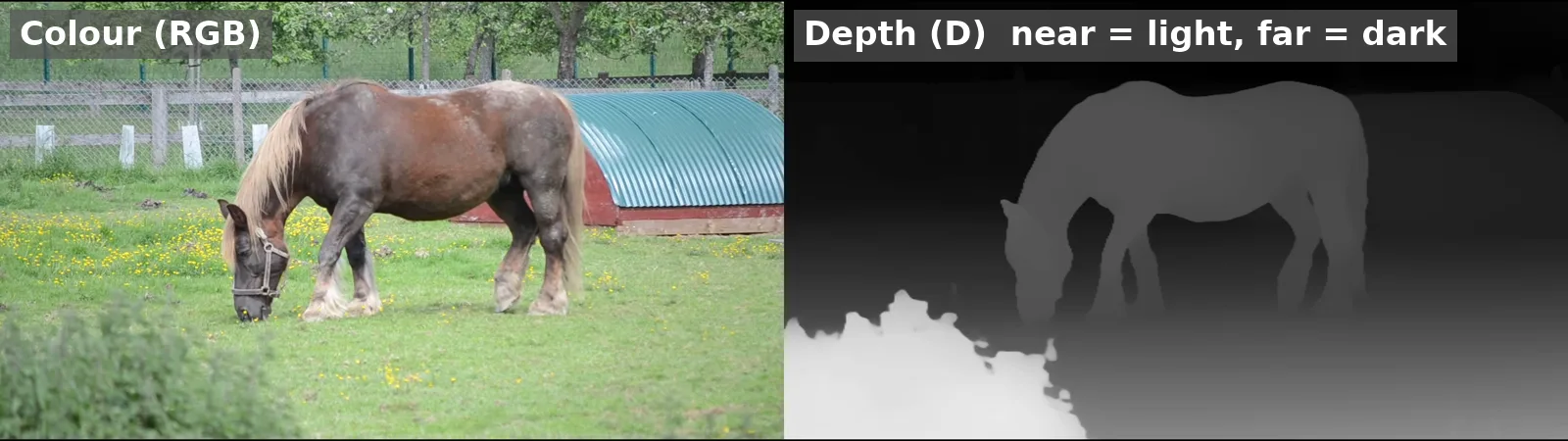
Our own RGBD output: colour on the left, depth on the right, 3840 x 1080. Made with the Owl3D app 2.8.0, Balanced model, on a Windows PC, 2026-11-21. Source clip: "A grazing horse at the Écomusée de la Bintinais" [3], Wikimedia Commons, CC0. Labels added by us.
Key takeaways
- RGBD = colour + depth. In our export each frame is twice as wide: picture on one half, its depth map on the other.
- Looking Glass Studio plays RGBD images and videos on a Looking Glass display [1].
- From a 2D video: the Owl3D app makes the depth map frame by frame and exports RGBD, with its Balanced model, on every plan. On the Free plan it converts the first 60 seconds of a video.
- The hologram is only as good as the depth map. Flat, warped or shaking depth shows up on the display.
What an RGBD video looks like
An RGBD video holds one view of the scene and a depth value for every pixel. It does not hold a left-eye and a right-eye view. Looking Glass puts it this way: RGB is "the color image or video", D is "a grayscale depth map describing how near or far each part of the image is", and the two "are placed together in a supported layout" [1].
In our own export the layout is:
| Our RGBD file (Owl3D app 2.8.0) | |
|---|---|
| Frame size | 3840 x 1080: two 1920 x 1080 halves |
| Left half | The colour video |
| Right half | The depth map: near is light, far is dark |
| Frame rate | 23.976 (our 8 s clip) |
| Length | The same as the source; one depth frame for every colour frame |
For a single photo, the idea is the same. Our free Depth Map Generator makes the depth map of one image in the browser. What a depth image is, and why some tools make near white and others near black, is in our depth image guide.
Make an RGBD video from a 2D video
You need the Owl3D app on your computer, and the video. We tested on a Windows PC. Use the Balanced model: the app makes RGBD with Balanced only. Balanced runs on any GPU, on every plan, and works offline. The Free plan converts the first 60 seconds of a video.
- Open the Owl3D app and add your video.
- Pick the Balanced model.
- Set the 3D format to RGBD. Keep Video, and pick the resolution (we used 1080p).
- Start the conversion. The app writes an MP4 with the colour on the left and the depth on the right.
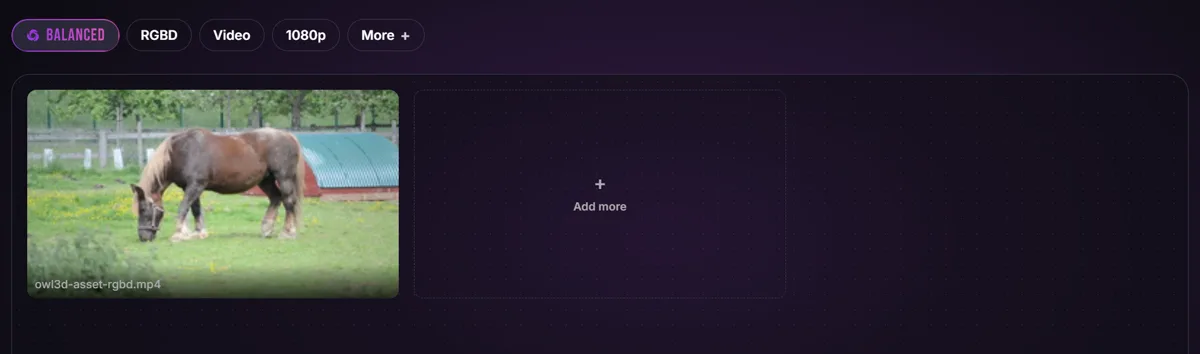
Our 8-second clip took 20.9 seconds to convert at 1080p. Here are 3 seconds of the result:
Make one from a depth camera
A depth camera such as the OAK-D records colour and depth, but not as one RGBD file [2]. An OAK-D owner who wanted RGBD video for a Looking Glass Portrait wrote in 2021: "Creating an RGB-D image is trivial and all one needs to do is create a new image with double the width and with the original one + the depth map side-by-side" [2]. For video, people in the same thread suggested doing that for every frame, for example by placing the depth video to the right of the colour video in a video editor [2]. The thread links Luxonis's own examples [2]. We have not tested a depth camera route.
Play an RGBD video
Looking Glass Studio loads RGBD images and videos and plays them on a Light Field Display connected through Looking Glass Bridge [1]. Looking Glass creator plugins mostly make quilts (a grid of views), so RGBD depth usually comes "from a separate tool or workflow" [1]. Which Looking Glass display to get, and what each one plays, is in our Looking Glass guide.
Why an RGBD video looks wrong
- The hologram looks flat. The depth map has too little contrast between near and far. Use a clip with a clear foreground and background.
- Edges smear or bend. The depth map's outline does not match the object, often around hair, leaves and fast motion. The bush in our frame shows a ragged edge.
- The scene is inside out. Near and far are swapped. Our export makes near light. Check the depth polarity your player expects.
- You see two pictures side by side. The player did not read the file as RGBD. Load it as RGBD in the player, not as a normal video.
- The depth shakes between frames. The depth map changes from one frame to the next, and the display shows that change as shaking.
RGBD or side-by-side 3D?
They are made for different screens. An RGBD video holds one view and its depth, for light field displays such as Looking Glass [1]. A side-by-side (SBS) 3D video holds a left-eye and a right-eye view, for 3D TVs and VR headsets. The Owl3D app also exports full side-by-side 3D: pick Side-by-side (VR/AR) as the 3D format instead of RGBD.
From Owl3DOwl3D converterA desktop app for Windows and Mac that turns 2D videos and photos into 3D.Frequently asked questions
What does RGB-D stand for?
Colour (red, green, blue) plus depth. RGB is the colour picture and D is a grey depth map of how near or far each part is [1].
Can I make an RGBD video without a depth camera?
Yes. An AI depth model can estimate depth from an ordinary video. The Owl3D app does this frame by frame and exports RGBD with its Balanced model.
Which side is the depth map on?
In our Owl3D export, the colour is on the left and the depth on the right. Looking Glass says only that the two go "together in a supported layout" [1], so check what your player expects.
Is RGBD the same as a depth map?
No. A depth map is the grey depth half alone. An RGBD file holds the colour picture and its depth map together.
Can I play an RGBD video on a 3D TV or VR headset?
Not as it is: those screens show a left-eye and a right-eye view. Make a side-by-side 3D video from the same clip instead.
Sources (3)
- Looking Glass Help Center, "What are quilt and RGBD content for Light Field Displays?" (last updated September 24, 2026). https://looking-glass.helpscoutdocs.com/article/422-quilt-vs-rgbd-content (opened 2026-11-21)
- Luxonis Forum, "Generating RGB-D video." (December 2021). https://discuss.luxonis.com/d/426-generating-rgb-d-video (opened 2026-11-20)
- Wikimedia Commons, "A grazing horse at the Écomusée de la Bintinais", CC0. https://commons.wikimedia.org/wiki/File:A_grazing_horse_at_the_%C3%89comus%C3%A9e_de_la_Bintinais.webm (downloaded 2026-11-21)