How to Judge 2D-to-3D Conversion Quality, and What Usually Goes Wrong
How we researched this: written by Owl3D from published sources, all 6 listed at the end.
Short answer
Run the same hard clips through each converter and watch the results on the screen you will really use. Check edges and thin things (hair, ropes, railings), glass and smoke, the strip beside near objects that the camera never filmed (disocclusion), depth that flickers over time, objects cut by the frame edge, subtitles, faces, and whether frame size, sound and HDR come through. Every AI conversion is an estimate: compare how often artifacts show and how bad they look. Owl3D, the publisher of this guide, makes 2D-to-3D conversion software, including Owl3D Cloud, described in one section below; the other makers are quoted from their own pages.
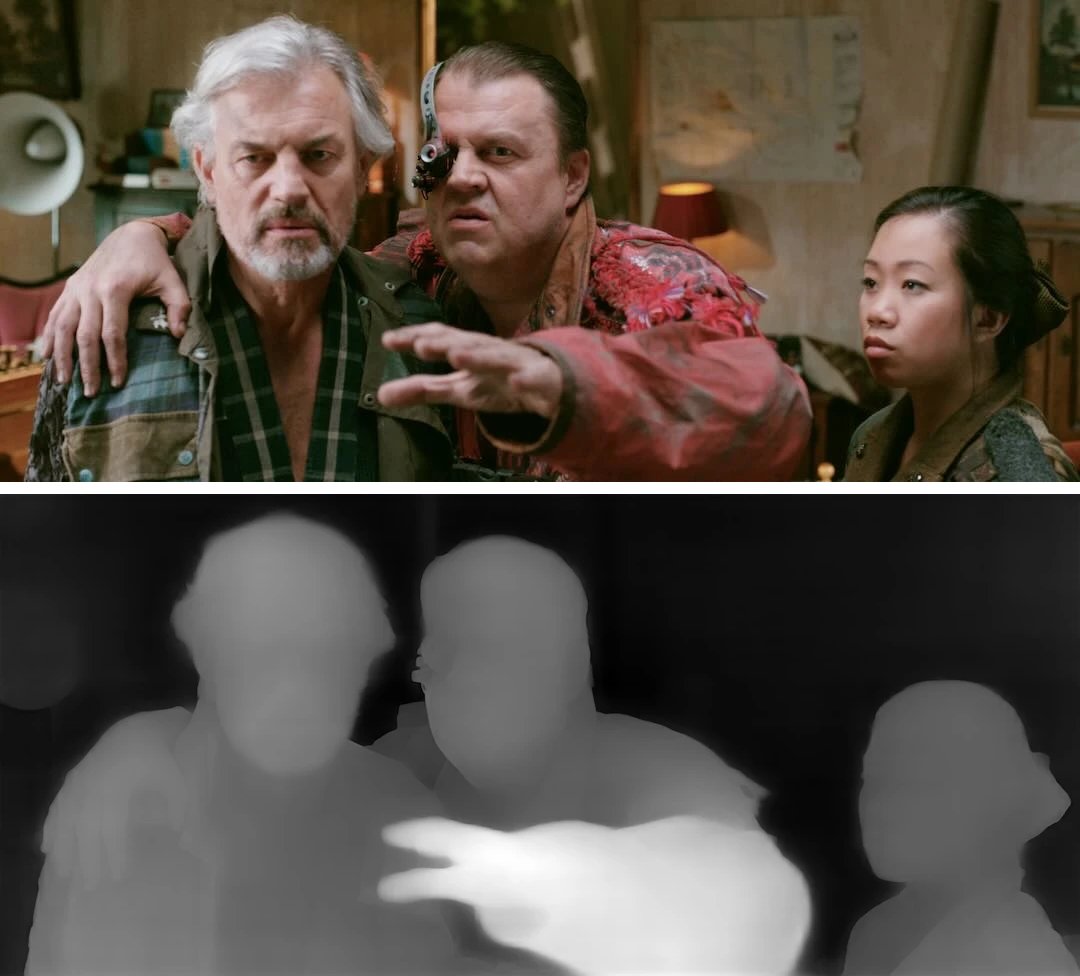
A video frame and an AI depth map of it, where "lighter areas are closer" [1]. Immersity and iw3 both build on depth maps like this [2][3]. Pictures: owl3d.com.
Key takeaways
- Faults cluster at edges, in glass and smoke, and in the gaps a second view opens: checklist.
- Depth flicker shows in still shots and after scene cuts: checklist.
- A fair test: same clips, target screen, each eye's picture alone: how to test.
- Studios paint the gaps by hand; AI estimates them: AI or studio.
What an AI converter does, and where the gap comes from
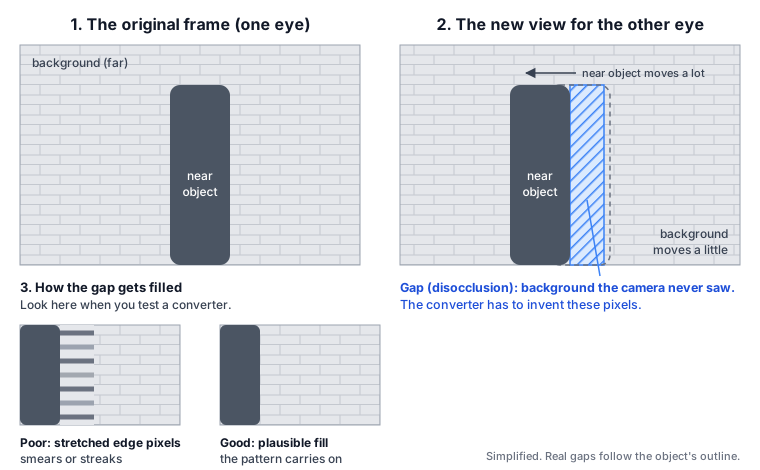
An AI converter estimates how far away each part of every frame is (a depth map), then shifts the pixels sideways by that depth to draw a picture for the other eye. In Wikipedia's words, "pixels of the original image are shifted to the left or to the right depending on depth map, maximum selected parallax, and screen surface position" [4]. Near things move more than far things, so the second view uncovers background that was hidden behind them. Researchers call these areas disocclusions: "holes may appear in the synthesized view due to disocclusion, thus significantly degrading the quality" [5]. Unless the background shows elsewhere in the shot, "the unknown areas must be filled in by an artist or inpainted, since the exact reconstruction is not possible" [4].
The checklist: what to look for
| Check | Clip that shows it | Good | Bad |
|---|---|---|---|
| Edges and thin things | Hair against a bright sky, ropes, railings, fences | Clean outline in both eyes; thin parts at their own depth | Halo or doubled edge; thin parts break or snap to the background |
| Glass, reflections, smoke | Windows, mirrors, water, smoke, rain, snow | Nothing jumps to an odd depth | A reflection pasted onto the glass; smoke warping the scene behind it |
| Gaps beside near objects | A person crossing a detailed background (brick, foliage, signs) | The background carries on plausibly | Smears or streaks of stretched edge pixels |
| Temporal stability | A long still shot, a fast pan, a scene cut | Depth stays put until the scene changes | Depth pumps or flickers; a jolt after a cut |
| Screen plane and comfort | Objects at the left or right frame edge; wide landscapes | Edge-cut objects sit at or behind the screen; distant views are easy to look at | Window violations; eyes pulled outward on far backgrounds |
| Black bars, titles, subtitles | A widescreen film with bars; burned-in subtitles; credits | Bars flat and black; text flat and readable | Bars bend or gain depth; letters warp |
| Faces and close-ups | Talking heads, close-ups | Round faces; nose and ears at believable depths | Flat cut-outs, or features at the wrong depth |
| File basics | Any clip | Same frame size per eye, frame rate, audio tracks, HDR if offered | Lower resolution, dropped audio tracks, HDR silently turned to SDR |
What the sources say behind each row:
- Edges and ghosting. Wikipedia lists "fuzzy semitransparent object borders – such as hair, fur, foreground out-of-focus objects, thin objects" among the hard cases, and blames poor handling of semitransparent edges for "edge doubling or ghosting" [4]. iw3's author writes that even very accurate depth "causes artifacts at foreground and background edges" [3].
- Glass and smoke. A depth map "inherently does not support semi-transparent objects or areas" [4]. Immersity's FAQ says "artifacts may be introduced at object edges and in areas with transparency or reflections" [1].
- Gaps. "Simple occlusion-filling techniques" lead to "stretching artifacts near object edges" [4]; Immersity: "Some stretching of objects may occur on edges" [1].
- Flicker. Immersity: "Temporal changes might also occur as each frame is processed independently" [1]. iw3 has a Flicker Reduction option that "stabilizes temporal variations in the depth range" and resets its state "at scene boundary frames" [3].
- Frame edges and comfort. When an object cut off by the side of the frame appears in front of the screen, Wikipedia calls it a "window violation": "an effect results that is unnatural and is undesirable" [6]. Distant objects should leave the eyes "neither crossed nor diverging" [6]. A file's left-right offset grows with the screen it is shown on, so a background that is comfortable on a phone can push your eyes outward on a wall; see parallax and screen size.
- Subtitles. Burned-in subtitles "will be processed along with the video, potentially causing artifacts in the subtitle display" [1].
- Faces. The "cardboard effect" is when objects "appear flat to the audience, as if they were made of cardboard" [4].
- File basics. Open the source and each result in MediaInfo or ffprobe and compare width, height, frame rate, audio tracks and colour transfer (PQ or HLG means HDR).
How to run a fair test
- Pick five to eight short clips. Cover the rows above: hair, glass, a crossing person, a still shot, a pan with a cut, a widescreen scene with subtitles, a close-up. Under a minute each is enough.
- Feed every tool the same files. Use each tool's default settings first and write down anything you change.
- Watch on the target screen. Use the real size and seating distance; a phone and a projector show different faults.
- Look at each eye's picture alone. Open the side-by-side file flat and check both halves. Some tools keep the original in one eye and draw only the other; iw3's guide says the drawn eye then gets "twice as much artifact/distortion" [3]. If you see a double outline in 3D but each half is clean, the doubling comes from the screen or glasses, not the file.
- Flip between left and right. Take the same frame from each half and toggle between them. Near things should shift one way, far things the other, and the screen plane should stay still; strips that change texture beside edges are the filled gaps.
- Watch ten minutes or more. Comfort problems and slow depth pumping show over time, not in a still.
AI or studio conversion
Wikipedia separates "quality semiautomatic conversion for cinema and high-quality 3DTV" from "low-quality automatic conversion" [4]; its automatic section describes older motion- and cue-based methods, not today's AI depth models. In studio work, people cut out each surface (rotoscoping), shape its depth, and repaint uncovered areas; "Time-consuming steps are image segmentation/rotoscoping, depth map creation and uncovered area filling" [4]. AI conversion automates those steps, which makes it fast and cheap enough for a whole library, and its fills are estimates. Gap-filling research agrees: such techniques "can only provide an estimation for a hole which may not be good enough or may even be erroneous" [5].
Where Owl3D fits
Owl3D Cloud runs in the browser. An AI model (StereoGen V2 Large) estimates depth for every frame and draws a second view for the other eye: an AI conversion, not the studio's 3D. Black bars are detected once for the whole film, kept out of the 3D and added back unchanged; a very dark band across the full width, such as a night sky, can be taken for a bar and stay flat. Owl3D's conversions are estimates too and can show the artifacts on this page. A new account converts its first 3 minutes of video free, with no card, so you can run this checklist on your own clips: convert a video to 3D online. Output format, limits and file details are on Owl3D Cloud specs.
Frequently asked questions
What is disocclusion in 3D conversion?
The background a second viewpoint reveals beside a near object, which the original camera never filmed. A converter has to invent it [4][5].
Why does my converted 3D video flicker?
Often because depth is estimated frame by frame and changes slightly between frames; Immersity's FAQ names this cause for its own tool [1]. Look for it in still shots, where nothing should move in depth.
Sources (6)
- Leia Inc., "FAQs" (immersity). https://www.leiainc.com/faqs (opened 2026-10-30)
- Leia Inc., "Immersity adds 2D-to-3D Video Conversion Tool", June 1, 2024. https://www.leiainc.com/news-articles/immersity-ai-platform-adds-new-2d-to-3d-video-conversion-tool (opened 2026-10-30)
- nagadomi, "iw3" README, GitHub. https://github.com/nagadomi/nunif/blob/master/iw3/README.md (opened 2026-10-30)
- Wikipedia, "2D to 3D conversion". https://en.wikipedia.org/wiki/2D_to_3D_conversion (opened 2026-10-30)
- Shuai Li, Ce Zhu, Ming-Ting Sun, "Hole Filling with Multiple Reference Views in DIBR View Synthesis", arXiv:1802.03079, February 8, 2018, abstract. https://arxiv.org/abs/1802.03079 (opened 2026-10-30)
- Wikipedia, "Stereoscopy", sections on viewing and "Stereo window". https://en.wikipedia.org/wiki/Stereoscopy (opened 2026-10-30)