What Is a Depth Image (Depth Map)? How It's Made and Used
How we researched this: written by Owl3D from published sources, all 17 listed at the end.
Short answer
A depth image, also called a depth map, is a picture where each pixel holds how far away that part of the scene is, instead of its colour [1][2]. It is usually shown in grey, with near and far at the two ends: some software makes near white, some near black [1][3]. Depth images come from depth sensors, from two cameras side by side, or from an AI model that estimates depth from one ordinary photo [2][4]. You can make one from your own photo below, free, in your browser.

Left: the photo. Right: its depth map, made with our free Depth Map Generator (near is white). Photo: Marco Del Torchio 95, CC0, via Wikimedia Commons.
Key takeaways
- Each pixel of a depth image is a distance, not a brightness, so a depth map is not a greyscale photo; see what it shows.
- White can mean near or far, depending on the software; see white or black.
- Sensors measure depth; an AI model working from one photo estimates which things are nearer, not distances in metres; see how it is made.
- Phones use depth for portrait blur and face unlock; 3D software uses it to turn a flat picture into a 3D one; see uses.
- Make a depth map from any photo in your browser, free, with nothing uploaded; see make one now.
What a depth image shows
In Apple's words, a depth map is like an image, but "instead of each pixel providing a color, it indicates distance from the camera to that part of the image (either in absolute terms, or relative to other pixels in the depth map)" [2]. Related terms in 3D graphics are Z-buffer and Z-depth, the Z being the camera's line of view [1].
Each distance is shown as a shade of grey, but a depth map is not a greyscale photo. A maker on the Carbide 3D forum carving a horse from an ordinary picture (July 2021) found "the low spots I'd rather be the high spots"; the reply: "you need a depthmap (heightmap?), not simply a grayscale image" [17].
The number of shades matters. "An 8 bit depth map can only represent a range of up to 256 different distances" [1]; a 16-bit file has 65,536.
Make a depth map from your photo
Make a depth map from a photo
Add a picture and get its depth map. An AI model works it out on your own device, in your browser. Your picture is not uploaded.
Riders at Yosemite Falls, 1901.
The first time, your browser downloads the depth model (27 to 50 MB) and keeps it for next time.
Your depth map appears here.
For video, and for higher-quality depth and 3D, there is the Owl3D converter, a desktop app.
The tool runs Depth Anything V2 Small in your browser, so the photo stays on your device. It saves near as white or black, in 8 or 16 bits; the full tool page explains the settings for engraving, CNC, Blender and ControlNet.
White is near, or black is near?
Both are in use. Wikipedia's example map is drawn with "Nearer surfaces are darker; further surfaces are lighter" [1]. The ControlNet depth model for image generation was trained on maps with "black representing deep areas and white representing shallow areas", that is, white near [3].
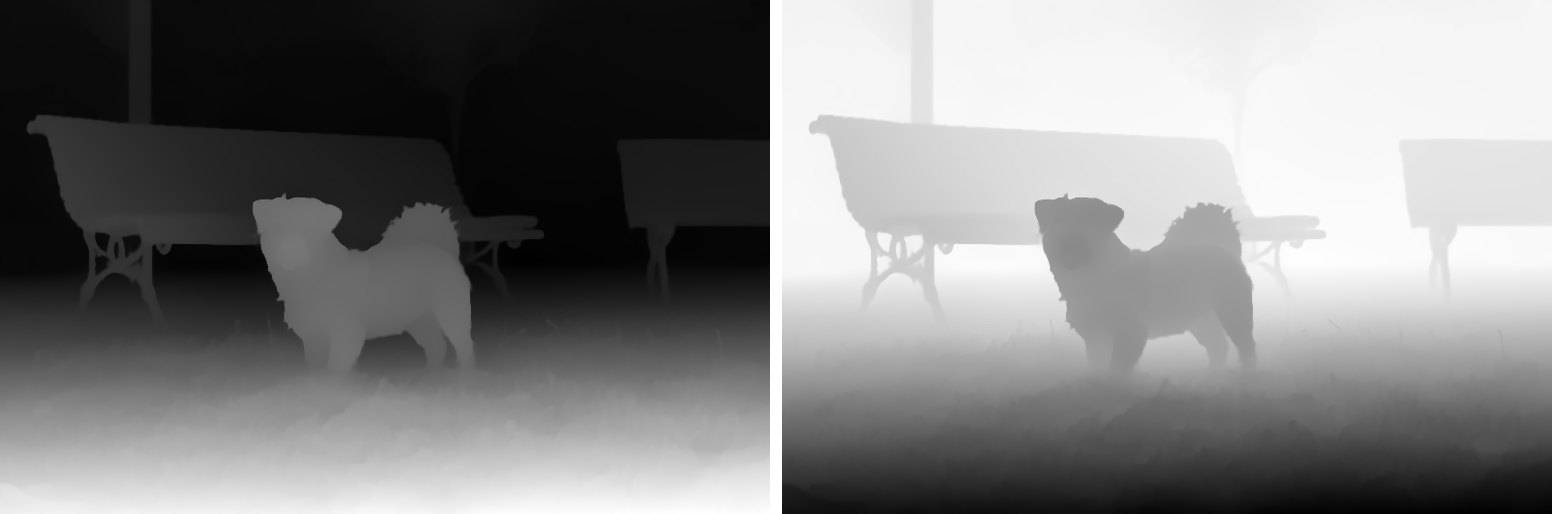
To check a map, find something you know is close. If it is dark and your software wants near as white (or the reverse), invert the map (in LightBurn, "Negative Image" [15]). An inside-out 3D effect, or an engraving that sinks what should stand out, means the same.
How is a depth image made?
| Method | How it gets depth | Where you meet it | What trips it up |
|---|---|---|---|
| Two cameras (stereo) | Closer objects "shift by a greater distance between the two images"; that shift, the disparity, gives relative distance [2] | Phones with a dual camera [2]; robots [6] | Apple notes a single point "isn't a good estimate of real-world distance" [2] |
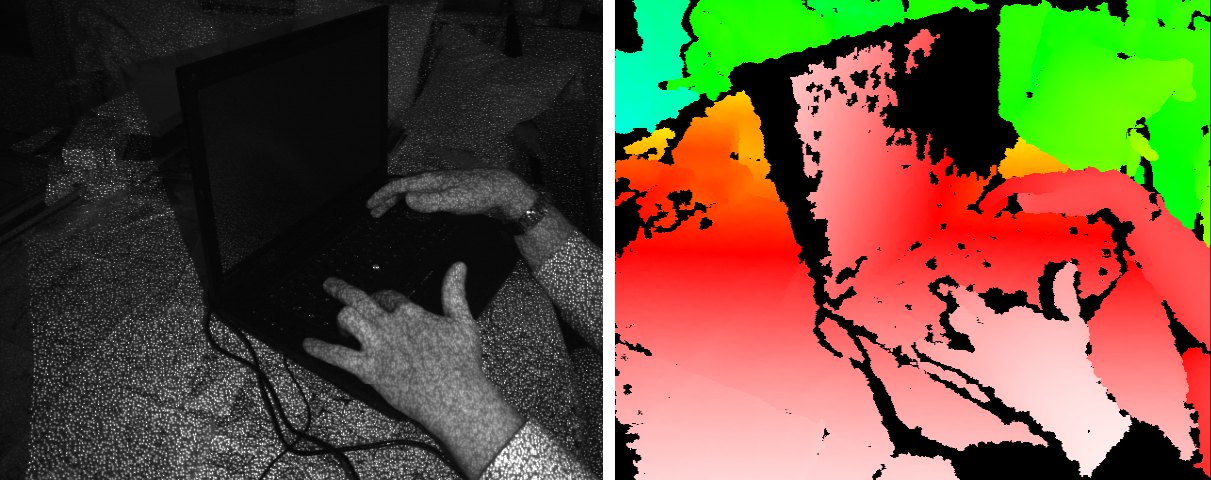
| Structured light | Projects a known pattern of dots or stripes and measures how the scene bends it [2][7] | iPhone Face ID, which projects "thousands of invisible dots" [8]; the original Kinect for Xbox 360 [5] | Shiny things: "reflective or transparent surfaces raise difficulties" [7] |
| Time of flight and LiDAR | Times "the round trip" of a light signal to each point [9] | The Kinect for Xbox One; some phones [9] | Strong background light, and light bouncing more than once [9] |
| AI from one photo | A model that has learned from many images reads clues such as far things looking smaller and lower in contrast [10] | Depth map tools; 2D-to-3D conversion [12]; Depth Anything V2 is one such model [4] | Gives relative depth, not metres [11] |
Measured depth or estimated depth?
A sensor can give real distances: Apple's TrueDepth camera "can directly measure depth (in meters)" [2]. A model working from one photo usually gives relative depth: it predicts "the depth order of objects or points in a scene without providing the precise measurements" [11]; metric models exist too [4][11]. For blur, 3D effects, carving and image generation, relative depth is enough; to measure distances, you need a sensor or a metric model.
What are depth images used for?
- Portrait photos. A depth map lets software blur a picture more or less by distance [1]. Apple's example is the iPhone camera's Portrait mode; with the depth saved in the photo, the effect can be changed long after the shot [2].
- Unlocking your phone. Face ID builds a depth map of your face from its dot pattern [8].
- Robots, AR and games. Depth tells a robot where things are [6] and lets a console follow your body [9]; depth scanning also serves AR gaming, quality control and medical imaging [7].
- 3D graphics. Fog, shadows and Z-buffering use depth maps, and so do Magic Eye pictures (autostereograms) [1]; our Magic Eye Maker turns a depth map into one. With the camera's settings known, a depth map can also become a 3D point cloud [10].
- Turning 2D into 3D. "Most semiautomatic methods of stereo conversion use depth maps and depth-image-based rendering": from the picture and its depth map, software makes a left and a right image and fills in the areas that become uncovered [12]. Owl3D, the publisher of this guide, makes a desktop converter for Windows and Mac that turns 2D photos and videos into stereoscopic 3D with AI on your own computer, saving the 3D result, not a depth map; its free plan converts up to 60 seconds of video per conversion, with no watermark.
- Engraving, 3D models and AI images. LightBurn's 3D sliced engraving mode is "intended for use with depth maps" [15]; Blender's Displace modifier moves a surface by the intensity of an image [16]; ControlNet uses a depth map to guide image generation [3].
Why does my depth map look wrong?
| What you see | Why | What to do |
|---|---|---|
| Black or empty patches from a depth camera | Shiny or see-through surfaces, or strong sunlight, disturb the sensor's reading [7][9] | Change the light or the angle, or fill the gaps in an image editor |
| Glass, mirrors or hair look odd | A depth map holds one distance per pixel, the first surface seen, so it cannot show what is behind glass, in a mirror, or several strands in one pixel [1] | Expect it; fix by hand where it matters |
| Smooth slopes come out as steps | 8 bits allow only 256 distances [1] | Save as 16-bit if your software takes it |
| A flat wall facing the camera reads the same everywhere, though its corners are farther away | Some maps store the distance to the camera's plane, not the straight-line distance to the camera [1] | Nothing, for many uses [1]; for measuring, check which one your sensor writes |
Frequently asked questions
Is a depth image the same as a depth map?
Yes. Both name an image, or an image channel, that records the distance of surfaces from a viewpoint [1].
What is the difference between a depth map and a disparity map?
A disparity map records how far each point shifts between two side-by-side pictures [6]. Near things shift more [2], so disparity grows as distance shrinks. Apple's dual-camera depth data, for example, measures disparity in units of 1/meters [2].
Is a range image the same as a depth image?
Nearly. A range image's pixel values "correspond to the distance", and the sensor is "sometimes referred to as a range camera or depth camera" [13]. But some depth maps store distance to the camera's plane, not straight-line distance [1].
Does "image depth" mean bit depth?
Sometimes. Colour depth, "also known as bit depth", is the number of bits used for the colour of each pixel [14], a different thing.
Is a depth map the same as a height map?
In 3D graphics they are different tools: a depth map records distance from a viewpoint, while height maps and bump maps change a surface's shape or its look [1]. In engraving the two names meet: LightBurn's documentation speaks of "depth maps – sometimes called height maps" [15].
Can my phone take depth images?
Many can. On the iPhone, the dual camera, the front TrueDepth camera and the LiDAR camera record depth [2], and several other phones have time-of-flight cameras [9]. Any phone photo can also get a depth map afterwards from an AI tool such as our Depth Map Generator.
Sources (17)
- Wikipedia, "Depth map". https://en.wikipedia.org/wiki/Depth_map (opened 2026-10-17)
- Apple Developer Documentation, "Capturing photos with depth" (AVFoundation). https://developer.apple.com/documentation/avfoundation/capturing-photos-with-depth (opened 2026-10-17)
- Lvmin Zhang (lllyasviel), "Controlnet - Depth Version", model card, Hugging Face. https://huggingface.co/lllyasviel/sd-controlnet-depth (opened 2026-10-17)
- Lihe Yang, Bingyi Kang, Zilong Huang and others, "Depth Anything V2" (NeurIPS 2024), code and model page, GitHub. https://github.com/DepthAnything/Depth-Anything-V2 (opened 2026-10-17)
- Wikipedia, "Kinect". https://en.wikipedia.org/wiki/Kinect (opened 2026-10-17)
- Wikipedia, "Computer stereo vision". https://en.wikipedia.org/wiki/Computer_stereo_vision (opened 2026-10-17)
- Wikipedia, "Structured-light 3D scanner". https://en.wikipedia.org/wiki/Structured-light_3D_scanner (opened 2026-10-17)
- Apple Support, "About Face ID advanced technology". https://support.apple.com/en-us/102381 (opened 2026-10-17)
- Wikipedia, "Time-of-flight camera". https://en.wikipedia.org/wiki/Time-of-flight_camera (opened 2026-10-17)
- Antonio Torralba, Phillip Isola and William Freeman, Foundations of Computer Vision, chapter 43, "Learning to Estimate Depth from a Single Image" (online edition). https://visionbook.mit.edu/3d_learning.html (opened 2026-10-17)
- Hugging Face Transformers documentation, "Monocular depth estimation". https://huggingface.co/docs/transformers/en/tasks/monocular_depth_estimation (opened 2026-10-17)
- Wikipedia, "2D to 3D conversion". https://en.wikipedia.org/wiki/2D_to_3D_conversion (opened 2026-10-17)
- Wikipedia, "Range imaging". https://en.wikipedia.org/wiki/Range_imaging (opened 2026-10-17)
- Wikipedia, "Color depth". https://en.wikipedia.org/wiki/Color_depth (opened 2026-10-17)
- LightBurn Documentation, "3D Sliced Engravings" (galvo). https://docs.lightburnsoftware.com/galvo/3DSlice.html (opened 2026-10-17)
- Blender Manual, "Displace Modifier". https://docs.blender.org/manual/en/latest/modeling/modifiers/deform/displace.html (opened 2026-10-17)
- Carbide 3D Community forum, topic 34586, July 27, 2021 (a member's question and a reply). https://community.carbide3d.com/raw/34586 (opened 2026-10-17)