3D Movies on PS VR2: What Works on PS5 and on PC
How we researched this: written by Owl3D from published sources, all 8 listed at the end.
Short answer
On a PS5, no. Sony's PS5 FAQ says: "Does PS5 support 3D Blu-ray movies? No, 3D stereoscopic output is not supported on PS5." [1] Films and media apps play in the PS VR2's cinematic mode, on a flat virtual screen [2][3]. On a PC with Sony's PS VR2 PC adapter, the headset runs SteamVR apps [4]. There, a VR video player shows a side-by-side (SBS) or over-under 3D file in real 3D [5][6]. For a 3D Blu-ray disc, owners report no simple route: they use SBS or over-under files, or a PC workaround [6]. Owl3D, the publisher of this guide, makes a 2D to 3D video converter.
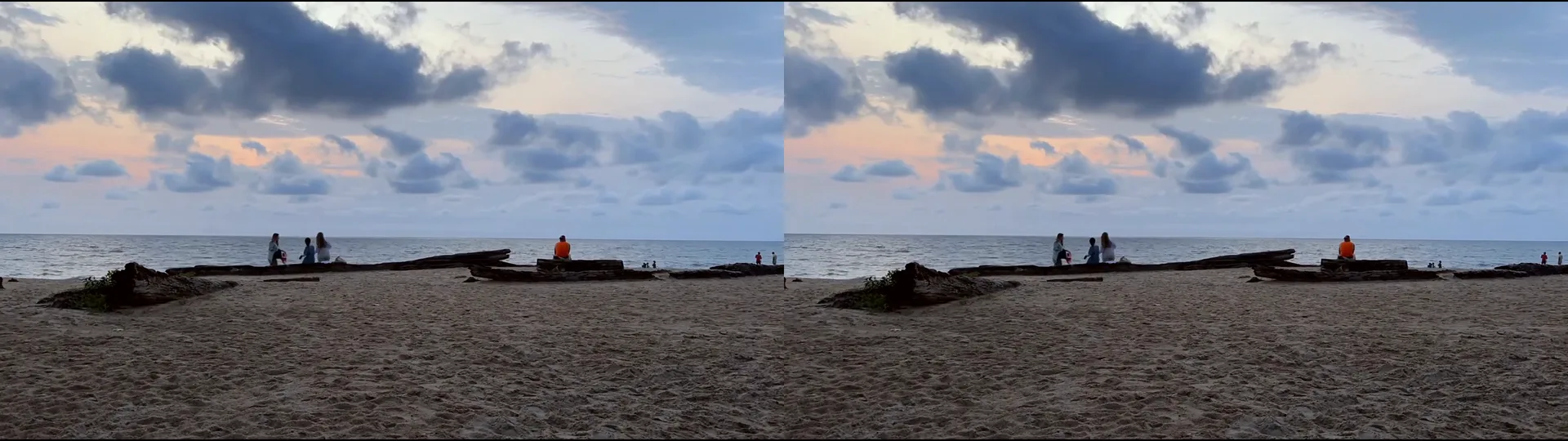
What a full side-by-side (SBS) 3D file looks like: one picture for each eye, in one frame. A VR video player on PC shows each half to one eye. This is not a PS VR2 capture. We made it on November 21, 2026 with the Owl3D app: a flat beach clip converted to a 3840 x 1080 Full SBS file (shown smaller). It is an AI conversion, not footage from two lenses. Source clip: a beach in Libreville, Gabon, CC0, from Wikimedia Commons [7].
Key takeaways
- PS5 only: films play flat, on a virtual screen. See on PS5.
- PC with the adapter: SBS and over-under files play in 3D. See on PC.
- Your film is only in 2D: you can make an SBS file from it. See no 3D version.
What plays where
| Setup | 3D Blu-ray disc | Your own SBS or over-under file | Source |
|---|---|---|---|
| PS VR2 on a PS5 | No 3D | Plays flat in Media Gallery (MKV, MP4, WebM, up to 3840 x 2160), on the cinematic-mode screen | Sony [1][2][8] |
| PS VR2 on a PC with the adapter | No direct route, owners report; one owner reports a workaround | Plays in 3D in a SteamVR video player such as Bigscreen | Bigscreen on Steam [5], owners [6] |
On a PS5: cinematic mode, no 3D
Sony's PS VR2 FAQ names two viewing modes. VR Mode is for VR games. In cinematic mode you see the PS5 menus and "all non-VR game and media content, such as streaming apps, on a virtual cinema screen", at 1920 x 1080 [2]. Your TV shows no picture while you watch [2][3].
A PS5 with a disc drive plays Ultra HD Blu-ray, Blu-ray and DVD discs [8]. But it has no 3D output, so a 3D Blu-ray does not play in 3D [1]. Media Gallery plays video files from a USB drive: MKV, MP4 or WebM, up to 3840 x 2160 [8]. It does not play copyright-protected files [8]. Sony's pages name no setting that shows such a file in 3D [2][3][8]. With no 3D setting, expect an SBS file to show as two pictures side by side on the flat screen. We have not tested this.
On a PC: SBS and over-under files in SteamVR
With Sony's PS VR2 PC adapter, the headset plays SteamVR content on a PC [4]. What you need and how to set it up is in our guide PS VR2 on PC.
Then you need a VR video player and a 3D file. Bigscreen is on Steam and works with "any SteamVR headset" [5]. Its store page says: "You can also watch movies in side-by-side 3D or over-under 3D directly from your desktop. Our videoplayer supports many file formats and codecs, including 3D movies!" [5] Other players that owners use with the PS VR2 are in is the PS VR2 worth it for PC.
In the player, set the video to SBS or over-under, the same layout as the file. Full SBS files hold two full-width pictures. Half SBS files squeeze both pictures into one normal-width frame. Our guide VR video player explains the layouts.
Your 3D Blu-rays on a PC (owner reports)
We have not tested this. Owners on Steam's PlayStation VR2 App forum, August 2024 [6]:
- One owner: "As far as i know there are no bluray 3d vr apps as the only types of 3d video that vr media players currently support are side by side (SBS) and top bottom or sometimes referred to as over under format".
- Another owner, on a Quest 3: "It is surprisingly difficult to get even owned 3D Blu Rays to work at all in VR headsets." The old way was to "rip and then extensively convert the (very large) files".
- The owner who asked found a way: the K-Lite Codec Pack with madVR and Media Player Classic played "the 3D BluRay in OverUnder view". Bigscreen was "very bad" for them: "it lags and stutters as hell". They used Virtual Desktop instead.
The film has no 3D version: make an SBS file
Many films were never released in 3D. The Owl3D app converts a 2D video file that you have the right to use into a full side-by-side 3D file, on your Windows PC or an Apple silicon Mac. The frame at the top of this page is an output of it (model Balanced, 1080p, 3D strength Standard, the 3rd of 5 levels). Open the file in a SteamVR player as above. It is an AI conversion: the second picture is estimated, so it is not the studio's 3D version.
From Owl3DOwl3D converterA desktop app for Windows and Mac that turns 2D videos and photos into 3D.FAQ
Can the PS VR2 play 3D Blu-rays on a PS5?
No. Sony: "3D stereoscopic output is not supported on PS5." [1]
Does PS VR2 show 3D movies in cinematic mode?
Cinematic mode is a flat virtual screen at 1920 x 1080 [2]. Sony names no 3D setting for it [2][3].
Can I watch 3D movies on PS VR2 with a PC?
Yes, as SBS or over-under files in a SteamVR video player, with Sony's PC adapter [4][5]. See on PC.
Sources (8)
- PlayStation Blog, "PS5: The Ultimate FAQ", November 9, 2020. https://blog.playstation.com/2020/11/09/ps5-the-ultimate-faq/ Opened 2026-11-21.
- PlayStation Blog, "PlayStation VR2: the ultimate FAQ", February 6, 2023. https://blog.playstation.com/2023/02/06/playstation-vr2-the-ultimate-faq/ Opened 2026-11-21.
- PlayStation Support, "How to play non-PS VR2 games on PS VR2 (Cinematic Mode)". https://www.playstation.com/en-us/support/hardware/ps-vr2-cinematic-mode/ Opened 2026-11-21.
- PlayStation Blog, "PlayStation VR2 players can access games on PC with adapter starting on August 7", June 3, 2024. https://blog.playstation.com/2024/06/03/playstation-vr2-players-can-access-games-on-pc-with-adapter-starting-on-august-7/ Opened 2026-10-09.
- Steam, "Bigscreen Beta" store page. https://store.steampowered.com/app/457550/ Opened 2026-11-21.
- Steam Community, PlayStation VR2 App discussions, "Is there a way to view 3D BluRays on the PSVR2?" (owners, August 13 to 18, 2024). https://steamcommunity.com/app/2580190/discussions/0/4509878102695439741/ Opened 2026-11-21.
- Wikimedia Commons, File:Sunset timelapse on the beach in Libreville, Gabon.webm (CC0). https://commons.wikimedia.org/wiki/File:Sunset_timelapse_on_the_beach_in_Libreville,_Gabon.webm Opened 2026-11-21.
- PlayStation Support, "How to play video and music from discs and USB drives on PlayStation". https://www.playstation.com/en-us/support/hardware/play-video-music-discs-usb-drives/ Opened 2026-11-21.