Panasonic Lumix 3D Lens (H-FT012): Which Cameras, and How to View the 3D
How we researched this: written by Owl3D from published sources, all 18 listed at the end.
Short answer
The Lumix G 12.5mm f/12 3D lens (H-FT012, 2010) is a small twin lens for Micro Four Thirds cameras [1][5]. It has a fixed aperture of f/12 and fixed focus [1][17]. On a Panasonic body that supports it, it saves 3D photos as .MPO files: one file holds the left and the right picture [12]. It does not record 3D video [3][12]. Its small f/12 aperture means it works best in bright light or with flash [6][12]. To see the 3D, open the MPO in a viewer that reads both pictures, or turn it into a side-by-side picture. Owl3D makes the Owl3D Shift 3D monitor named on this page. We do not make or sell lenses or cameras.

A photo taken with the Panasonic 3D lens on a Lumix GF3, split back into the left and right pictures. Photo: hoppenbrouwers on Flickr, Public Domain Mark 1.0. The owner notes a lens modification. Split by Owl3D on 2026-11-20.
Key takeaways
- Check your camera body first. See which cameras take 3D photos.
- Your 3D shot looks flat on a computer? It is not broken. See what the MPO file holds.
- See the depth on a 3D TV, a VR headset or a 3D monitor. See view your photos in 3D.
- Thinking of buying one used? See is it worth it.
Specs
| Spec | H-FT012 |
|---|---|
| Focal length | 12.5 mm; Panasonic gives 65 mm equivalent, measured on the GH2 at 16:9 [1][5] |
| Aperture | f/12, fixed [1] |
| Focus | Fixed, 0.6 m (1.97 ft) to infinity [2] |
| Stereo base | 10 mm [1] |
| Elements | 4 elements in 3 groups, two times [1] |
| Size and weight | About 57 mm across, 20.5 mm long, 45 g [1][2][11] |
| Released | Announced September 21, 2010, list price $249.95 [5] |
The 10 mm stereo base is small: the two lenses sit much closer than your eyes. Panasonic warns that from 0.6 m to about 1 m the "horizontal disparity becomes too great", so the 3D may not show at the edges [2].
Which cameras take 3D photos with it?
Panasonic's own compatibility pages, dated October 20, 2025, list the lens body by body [3]:
| Result | Panasonic bodies |
|---|---|
| 3D photos | G2 (firmware 1.1 or later [4]), GH2, G3, GF2, GF3, GX1, GF5, G5, GH3, GF6, G6, GX7, GM1, GH4, GM5, GF7/GF8, G7, GX8, GX80/GX85, G80/G85, GF9/GX800/GX850, GF10 |
| Not supported | G1, GH1, GF1, G10, and every Four Thirds body |
| Not supported (Panasonic's note: "It is impossible to view as 3D for taking pictures") | GH5, GH5S, G9, GX9, G90/G95, G97, G100, GH5M2, GH6, G9M2, GH7 |
On every supported body the lens works in "pan focus" and shows "Not available at Movie mode" [3]. Vertical shots are not supported [2].
Olympus bodies. Panasonic's pages do not cover them. Owner reports agree that early Pen bodies do not take the lens: one owner wrote in 2012, "Bought the Panasonic 3D lens thinking that it would work with my EP3 BUT IT DOESNT!!!" [8]. A 2012 review lists the E-P1, E-P2, E-P3, E-PL1, E-PL2, E-PL3 and E-PM1 as unable to use it, and says "The OM-D E-M5 can" [12]. We have not tested an Olympus body.
What the MPO file holds
Each shot gives you an .MPO file, and, depending on a camera setting, a normal JPEG too [6][12]. MPO (Multi Picture Object) is a CIPA format: "two or more JPEG files concatenated together" [16]. From this lens, the file holds one picture from each of the two lenses [12].
The two pictures share one sensor, so each is small. On the GH2 at 4:3, each picture is 1920 × 1440 pixels, and the lens "only uses 35% of the total sensor area" [12]. On the GF2 the JPEG is 1600 × 904 [6].
A normal photo viewer opens only the first picture, so the shot looks flat.
Our test: how much depth is in a Lumix 3D lens photo?
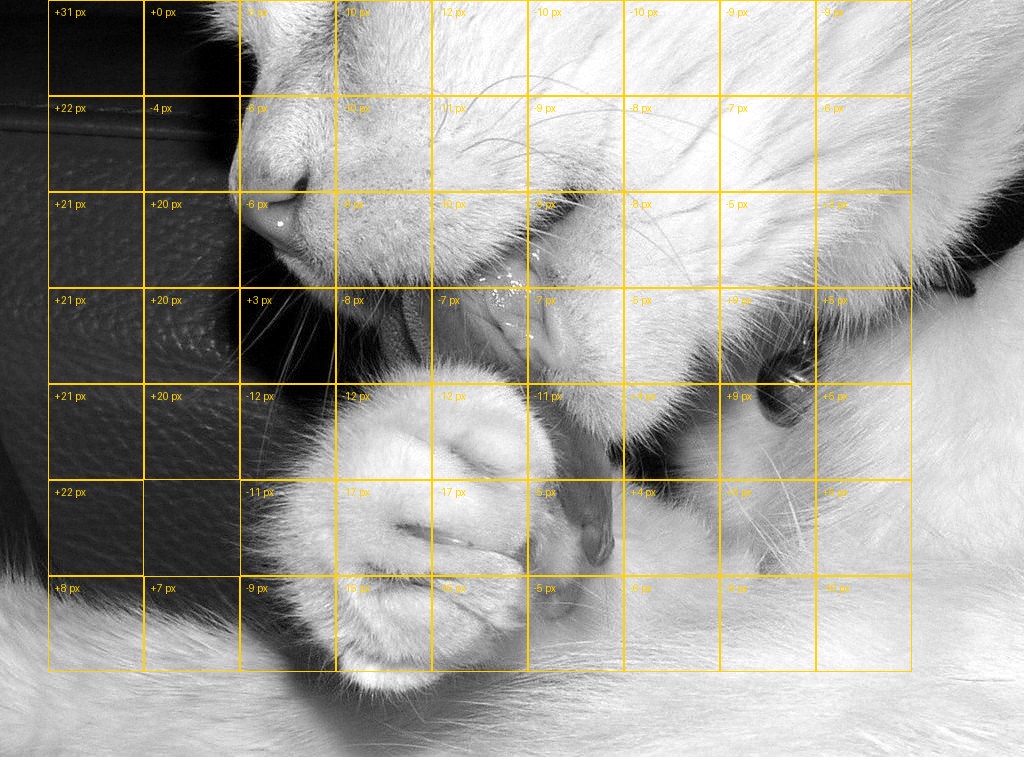
We found no original H-FT012 MPO file with a reuse licence. We found one public-domain 3D lens photo, saved as a red-cyan picture [18]. We did this:
- Split the eyes. The red channel holds the left eye. The green and blue channels hold the right eye. We wrote each eye as its own picture, 1024 × 757 pixels.
- Measured the shift. We cut the left picture into 96-pixel blocks. For each block, we searched up to 48 pixels left and right for the best match in the right picture.
- Read the result. 62 of 63 blocks matched well. The shift runs from −17 to +31 pixels. The cat's paw, nearest the lens, sits at about −12 to −17 pixels. The dark background sits at about +20 pixels.
So the photo holds real depth: about 40 pixels between near and far in a 1024-pixel picture. The photographer set the zero point when making the red-cyan file. The owner also notes a lens modification, so a stock lens may show less depth. The file's EXIF data holds no camera details, only the editing software. So we could not check the settings.
View your photos in 3D
On a 3D TV. Panasonic: "A TV compatible with 3D is required to play back pictures recorded in 3D" [2]. Connect the camera to the TV, or put the memory card in a 3D TV that reads MPO files [8]. Many 3D TVs also show side-by-side pictures from a USB stick: play 3D files on a TV or projector has the settings.
In a VR headset. Turn the MPO into a side-by-side picture (next section). Open it in a VR photo viewer in side-by-side 3D mode.
On a glasses-free 3D monitor. We sell one, the Owl3D Shift, so read this with that in mind. It sits beside your computer and shows 3D to one viewer at a time without glasses. Its Playlist player opens MPO files and shows both views in 3D. Today that player ships in the Mac app, and the Windows version is still in testing. On a Mac or a Windows PC, a side-by-side copy also shows in 3D in the Shift's SBS Mode. We have not tested Shift with H-FT012 files.
With no screen at all. Put the two pictures side by side and free-view them. Our guide to cross-eye 3D photos shows how.
Turn MPO into side-by-side
Our Stereo Photo Maker opens an MPO file in the browser, aligns the two pictures, and saves side-by-side or red-cyan.
Convert and align a stereo photo
Open a 3D photo, line it up, and save it in the format you need. It all happens in your browser. Your pictures are not uploaded to our servers.
1. Add your pictures
A photo from a Fujifilm 3D camera.
2. Line them up
Your 3D picture appears here.
Saved pictures carry a small "made with owl3d.com" mark in the bottom corner. It is in 3D too: it floats just in front of the screen.
Adjust by hand
One ordinary photo and no second view? The Owl3D converter makes 3D from 2D photos and videos.
| Tool | What it does | Tested by us |
|---|---|---|
| Owl3D Stereo Photo Maker (browser) | Opens MPO, aligns, saves side-by-side, red-cyan or wiggle GIF | Our own tool, not tested with an H-FT012 file |
| StereoPhoto Maker (Masuji Suto, free, Windows) | "Support for MPO files", auto-alignment, many side-by-side layouts [15] | No |
The two pictures can be a little out of line. One E-M5 owner fixed this with auto-align in StereoPhoto Maker [8]. In a 2020 thread, lenses modified for close-ups needed side-to-side alignment and cropping [7]. Auto-alignment fixes most of it.
Is the Lumix 3D lens worth buying?
The record from 2010 to 2012 is mixed. A reader review on the SLRgear page lists "can only be used in bright light" as a con. The GH2 owner found that "so many of my outdoor daytime shots came out too dark" [6]. A 2012 review ends: "Don't buy this lens" [12]. A DVXuser test in 2011 asked if "this little $249 lens" could make a GH2 a 3D movie camera. His short answer was yes, with the lens contacts covered. But the best result was standard-definition video, so he expected few people to bother [17].
Buy one if you have a supported body, shoot in daylight, and want small 3D photos for a screen. If you want 3D video, or full-size 3D photos, a dedicated 3D camera fits better: see 3D cameras. For how to shoot 3D in general, see 3D photography.
Frequently asked questions
Does the Lumix 3D lens work on Olympus cameras?
Not on early Pen bodies such as the E-P3 [8][12]. A 2012 review and a forum reply say the OM-D E-M5 takes it [8][12]. Panasonic's own pages do not list Olympus bodies [3].
Can the H-FT012 record 3D video?
No. Panasonic lists the lens as "Not available at Movie mode" on every body [3]. In a 2010 forum thread on the GH2, a member replied: "Only 3D still images" [10]. Owners record video by taping over the lens contacts, so the camera sees a manual lens [9][13][14]. Each frame then holds both views. The 3D must be made in editing.
Why does my 3D lens picture look flat on my computer?
Your viewer shows only the first picture of the MPO file. Use a viewer that reads both, or make a side-by-side copy (see turn MPO into side-by-side).
Which is better, this lens or the Fujifilm W3?
The Fujifilm FinePix Real 3D W3 is a 3D camera with two lenses about as far apart as your eyes. It takes 3D photos and 3D video [6]. The lens takes small 3D photos only. See 3D cameras.
Sources (18)
- Panasonic North America, "Features and specifications Lumix lens model H-FT012". https://help.na.panasonic.com/answers/features-and-specifications-lumix-lense-model-h-ft012 (opened 2026-11-21)
- Panasonic, H-FT012 operating instructions VQT3B92. https://help.na.panasonic.com/wp-content/uploads/2023/02/HFT012_VQT3B92_ENG_ESP.pdf (opened 2026-11-21)
- Panasonic, digital camera lens compatibility pages (per body, dated October 20, 2025). https://av.jpn.support.panasonic.com/support/global/cs/dsc/connect/gh2.html and https://av.jpn.support.panasonic.com/support/global/cs/dsc/connect/gh5.html (opened 2026-11-21)
- Panasonic press release, G2 firmware for the 3D lens, Imaging Resource, September 21, 2010. https://old.imaging-resource.com/NEWS/1285056001.html (opened 2026-11-21)
- "Panasonic creates first 3D lens for Lumix G cameras", TechCrunch, September 21, 2010. https://techcrunch.com/2010/09/21/panasonic-creates-first-3d-lens-for-lumix-g-cameras/ (opened 2026-11-21)
- SLRgear, "Panasonic 12.5mm f/12 Lumix G 3D" review, Imaging Resource, 2011. https://imaging-resource.com/lenses/panasonic/12.5mm-f12-lumix-g-3d/review (opened 2026-11-21)
- "Panasonic Lumix 3D lens with…" (close-up thread), photo-3d on groups.io, September 2020 (archived copy). https://photo-3d.groups.io/g/main/topic/panasonic_lumix_3d_lens_with/76834856 (opened 2026-11-21)
- "Panasonic 3D lens on Olympus body?", DPReview forums, 2012 to 2014 (archived copy). https://www.dpreview.com/forums/thread/3217290 (opened 2026-11-21)
- "3D video: which cameras?", DPReview forums, March 2014 (archived copy). https://www.dpreview.com/forums/thread/3636960 (opened 2026-11-21)
- "Does GH2 with 3D lens not support 3D video?", mu-43 forum, 2010 (archived copy). https://www.mu-43.com/threads/does-gh2-with-3d-lens-not-support-3d-video.5993/ (opened 2026-11-21)
- Neocamera, "Panasonic Lumix G 12.5mm F/12" specifications. https://www.neocamera.com/lens/panasonic/lumix_g_12.5mm_f12 (opened 2026-11-21)
- m43photo, "Lumix G 12.5mm f/12 3D lens review", August 2012. http://m43photo.blogspot.com/2012/08/lumix-g-125mm-f12-3d-lens-review.html (opened 2026-11-21)
- m43photo, "3D video recording with Lumix 12.5mm f/12", September 2012. http://m43photo.blogspot.com/2012/09/3d-video-recording-with-lumix-125mm-f12.html (opened 2026-11-21)
- EOSHD, "Panasonic GH2 work-around enables HD video shooting with Lumix 3D lens". https://www.eoshd.com/news/panasonic-gh2-work-around-enables-hd-video-shooting-with-lumix-3d-lens/ (opened 2026-11-21)
- Masuji Suto, StereoPhoto Maker (official page). https://stereo.jpn.org/eng/stphmkr/ (opened 2026-11-21)
- Wikipedia, "JPEG", section "JPEG Multi-Picture Format". https://en.wikipedia.org/wiki/JPEG#JPEG_Multi-Picture_Format (opened 2026-11-21)
- Barry Green, "3D on the cheap? Lumix 3D lens on AF100 and GH2", DVXuser, January 19, 2011. https://www.dvxuser.com/threads/3d-on-the-cheap-lumix-3d-lens-on-af100-and-gh2.237658/ (opened 2026-11-21)
- hoppenbrouwers, "Panasonic 3D-lens" (red-cyan photo, Lumix GF3, November 26, 2018), Flickr, Public Domain Mark 1.0. https://www.flickr.com/photos/hoppenbrouwers/46020736962/ (opened 2026-11-20)