3D Photography: What It Is and How to Take 3D Photos
How we researched this: written by Owl3D from published sources, all 12 listed at the end.
Short answer
3D photography, also called stereo or stereoscopic photography, takes two photos of the same scene from two points a little apart, one for each eye. Shown so that each eye sees only its own photo, the two merge into one picture with depth [5][6]. You can take one with almost any camera: shoot, move the camera sideways by about 1/30 of the distance to the subject, and shoot again [1]. A phone app helps, and a twin-lens 3D camera takes both photos at once.
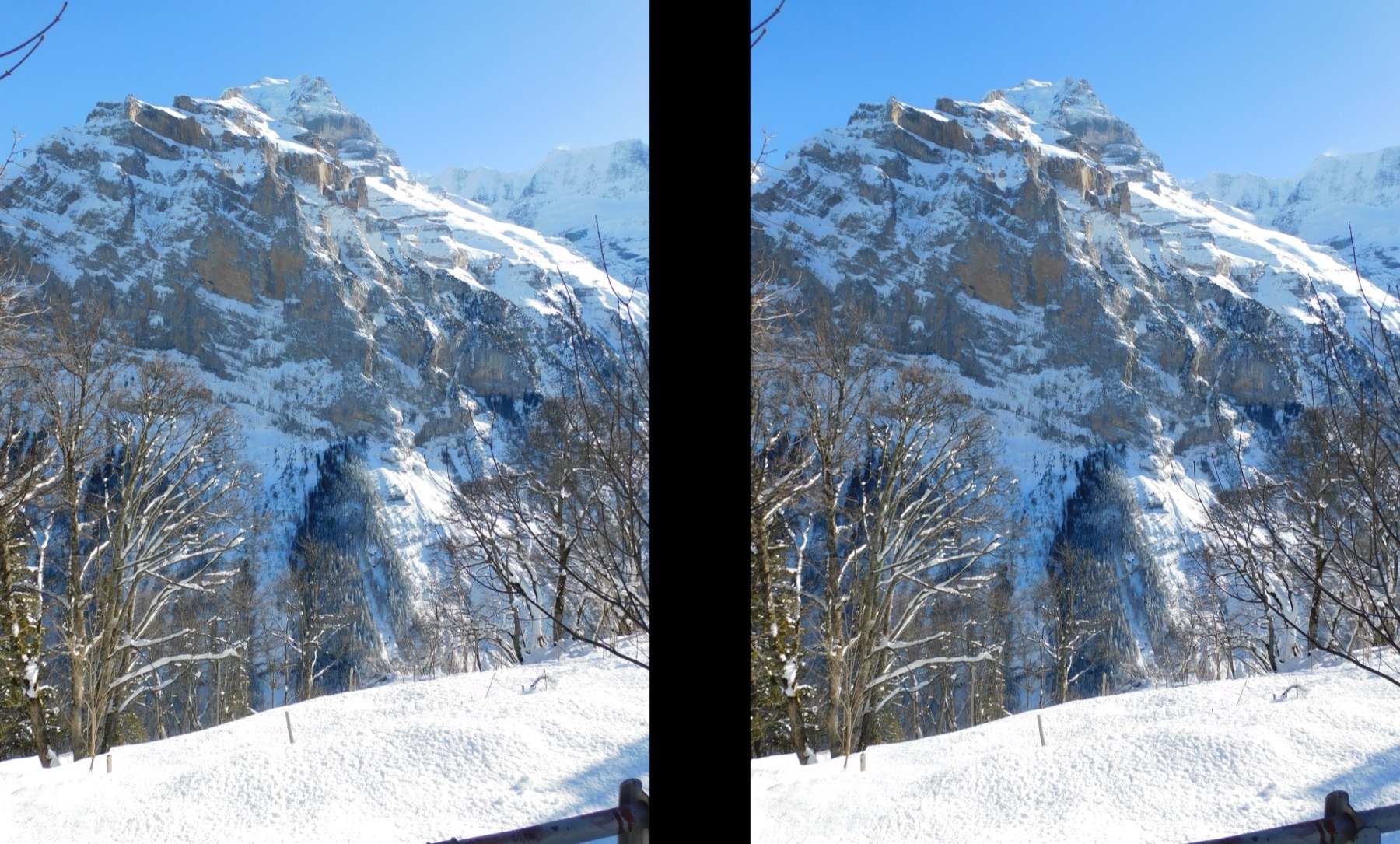
A 3D photo is two photos: this pair of the Jungfrau, Switzerland, was taken one after the other from two points a little apart. Laid out for parallel viewing. Photo: VasuVR, CC BY 4.0, via Wikimedia Commons.
Key takeaways
- Any camera or phone can take a 3D photo in two shots, if nothing in the scene moves; see one camera, two shots.
- How far to move: about 1/30 of the distance to the subject, so 10 cm for a subject 3 m away [1]; see the steps.
- A 3D photo that hurts to look at usually needs aligning, not a new camera; see when it looks wrong.
- To see the depth: cross or relax your eyes, red-cyan glasses, a VR headset or a 3D screen; see view them.
What 3D photography is, and what it is not
Your eyes are about 6.5 cm apart, so each sees the world from a slightly different angle, and the brain turns the difference into depth [5]. A 3D photo copies that: a left-eye photo and a right-eye photo, called a stereo pair. Photographers made millions of stereo views between 1850 and 1930, printed side by side and looked at through a stereoscope [6].
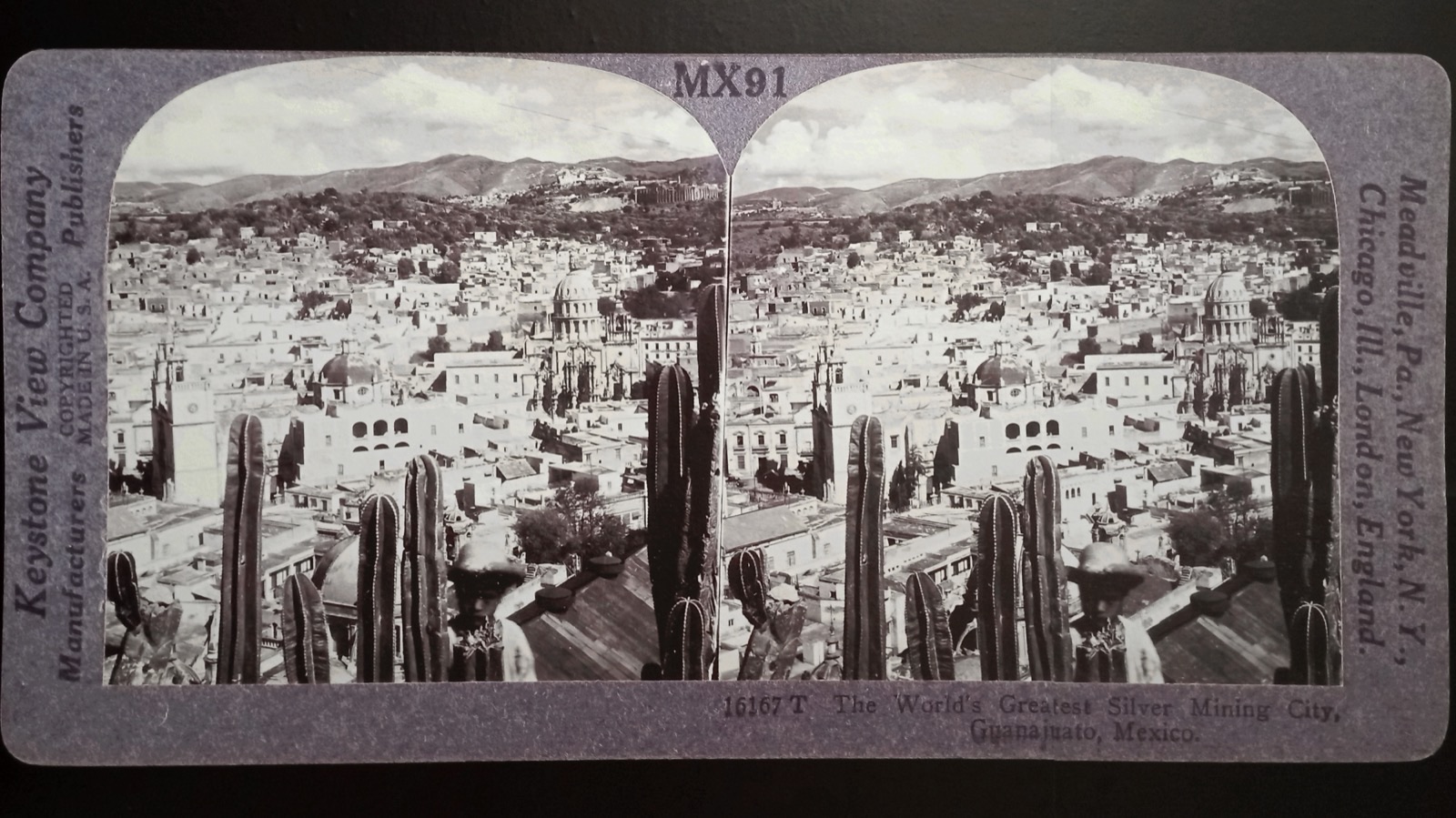
Three other things are also called "3D photo":
- 3D product photography and 3D models. Many photos from all around a product, shown as a view you can turn [12], or made into a measurable 3D model by photogrammetry [5].
- The tilt effect on a phone. One photo that shifts as you tilt the phone; no second view. See what apps mean by "3D photo".
- A 3D photo made from one photo. Software estimates depth and builds the second view; it is computed, not captured. See converting a photo.
Three ways to take a 3D photo
| Way | What you need | Moving subjects? |
|---|---|---|
| One camera, two shots | Any camera or phone; a slide rail helps [1] | No: the scene must hold still between shots [3] |
| A phone that shoots both views | An iPhone with Spatial mode; see with a phone | Yes: both views at once |
| A twin-lens 3D camera | A stereo camera, new or second-hand [3] | Yes: both lenses fire together [3] |
How to take a 3D photo with one camera (two shots)
It costs nothing extra and suits landscapes, buildings and still life.
Pick a scene with layers. Something near, something in the middle, something far. A flat wall far away gives a flat 3D photo [2].
Fix the camera settings. Use the same exposure and focus for both shots; manual mode helps [2]. A small aperture keeps every layer sharp [2][4].
Take the left photo. Make it a habit to take the left one first, so you never mix them up later [1][2].
Move the camera to the right. About 1/30 of the distance to the subject: 10 cm at 3 m, 50 cm at 15 m [1]. Keep it level and do not twist it [1]. Without a tripod, shift your weight from the left foot to the right, elbows tucked in: stereo photographers call it the cha-cha [1][4]. On a tripod, a slide rail moves the camera without turning it [1].
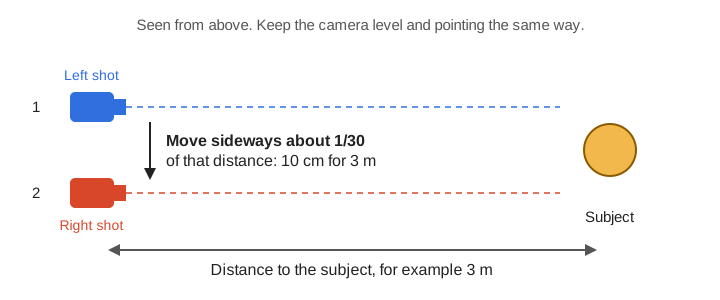
Take the right photo straight away, before anything in the scene moves [1].
Put the two together and align them. See put the two photos together.
Diagram: Owl3D, from the 1/30 rule in The Stereoscopy Blog [1].
For close-ups the move is tiny, and a macro slide rail helps [1]. Moving about 1/10 instead gives "hyper" depth: a toy-like look that can feel seasick on a big screen [2].
With a phone
An iPhone with Spatial mode in the Camera app takes both views at once; see taking a spatial photo. On any other phone, an app such as i3DSteroid (iPhone), 3DSteroid Pro (Android) [1][3] or CrossCam guides the two shots and aligns them; see 3D photo apps. The 1/30 rule above applies.
With a twin-lens 3D camera
A stereo camera fires two lenses together, so moving subjects work [3]. The lenses sit a fixed distance apart, so you choose the distance instead: about 30 times the lens spacing. The Fujifilm FinePix Real 3D W3 has lenses 7.5 cm apart, so the subject should be about 2.25 m away [2]. A mirror attachment called a beam splitter lets an ordinary camera take both views at once too, though the mirrors can distort or add reflections [1][3].
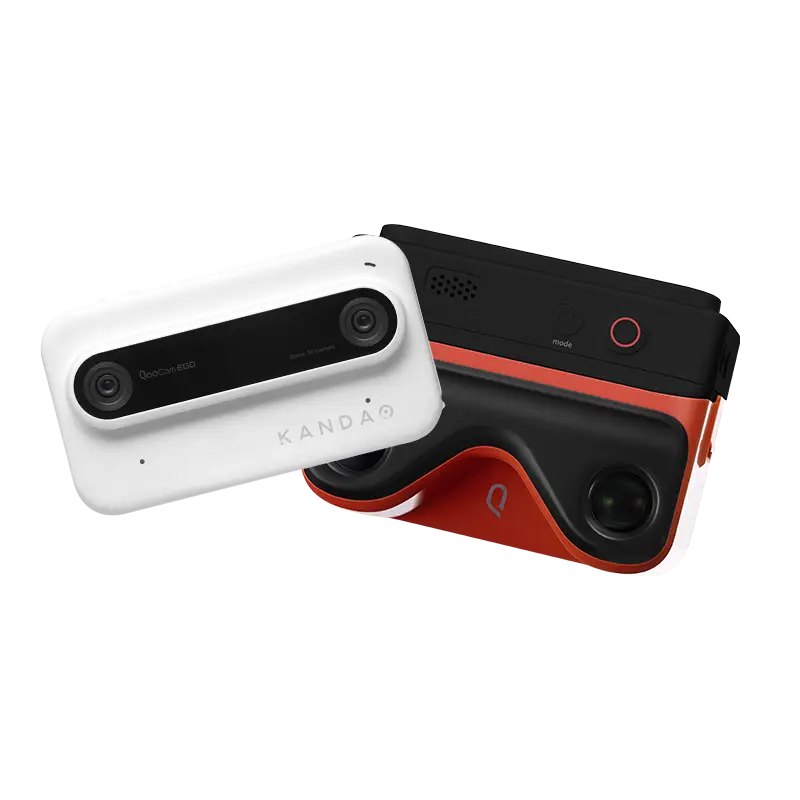
Old film stereo cameras and the Fujifilm W1 and W3 are still sold second-hand [3]. For what is on sale new, prices, and which file each camera saves, see 3D cameras.
When a 3D photo looks wrong
| What you see | Why | What to do |
|---|---|---|
| It hurts to look at, or will not merge | One photo is higher, tilted or larger than the other [8] | Align the pair in software [2][8] |
| The depth looks inside out | Left and right are swapped [8] | Swap them |
| Too much depth, seasick on a big screen | The camera moved too far [2] | Retake nearer 1/30 [2] |
| Almost flat | Too little movement, or no near objects [2][3] | Move more, or add a foreground |
| Something near the edge is uncomfortable | It breaks the "stereo window", the frame of the picture [2][4] | Set the window when aligning, or reframe [4][8] |
| Ghosts or blur in one area | Something moved between the shots [2] | Retake, or use a twin-lens camera |
What stereo photographers report
We have not tested these. On two shots with one camera, a Photo Stack Exchange answer (November 2016): "Animals, including people, would be impossible." [10] Two members of the mflenses forum, March 2024, on hand-held pairs: "any rotation or up and down movement will hurt your eyes when looking at the shot", and on cross-eyed viewing: "it took me weeks to master it." [11]
Put the two photos together, and where to view them
The free StereoPhoto Maker, for Windows with a Mac version, aligns pairs automatically, sets the stereo window, saves side-by-side and red-cyan, and can open Apple spatial photos [7][1][4]. Our Stereo Photo Maker does the everyday jobs in a browser on a computer or phone: open two photos or an MPO file from a 3D camera, align them automatically, and save side-by-side, red-cyan or a wiggle GIF. Nothing is uploaded; saved pictures carry a small "made with owl3d.com" mark [8].
| Where | Save it as |
|---|---|
| Your eyes alone (crossed or relaxed) | Side-by-side, cross-eyed or parallel; keep a parallel pair no wider than about 7 cm [9] |
| Red-cyan glasses | Anaglyph, red over the left eye [9]; see anaglyph 3D |
| VR headset or phone VR viewer | Side-by-side (parallel) [8] |
| 3D TV or monitor | Side-by-side or over-under [8] |
| Social media, no glasses | Wiggle GIF [8] |
Smaller pairs are easier to free-view [9]; practise on this pair.
On a glasses-free 3D screen, the depth shows with no glasses and no eye tricks. Owl3D, the publisher of this guide, makes one: the Owl3D Shift, a 14-inch display used beside a computer running the Owl3D app. Start Stereo 3D Playback in the app, show a side-by-side 3D photo on the Shift in any photo viewer, and it appears in 3D, to one viewer at a time. It does not open MPO files or Apple spatial photos directly: save them as side-by-side first, for example with the tools above.
From Owl3DOwl3D ShiftA 14-inch Live 3D monitor: anything on its screen turns into glasses-free 3D.Frequently asked questions
Can I take a 3D photo with my phone?
Yes. Take two photos a little apart with any phone, or use an app or an iPhone's Spatial mode; see with a phone.
How far apart should the two photos be?
About 1/30 of the distance to the subject: 10 cm at 3 m [1]. With a twin-lens camera, stand about 30 times the lens spacing away [2].
Do I need glasses to see a 3D photo?
No. With practice you can see a side-by-side pair by crossing or relaxing your eyes [9]. Glasses, headsets and 3D screens make it easier.
Is 3D photography the same as 3D product photography?
No. 3D product photography shows a product from all around, as a view you can turn [12] or as a 3D model made by photogrammetry [5]. 3D photography is two photos, one per eye.
Can I turn one ordinary photo into a 3D photo?
Yes, with software that estimates the depth. The result is a computed second view, not a second photo; see converting a photo.
Sources (12)
- The Stereoscopy Blog (Rebecca Sharpe), "Stereoscopic (3D) Photography with a Single Lens", March 4, 2022. https://stereoscopy.blog/2022/03/04/stereoscopic-3d-photography-with-a-single-lens/ (opened 2026-10-17)
- The Stereoscopy Blog, "A Few Quick Tips to Help Take Better Stereoscopic (3-D) Photos", February 17, 2022. https://stereoscopy.blog/2022/02/17/a-few-quick-tips-to-take-better-stereo-photos/ (opened 2026-10-17)
- 35mmc, "How to Take a 3-D Photo with Almost Any Camera", June 21, 2024. https://www.35mmc.com/21/06/2024/how-to-take-a-3-d-photo-with-almost-any-camera/ (opened 2026-10-17)
- Digital Photography School, "Photo Magic, 3D Photography". https://digital-photography-school.com/photo-magic-3d-photography/ (opened 2026-10-17)
- 3Dsurvey, "What's the difference between 3D photography and photogrammetry?". https://3dsurvey.si/difference-between-3d-photography-and-photogrammetry/ (opened 2026-10-17)
- The New York Public Library, Stereogranimator, "Stereoscopic photography: About" (archived site, no longer updated). https://stereo.nypl.org/about/stereoscopy.html (opened 2026-10-17)
- Masuji Suto, "StereoPhoto Maker" (version 6.41, July 11, 2026). https://stereo.jpn.org/eng/stphmkr/ (opened 2026-10-17)
- Owl3D, "Stereo Photo Maker" (free browser tool). https://www.owl3d.com/tools/stereo-photo-maker (opened 2026-10-17)
- The Stereoscopy Blog, "How to View Stereoscopic 3-D Images: Basic Tutorial", August 4, 2019. https://stereoscopy.blog/2019/08/04/how-to-view-stereoscopic-3-d-images-basic-tutorial/ (opened 2026-10-17)
- Photo Stack Exchange, question 84025, answer posted November 26, 2016. https://photo.stackexchange.com/questions/84025 (opened 2026-10-17)
- mflenses forum, "3D stereo experiments with adapted MF lenses", posts of March 14, 2024. https://forum.mflenses.com/3d-stereo-experiments-with-adapted-mf-lenses-t85090.html (opened 2026-10-17)
- Ortery, "3D Product Photography". https://www.ortery.com/3d-product-photography/ (opened 2026-10-17)