Meta VR Glasses with a PC or Mac: How They Connect
How we researched this: written by Owl3D from published sources, all 5 listed at the end.
Short answer
Yes. Meta says you can "connect your Mac or Windows PC wirelessly or over USB-C" and work on its screens in the glasses [1]. There are three ways: stream your desktop wirelessly, plug a computer into the DisplayPort input on the puck, or run PC VR games through Meta Quest Link [2][3]. All of this is announced: the glasses go on sale in spring 2027 [1]. Meta has not said whether a 3D film played on a computer shows in 3D in the glasses. Owl3D, the publisher of this guide, makes a 2D-to-3D converter and the Owl3D Link app. We do not sell Meta VR Glasses and have not tested them.
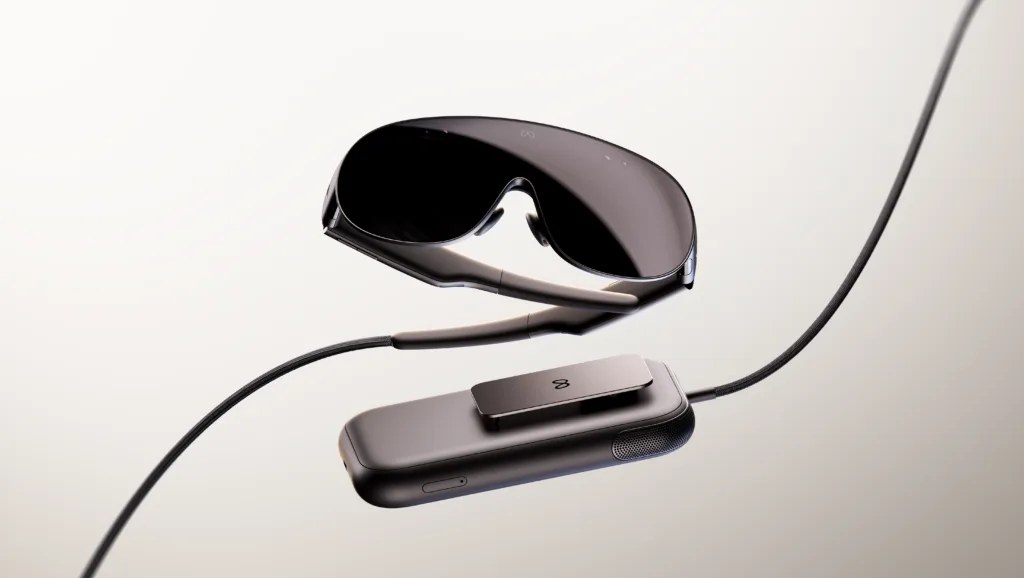
Meta VR Glasses and the puck that holds the computer and battery. The USB-C port for a computer is on the puck. Image: Meta.
Key takeaways
- A Mac or a Windows PC: both are named by Meta, wirelessly or over USB-C; see the three ways.
- With a cable, the glasses act as a display for a laptop, phone, console or handheld, with no capture card; see the cable.
- PC VR games run through Meta Quest Link, by cable or Air Link; see PC VR.
- 3D from a computer is not confirmed; see 3D films.
The three ways to connect
| Way | What you get | Mac | Windows PC |
|---|---|---|---|
| Wireless | Your desktop as one or more virtual screens [1][3] | Yes [1][3] | Yes [1][3] |
| USB-C cable into the puck | The glasses as a display for the computer [2][4] | Yes [2] | Yes [2] |
| Meta Quest Link (cable or Air Link) | PC VR games and apps [2] | Not stated | Listed as "PC VR" [2] |
All of this is announced for a device that ships in spring 2027, and can change before launch.
Last checked : Meta's announcement and developer device table, Road to VR and UploadVR.
Wireless is the route for work. Meta puts it next to bringing "your own keyboard and mouse" [1]. Road to VR describes "wireless multi-screen virtual desktop streaming from Mac, PC or phone" [3]. Meta has not published which app does this or what it needs on the computer. For how a Quest 3 shows a computer's screen today, see Meta Quest remote desktop.
A cable into the puck
The puck has one USB-C port and a DisplayPort input [2], and you plug in over USB-C [4]. Meta's developer table says you can "Use as a Mac, Windows, or console display" [2]. UploadVR reports that you can plug in "any USB-C DisplayPort device" to the puck, "including a phone, laptop, or gaming handheld", and see it "as a virtual screen, without the need for a capture card" [4]. UploadVR says that is a first for a Meta standalone device [4].
UploadVR's wording means the computer's USB-C port must send a DisplayPort video signal (DisplayPort Alt Mode) [4]. Road to VR's spec table lists "Full DP Alt Mode support" and a "USB 3.2 Gen 2 cable" [3]. Neither Quest 3 nor Quest 3S has this input: Meta's table shows "N/A" for both [2].
PC VR games
Meta's developer table lists PC VR on Meta VR Glasses through "Meta Quest Link (cable or Air Link)", the same entry as for Quest 3 and 3S [2]. Our guide to connecting a Meta Quest to a PC covers the Quest steps and what the PC needs. Meta's table does not name a Mac for Quest Link [2].
Meta says most existing Quest apps "should run at parity or better than Quest 3" on the glasses [5]. Controllers are not in the box by default, though UploadVR reports a bundle with controllers "in some retail channels" [4]. Touch Plus controllers are sold separately [2].
Will a film from your computer play in 3D?
The 3D films Meta has announced come through apps in the glasses, not from a computer. Disney+ streams films in 3D in select countries, and Peacock, HBO Max and Paramount+ are "offering their 3D media catalogs" [1]. See 3D movies on Meta VR Glasses.
A 2D film or your PC screen in 3D
Owl3D Link is our app for Meta Quest. With the Owl3D desktop app running on a Windows PC with an NVIDIA RTX 3060 or better, it shows what is on the PC in the headset, converted from 2D to 3D instantly, as it plays. It is an AI conversion, not the studio's 3D version. It works from Windows only, not from a Mac. Owl3D Link is free to use. On the free plan a session lasts 15 minutes and the picture carries a watermark. If Meta VR Glasses run Quest store apps, it should work there too, and we will confirm at launch; we have not tested it on the glasses. Meta says the glasses "run the same Store and payment platform" as Meta Quest [5].
On a Mac, Owl3D's converter makes a 3D file instead. It is a desktop app for Windows and Mac. It takes a 2D video file you have the right to use and makes a side-by-side, half side-by-side or top-bottom 3D file on your own computer. It is not instant: a full film takes time. Which file layouts the glasses' player accepts is not published yet.

Questions people ask
Do Meta VR Glasses need a PC?
No. Meta says the puck "handles compute, battery, and storage" [1]. A computer is an "option", in Meta's word, for work screens [1], and PC VR needs one [2].
Can I use Meta VR Glasses as a monitor for a console?
Meta's developer table says the DisplayPort input lets you use the glasses as a "console display" [2]. UploadVR names a "gaming handheld" as a device you can plug in [4].
Can I connect an iPhone or Android phone?
Road to VR's spec table lists phone mirroring as "Yes" [3], and UploadVR names a phone among the USB-C DisplayPort devices you can plug in [4]. Meta has not published which phones work.
Sources (5)
- Meta, "Introducing Meta VR Glasses, A New Era for Virtual Reality" (September 23, 2026). https://www.meta.com/blog/meta-vr-glasses-announcement-meta-connect/ Opened 2026-11-12.
- Meta developer documentation, "Compare devices" (updated October 23, 2026). https://developers.meta.com/vr/resources/compare-devices/ Opened 2026-11-12.
- Road to VR, Scott Hayden, "Meta Announces 'VR Glasses' Next-Gen XR Headset, Priced at $1,300" (September 23, 2026). https://roadtovr.com/?p=232488 Opened 2026-11-12.
- UploadVR, David Heaney, "Meta VR Glasses Officially Announced, Shipping Spring 2027 For $1300" (September 23, 2026). https://www.uploadvr.com/meta-vr-glasses-officially-announced-connect-2026/ Opened 2026-11-12.
- Meta for Developers, "VR is Expanding. Start Building for Meta VR Glasses Today." (September 24, 2026). https://developers.meta.com/blog/meta-connect-recap-start-building-the-future-of-vr/ Opened 2026-11-12.