Best VR Headset for PC (2026): Picks by Use and Specs
How we researched this: written by Owl3D from published sources, all 15 listed at the end.
Short answer
For most PC owners, the Meta Quest 3 is the safe pick. It streams PC games over Wi-Fi or a USB cable and also works without the PC [3][5]. The Steam Frame is Valve's wireless headset for a Steam library, with eye tracking that sharpens the streamed picture where you look [1]. For flight and racing sims, a DisplayPort headset such as the Pimax Crystal Light sends the picture with no wireless step and more pixels per eye [8]. The Quest 3S is Meta's lower-priced Quest [13], but sim owners find it less sharp (see what owners report). If you already own a PS5 headset, the PS VR2 works on a PC with Sony's adapter [7]. Owl3D, the publisher of this guide, makes 2D-to-3D software. We sell no headset and have tested none of these: the specs come from the makers' own pages and the experiences from owners, with dates.
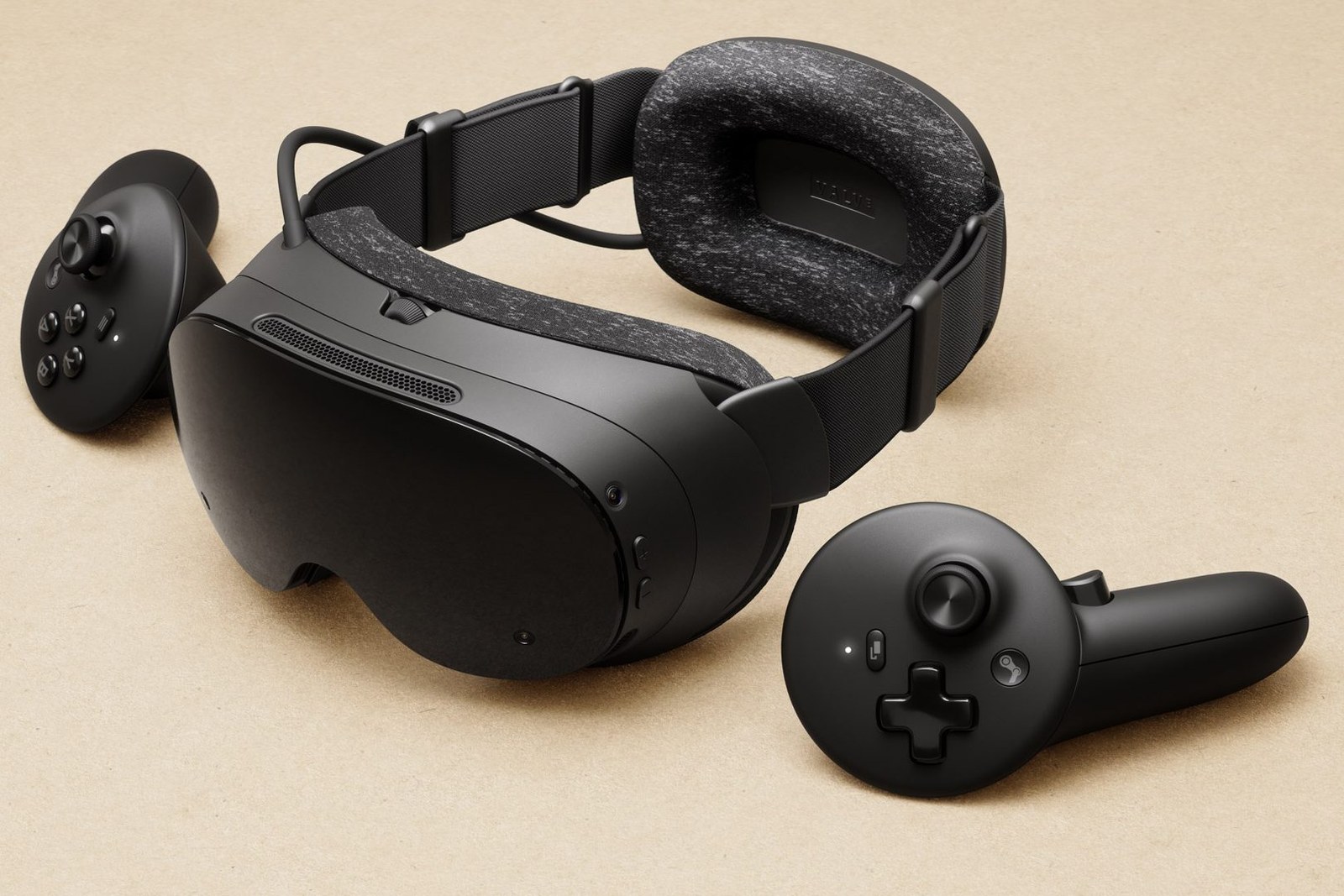
The Steam Frame and its controllers. Image: Valve, via Road to VR.
Key takeaways
- Pick by how you connect: wireless streaming (Steam Frame, Quest 3, Quest 3S) or a cable (DisplayPort for PS VR2, Crystal Light and Vive Pro 2; fiber optic for Bigscreen Beyond 2). See the table.
- The HP Reverb G2 runs on Windows Mixed Reality, which Windows 11 24H2 removed. Do not buy one now; see what to avoid.
- For films, a VR video player plays side-by-side (SBS) 3D files. See films and your own videos.
The picks, by use
Wireless, for a whole Steam library: Steam Frame. It streams from the PC over its own 6GHz adapter, which comes in the box [1]. Eye tracking steers "the best quality pixels only to where you're looking" [1]. Road to VR's reviewer found "not a meaningful visual advantage" over a Quest 3 [2]. Steam Frame or Quest 3 in detail: our comparison.
All-round and good value: Meta Quest 3. It has pancake lenses and 2064 x 2208 pixels per eye [3]. It works with a PC through Link (a USB cable) or Air Link (Wi-Fi) [3][5]. It weighs 515 g, against 435 g for the Steam Frame [2].
Lower price: Meta Quest 3S. It connects the same way, with Fresnel lenses and 1832 x 1920 pixels per eye [4][13]. Sim owners say the difference shows (see reports).
Most pixels, for sims: Pimax Crystal Light. It has 2880 x 2880 pixels per eye and takes the picture over DisplayPort [8]. It tracks with its own cameras, with no base stations to buy [8]. Pimax asks for an RTX 2080 at minimum and an RTX 3070 or better as recommended [8]. It weighs 815 g [8].
Lightest: Bigscreen Beyond 2. It weighs 107 g and has micro-OLED displays [10]. It runs on SteamVR with a 5-meter fiber optic cable, and its tracking comes from SteamVR base stations [10]. The Beyond 2e adds eye tracking [10].
You already own one: PS VR2. With Sony's PC adapter it runs SteamVR games. It needs a DisplayPort 1.4 output on the PC itself; Sony says DisplayPort over USB Type-C does not work with the adapter [7]. Before buying one for a PC, check stock: see can you still buy a PS VR2. Steps and what it loses on PC: PS VR2 on PC.
The headsets side by side
| Headset | Pixels per eye | Refresh | Link to the PC | Tracking |
|---|---|---|---|---|
| Steam Frame | 2160 x 2160 LCD [1] | 72-144Hz [1] | Wireless, 6GHz adapter included [1] | Cameras on the headset [1] |
| Meta Quest 3 | 2064 x 2208 [3] | 72, 90, 120Hz [3] | Link cable (sold separately) or Air Link (Wi-Fi) [3] | Cameras on the headset [3] |
| Meta Quest 3S | 1832 x 1920 [4] | 72, 90, 120Hz [4] | Link cable (sold separately) or Air Link [4] | Cameras on the headset [4] |
| PS VR2 | 2000 x 2040 OLED [6] | 90, 120Hz [6] | Sony PC adapter, DisplayPort 1.4 [7] | 4 cameras on the headset [6] |
| Pimax Crystal Light | 2880 x 2880 [8] | 60, 72, 90, 120Hz [8] | DisplayPort [8] | Inside-out, no base stations [8] |
| Bigscreen Beyond 2 | 5120 x 2560 for both eyes, micro-OLED [10] | 75, 90Hz [10] | Fiber optic cable, SteamVR [10] | SteamVR base stations [10] |
| HTC Vive Pro 2 | 2448 x 2448 [11] | 90, 120Hz [11] | DisplayPort 1.2 or higher; 1.4 with DSC for full resolution [11] | SteamVR base stations [11] |
We give no prices: each maker lists its own. Pimax also takes orders for the Dream Air (Sony micro-OLED, DisplayPort); its page names no refresh rate or ship date [9].
How to pick
- Your graphics card. More pixels need a stronger card; see do you need a powerful PC.
- Cable or wireless. Streaming "can be highly variable", says Valve [1]. Air Link wants a Wi-Fi network, "preferably 5GHz" [5]. A DisplayPort headset needs a free DisplayPort output on the PC [7][8][11].
- Base stations. Bigscreen Beyond 2 and Vive Pro 2 need SteamVR base stations mounted in the room [10][11]. The others need nothing on the walls.
- Comfort. Listed weights run from 107 g (Beyond 2) to 815 g (Crystal Light) [10][8]; Sony and HTC list none [6][11].
What not to buy now
HP Reverb G2. It is a Windows Mixed Reality headset [14]. Microsoft says Mixed Reality "was removed in Windows 11, version 24H2" [12]. Older devices work with Steam "through November 2026" only if the PC stays on version 23H2 [12]. After that, Windows Mixed Reality gets no security updates [12].
Meta Quest Pro. Meta stopped selling it at the start of 2025 [13].
Films and your own videos on a PC VR headset
A 3D film for a headset is usually one video file with two pictures in it: one for the left eye and one for the right, side by side (SBS). A VR video player splits it and shows each half to one eye.

The two halves differ a little. In the zoom below (left eye above, right eye below), the brow sits a few pixels further left in the lower picture. Your brain turns that shift into depth.

On a Meta Quest, player apps such as Skybox and DeoVR open these files. Longer guide: a VR movie theater at home.
Have a film that only exists in 2D? Owl3D's converter makes a side-by-side file from a 2D video you have the right to use, for VR and AR headsets. It is an AI conversion, not the studio's 3D version, and a full film takes time to convert. The free tier adds no watermark and stops at 60 seconds per conversion. With a Meta Quest and a Windows PC, Owl3D Link shows what plays on the PC in 3D, converted instantly as it plays. It is free to use; on the free plan a session lasts 15 minutes and the picture carries a watermark. The PC needs an NVIDIA RTX 3060 or better.
From Owl3DOwl3D converterA desktop app for Windows and Mac that turns 2D videos and photos into 3D.What owners report
Posts by sim pilots on flight-sim forums. We have not tested these headsets. Each is one person's report.
- Quest 3S for sims. A new Quest 3S owner wrote in June 2026 that the image "is not crisp, steam gauges are hardly readable unless you get closer" [14]. A reply in the same thread came from someone who tried both: "after looking at the image quality of the Quest 3 in comparison, I couldn't go back to the 3S" [14].
- Quest 3 or Crystal Light. A sim pilot who moved from a Quest 3 to a Crystal Light wrote in September 2024: "The clarity in the cockpit is the same with both headsets. But the ground textures on the ground in CL have better resolution" [15]. The Quest 3 ran faster [15].
- Weight and cable. An owner who moved from a Quest 3 to a Pimax Crystal Super wrote in September 2026 that it is "uncomfortably heavy after an hour or two" and its cable gets "tangled" [14]. Yet the Quest now looked "very blurry" [14].
Questions people ask
Do you need a powerful PC for VR?
A mid-range one is enough to start. Meta's recommended card for Link is an RTX 20 series or Radeon RX 6000 series [5]. Sony's minimum for the PS VR2 is a GTX 1650 [7]. Headsets with more pixels need more: Pimax recommends an RTX 3070 for the Crystal Light [8].
Quest 3 or Quest 3S for PC VR?
The Quest 3, if the budget allows: more pixels per eye and pancake lenses, against Fresnel lenses on the 3S [3][4].
Can I use a PS VR2 on a PC?
Yes, with Sony's PC adapter and a PC with a DisplayPort 1.4 output and Bluetooth 4.0 or later [7]. On PC, Sony says HDR, eye tracking and haptics beyond basic rumble are not available [7]. See PS VR2 on PC and is the PS VR2 worth it for PC.
Can I watch 3D Blu-ray films on a PC VR headset?
A VR player app plays 3D films that come as side-by-side or top-bottom files, as above. For a disc, see 3D movies on video glasses.
Sources (15)
- Valve, Steam Frame specifications page. https://store.steampowered.com/hardware/steamframe/specs Opened 2026-11-21.
- Road to VR, Scott Hayden, "Steam Frame Review – Power-user's Playground" (September 16, 2026). https://www.roadtovr.com/valve-steam-frame-review/ Opened 2026-11-21.
- Meta, Meta Quest 3 product page. https://www.meta.com/quest/quest-3/ Opened 2026-11-21, from outside the US.
- Meta, Meta Quest 3S product page. https://www.meta.com/quest/quest-3s/ Opened 2026-11-21, from outside the US.
- Meta Quest Help, "Windows PC requirements for Meta Horizon Link" and "How to set up Meta Horizon Link and Air Link". https://www.meta.com/help/quest/articles/headsets-and-accessories/oculus-link/requirements-quest-link/ and https://www.meta.com/help/quest/articles/headsets-and-accessories/oculus-link/connect-with-air-link/ Opened 2026-11-21.
- Sony, PS VR2 tech specs. https://www.playstation.com/en-us/ps-vr2/ps-vr2-tech-specs/ Opened 2026-11-21.
- Sony, "How to prepare for using PS VR2 with PC", and PlayStation Direct, PS VR2 PC adapter page. https://www.playstation.com/en-us/support/hardware/pc-prepare-ps-vr2/ and https://direct.playstation.com/en-us/buy-accessories/playstationvr2-pc-adapter Opened 2026-11-21.
- Pimax, Crystal Light page. https://store.pimax.com/pages/crystal-light Opened 2026-11-21.
- Pimax, Dream Air page. https://store.pimax.com/pages/dream-air Opened 2026-11-21.
- Bigscreen, Bigscreen Beyond 2 home page. https://www.bigscreenvr.com/ Opened 2026-11-21.
- HTC, VIVE Pro 2 specs (US). https://www.vive.com/us/product/vive-pro2/specs/ Opened 2026-11-21.
- Microsoft Learn, "Features and functionality removed in Windows client". https://learn.microsoft.com/en-us/windows/whats-new/removed-features Opened 2026-11-21.
- UploadVR, David Heaney, "Quest Pro Is Now Officially Discontinued" (January 2, 2025). https://www.uploadvr.com/quest-pro-officially-discontinued/ Opened 2026-11-21.
- Microsoft Flight Simulator Forums, users' posts: "Meta Quest 3S / GPU performance & image quality" (June 2026), "Is it worth upgrading from Meta Quest 3 to Pimax Crystal Light?" (September 2026) and "My Review of the Pimax Crystal Light: An Excellent Alternative to the HP Reverb G2" (December 2024). https://forums.flightsimulator.com/t/meta-quest-3s-gpu-performance-image-quality/769174 , https://forums.flightsimulator.com/t/is-it-worth-upgrading-from-meta-quest-3-to-pimax-crystal-light/775390 and https://forums.flightsimulator.com/t/my-review-of-the-pimax-crystal-light-an-excellent-alternative-to-the-hp-reverb-g2/692767 Opened 2026-11-21.
- AVSIM forums, users' posts: "Crystal Light vs Quest 3. Experience" (September 2024). https://www.avsim.com/forums/topic/648684-crystal-light-vs-quest-3-experience/ Opened 2026-11-21.