3D Movies on Oculus Rift and Rift S: Players and Files
How we researched this: written by Owl3D from published sources, all 4 listed at the end.
Short answer
Yes. The Oculus Rift and Rift S are PC headsets, so a 3D movie plays in a VR video player on your PC, through SteamVR or the Oculus PC app [1][3]. Three players on Steam name the Rift today: Bigscreen [1], SKYBOX VR Video Player [2] and Virtual Desktop Classic [3]. The movie must be a 3D file, side-by-side (SBS) or over-under. In the player, set the 3D mode to the same layout as the file. If you see two pictures next to each other, or the film looks flat, the mode does not match the file. Owl3D, the publisher of this guide, makes a 2D to 3D video converter.

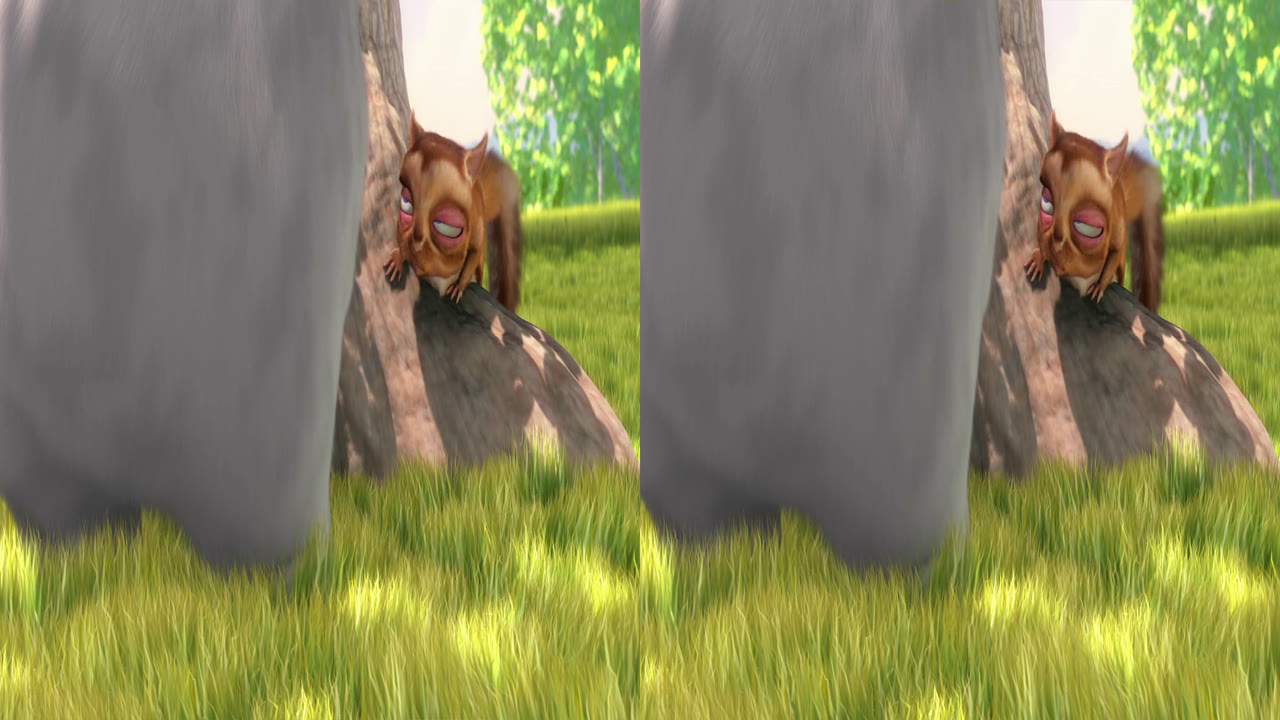
A full side-by-side 3D frame: one picture for each eye, in one 3840 x 1080 frame (shown smaller). A Rift player shows the left half to your left eye and the right half to your right eye. We made it on November 22, 2026 from one frame (00:02:10) of Big Buck Bunny 3D, a film released in stereo 3D. This is not a capture from a Rift: we have not tested these files on one. Big Buck Bunny CC-BY Blender Foundation 2008; 3D Sunflower version CC-BY Janus B. Kristensen 2013 [4].
Key takeaways
- The Rift needs a PC player. Pick one in players that list the Rift.
- Two pictures side by side, or flat: fix it in the 3D mode.
- No 3D files yet: see where to get 3D movies.
- Only a 2D copy of the film: make an SBS file.
Players that list the Rift today
These three players name the Oculus Rift on their Steam store pages, read on November 22, 2026. Each plays 3D side-by-side files from your PC.
| Player | Headsets it names | 3D files it plays | Source |
|---|---|---|---|
| Bigscreen | Oculus Rift, Rift S, Quest, HTC Vive, any SteamVR headset, Windows Mixed Reality | Side-by-side and over-under, "directly from your desktop" | Steam [1] |
| SKYBOX VR Video Player | Oculus Rift, Vive, Microsoft MR | Side-by-side and over-under; it detects the layout itself | Steam [2] |
| Virtual Desktop Classic | Oculus Rift / Rift S, HTC Vive, Valve Index, WMR | "3D Side-By-Side video support" | Steam [3] |
Bigscreen and Virtual Desktop Classic list "SteamVR or Oculus PC" as their VR support [1][3]. SKYBOX lists SteamVR [2]. Virtual Desktop Classic names only PC headsets: its page says it is "NOT for the Meta Quest or Pico headsets" [3].
More players, and what each does for 180 and 360 video, are in our guide VR video player. Bigscreen's own 3D movie rentals are in Bigscreen 3D movies.
How to watch a 3D movie on the Rift
- Install one of the players above from Steam on the PC that runs your Rift.
- Put the 3D movie file on that PC. Check its layout: side-by-side or over-under, full or half. The file name often says it, for example "SBS" or "OU".
- Put on the Rift, start the player and open the file from your PC.
- Set the player's 3D mode to the file's layout. SKYBOX tries to find the layout by itself [2]. If the picture is wrong, set it by hand.
Two pictures side by side, or a flat picture
What you see: two copies of the film next to each other (or one above the other), or a picture with no depth.
Why: a 3D file holds two pictures, one per eye, in one frame. If the player's 3D mode is off, it shows the whole frame on one flat screen. You see both pictures at once, as in the frame below.
What to do: turn on the player's 3D mode and pick the layout of the file. If the film then looks stretched or squeezed, you picked full when the file is half, or the other way round.
The three file layouts
| Layout | Frame | What is in it |
|---|---|---|
| Full side-by-side (Full SBS) | 3840 x 1080 for a 1080p film | Two full-width pictures, left and right |
| Half side-by-side (Half SBS) | 1920 x 1080 | Two pictures, each squeezed to half width |
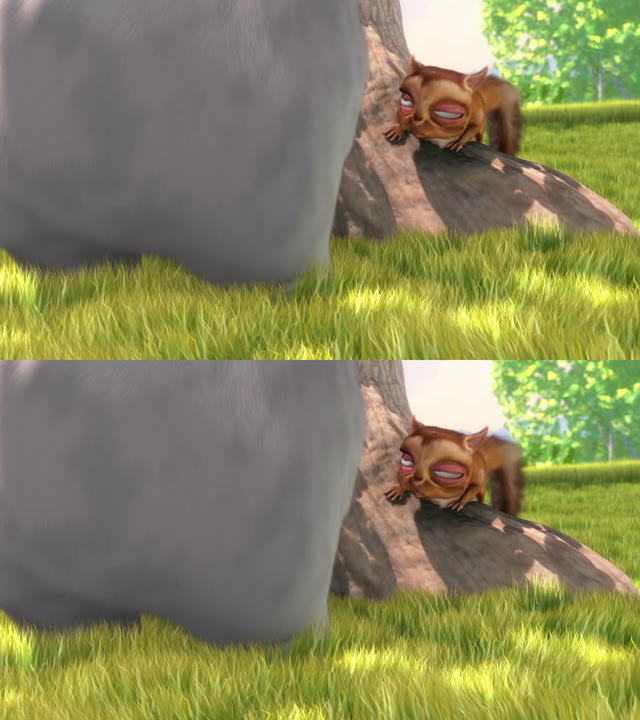
| Over-under (top-bottom) | 1920 x 2160 full, or 1920 x 1080 half | Left-eye picture on top, right-eye picture below |
Where to get 3D movies
Our guide free 3D movies lists free 3D films and short clips, and where to find them. Bigscreen also rents 3D movies from studios inside the app [1].
The film has no 3D version: make an SBS file
Many films were never released in 3D. The Owl3D app converts a 2D video file that you have the right to use into a side-by-side or over-under 3D file, on your PC. Open the file in a Rift player as above. It is an AI conversion: the second picture is estimated, so it is not the studio's 3D version.
From Owl3DOwl3D converterA desktop app for Windows and Mac that turns 2D videos and photos into 3D.FAQ
Can you watch 3D movies on an Oculus Rift?
Yes, as side-by-side (SBS) or over-under files in a PC VR video player such as Bigscreen, SKYBOX or Virtual Desktop Classic [1][2][3].
What is the best 3D movie player for the Rift?
We have not tested them on a Rift. Bigscreen names the Rift and Rift S and plays SBS and over-under files [1]. SKYBOX finds the 3D layout by itself [2]. Virtual Desktop Classic was made for PC headsets like the Rift [3].
Does the Rift S play 3D movies too?
Yes. Bigscreen and Virtual Desktop Classic name the Rift S on their Steam pages [1][3].
Why does my 3D movie show two pictures?
The player's 3D mode is off, or set to the wrong layout. See two pictures side by side.
Sources (4)
- Steam, "Bigscreen Beta" store page. https://store.steampowered.com/app/457550/ Opened 2026-11-22.
- Steam, "SKYBOX VR Video Player" store page. https://store.steampowered.com/app/721090/ Opened 2026-11-22.
- Steam, "Virtual Desktop Classic" store page. https://store.steampowered.com/app/382110/ Opened 2026-11-22.
- Big Buck Bunny 3D, bbb3d.renderfarming.net (licence: Big Buck Bunny CC-BY Blender Foundation 2008; 3D Sunflower version CC-BY Janus B. Kristensen 2013). http://bbb3d.renderfarming.net/ Opened 2026-11-22.