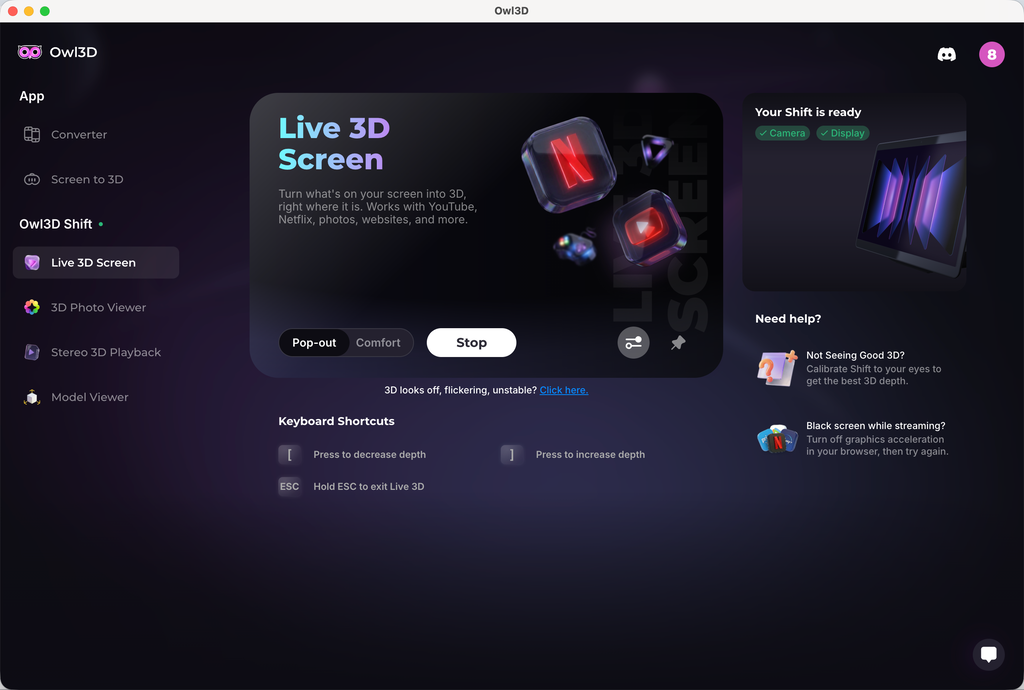
¡Hola, GB, gracias por los comentarios! Parece que tu Shift no se calibró correctamente, lo que provoca los patrones de moiré/el efecto de centelleo que estás viendo. Algunos usuarios tuvieron el mismo problema y notaron una gran mejora después de calibrar.
Para calibrar, ve a Live 3D Screen y, en el lado derecho, verás una sección «Not Seeing Good 3D?». Haz clic ahí y entrarás en un programa de calibración. Dentro del programa habrá un control deslizante que puedes usar para ajustar el desfase 3D. Normalmente, tu valor de calibración debería estar en torno a 0. Intenta encontrar un valor que dé el mejor 3D y menos centelleo. Si crees que has hecho bien la calibración y sigues viendo mucho centelleo, avísame. Lo investigaremos más a fondo.
En cuanto a tu otra petición, ver imágenes o vídeos full side-by-side, pronto vamos a añadir un reproductor multimedia nativo compatible con contenido full side-by-side.
Hi GB, thanks for the feedback! It sounds like your Shift wasn't calibrated correctly, which will cause the moiré patterns/shimmering effect you're seeing. Some users had the same issue and saw great improvement after calibration.
To calibrate, go to Live 3D Screen, and on the right-hand side, you'll see a section "Not Seeing Good 3D?" Click that, and you'll enter a calibration program. Within the program, there will be a slider you can use to adjust the 3D offset. Normally speaking, your calibration value should be around 0. Try to find a value that has the best 3D and less shimmering. If you believe you've done the calibration correctly and are still seeing bad shimmering, let me know. We'll dig deeper.
To your other request, viewing full side-by-side image or video, we're gonna add a native media player soon that supports full side-by-side media.


 Shift.
Lo pruebo con la nueva versión 2.4.0 en un MacBook Pro M1 pro (16 Go Ram).
Funciona muy bien, impresiona con mis Blu-ray 3D 4K 10 bit ripeados.
Lo probaré más adelante con un Mac mini M4 Pro & también en PC Windows (cuando tenga tiempo).
Muchísimas gracias por su trabajo, chicos, y por ayudarnos a disfrutar más del 3D inmersivo y sin gafas también.💯
Esta última versión da inmersión.
Shift.
Lo pruebo con la nueva versión 2.4.0 en un MacBook Pro M1 pro (16 Go Ram).
Funciona muy bien, impresiona con mis Blu-ray 3D 4K 10 bit ripeados.
Lo probaré más adelante con un Mac mini M4 Pro & también en PC Windows (cuando tenga tiempo).
Muchísimas gracias por su trabajo, chicos, y por ayudarnos a disfrutar más del 3D inmersivo y sin gafas también.💯
Esta última versión da inmersión.