Wall of love

Owl3D Shift Reviews

Judge.me

The only issue, that took a star from five to 4 is a shadow of right eye in the picture on the left, and vice versa.

The eye tracking was not so top. In the beginning, as more people came to look at it, and calibration was not done correctly, the was focusing problem. My side error, no star taken.

Reply from Owl3D:

Hi, thank you for the detailed feedback and your encouragement; it means a lot to us.

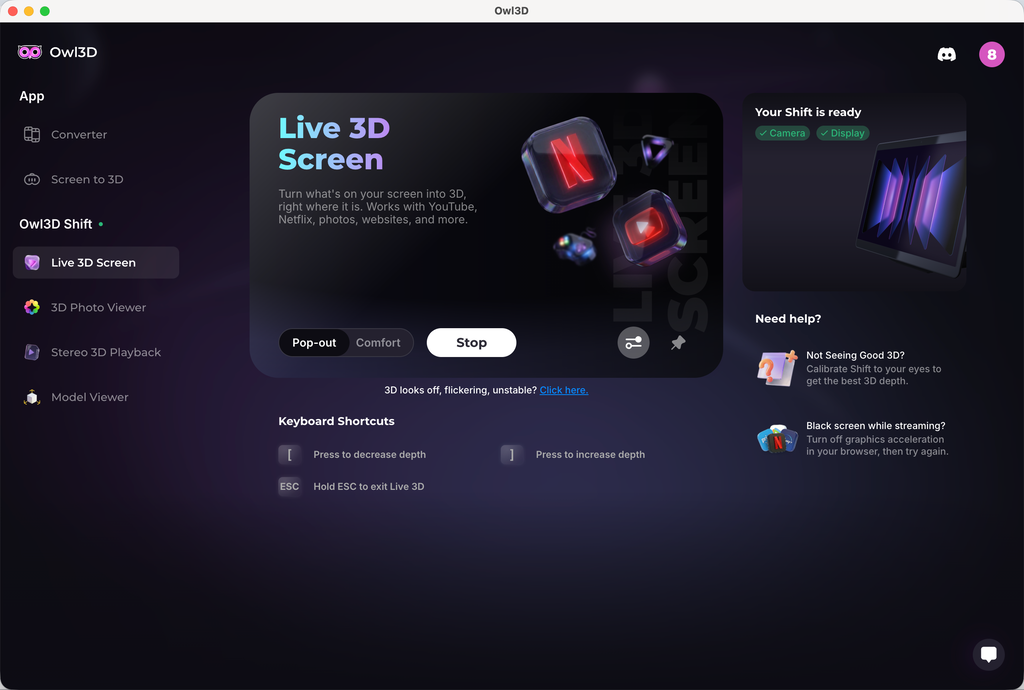
On the ghosting between eyes, some crosstalk comes from the lenticular optics themselves, but two things reduce it noticeably. Run the quick calibration from the 'Not seeing good 3D?' prompt in Live 3D, and try Comfort mode. Pop-out pushes more depth and shows more halo as a tradeoff.

If you have any further feedback or other suggestions, we appreciate you sharing them with support@owl3d.com. Thank you!

James AllenShift owner

This is an utterly incredible bit of kit. My use case currently is to enjoy media in the way that I used to on my old 3D tv and, goodness, this is incredible for that purpose. Running with a LOQ laptop, zero latency, perfect depth.

khezuhShift owner

finally my shift has arrived! everything was easy to set up 👍 been watching anime, movies and playing games on it chefs kiss it just WORKS!

u/cyberealityShift owner · r/3dspiracy

NEW "Glasses Free" 3D Monitor for 3DS Emulation. Works Perfect w/ Azahar in Actual Stereo 3D. Just like the Nintendo 3DS but 4K!! Only $499

Just got this new "glasses free" 3D monitor called the Owl3D Shift and decided to try 3DS games today. Works 100% perfect with Azahar. Was able to do 4K resolution (9x scale) on my RTX 3080 laptop, in 3D too!! … I have a few other of these new 3D monitors (that don't need glasses) and this is one of the better ones I've seen. The ghosting (crosstalk) is especially low, and it's 4K at 14" (it's a portable display) so looks nice and sharp on the 3DS games. If you want to try this (and have the Owl3D Shift) make sure to set Citra/Azahar to rendering with Vulkan, stereoscopic display to SBS, and screen layout to Single Screen. To get it to open in 3D on the display, use the Owl3D app with the Stereo 3D Playback mode set to Side-by-Side. Looks absolutely sick.

A 3DS Mario game running on the Shift above a keyboard
u/hologramwatchShift owner · r/Odyssey3D

Replying in “My Owl3D Shift Arrived!! Glasses-Free 3D for $499!!!”

My Owl Shift arrived two days ago. The 2d to 3d conversion is quite good, better than what my xreal glasses can do, I find the xreal have a lot of depth errors and I see very little on the Owl. I find the screen image pop out always returning to 50% is a bit too much, it looks more realistic at about 20% and is easier on the eyes. wish there was a way to keep it at 20 instead of having to reset it every time I turn it on but it's not too big of a deal. Screen image quality is very good … I still have to spend more time with the Owl but first impressions are very good.

Bruce HShift owner

It's truly insane how good the 3D is, and natural, no "hold your head within 0.01mm of the sweet spot". It doesn't feel like a gimmick.

Judge.me

I just received my Owl3D Shift and I haven't tried all it's options yet. But the live stream 3-D for YouTube videos works extremely well, I think. A great new product for the 3-D community.

xretsimShift owner

Using the IINA video player app on my Mac I can play FS3D (frame-sequential 3D) just fine.

.kovarskiShift owner

A lot of fun since what I am looking for seems to work. Interesting with a lot to learn. … My main interest was using it with stereoscopic photos.

nevi976Shift owner

you've done an incredible job at improving the flickering issue/consistency! Previously I thought I wouldn't have watched a whole movie on it - but it's working flawlessly now!

Josh6499Shift owner

You guys need to try F-Zero GX with Dolphin emulator on this thing. It's insane. Also I was able to run Helldivers 2 with the live 3D at 45 FPS locked , rendering it at 1080p with DLSS quality on a laptop 5080. (Similar to desktop 5070). It was actually pretty nice and playable! Wish it was better, but it's a start at least.

3dmurchShift owner

In terms of the display itself it's probably the best glasses free display I've used (and I've used many).

Reply from Owl3D (Leonaikq):

We’ve added power control in the latest 2.4.0, you can download here. <#1076169238034792508>

Full SBS support and HSBS detection issue fix are on the way.

Jordy KroezeShift owner

Just got mine, and the video mode is amazing. Still need to test best lightning/angle but already impressed.

u/Short_Mechanic8276Shift owner · r/Odyssey3D

Replying in “My Owl3D Shift Arrived!! Glasses-Free 3D for $499!!!”

I've tried playing some 3D games, but the view gets darken when Live 3D is turned on, reported it and they said that are fixing it in the next software update. If just talking about the 2D-3D conversion, the effect is done much better than Spatiallabs Go.

Judge.me

3d effect is overall good,but hallucination is sideffect we need to sovle it,then it would be perfect

Judge.me

I really was impressed with how 3D the image was. And how crystal Clara was? I do unfortunately have an issue with it. Right now, where the driver for the camera is not working correctly.

u/cyberealityShift owner · r/Odyssey3D

My Owl3D Shift Arrived!! Glasses-Free 3D for $499!!!

Just got my Owl3D Shift, haven't even opened the box yet. This is the newest "glasses free" 3D monitor to launch at $499, which is an insane price given how expensive things have been the last 2 years. It's 4K stereo 3D, but only a 14" display, and 60Hz at that, so not necessarily competing with the Samsung Odyssey 3D, but the price is quite reasonable and I'm hyped to see how the quality looks. … Any one else go theirs yet and want to share what you think?

The Owl3D Shift box, unopened, on a desk chair
Judge.me

使用体验:

1、 2D 实时转3D 效果并不明显,设备参数如下:

Pop-out 模式

Adjust 3D:increase depth

2、 2D 转 3D 视频画面,物体有很明显的重影,观看的时候有眩晕的感觉

3、头轻轻移动的时候,屏幕有明显的闪动,类似黑影划过

Photo from Anonymous
Judge.me

I liked it

Judge.me

Super cool product! The 3D effect is awesome; though a little hard on the eyes at times. The live 3D is also very impressive for just releasing. I cannot wait to see how it improves with updates!

Photo from DC
VinZShift owner

Hi, after benchmarking the Owl3D Shift, forcing a maximum frame rate of 60 Hz (via Nvidia Control Panel) in native apps like Calibration, Display-mirror, Model Viewer, and 3D Photo Viewer drastically improves the user experience. Why? Since the physical display and the tracking camera both run at 60 Hz, letting the software render at 90-100 Hz creates frame pacing mismatches and unnecessary GPU overhead. Capping the software at 60 Hz achieves perfect 1:1 synchronization.

Reply from Owl3D (richmengsix):

Appreciate for the feedback. we will look into this

Tricks 🎃R TreatsShift owner

Rise of the Tomb Raider - Native 3D plays pretty flawless for me RTX 4080. So far the easiest to get going from my Steam Library over on the Shift.

u/hologramwatchShift owner · r/Odyssey3D

Replying in “My Owl3D Shift Arrived!! Glasses-Free 3D for $499!!!”

meant to add from my previous post on the owl that the "holographic" photo conversion is neat, any still photo from the web or your files can be dropped in and it will convert it to full parallax 3d, meaning you can actually look around the image and see a bit above, below and side to side rather than a static 3d image.

XretsimShift owner

On my system with the test game I was using (Shadow of the Tomb Raider), the frame rate was about 5 to 8 fps in full screen, and 60fps in a window. The difference was dramatic, easily enough to take the game from unplayable to quite enjoyable.

By going to the little game controller icon on the menu bar and turning game mode off (see screenshot), my frame rate in full-screen mode climbed to match the framerate I was seeing in Windowed mode.

JaucoholicShift owner

Just got mine today. I'm really liking it. The 3D effect on pictures especially is fantastic.

Michael MeehanShift owner

Just wanted to say that I received the Shift and installed it today. First impressions are pretty amazing. Thanks for putting this together.

takochan19Shift owner

well the live 3D feature is still peak / view 2D photo in fullscreen really mindblowing

Judge.me

超新穎的技術,期待後續更新,很喜歡,感覺來到新時代的感覺!

Judge.me

Amazing product

forkboy22Shift owner

Got mine today. Super impressed. Works better than I expected. Only issues I've had so far is that it doesn't seem work with FastStone Image Viewer and it has a difficult time with Full SBS images.

Reply from Owl3D (Leonaikq):

Full SBS support will come soon. It’s our top priority now.

u/paulct91Shift owner · r/Odyssey3D

Replying in “My Owl3D Shift Arrived!! Glasses-Free 3D for $499!!!”

Its actually not quite that bad oddly 14' is surprisingly usable to play games on though, the either lack of HDR or spotty Windows HDR support is odd. For reference I play some of my Gamecube games via Dolphin on it. Dolphin has a stereoscopy features built-in so using the Owl3D Shift with the company's own app, Owl3D app, does make for a fun Super Mario Eclipse playing experience but, mine has some 3D abberation so I might send mine back to check if another unit fixes it. 🫤

u/cyberealityShift owner · r/Odyssey3D

Replying in “My Owl3D Shift Arrived!! Glasses-Free 3D for $499!!!”

it's crazy, omfg!! the 2d-to-3d algorithm was improved recently, or they changed it for the shift, cause the live desktop conversion looks a lot better. still not quite native stereo, but at times it could have been. … they have a mode to turn photos into point clouds (or guassian splats) with head-tracking and everything. absolutely insane!! … performance seemed weak here, and i was getting audio stutter when playing an MP4 video. … also, there were some issues with flickering when moving my head around, and the overall brightness of the display is less than samsung/acer. but i believe those issues can be fixed in software, and other than that it's one of the most impressive things i've seen in a while (particularly the gaussian splat photo mode)

u/nautymacShift owner · r/Stereo3Dgaming

[Release / Temporary Fix] Owl3D 3D Brightness – A tray tool to fix dark/dull screens on the Owl3D Monitor

If you use the Owl3D Monitor (Shift display), you've probably noticed that when Live 3D is on, the midtones become noticeably darker, making videos and photos look dull even with the backlight at max. … To solve this, I created Owl3D 3D Brightness — a small, lightweight tray tool that applies brightness and color corrections only while 3D is running. This tool is designed to serve as a temporary workaround until an official fix or update is released. (Note: This is a community tool, not made or supported by Owl3D).

Judge.me

Works very Fine, as expected. My expectation, that the Shift needs only one USB-connection, was Not realized.

Judge.me

Live 3d not good for movies and converting comics via comic read is hit or miss. Even self converting to sbs images does not converge.

Reply from Owl3D:

Hi! Thank you very much for leaving us feedback. Sorry that your initial experience wasn't as smooth.

For the SBS conversion issue you mentioned in Stereo 3D Playback, set the format to Side-by-side instead of Auto. Auto can miss some SBS stills, and forcing Side-by-side has resolved this for other owners.

A convergence slider for SBS content and a built-in SBS photo and video player are both on our roadmap, so you won't need a third-party viewer for your conversions. For movies, 3D strength and convergence controls are coming to Live 3D so you can tune the effect yourself.

We appreciate your further feedback, and our engineer might contact you by email to learn more details about your experience. Thank you!

Judge.me

The 3D display isn't very stable, and the image gets distorted if you move your head.

Reply from Owl3D:

Hi! Thank you very much for leaving us feedback. Sorry that your initial experience wasn't as smooth. The stability issue related to head movement you mentioned has been fixed in our latest 2.3.0 software. Could you give it a try and let us know if the experience has improved? You can download the latest version on our website at www.owl3d.com/shift.

Looking forward to hearing your thoughts on the new version!

Cheers,

Leon

Judge.me

Discovering, at first, Owl3D´s desktop app was a revolution! Now, having bought and used the Owld3D Shift ...I´m at a loss for words. A dream made reality! THANK YOU Owl3D team!!!

Photo from Andy Bäcker
Judge.me

Another pleasant surprise was the quality of the 2D-to-3D video conversion. Compared to other solutions I have tested, the 3D image on Shift often appears calmer, more stable, and less flickery. This makes watching videos more comfortable for longer periods of time.

Photo from Peter Wollschläger
Judge.me

3D is awesome. Very little setup, it just works. This feels like the future, no glasses just a screen that looks like you are in the room or if it’s an old family video upscaled or hi resolution you feel like you have just time traveled! If you have a decent GPU or a newer MAC highly recommended!

maxpayne4Shift owner

It feels like magic. First glasses free 3D since I had a Nintendo 3DS back in the day.

u/cyberealityShift owner · r/Odyssey3D

Replying in “My Owl3D Shift Arrived!! Glasses-Free 3D for $499!!!”

yeah, this photo into hologram conversion is INSANITY!! it seems to be a point cloud or gaussian splat but the quality is crazy, and the head-tracking is extremely accurate with low latency. this was probably the most impressive thing on there, cause i've never seen anyone ship this in a product (lots of tech demos on social media, but this is the first time i've seen it released in a finished form).

Judge.me

I received it two days ago; the screen is better than I expected, and it was worth the long wait.

falksirkillsalotShift owner

This works great, Awesome Job Guys and Gals. I was a bit skeptical of the size, but the 3D and Depth just makes it look so much bigger.

Judge.me

Very well made device, video looks great and the effects are impressive.

drowhunterShift owner

Received my Shift last Wednesday, I'm shocked how good the screen looks in normal 2D mode. It's actually way better than my actual laptop.

Josh6499Shift owner

I was playing Forza and Helldivers 2 today and it was running beautifully with the Live 3D conversion on the Shift. Ultra settings 4K 60hz no problem. 5090 was running at like 50% utilization.

sevensixtyShift owner

At the moment playing any PC games in SBS (native,Geo11,etc) is not viable for me (3090) due to poor performance. Just turning on SBS mode is consuming 40% of my GPU without even running a game. No idea why, maybe fixable in an update, so for now I have given up on that. But I have been having an amazing experience using PS Remote Play (PXPlay) and Live 3D conversion.

Reply from Owl3D (richmengsix):

Thanks for the feedback. We are aware of this issue and look to improve sbs mode performance in the next few versions.

htbaaShift owner

Finally a high res option to watch some 3D SBS that's not a 3DS or with a VR headset.

Judge.me

The display is nice, but the image is not as clear as I hoped - There are vertical lines visible even from a comfortable viewing distance, it feels like looking at a lenticular print. Also - I wish the 3D viewer for native 3D would have more options for viewing formats - mainly full width SBS and cross view images, this way I could easily brose the web and see 3D images in these formats without resorting to download and view on an app like stereo photo maker to resolve the image to the correct format.

Judge.me

waiting for more Mac compatability

GBShift owner

It works but unfortunately the glasses free 3D display is somewhat disappointing. The main issue is no support for full width SBS image or video files. Then there is the problem of shifting moire patterns and shimmering contrast cycling accross the screen, drawing attention to the screen matrix.

Reply from Owl3D (Leonaikq):

Hi GB, thanks for the feedback! It sounds like your Shift wasn't calibrated correctly, which will cause the moiré patterns/shimmering effect you're seeing. Some users had the same issue and saw great improvement after calibration.

To calibrate, go to Live 3D Screen, and on the right-hand side, you'll see a section "Not Seeing Good 3D?" Click that, and you'll enter a calibration program. Within the program, there will be a slider you can use to adjust the 3D offset. Normally speaking, your calibration value should be around 0. Try to find a value that has the best 3D and less shimmering. If you believe you've done the calibration correctly and are still seeing bad shimmering, let me know. We'll dig deeper.

To your other request, viewing full side-by-side image or video, we're gonna add a native media player soon that supports full side-by-side media.

u/nautymacShift owner · r/Stereo3Dgaming

Shift3D-AMD: Glasses-free 3D for any window on the Owl3D Shift, even on AMD GPUs (free, open, one exe)

Owl3D Shift 3D Monitor support only Owl3D's own 2D→3D (Live 3D) only runs on NVIDIA, so on an AMD (or Intel) machine the Shift can't convert anything by itself. It captures any window, turns it into side-by-side 3D with a depth model that runs on any GPU (Depth Anything V3 Small on DirectML) on Owl3D Shift 3D Monitor, and lets Owl3D's Stereo 3D Playback do the eye tracking and weaving as usual. Unofficial, not affiliated with Owl3D, no Owl3D files inside. Single exe, no install.

real_shenanigansShift owner

Just got my Shift in the mail and have been toying around with it. The live 3D is pretty neat … this sub 60 fps in non 3d mode is kind of a deal breaker.

Find your own use for it

Movies, games, your own photos, live 3D from anything on screen — see what Shift does.

Explore Shift

Stay Updated on Exciting News!

© 2026 Owl3D. All rights reserved.