XREAL Aura and 3D Movies: What It Plays, Price and Ship Date
How we researched this: written by Owl3D from published sources, all 17 listed at the end.
Short answer
Yes, XREAL Aura plays 3D movies. XREAL's own manual says it "supports side-by-side 3D content", through a video player you install from Android XR [1]. Studio 3D films come through Google TV, and spatial view turns 2D video into 3D with a tap [2]. Launch price starts at $1,099 through the end of the year, and shipping is expected to begin in mid-November 2026 [2][3]. Owl3D, the publisher of this guide, makes a 2D-to-3D converter, described in one passage below. Device facts come from XREAL's and Google's own pages. Aura has not reached buyers yet and we have not tested one.
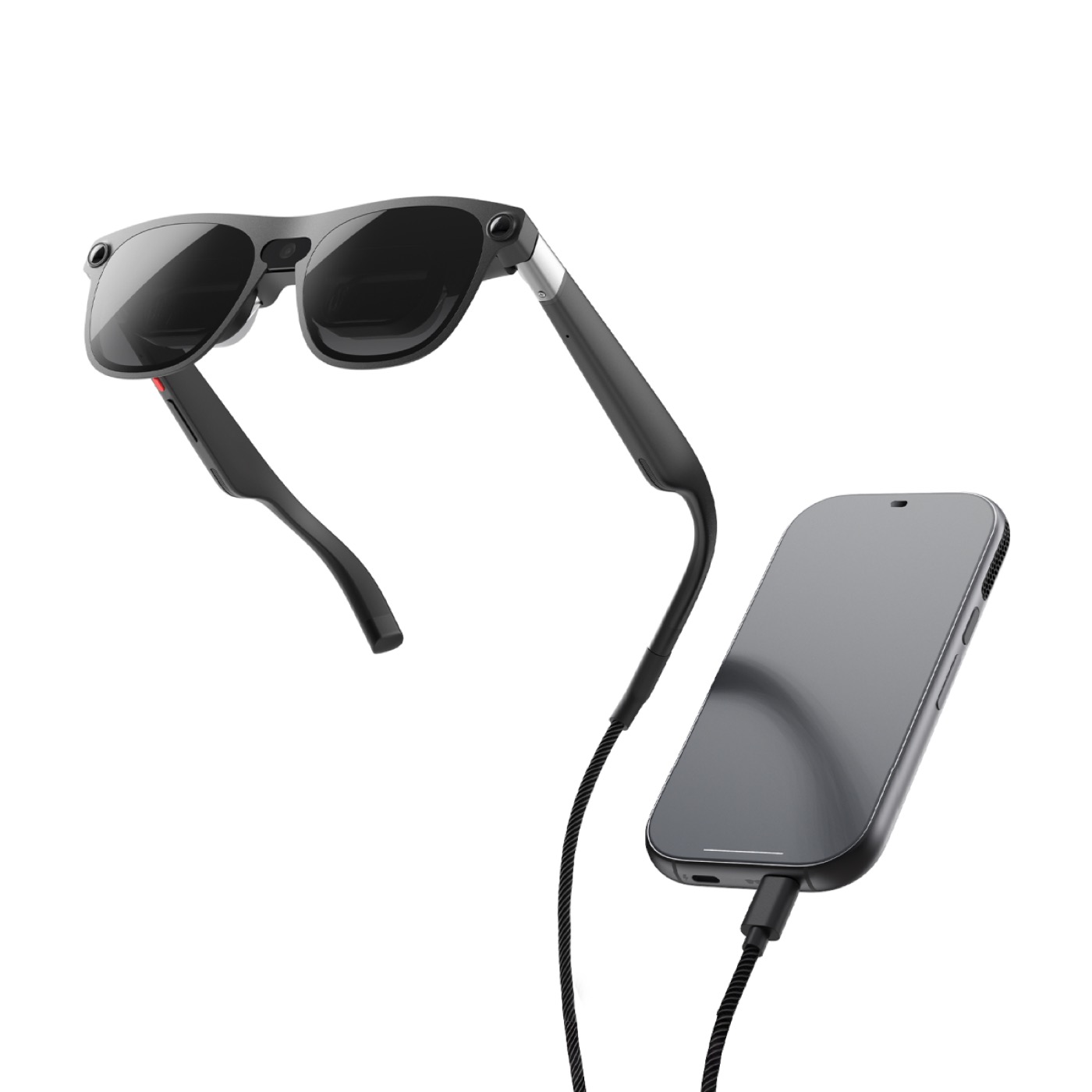
XREAL Aura: 95 g glasses and a 265 g compute puck joined by a cable. Image: XREAL.
Key takeaways
- Three routes to 3D films: Google TV, your own side-by-side files, or spatial view: how each one works.
- A Google TV film must be bought in its 3D-eligible form, and only plays in 3D on Android XR: the Google TV catch.
- $1,099 for 12GB/256GB, $1,299 for 16GB/512GB, until the end of December: price and ship date.
- The charging cable in the box carries no video from a laptop: what to connect.
- A film with no 3D release can become a 3D file with an AI conversion, not the studio's 3D version: Owl3D's converter.
How to watch 3D movies on XREAL Aura
| Route | What you watch | What it needs | The limit |
|---|---|---|---|
| Google TV | Studio 3D films | A Google account, and a film sold with a 3D version [6] | Not every film has one [6] |
| A 3D video player | Your own side-by-side files | A player app that supports 3D, installed from Android XR [1] | XREAL names no app [1]. Spatial Film's listing names Aura [17] |
| Spatial view | Almost any 2D video, photo or game, in 3D [2] | One tap in Quick Settings [5] | Works best on "non-protected video content" [5] |
| YouTube | 3D, 180° and 360° videos [7] | The YouTube app's filters under the search bar [7] | "3D movies are not available on Android XR" there [7] |
Google TV: real 3D versions, with a catch
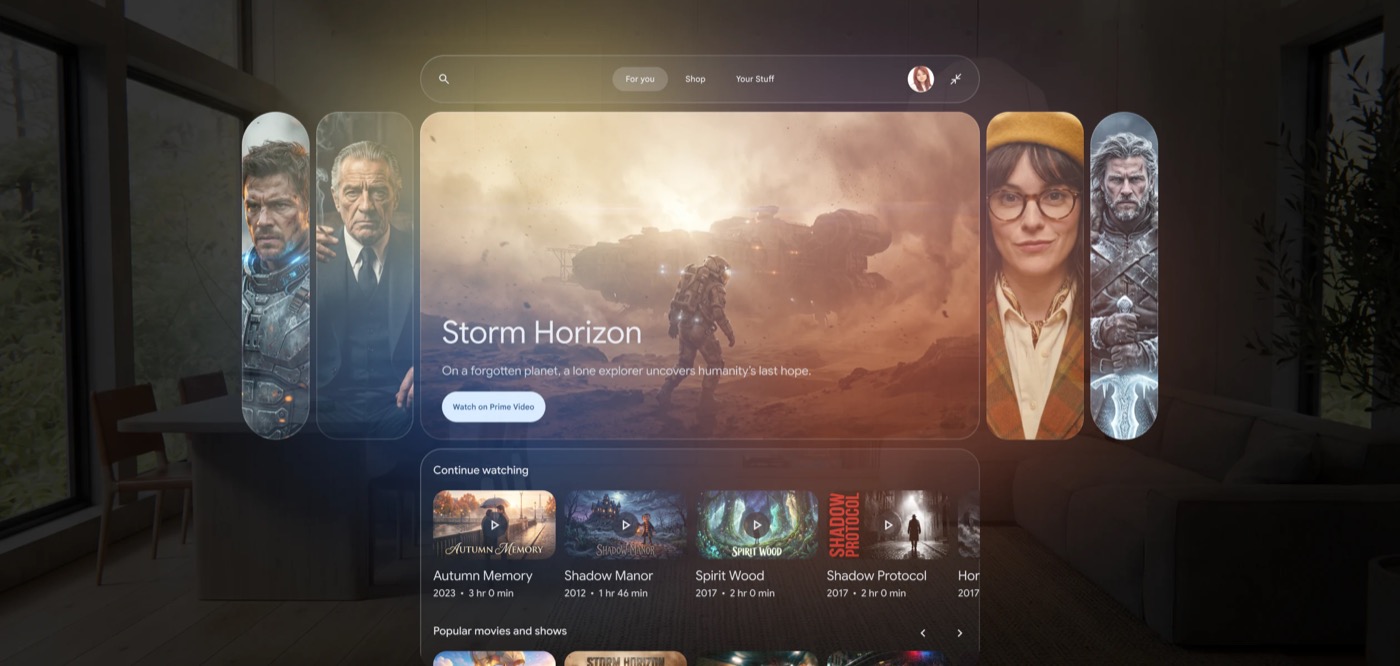
Google says "If you own the 3D version of content, you can only play its 3D version on an Android XR device" [6]. When you buy certain content after October 21, 2025, the 3D version "may also be offered" with the 2D one [6]. Buy in HD or 4K and you get "the high-definition 3D version" [6]. Google's page does not say what happens to a film bought before that date.
Google published no title list on the pages we read. A Blu-ray Forum member posted one for Samsung's Galaxy XR, also Android XR, in January 2026, with titles such as Hugo and Jurassic World Rebirth [12]. Another member, who does not own the headset, wrote that Disney seemed missing, and in March 2026 that new 3D titles seemed to have stopped [12]. Those are forum reports, not Google's word. Check the film's page in Google TV before you pay.
Your own side-by-side files
XREAL names no player, and does not say whether Aura takes Full SBS, Half SBS or both [1]. Spatial Film's Google Play listing says it is made for Android XR, "the Samsung Galaxy XR Headset and XREAL Aura XR Glasses", and lists "3D Half/Full SBS (MKV/MP4/MOV)" [17]. That is the developer's claim, and we have not tested it. Android XR's developer guide confirms that apps can show stereoscopic side-by-side video on flat surfaces [10].
"Android XR 3D SBS Video Player", despite its name, lists 180-degree side-by-side video and MV-HEVC spatial video, and no flat 3D films [11]. For what SBS files are, and Full against Half, see 3D movies on video glasses.
Spatial view: 2D to 3D as it plays
Turn it on in Quick Settings, or in the Settings app under Spatial Setting [5]. Google's help page lists these limits [5]:
- It works only on the app window in focus, and only in Home Space.
- It "works best for images and non-protected video content", so protected streams may not work as well.
- It supports "up to 1440p or lower at 30 frames per second".
- It may turn itself off to keep the system running well, then comes back on by itself.
Google's launch post says spatial view is "now supporting higher-resolution content" and gives no number [2].
XREAL Aura price and ship date
| Model | Launch price | Regular price |
|---|---|---|
| 12GB + 256GB | $1,099 [3][4] | $1,279 [3][4] |
| 16GB + 512GB | $1,299 [3][4] | $1,499 [3][4] |
Last checked : prices on XREAL's US shop page, read from outside the US.
Google says launch pricing runs "through the end of the year" [2].
Orders opened on October 28, 2026 in the US, Canada and Korea, and on November 2 in Japan [2]. In the US you can buy from XREAL or BestBuy.com [2]. XREAL's page says "Shipping is expected to begin in mid-November 2026, with orders shipped on a rolling basis", and "Founder's Edition orders will ship first" [3]. Priority does not guarantee a delivery date [3].
Pick your size when you order: M fits an IPD of 60 to 66 mm and L fits 66 to 72 mm [3].
XREAL Aura specs that matter for films
| Spec | XREAL Aura |
|---|---|
| Picture | Sony Micro-OLED, 1920 × 1200 per eye, up to 120 Hz [9] |
| Field of view | 70° diagonal, 32 pixels per degree [1][9] |
| Brightness | Up to 1050 nits [9] |
| Lenses | See-through, with 5 levels of dimming [1][9] |
| Battery | 3 to 4 hours of typical use, in the puck [1] |
| Weight | Glasses 95 g, puck 265 g [9] |
You can charge the puck while you watch [1], and spatial view uses "slightly more battery power" [5]. One reviewer who tried Aura before launch wrote that for a 16:9 movie "the little vertical FOV is not disturbing much", and "I tried a 3D video, and it was nice as well" [13].
What to connect to XREAL Aura
Aura needs nothing else for Google TV, YouTube or a player app: the puck runs Android XR by itself, with Wi-Fi and a Google account [1][9]. To watch from another device there are two routes [8]:
| Route | Plug into | What you get | Watch out for |
|---|---|---|---|
| Wired Mirroring | The puck's Charging Port | The device's picture as a window inside Android XR | The included charging cable "does NOT support DisplayPort video transmission". Bring a video-capable USB-C cable |
| External display | The glasses' cable, unplugged from the puck | The glasses as a plain screen, powered by the device | No Android XR apps, Gemini or hand tracking |
Both routes need USB-C DisplayPort Alt Mode. XREAL lists MacBooks, Windows laptops with DP-capable USB-C, Nintendo Switch, Steam Deck, ROG Ally and some Android phones for the puck route, and says compatibility can differ by device [1]. HDMI devices need an adapter [8]. Wired Mirroring takes the puck's only charging port [1], and XREAL does not say whether the other device charges the puck through it.
XREAL does not say that either route shows side-by-side films in 3D. External display mode uses the One series menus [8], which have a 3D Mode [14], but Aura's own menu list omits it [8]. Treat that as untested.
XREAL Aura vs Meta VR Glasses and other video glasses for 3D films
| Device | Studio 3D films | Your SBS files | 2D to 3D as it plays | Status |
|---|---|---|---|---|
| XREAL Aura | Google TV [2] | Yes, with a player app [1] | Spatial view [5] | Ships from mid-November [3] |
| Meta VR Glasses | Announced: Disney+ and a rent-or-buy store [15] | Not stated [15] | Not stated [15] | Spring 2027 [15] |
| XREAL One series | Not stated | Full and Half SBS, by the 3D Mode menu [14] | REAL 3D [16] | Sold today |
For Meta's film plans see 3D movies on Meta VR Glasses. For XREAL, VITURE and RayNeo glasses, buttons and fixes included, see 3D movies on video glasses.
A film with no 3D release
On Google TV, a film with no 3D version plays in 2D [6]. Spatial view is the quick answer. If you want the 3D made before you sit down, the Owl3D desktop app for Windows and Mac converts 2D video files you have the right to use into stereoscopic 3D, with AI, on your own computer. Its outputs include Side-by-side and Half Side-by-Side. It is an AI conversion, not the studio's 3D version, and it takes a file and time. We have not played a converted file on Aura, so try a short clip in your player first.
From Owl3DOwl3D converterA desktop app for Windows and Mac that turns 2D videos and photos into 3D.FAQ
Does XREAL Aura work with Netflix?
Not confirmed. XREAL and Google name Google TV and YouTube, and Google's picture shows Peacock [2]. None of the XREAL or Google pages we read names Netflix. Check Google Play on the device.
Can I use XREAL Aura without the puck?
Yes, as a plain display for a laptop, phone or handheld. You lose Android XR features such as hand tracking [1], and with them Google TV, spatial view and player apps on the puck [8].
Can I wear XREAL Aura with glasses?
XREAL lists three options if you wear corrective lenses: prescription lenses through official channels, the included Optical Insert Frame with prescription lenses, or contact lenses [1].
Sources (17)
- XREAL, XREAL AURA manual, "Frequently Asked Questions". https://tutorials.xreal.com/docs/aura/troubleshooting/faq/ (opened 2026-11-02)
- Google, Shahram Izadi, "XREAL AURA: Wired XR glasses to watch, work, and play", October 28, 2026. https://blog.google/products-and-platforms/platforms/android/xreal-aura/ (opened 2026-11-02)
- XREAL US shop, "XREAL AURA". https://us.shop.xreal.com/products/xreal-aura (opened 2026-11-02)
- Road to VR, "Android XR's First AR Glasses 'XREAL Aura' Launch Today, Starting at $1,100 for Limited Time", October 28, 2026. https://roadtovr.com/google-ar-glasses-xreal-aura-release-date-price/ (opened 2026-11-02)
- Android XR Help, "Use Spatial view on Android XR". https://support.google.com/android-xr/answer/17004031?hl=en (opened 2026-11-02)
- Google TV Help, "Watch HD, 4K UHD, HDR & 3D videos". https://support.google.com/googletv/answer/14282496?hl=en (opened 2026-11-02)
- Android XR Help, "Get started with YouTube for XR". https://support.google.com/android-xr/answer/16644997?hl=en (opened 2026-11-02)
- XREAL, XREAL AURA manual, "Connecting Other Devices". https://tutorials.xreal.com/docs/aura/using-aura/use-external-display/ (opened 2026-11-02)
- XREAL, XREAL AURA manual, "Technical Specifications". https://tutorials.xreal.com/docs/aura/specifications/ (opened 2026-11-02)
- Android Developers, "Add spatial video to your app". https://developer.android.com/develop/xr/jetpack-xr-sdk/add-spatial-video (opened 2026-11-02)
- Google Play, "Android XR 3D SBS Video Player". https://play.google.com/store/apps/details?id=space.mathewvarghese.androidxr3dsbsvideoplayer&hl=en_US&gl=US (opened 2026-11-02)
- Users' reports: Blu-ray Forum, "Samsung Galaxy XR (AndroidXR) now offers 3D streaming", January to March 2026. https://forum.blu-ray.com/showthread.php?p=23786261#post23786261 (opened 2026-11-02)
- The Ghost Howls, "XREAL Aura impressions: very interesting AR glasses", August 27, 2026. https://skarredghost.com/2026/08/27/xreal-aura-hands-on-impressions/ (opened 2026-11-02)
- XREAL, One series tutorial, "3D Mode". https://tutorials.xreal.com/docs/glasses/one-series/osd/3d-mode/ (opened 2026-11-02)
- Meta, "Introducing Meta VR Glasses, A New Era for Virtual Reality". https://www.meta.com/blog/meta-vr-glasses-announcement-meta-connect/ (opened 2026-11-02)
- XREAL, One series tutorial, "REAL 3D". https://tutorials.xreal.com/docs/glasses/one-series/osd/real-3d/ (opened 2026-11-02)
- Google Play, "Spatial Film". https://play.google.com/store/apps/details?id=com.hughhou.spatialfilm&hl=en_US&gl=US (opened 2026-11-02)