Owl3D Cloud Specs: What Goes In, What Comes Out
How we researched this: written by Owl3D from published sources, all 2 listed at the end.
Short answer
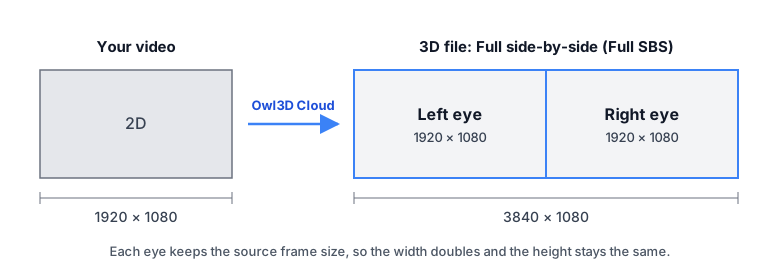
Owl3D Cloud takes an MP4, MOV, M4V or MKV video up to 4096 × 2160, 60 fps, 3 hours and 100 GB, and returns one Full side-by-side (Full SBS) 3D file in HEVC, each eye at the source frame size: 1920 × 1080 in, 3840 × 1080 out. The sound is copied, not re-encoded. Output is SDR unless you keep HDR on an HDR source, on the Pro and Max plans. There is nothing to tune: Cloud picks the depth and the screen plane itself. Owl3D, the publisher of this guide, makes Owl3D Cloud and the desktop app. Cloud is in beta [1]; this page describes it as of October 30, 2026.
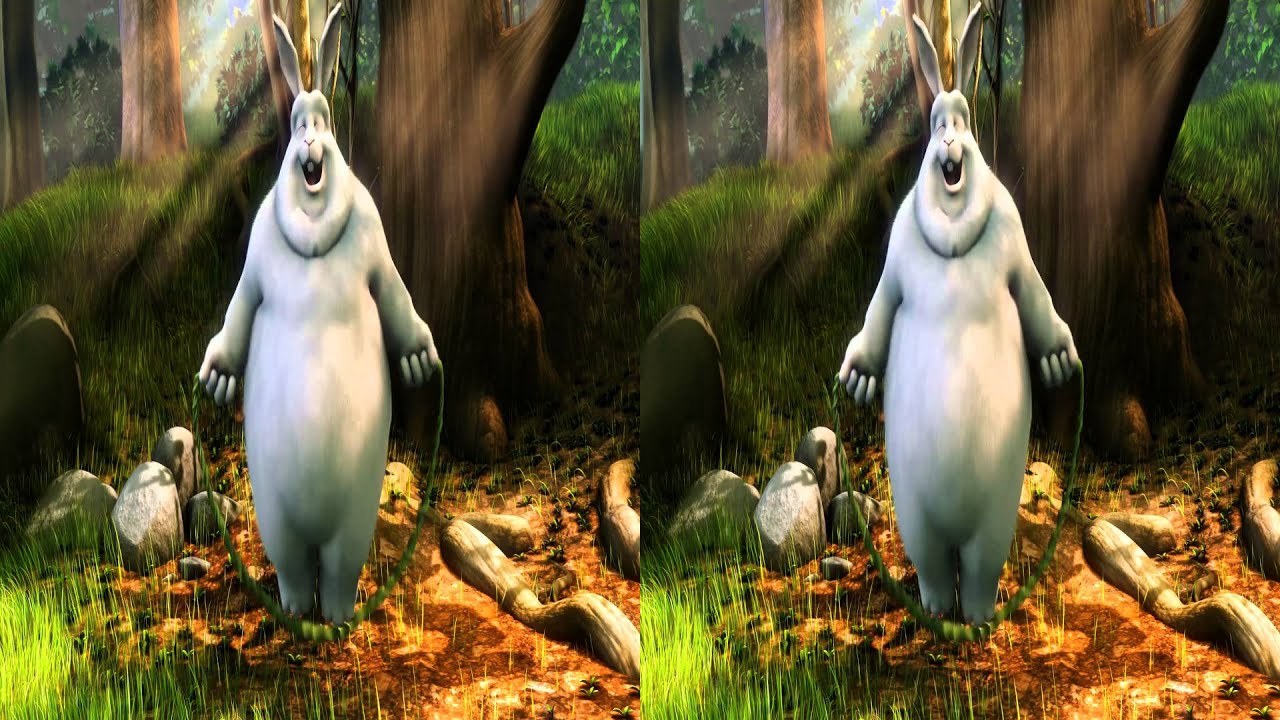
What a side-by-side 3D file looks like on an ordinary screen: one picture per eye. A frame of Big Buck Bunny's own 3D version, not a Cloud output. Image: © Blender Foundation, bigbuckbunny.org, CC BY 3.0.
Key takeaways
- The output is always Full SBS, HEVC, in MP4, or MKV for an MKV source: the spec sheet.
- Each eye keeps the source frame size, so 3840 × 2160 gives 7680 × 2160: frame size.
- HDR stays HDR only with Keep HDR, on an HDR source, on Pro or Max: HDR.
- ProRes, DNxHR, 4:2:2 and 10-bit H.264 are refused; the desktop app takes them: what you can upload.
The spec sheet
| What | Owl3D Cloud |
|---|---|
| 3D format | Full SBS: left and right eye next to each other, each at full width. Fixed, no choice |
| Frame size | Each eye's frame = the source frame size; the frame size is never scaled up or down |
| Video codec | HEVC (H.265), quality-based, encoded once; no bitrate setting |
| Container | MP4 for MP4, MOV and M4V sources; MKV for MKV sources. File name ends in _FSBS_3D |
| Audio | Copied unchanged, not re-encoded |
| Subtitles, chapters | An MKV keeps all subtitle tracks and chapters |
| Frame rate | Kept as in the source, up to 60 fps |
| Color | SDR, 8-bit, BT.709; or Keep HDR: 10-bit, BT.2020 |
| Black bars | Detected, kept out of the 3D, added back |
| Depth settings | None: automatic |
| Largest input | 4096 × 2160 (2160 × 4096 upright), 60 fps, 3 hours, 100 GB |
| Files | .mp4, .mov, .m4v, .mkv |
| Input codecs | H.264 (8-bit), HEVC (8, 10, 12-bit), AV1 (8, 10-bit), VP9; 4:2:0 only |
| Runs on | A browser on Windows, Mac, Android or iPhone; no graphics card, no install [1] |
| Free | The first 3 minutes of video for a new account, no card [1] |
How the 3D is made: an AI model (StereoGen V2 Large) estimates depth for every frame and draws a second view for the other eye [1]. It is an AI conversion, not the studio's 3D.
Frame size: each eye keeps the source size
Full SBS puts both eyes in one frame twice as wide as the source. The height does not change.
| Your video | 3D file |
|---|---|
| 1920 × 1080 | 3840 × 1080 |
| 3840 × 2160 | 7680 × 2160 |
| 3840 × 1608 (2.39:1, no bars) | 7680 × 1608 |
| 1080 × 1920 (phone, upright) | 2160 × 1920 |
| 2160 × 3840 (upright) | 4320 × 3840 |
Upright and phone-rotated videos come out upright; the file carries no rotation tag. Cloud has no option to make the output smaller: for a 3840 × 1080 file, start from a 1080p video.
HDR
By default every file is SDR: 8-bit, BT.709. An HDR source (PQ or HLG) is tone-mapped to SDR.
To keep HDR, choose Keep HDR (HDR10) before you start. The output is then 10-bit HEVC (Main 10), BT.2020: a PQ source comes out HDR10, and an HLG source stays HLG. The conditions:
- The option appears only when the video is HDR.
- It is on the Pro and Max plans (plans).
- It uses more credits than an SDR conversion.
- A free trial conversion is always SDR.
Dolby Vision is not kept.
Sound, subtitles and frame rate
Audio is copied unchanged, never re-encoded. An MKV keeps every audio track, subtitle track and chapter. An MP4 keeps every track the MP4 format can hold; a track it cannot hold is left out, not converted. If your source has such a track, upload it as MKV.
The frame rate stays as it was (for example 23.976, 24, 25, 29.97, 30, 50, 59.94 or 60 fps); a faster video is refused before upload. Variable-frame-rate phone video is converted at a constant rate, with sound kept in sync.
Black bars
A film framed for a wide screen often sits inside a 16:9 frame with black bars. Cloud detects the bars once for the whole video, keeps them out of the 3D conversion, and adds them back unchanged. The 3D file keeps the source frame size and its bars.
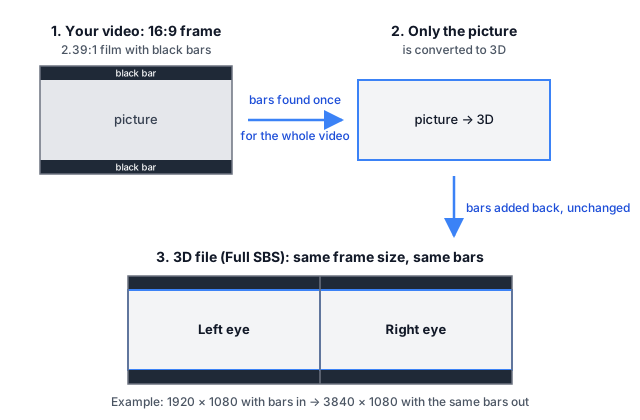
One catch: a very dark band across the full width, such as a night sky, can be taken for a bar and get no 3D. Cloud has no switch to turn detection off; the desktop app does, under Advanced.
What you can upload
A video file you have, up to 3 hours, 100 GB, 60 fps and 4096 × 2160 (or 2160 × 4096 upright), as .mp4, .mov, .m4v or .mkv. Anything larger is refused before upload, so there is no 8K. Links to YouTube or streaming video are not accepted [1]. Cloud converts video only, not photos.
Accepted codecs are H.264 (8-bit), HEVC (8, 10 and 12-bit), AV1 (8 and 10-bit) and VP9, all 4:2:0. Camera and editing codecs such as ProRes, DNxHR and CineForm are not accepted, nor is 4:2:2 or 4:4:4 in any codec, 10-bit H.264 or video with alpha. The desktop app converts those on your own computer.
After you start
- Cloud shows an estimate of the time before you start. A whole film takes hours, so try a short clip first [2].
- You can close the page after the upload; an email arrives when the 3D file is ready [1], or if the conversion fails.
- A finished video stays in your Library for 30 days, with one reminder email 7 days before it is deleted. You can remove it from the Library at any time.
- Download links are signed and last at most 24 hours.
To try it, upload a short clip at app.owl3d.com, or read more on converting video to 3D online.
What Cloud does not do (yet)
| You need | In Cloud | Instead |
|---|---|---|
| Half SBS or Top-Bottom | No, Full SBS only | Desktop app: Half SBS, Top-Bottom |
| Spatial video for Apple Vision Pro (MV-HEVC) | No; Vision Pro plays the Full SBS file in a player app | Desktop app on a Mac: Spatial Video |
| Anaglyph (red-cyan) | No | — |
| 8K | No, input up to 4K | Desktop app, up to 8K on Pro |
| A smaller output, such as 1080p from 4K | No | Desktop app: HD 1080p setting |
| Dolby Vision | Not kept | Not offered |
| 3D strength, convergence | No settings | Desktop app: five strength steps; convergence under Advanced |
| ProRes, DNxHR, 4:2:2, 10-bit H.264 | Refused | Desktop app |
Which player or screen reads which layout: 3D video formats.
Frequently asked questions
Does Owl3D Cloud keep HDR?
Only if you choose Keep HDR (HDR10) for an HDR source, on the Pro or Max plan. Otherwise, and always for a free trial conversion, the 3D file is SDR, 8-bit, BT.709. Dolby Vision is not kept.
What resolution is the 3D file?
Twice the source width at the source height: 3840 × 2160 in gives 7680 × 2160 out. Cloud takes up to 4096 × 2160 and has no 1080p output option.
Sources (2)
- Owl3D, "Owl3D Cloud is now in beta" (blog). https://www.owl3d.com/blog/owl3d-cloud-beta (opened 2026-10-30)
- Owl3D, "Convert Video to 3D Online" (tool page), "How long does it take?". https://www.owl3d.com/tools/convert-video-to-3d-online (opened 2026-10-30)