JVC GS-TD1: What It Records and How to Watch Its 3D Video
How we researched this: written by Owl3D from published sources, all 19 listed at the end.
Short answer
The JVC Everio GS-TD1 (2011) films 3D with two lenses and two sensors [3]. It saves 3D in one of three formats. Side-by-side AVCHD (.MTS) plays in 3D on almost any 3D screen. MP4 (MVC) keeps full HD for each eye, but a normal player shows only one eye, in 2D [5][7]. AVCHD 3D, added by a later firmware update, also keeps full HD for each eye [2]. To watch those in 3D today, play them from the camcorder over HDMI to a 3D TV [4][8], or convert them to side-by-side first. We decoded a real GS-TD1 MP4 (MVC) clip into both eyes and joined them side by side; the steps are below. Owl3D makes the Owl3D Shift 3D monitor named on this page. We do not make or sell camcorders.

A 3D still from a GS-TD1 (.MPO), split into the left and right pictures and placed side by side: the layout most 3D screens play. Photo: JVC UK sample image [3]. Split by Owl3D on 2026-11-20.
Key takeaways
- Find out which 3D format your clip is in first. See which file you have.
- Side-by-side clips play on a 3D TV, a VR headset or a 3D monitor as they are. See watch it in 3D.
- MP4 (MVC) looks flat on a computer? It is not broken. A normal player shows only the left eye. See turn MVC into side-by-side.
- Thinking of buying one used? See is it still worth it.
The three 3D formats of the GS-TD1
| Format | Picture | Plays in 3D on |
|---|---|---|
| AVCHD (side-by-side), .MTS | Both eyes in one 1920 × 1080 frame, each squeezed to 960 × 1080 [4] | 3D TVs, VR players and 3D monitors that take side-by-side |
| MP4 (MVC), .MP4 | Each eye full HD, 1920 × 1080 [3][4] | The camcorder itself and a 3D TV over HDMI [4][8]. Elsewhere, convert it first |
| AVCHD 3D, .MTS (added by a later firmware update [1]) | High picture quality "while maintaining the compatibility" [1] | The camcorder over HDMI [8], and discs made with an "AVCHD 3D compatible Blu-ray recorder" [1] |
JVC's manual sums up the choice: AVCHD "for higher compatibility", MP4 (MVC) "for higher definition picture quality" [1]. 3D is recorded interlaced: 1080/50i for each eye on the European model [2] and 1080/60i on the Japanese model [10]. We found no JVC spec sheet for the US model. In 3D mode the zoom is 5× optical, against 10× in 2D [2].
3D photos are saved as .MPO files at 1920 × 1080 [3][11].
Which file do you have?
- Look at the file name. Files ending in .MP4 are MP4 (MVC). Files ending in .MTS are AVCHD: side-by-side, AVCHD 3D or 2D.
- Play an .MTS clip in any player. Two squeezed copies of the picture side by side mean side-by-side AVCHD. One normal picture means 2D, or probably AVCHD 3D (we found no AVCHD 3D sample to check).
- Check with a file info tool. In ffprobe, an MVC file shows one ordinary 1920 × 1080 H.264 stream: the tool sees only the first eye. The second eye is hidden inside it (our test below).
Watch your GS-TD1 clips in 3D
On a 3D TV. Connect the camcorder with its HDMI mini cable. JVC: "If you are using a 3D compatible TV, you can play back 3D images by connecting to the HDMI connector" [8]. This works for MP4 (MVC) too [4]. On many 3D TVs, side-by-side files also play from a USB stick: set the TV's 3D mode to side-by-side. Our guide play 3D files on a TV or projector has the settings.
In a VR headset. Copy a side-by-side file to the headset and choose the side-by-side 3D mode in a video player. Which player to pick: VR video players.
On a glasses-free 3D monitor. The Owl3D Shift shows a side-by-side or top-bottom picture in 3D with no glasses. You play the file in your own player, such as VLC or PotPlayer, and start Stereo 3D Playback in the Owl3D app. It takes full and half side-by-side. MP4 (MVC) and AVCHD 3D files need converting to side-by-side first (next section). We have not tested Shift with GS-TD1 files.
On a computer with a 3D display. JVC's Everio MediaBrowser 3D software (by Pixela) added 3D playback on a PC in June 2011 [9]. A December 2011 update added AVCHD 3D Blu-ray discs made from MVC clips [9]. It needs a 3D monitor and glasses [3], and its last update is from 2012 [9]: check that it still installs before you rely on it.
Turn MP4 (MVC) into side-by-side
MVC (Multiview Video Coding) stores the left eye as normal H.264 video and codes the right eye from it, which saves about half of the right eye's data [13][15]. A player without an MVC decoder plays the left eye and skips the rest. A forum member put it this way in 2011: "plain-old AVC decoders only get one of the views. You need an MVC decoder to view both." [7] A DVinfo user filming with a JVC 3D camera had the same problem in 2011: "the MVC file types dont playback on the tv's" [14].
Our test with a real GS-TD1 file
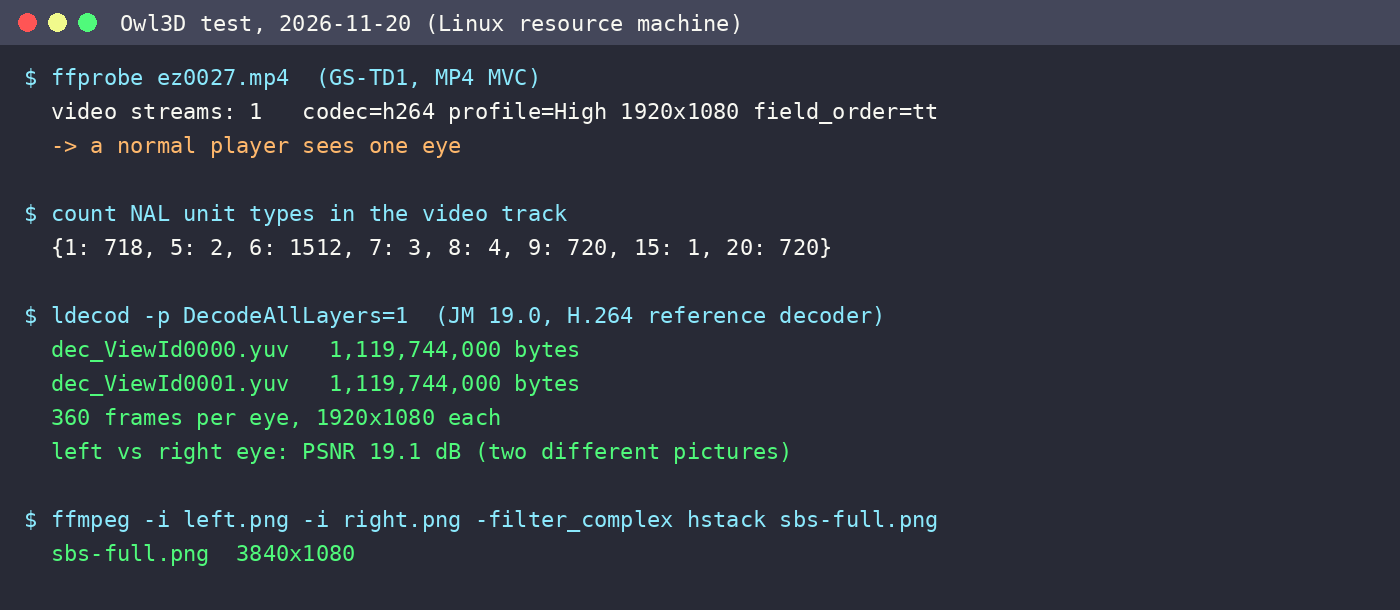
We took a 12-second MP4 (MVC) clip that a GS-TD1 recorded in January 2011 (the date stored in the file), published by the Japanese site AV Watch [6]. On a Linux machine we did this:
- Checked the file. ffprobe saw one H.264 video stream, 1920 × 1080, 59.94 fields a second. The right eye was there as extra NAL units (type 20) in the same track, with its settings in an "mvcC" box.
- Decoded both eyes. We used the JM reference decoder of the H.264 standard, with all views turned on. It wrote one file for each eye, with 360 frames each: the whole clip.
- Joined them. ffmpeg removed the interlace lines from each eye, then placed the two eyes next to each other in one 3840 × 1080 picture (full side-by-side).
The test showed that the right eye is a real second picture, not a copy: the two eyes differ, as they should for 3D. JM needed small changes to read this file: we removed some timing messages and rebuilt a header the MP4 leaves out. The two eyes measured about 19 dB PSNR apart.
Tools a normal user can try
| Tool | What it does | Notes |
|---|---|---|
| Everio MediaBrowser 3D (JVC, Pixela) | Supplied with the camcorder. Its June 2011 update added "Convert to Side-by-Side 3D Video" [3][9] | 2011 software |
| MVC to AVI Converter (3dtv.at) | Turns .mts and .mp4 MVC files into two AVI files, one per eye [15] | Windows. Join the two AVIs into side-by-side in a video editor |
| Stereoscopic Player (3dtv.at) | Plays MVC in MP4 containers in 3D since version 1.7.2 (May 2011) [16] | Windows. Can show side-by-side |
| FRIM Decoder | Free command-line MVC decoder [17] | Windows. Reads elementary and transport streams; MP4 is not listed |
We tested none of these four tools ourselves.
Is the GS-TD1 still worth buying?
| Spec | GS-TD1 |
|---|---|
| Released | March 2011 in the US, list price $1,699.95 [4] |
| Sensors and lens | Two 3.32-megapixel CMOS sensors, F1.2 lens [4] |
| 3D video | 1920 × 1080 for each eye (MP4 MVC), or side-by-side AVCHD [4] |
| Storage | 64 GB built in, plus an SDXC slot [4] |
| Screen | 3.5-inch, 3D without glasses (parallax barrier) [5] |
| Zoom | 5× in 3D, 10× in 2D [2] |
The reviews of 2011 were mixed. The Register called the sense of depth "extraordinary" [5]. Reviewed.com found the controls slow in 3D mode and wrote that the 3D screen "gave me a headache" [18]. If you buy one used, plan to shoot in side-by-side AVCHD: it is the format most 3D screens play today.
Frequently asked questions
Can VLC play GS-TD1 3D files in 3D?
VLC plays side-by-side AVCHD clips as a picture with two halves. A 3D TV, a VR player or a 3D monitor then shows them in 3D. For MP4 (MVC), expect the left eye only: popular open-source H.264 decoders such as FFmpeg's "simply ignore" the second view [13]. We have not tested VLC with these files.
How do I copy files from the GS-TD1 to a computer?
Connect it with the USB cable and copy the whole folder. JVC also supplied Everio MediaBrowser 3D for backups [12]. Do not rename or move files inside the folder if you want to play them on the camcorder again [12].
Does the GS-TD1 record 24p?
Not that we found. JVC's European manual lists 1080/50i [2], and the Japanese model records 1080/60i [10]. JVC's professional 3D camcorder, the GY-HMZ1U, records 1080 24p [19].
Can I make a 3D Blu-ray from GS-TD1 footage?
Yes, with JVC's software. Its December 2011 update writes AVCHD 3D Blu-ray discs from MVC clips [9]. The camcorder can also copy files to a supported external Blu-ray drive [12].
Sources (19)
- JVC, GS-TD1 online manual, "3D VIDEO REC FORMAT (3D mode only)". https://manual3.jvckenwood.com/c1dw/GBLESYyjhvspvb.html (opened 2026-11-20)
- JVC, GS-TD1 online manual, "Specifications". https://manual3.jvckenwood.com/c1dw/GBLESYkfdhjnii.html (opened 2026-11-20)
- JVC UK, GS-TD1 features page and sample images. https://uk.jvc.com/microsite/uk/gs-td1/function/function.html (opened 2026-11-20)
- JVC press release, "JVC First To Offer Full HD 3D Consumer Camcorder", Imaging Resource, March 7, 2011. https://www.imaging-resource.com/NEWS/1299522927.html (opened 2026-11-20)
- Steve May, "JVC Everio GS-TD1 3D camcorder" (review), The Register, May 6, 2011. https://www.theregister.co.uk/2011/05/06/review_jvc_everio_gs_td1_3d_camcorder/ (opened 2026-11-20)
- Nobuyoshi Kodera, "第500回:新しい潮流を作るか、二眼3DカムコーダJVC「GS-TD1」" (Electric Zooma! No. 500, Japanese, with sample files), AV Watch, February 2, 2011. https://av.watch.impress.co.jp/docs/series/zooma/20110202_424208.html (opened 2026-11-20)
- "JVC GS-TD1 MVC .mp4 stream", Doom9's Forum, February 2011. https://forum.doom9.org/archive/index.php/t-159339.html (opened 2026-11-20)
- JVC, GS-TD1 online manual, "Playing Back 3D Images" (on a TV). https://manual3.jvckenwood.com/c1dw/GBLESYvrvdnmpd.html (opened 2026-11-20)
- Pixela, Everio MediaBrowser 3D update history (archived copy). http://web.archive.org/web/20240914132246/https://www.pixela.co.jp/oem/jvc/mediabrowser/e/everio_mediabrowser_3d/updata_download.html (opened 2026-11-20)
- Kentaro Yamazaki, "ビクター、「GS-TD1」撮影動画からAVCHD 3D作成可能に" (Japanese), AV Watch, August 26, 2011. https://av.watch.impress.co.jp/docs/news/473099.html (opened 2026-11-20)
- Pocket-lint, "JVC Everio GS-TD1 review". https://www.pocket-lint.com/review/72413-jvc-everio-gs-td1-review (opened 2026-11-20)
- JVC, GS-TD1 online manual, "List of Files and Folders" and "Copying to Windows PC". https://manual3.jvckenwood.com/c1dw/GBLESYscjdatpp.html and https://manual3.jvckenwood.com/c1dw/GBLESYskdrtvgu.html (opened 2026-11-20)
- Wikipedia, "Multiview Video Coding". https://en.wikipedia.org/wiki/Multiview_Video_Coding (opened 2026-11-20)
- "MVC files to SIDE BY SIDE??!", DVinfo.net, November 2011. https://www.dvinfo.net/forum/3d-stereoscopic-production-delivery/502320-mvc-files-side-side.html (opened 2026-11-20)
- 3dtv.at, "MVC to AVI Converter". https://www.3dtv.at/Products/MvcConverter/Index_en.aspx (opened 2026-11-20)
- 3dtv.at, Stereoscopic Player version history. https://www.3dtv.at/Products/Player/History_en.aspx (opened 2026-11-20)
- videofan3d, "FRIM Encoder" (FRIM encoder and decoder package). https://sites.google.com/site/videofan3d/software/frim-encoder (opened 2026-11-20)
- Reviewed.com, "JVC GS-TD1 Camcorder Review", April 2011. https://www.reviewed.com/camcorders/content/jvc-gs-td1-review (opened 2026-11-20)
- Videomaker, "JVC GY-HMZ1U 3D Camcorder Review". https://www.videomaker.com/article/c5/15479-jvc-gy-hmz1u-3d-camcorder-review/ (opened 2026-11-20)