Immersity AI, iw3 and Other 2D-to-3D Converters: What Each One Is
How we researched this: written by Owl3D from published sources, all 15 listed at the end.
Short answer
These names do two different jobs. Immersity AI, formerly LeiaPix, turns a photo into a short moving clip with a sense of depth that plays on any screen; its web version also makes true 3D images and videos. iw3 is a free, open-source program that turns videos and photos into side-by-side 3D on your own computer, for a VR headset or a 3D screen. Owl3D, Stream to 3D and VisionDepth3D also make 3D video files on your own computer. So decide first what you want to end up with: a clip to post, or a 3D file to watch in 3D. Owl3D, the publisher of this guide, makes one of these converters; every other tool is described from its maker's own pages and store listings.
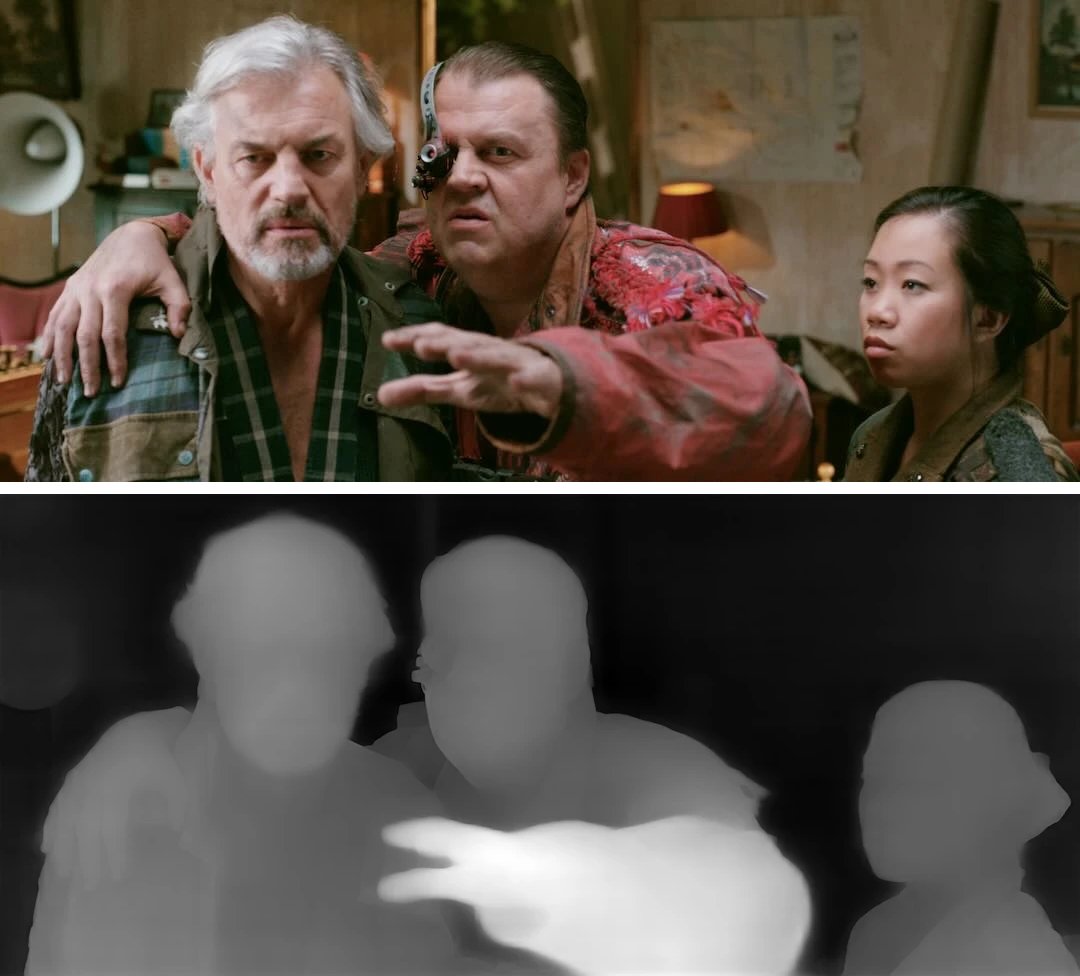
A video frame and an AI depth map of it, where "lighter areas are closer" [5]. Immersity and iw3 both build on depth maps like this [2][10]. Pictures: owl3d.com.
Key takeaways
- A moving photo for social media is Immersity's Immersive Motion; its phone app is free with a small watermark: Immersity AI.
- For a 3D video on a headset, 3D TV or 3D screen, iw3 is free; Owl3D, Stream to 3D and VisionDepth3D have free tiers or a trial: at a glance.
- immersity.ai now opens Leia Inc.'s site, leiainc.com, where the apps are still listed: what changed.
- None of the makers' pages we read compares these tools on the same footage; try the free tiers on one clip of your own: how to choose.
The names at a glance
| Name | Maker | What you get | Runs on | Cost, as the maker's page showed |
|---|---|---|---|---|
| Immersity AI | Leia Inc. | Moving clips with depth; 3D images and videos (side by side) [3][5] | Web browser; phone app for iPhone and Android [7][8] | Phone app free, with a watermark; web plans $4.99 to $99.99 a month [4][5] |
| iw3 | nagadomi, open source | 3D images and videos: Full or Half SBS, top-bottom, VR180, anaglyph [10] | Your own computer: Windows installer; guides for Ubuntu and macOS [9] | Free [9] |
| Owl3D | Owl3D | 3D videos and photos: side by side, Half SBS, top-bottom; Spatial Video on a Mac | Your own Windows PC (NVIDIA, AMD or Intel graphics) or Mac | Free plan: 60 seconds of video per conversion, no watermark; paid plans on the pricing page |
| Stream to 3D | IWAHDK Ltd | Plays, streams and converts to SBS or top-bottom [12] | Windows, 64-bit [12] | US $24.99 once, or a subscription [12] |
| VisionDepth3D | VisionDepth | 3D videos: Half or Full SBS, anaglyph; VR180 in Pro [14] | Windows and NVIDIA recommended [14] | Free tier (3 minutes, 1080p, watermark); Pro $59.99 once [14] |
Last checked : makers' pages, read from outside the US.
Tools that convert while a video plays, with no file, are in convert as it plays; iw3, Stream to 3D, Deep Desktop and Owl3D have that route too (below).
Immersity AI (formerly LeiaPix)
Immersity AI is Leia Inc.'s 2D-to-3D service. Leia's announcement of June 1, 2024 says it was "Previously known as LeiaPix" and now converts video as well as images [2]. On October 17, 2026, immersity.ai opened Leia's own site, leiainc.com, which lists Immersity for Web and Immersity for Mobile under "Apps" [1].

It makes two kinds of output, plus depth maps and Apple Music Album Motion clips [3]:
- Immersive Motion: a photo turned into a short video with camera movement and depth. Leia's FAQ says these "can be enjoyed on standard 2D displays", while 3D images and videos need a "'stereo' display" [5].
- 3D Image and 3D Video, side by side (MV-HEVC for Apple Vision Pro), for "any XR device, including Apple Vision Pro and Meta Quest" [3][5]. Videos must be MP4, MKV or MOV, in H.264 or H.265, up to 2GB [5].
What it costs. Immersity for Mobile is "free to use, with a minor watermark" [5] and makes motion reels from up to five photos [6]. The web pricing page showed, on October 17, 2026, read from outside the US: a free plan with watermarked exports up to 720p and "No Commercial Use"; Image $4.99 and Image Pro $14.99 a month; Video $24.99, Video Pro $49.99 and Video Max $99.99 a month, paid in credits that expire every month [4]. The FAQ on the same site still says "we do not offer a trial or free version of Immersity for Web" [5].
iw3
iw3 is a free program by the developer nagadomi, part of the open-source nunif project on GitHub, under the MIT license [9]. It turns images and videos into 3D files on your own computer: Full or Half SBS, top-bottom, VR180 or red-cyan anaglyph [10].
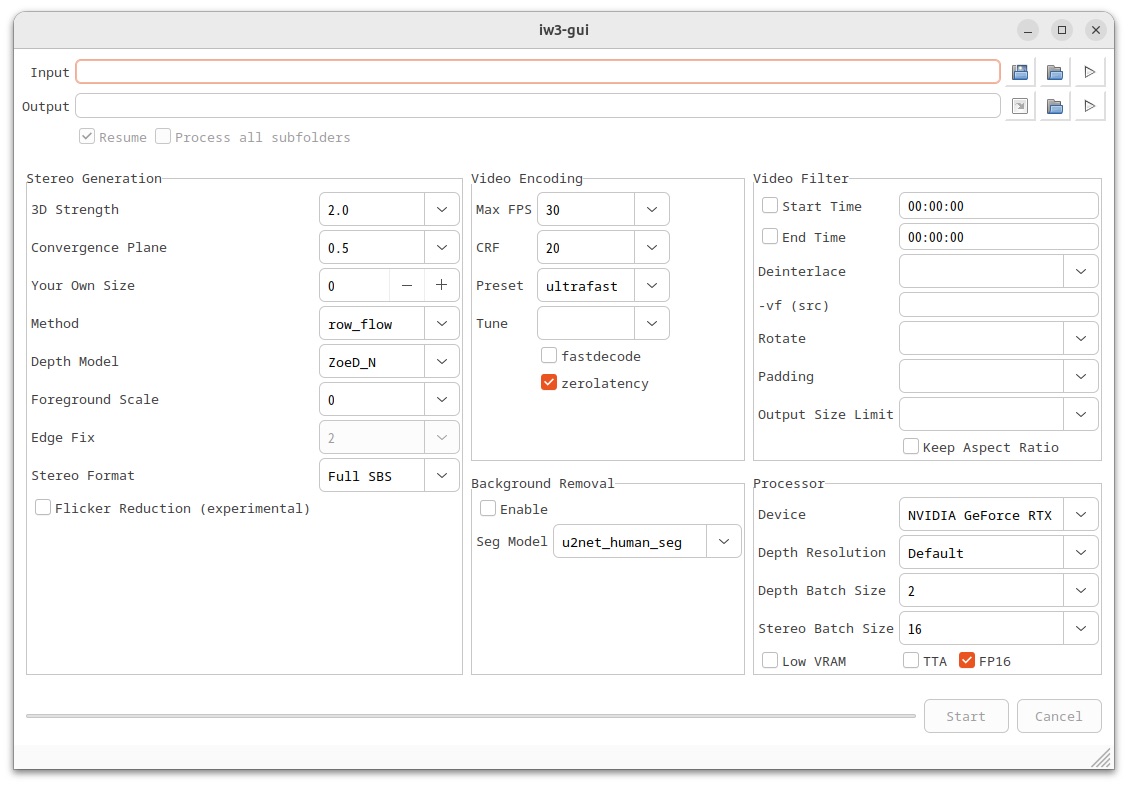
- What it runs on. Windows, through an installer package; install guides for Ubuntu and macOS; extra steps for Intel graphics and older NVIDIA cards [9]. The author tested it on an RTX 3070 Ti (Linux) and a GTX 1050 Ti laptop (Windows) [10].
- What using it is like. A window or the command line, with many settings; the first run "may take some time as it needs to download large model files" [10].
- iw3-desktop, in the same project, "converts your PC desktop screen into 3D in real-time and streams it over Wi-Fi" to a headset's browser. It is confirmed with Meta Quest and PICO 4, "but not with VisionPro" [11].
Owl3D
Owl3D's converter turns a video or photo you have the right to use into a 3D file on your own Windows PC or Mac, in the formats in the table above. The free plan converts up to 60 seconds of video per conversion, with no watermark. It is not instant, and the result is an AI conversion, not a studio's 3D version. StereoGen, its higher-quality model, is coming soon; it needs an NVIDIA RTX card and takes hours. To watch without making a file, Owl3D Link converts what is on a Windows PC in real time and shows it in a Meta Quest; the PC needs an NVIDIA RTX 3060 or better. Owl3D Link is free to use; on the free plan a session lasts 15 minutes and the picture carries a watermark.
From Owl3DOwl3D converterA desktop app for Windows and Mac that turns 2D videos and photos into 3D.Stream to 3D, VisionDepth3D and Deep Desktop
- Stream to 3D (IWAHDK Ltd) plays, streams and converts on Windows [12]. Its store showed, on October 17, 2026, in US reference prices: Standalone US $24.99 once; Complete US $11 every 3 months; Real-Time, playback only, US $9 every 3 months after a one-week free trial [12].
- VisionDepth3D has a free tier (one video up to 3 minutes, 1080p, with a watermark) and a "one-time $59.99" Pro unlock that adds VR180 and batch work [14]. Its maker recommends Windows and an NVIDIA card; on AMD or Intel graphics, support "may vary" [14].
- Deep Desktop brings generated depth to your screen, images, videos and games, for a VR headset, side-by-side 3D or anaglyph glasses. It runs on Windows or Linux; on Windows it needs at least a GTX 1060 6GB or RX 6600 XT. Its US Steam page showed $5.99 on October 17, 2026 [15].
How to choose
Three facts decide it, and you know them before installing anything (prices are in the table):
- What you want to end with. A moving clip to post: Immersity's Immersive Motion. A 3D file for a headset, 3D TV, projector or 3D screen: iw3, Owl3D, Stream to 3D, VisionDepth3D or Immersity's 3D Video.
- Your computer. On a Mac: Owl3D, iw3 (macOS install guide) or Immersity in a browser. Stream to 3D is a Windows application [12].
- Upload or keep it local. Immersity works on uploaded files [5]. Stream to 3D says your media is "processed locally" [13]; iw3, Owl3D and VisionDepth3D also run on your own computer [9][14].
Frequently asked questions
Is Immersity AI free?
Partly. The phone app is free with a small watermark [5]. The web pricing page lists a watermarked free plan, though the FAQ says there is no free version; paid plans start at $4.99 a month [4][5].
What happened to LeiaPix?
It was renamed Immersity AI; Leia's announcement of June 1, 2024 says "Previously known as LeiaPix" [2].
Is Immersity's moving clip real 3D?
Not in the two-eye sense: Leia says Immersive Motions play on ordinary 2D screens [5]. To watch in 3D on a headset or 3D screen, pick a 3D image or video output.
Does iw3 work on a Mac or with AMD graphics?
The project has install guides for macOS and Ubuntu and extra steps for Intel graphics [9], and iw3's guide gives a fix for an error on older AMD cards [10].
Which converter gives the best 3D?
We do not rank them: Owl3D makes one, and none of the makers' pages we read compares them on the same footage. Immersity and iw3 both warn of flaws at object edges [5][10]. Run the same short clip through the free tiers and watch the results on the device you will use.
Is there a free alternative to Owl3D?
Yes. iw3 is free and open source [9], and VisionDepth3D has a free tier [14]. Owl3D also has a free plan: 60 seconds of video per conversion, no watermark.
Sources (15)
- Leia Inc., immersity.ai home page; the address opened https://www.leiainc.com/ ("Immersive Experiences on Any Device"). https://immersity.ai/ (opened 2026-10-17)
- Leia Inc., "Immersity adds 2D-to-3D Video Conversion Tool", June 1, 2024. https://www.leiainc.com/news-articles/immersity-ai-platform-adds-new-2d-to-3d-video-conversion-tool (opened 2026-10-17)
- Leia Inc., "immersity for Web". https://www.leiainc.com/for-web (opened 2026-10-17)
- Leia Inc., "Immersity for Web Pricing", Image and Video tabs. https://www.leiainc.com/pricing (opened 2026-10-17, from outside the US)
- Leia Inc., "immersity FAQs". https://www.leiainc.com/faqs (opened 2026-10-17)
- Leia Inc., "immersity for Mobile". https://www.leiainc.com/for-mobile (opened 2026-10-17)
- Apple App Store (US), "immersity for Mobile". https://apps.apple.com/us/app/immersity-for-mobile/id6499062490 (opened 2026-10-17)
- Google Play, "immersity for Mobile". https://play.google.com/store/apps/details?id=com.leiainc.immersityai (opened 2026-10-17)
- nagadomi, "nunif" repository page (MIT license; iw3, iw3-desktop; install guides), GitHub. https://github.com/nagadomi/nunif (opened 2026-10-17)
- nagadomi, "iw3" README, GitHub. https://github.com/nagadomi/nunif/blob/master/iw3/README.md (opened 2026-10-17)
- nagadomi, "iw3-desktop: PC Desktop 3D Streaming Tool", GitHub. https://github.com/nagadomi/nunif/blob/master/iw3/docs/desktop.md (opened 2026-10-17)
- IWAHDK Ltd, "Stream to 3D Store". https://iwantaholodeck.com/stream-to-3d-store/ (opened 2026-10-17, from outside the US)
- Steam, "Stream to 3D" store page, US store view. https://store.steampowered.com/app/2494510/Stream_to_3D/?cc=us&l=english (opened 2026-10-17)
- VisionDepth, "VisionDepth3D" repository page, sections "Free vs Pro" and "System Requirements", GitHub. https://github.com/VisionDepth/VisionDepth3D (opened 2026-10-17)
- Steam, "Deep Desktop" store page, US store view. https://store.steampowered.com/app/2947590/Deep_Desktop/?cc=us&l=english (opened 2026-10-17, from outside the US)