3D Parallax: How Much Depth Is Comfortable, and Why a Big Screen Feels Stronger
How we researched this: written by Owl3D from published sources, all 5 listed at the end.
Short answer
Parallax is the sideways distance between the left-eye and right-eye images of the same point, measured on the screen [1]. A 3D file stores it as a share of the image width, so the same file has more parallax, in millimetres, on a bigger screen. The hard limit: a background should not be drawn farther apart than your eyes, about 65 mm [3], or your eyes have to turn outward [1]. On a 1.2 m wide TV that allows 5.4% of the image width; on a 10 m wall, only 0.65%. For TV, comfort budgets are tighter still: Sky's 3D channel allowed +2% behind the screen and −1% in front [2]. Owl3D, the publisher of this guide, makes Owl3D Cloud and the Owl3D desktop app, which convert 2D video to 3D.
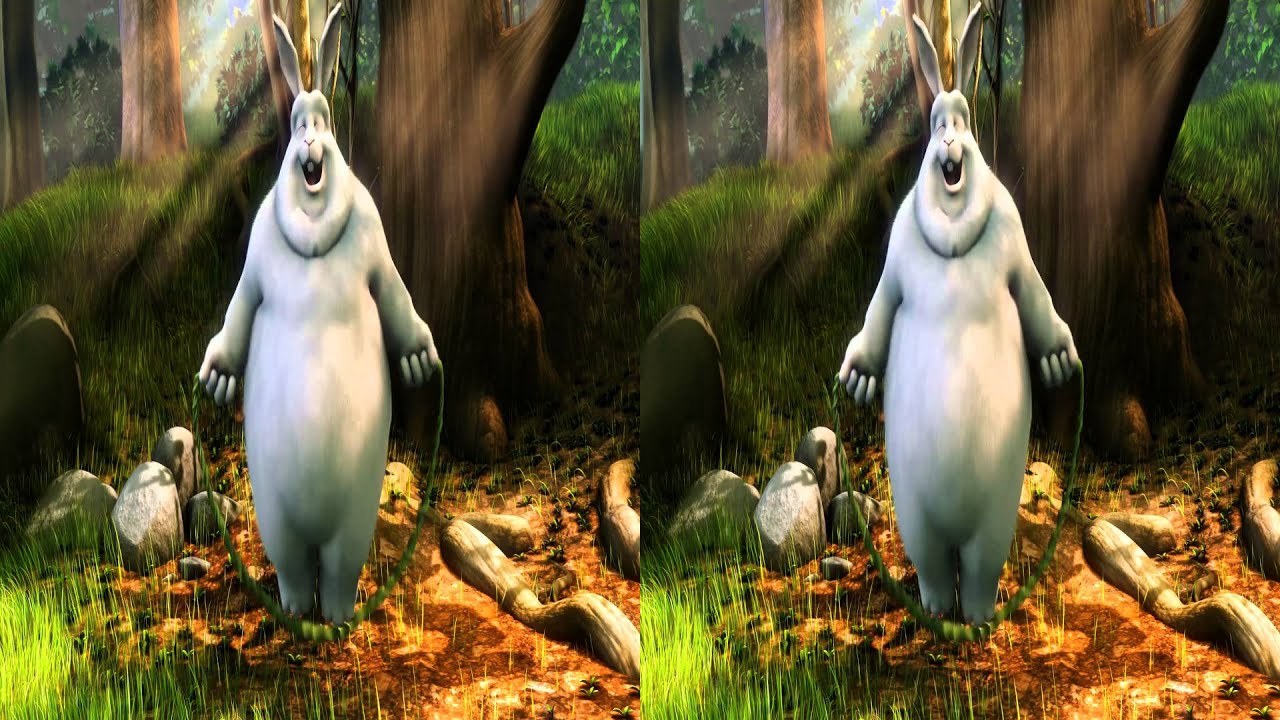
A side-by-side 3D frame: one picture per eye. The small sideways differences between the two pictures are the parallax. A frame of Big Buck Bunny's own 3D version. Image: © Blender Foundation, bigbuckbunny.org, CC BY 3.0.
Key takeaways
- Parallax is measured on the screen, so one file is gentle on a TV and strong on a wall: why size matters.
- Background parallax wider than about 65 mm makes the eyes turn outward; on a 10 m wall that is 0.65% of the width: the table.
- Sky's TV budget was +2% behind the screen and −1% in front; big screens get less: rules of thumb.
- A converted file has one parallax for every screen, so test it on the largest screen you will use: converted files.
Positive, zero and negative parallax
Where an object seems to sit depends on where its two images are drawn [1]:
- Positive parallax: the left-eye image is shifted left and the right-eye image right. The object appears behind the screen.
- Zero parallax: both images are in the same place. The object appears on the screen plane.
- Negative parallax: the images cross over. The object appears in front of the screen.
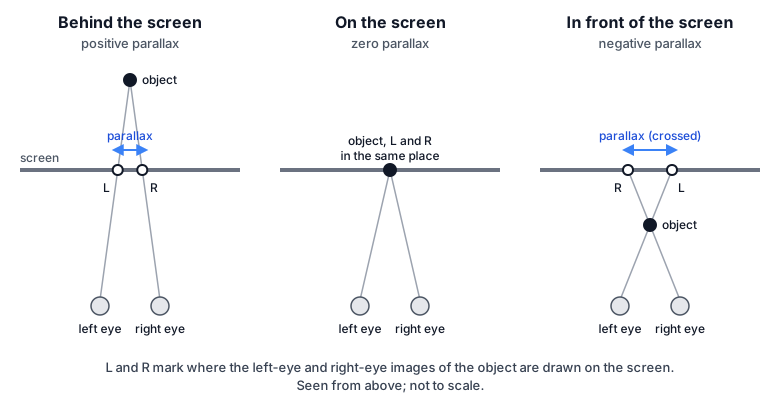
The screen plane is set by convergence. In post-production it is moved by shifting the two images sideways, which BSkyB's guide calls horizontal image translation [1]. Stereographers give parallax as a percentage of image width; 1% is about 19 pixels on a 1920-pixel-wide image [3]. For more on how depth works, see what stereoscopic 3D is.
Why the same 3D file feels stronger on a big screen
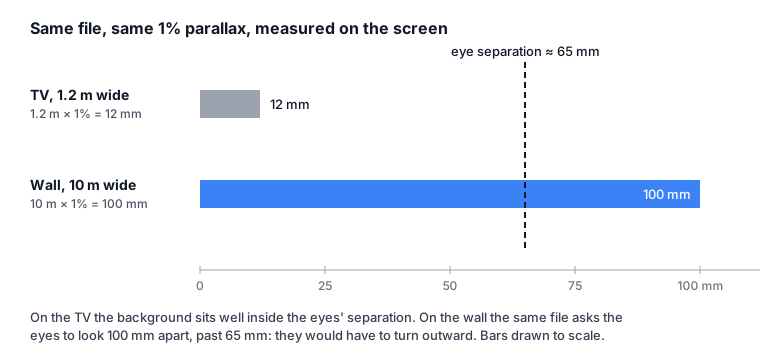
A file holds parallax in pixels, a share of whatever screen shows them. Your eyes stay a fixed distance apart, so parallax that suits one screen size does not suit every size [3].
Take a background at 1% parallax. On a TV 1.2 m wide, 1% is 1,200 mm × 0.01 = 12 mm. On a wall 10 m wide, it is 10,000 mm × 0.01 = 100 mm, wider than your eyes.
Vision scientists at UC Berkeley (Shibata and colleagues, 2011) predict the same thing: content made for a small screen and magnified onto a large one, viewed from farther away, gives slightly more discomfort. "This effect is largely due to the inability to diverge the eyes comfortably" [4].
The hard limit: about 65 mm behind the screen
The space between human eyes is 6.5 cm (2.5 in) on average [3]. When a background's two images sit farther apart than that, BSkyB's guide warns, "it can cause the eyes to turn outward, which is both unnatural and extremely uncomfortable" [1]. The images can then become impossible to fuse [1].
So the largest background parallax, as a share of the image, is 65 mm divided by the image width:
- 10 m wall: 65 ÷ 10,000 = 0.0065, or 0.65%.
- 1.4 m TV: 65 ÷ 1,400 = 0.046, or 4.6%.
Maximum background parallax by screen width
| Screen | Image width | Arithmetic | Max background parallax | On a 1920-px-wide eye image |
|---|---|---|---|---|
| 27-inch monitor, incl. glasses-free 3D | 0.6 m | 65 ÷ 600 | 10.8% | 208 px |
| 55-inch TV | 1.2 m | 65 ÷ 1,200 | 5.4% | 104 px |
| 63-inch TV | 1.4 m | 65 ÷ 1,400 | 4.6% | 89 px |
| Home projector screen | 2.5 m | 65 ÷ 2,500 | 2.6% | 50 px |
| Cinema screen | 10 m | 65 ÷ 10,000 | 0.65% | 12 px |
| LED wall | 15 m | 65 ÷ 15,000 | 0.43% | 8 px |
Width is the picture's width on the screen. For a side-by-side file, measure within one eye's half. Pixels = percentage × 1,920.
This is a ceiling, not a target, and viewers with closer-set eyes reach it sooner (the Berkeley paper used 6.3 cm as the eye separation in one of its calculations [4]). On small, close screens the ceiling is far above what is comfortable: for the farthest background in films on small screens, "most people are comfortable with an Artificial Horizon of +1.8% to +2.5%" [3].
Comfortable budgets people publish
There is no single standard. Stereographers the Berkeley researchers spoke to had "no consensus on one quantitative rule" [4]. Three published rules:
| Source | Behind the screen | In front of the screen | Notes |
|---|---|---|---|
| Sky 3D channel spec [2] | +2% | −1% | 3% total budget; temporary excursions to +4% and −2.5% |
| Cinematographers' "percentage rule" [4] | 1–2% | 2–3% | Researchers suggest 3–4% in front; applies to objects a viewer might look at |
| Large screens, theater, IMAX [3] | — | — | Total range of 0.75% to 1.5%; farthest background +1% on a 6.5 m screen |
The Sky figures are for television. Carried onto a 10 m wall, +2% is 200 mm on the screen, about three times the eyes' separation. For front (negative) parallax there is no hard ceiling of the same kind, "since convergence is not as problematic as divergence" [3]. BSkyB's guide also warns that cuts between strong negative and strong positive parallax "can be very uncomfortable and quickly become visually tiring" [1].
Why 3D can tire the eyes even inside the budget
"When viewing 3D, our eyes always focus on the screen but may converge anywhere along the Z-axis" [1]. This mismatch is the vergence-accommodation conflict. Shibata and colleagues (2011) found it is a cause of visual discomfort, with symptoms "including eyestrain, blurry vision, eye tiredness, and headache" [4].
Distance matters. Content behind the screen was less comfortable at far viewing distances, content in front at near ones [4]. The comfortable range is wide at a cinema and narrow up close: "In cinema, the range extends from 1.6 m to infinity. With a mobile device, the range extends from only 0.28 to 0.44 m" [4].
Headsets and AR glasses: the virtual screen counts
A headset or AR glasses show a virtual screen. XREAL, for example, sets the XREAL One to a 147-inch screen 4 m away by default, and lets you change both, with distance from 1 m to 10 m [5].
A 147-inch 16:9 screen is about 3.25 m wide (147 in × 0.872 = 128 in). If the video fills it, the background limit is 65 ÷ 3,250 = 2.0%. Enlarge the virtual screen and the limit shrinks, as with a real one.
What this means for a converted 2D-to-3D file
A converter writes one parallax into the file and does not know your screen. A conversion that looks right on a TV can ask too much on a projector or LED wall, so check it on the largest screen you will use:
- Convert a short clip. Pick one with a distant background, such as a landscape or a sky.
- Play it on the real screen. Watch from a normal seat.
- Check the background. If it looks doubled or is hard to fuse, lower the depth and try again.
Owl3D Cloud picks the depth and the screen plane automatically; there are no settings to tune. The Owl3D desktop app sets 3D strength in five steps: Subtle, Gentle, Standard (the default), Strong and Maximum. It puts convergence on the subject by default; under Advanced you can choose Subject focus, Pop-out or Manual. Neither has a screen-size setting. So for a very large screen, test a short clip on that screen, and if the background feels hard to fuse, lower the strength in the desktop app. Either way, the result is an AI conversion, not the studio's 3D.
From Owl3DOwl3D converterA desktop app for Windows and Mac that turns 2D videos and photos into 3D.Frequently asked questions
Does sitting farther back help?
Usually. With the screen and content fixed, "a given range of disparities in the displayed image should become more comfortable as the viewer moves farther from the display screen" [4]. It does not change the parallax on the screen itself, which is set by the file and the screen width [1][3].
Sources (5)
- Simon Reeve and Jason Flock, Senior Editors, BSkyB, "Basic Principles of Stereoscopic 3D" (PDF, 27 pages, hosted by Newcastle University; no publication date, copyright line 2010). https://www.ncl.ac.uk/media/wwwnclacuk/pressoffice/files/pressreleaseslegacy/Basic_Principles_of_Stereoscopic_3D_v1.pdf (opened 2026-10-30)
- Robin Palmer (Cel-Soft), "Meeting standards in 3D", KitPlus, listed 1 January 2013; on BSkyB's "Technical Guidelines for Plano Stereoscopic 3D Programme Content". https://kitplus.com/articles/meeting-standards-in-3d/718 (opened 2026-10-30)
- Convergence 3D, Info Center, "Techniques of stereo 3D" (based on the course by David Steiner and Cédric-Alexandre Saudinos). https://convergence3d.net/en/techniques_of_stereo_3d (opened 2026-10-30)
- Takashi Shibata, Joohwan Kim, David M. Hoffman and Martin S. Banks, "The zone of comfort: Predicting visual discomfort with stereo displays", Journal of Vision 11(8):11, 2011. doi:10.1167/11.8.11. https://pmc.ncbi.nlm.nih.gov/articles/PMC3369815/ (opened 2026-10-30)
- XREAL Tutorials, One series, "Display adjust" (Screen Size, Screen Distance). https://tutorials.xreal.com/docs/glasses/one-series/osd/dispaly-adjust/ (opened 2026-10-30)