Stereo Photo Converter
Open an MPO or two photos, line them up automatically, and save side-by-side, red-cyan, JPG or a wiggle GIF, in any browser, on Windows, Mac or a phone.
Convert and align a stereo photo
Open a 3D photo, line it up, and save it in the format you need. It all happens in your browser. Your pictures are not uploaded to our servers.
1. Add your pictures
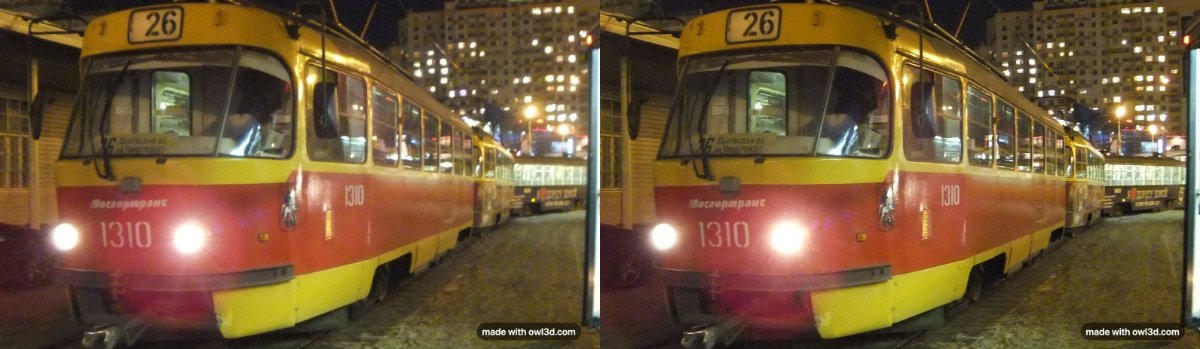
A photo from a Fujifilm 3D camera.
2. Line them up
Your 3D picture appears here.
Saved pictures carry a small "made with owl3d.com" mark in the bottom corner. It is in 3D too: it floats just in front of the screen.
Adjust by hand
One ordinary photo and no second view? The Owl3D converter makes 3D from 2D photos and videos.
How to use it
- Add your pictures. Press "Choose files" and pick two photos (left, then right; if they come out the wrong way round, use "Swap left and right"), one side-by-side image, or an MPO or JPS file from a 3D camera. On a phone this opens your photo library. No pictures yet? Press "Load an example".
- Press "Auto align". The tool finds the same points in both views and corrects the differences in height, tilt and size between them. It then tells you what it changed and how many points it used.
- Choose the output and download. Pick side-by-side, cross-eyed, over-under, red-cyan, a wiggle GIF or video, separate left and right files, or an MPO, and press "Download".
If the depth looks inside out, open "Adjust by hand" and turn on "Swap left and right". The same panel moves the whole picture forward or back ("Depth position (stereo window)"), and fine-tunes rotation, height and size if a pair needs more than automatic alignment gives it.
What this stereo photo converter does
A stereo photo is two pictures of the same scene taken a few centimetres apart, one for each eye. This tool opens such a pair, lines the two views up, and saves it in the layout your screen, viewer or glasses need. It does the everyday jobs people use StereoPhoto Maker for: splitting an MPO into two JPEGs, joining two photos into one 3D picture, aligning a pair, and making a red-cyan or cross-eyed version. It runs in a browser, so it also works on a Mac or a phone.
Automatic alignment. Two photos taken by hand, or by two cameras, rarely line up exactly: one is a little higher, tilted or larger than the other. Your eyes can cope with differences from left to right (that is the depth), but not with differences in height, which make a 3D picture hard to look at. Auto align corrects only those: the vertical shift, the rotation, the size difference, and the keystone (perspective) difference when the cameras were turned toward each other. It leaves the left-to-right differences alone, then crops both views to the area they share.
Depth position (stereo window). After aligning, the tool shifts the views so that the nearest part of the scene sits just behind the screen. Nothing then seems to stick out through the edge of the frame, which is uncomfortable to look at. The "Depth position" slider moves the whole scene forward or back from there.
The mark. Every saved picture carries a small "made with owl3d.com" label in the bottom corner. It is in 3D too: it floats just in front of the screen, and once "Auto align" has set the depth, in front of everything in your photo.
The formats, explained
| Format | What it is | Use it for |
|---|---|---|
| Side-by-side (parallel) | Left eye's view on the left, right eye's on the right | 3D monitors and TVs, VR headsets and phone VR viewers, parallel free-viewing |
| Side-by-side (cross-eyed) | The two views swapped | Viewing with crossed eyes, no equipment |
| Over-under | Left view on top, right view below | 3D TVs and players that take top-bottom |
| Red-cyan anaglyph | Both views in one picture, in two colours | Red-cyan glasses, red over the left eye |
| Wiggle GIF or video | The two views shown one after the other | Posting online: depth with no glasses |
| MPO | Two JPEGs in one file, following CIPA's Multi-Picture Format [3] | 3D photo viewers and editors that read MPO (not tested on a Nintendo 3DS) |
| Left and right files | Two separate JPEGs or PNGs | Sharing, editing, any photo app |
The tool also opens JPS files (a side-by-side JPEG with the right view first), but does not save them.
The anaglyph offers three colour settings. "Dubois colour" uses Eric Dubois's least-squares method, which he designed to optimize an anaglyph for the glasses and the screen [4]. "Colour" is the plain red-cyan split. "Grey" has no colour at all, and suits black-and-white photos and pictures with strong reds.
Frequently asked questions
Why does my MPO file open as one flat picture?
An MPO holds two JPEGs, the left and the right view, one after the other. Most photo apps show only the first. Add the file here and the tool reads both. Fujifilm's FinePix Real 3D W1 and W3 save their 3D stills as MPO [1][2], and the Nintendo 3DS saves its 3D photos as MPO with a JPEG copy [6].
How do I convert MPO to JPG?
Add the MPO, choose "Left and right files" and press "Download": you get the left and the right view as two ordinary JPEGs. Choose "Side-by-side (parallel)" instead to get both views in one JPEG, which most 3D screens and VR viewers can show in 3D.
I can't cross my eyes. How else can I see the 3D?
Save it as "Red-cyan anaglyph" and look through red-cyan glasses, red over the left eye. Or save a "Wiggle GIF", which flips between the two views and shows depth on any screen, with no glasses and no eye tricks.
Is this StereoPhoto Maker?
No. StereoPhoto Maker is free Windows software by Masuji Suto; it can batch-align hundreds of pictures [7], and its maker offers a Mac version that runs the Windows program with a compatibility layer [8]. This tool is not connected with it. It does the common jobs, one picture at a time, in any browser, with nothing to install.
Which is parallel and which is cross-eyed?
In a parallel side-by-side image, the left eye's view is on the left. You look "through" the screen, as if at something far away, so each eye stays on its own half. In a cross-eyed image the views are swapped, and you cross your eyes until the two halves overlap in the middle. If you add a side-by-side image, the tool asks which kind it is; if you pick wrong, the depth looks inside out.
How do I view a cross-eyed 3D picture?
Hold up a fingertip between your eyes and the picture and look at it: behind it, the two halves drift together until a third, 3D picture appears in the middle. The steps, with a pair to practise on, are in our guide to stereoscopic 3D. Some people take a while to learn it; if it is uncomfortable, stop and use the red-cyan or wiggle version.
Why does automatic alignment not change the depth?
Because the left-to-right difference between the views is the depth; only height, tilt, size and perspective are corrected. Too deep or too flat comes from how far apart the photos were taken.
What does it mean when alignment "was not sure"?
It found too few points that appear in both views, or the points disagreed. This happens with plain scenes such as a clear sky, with two photos of different scenes, and with things that moved between shots. The pictures are then left as they were, or shown with the uncertain correction for you to check; either way "Adjust by hand" lets you set it yourself.
How do I take a stereo pair with one camera or phone?
Take one photo, move the camera sideways a few centimetres, keeping it level and pointed the same way, and take a second. It works only for scenes that do not move. Then add the two photos here, left first, and press "Auto align" to correct how the camera moved.
Can I view the result on a 3D screen or in a VR headset?
Yes: save it as side-by-side (parallel). A VR headset or phone viewer shows each half to one eye in any photo viewer that has a side-by-side 3D mode.
Are my photos uploaded?
No. Everything, including automatic alignment, runs in your browser on your device. Your pictures are not uploaded to our servers.
Does it work with the Nintendo 3DS?
It opens 3DS photos (MPO) and saves MPO files. We have not tested whether a 3DS shows an MPO made here.
See it in 3D without glasses, or start from one photo
On the Owl3D Shift, a glasses-free 3D display used beside a computer, a side-by-side picture shown on its screen is displayed in 3D, for one viewer at a time. The Shift does not open MPO files itself, so save the side-by-side version here first. If you have only one ordinary photo, the Owl3D converter, a desktop app for Windows and Mac, turns 2D photos and videos into 3D with AI; the depth is the software's estimate, not a second photograph. In your browser, the Anaglyph Maker and Wigglegram Maker also take one ordinary photo.
Learn more
How 3D photos work, and the ways to view them: Stereoscopic 3D. Cameras that take them: 3D cameras.