How to Play Your Own 3D Video on Apple Vision Pro
How we researched this: written by Owl3D from published sources, all 22 listed at the end.
Short answer
It depends on the file. A side-by-side (SBS) or top-bottom 3D video plays in 3D in a 3D player app from the App Store, such as Reality Player, Moon Player or SKYBOX [7][8][10]. You must set the player to the file's layout. An MV-HEVC file, the 3D format visionOS uses [3], opens from the Files app with no extra app [2]. Get the file onto the headset by AirDrop, iCloud Drive or a file server [2][4][6]. Skip to: which file do I have · move the file · pick a player · it plays flat or looks wrong · no 3D file yet
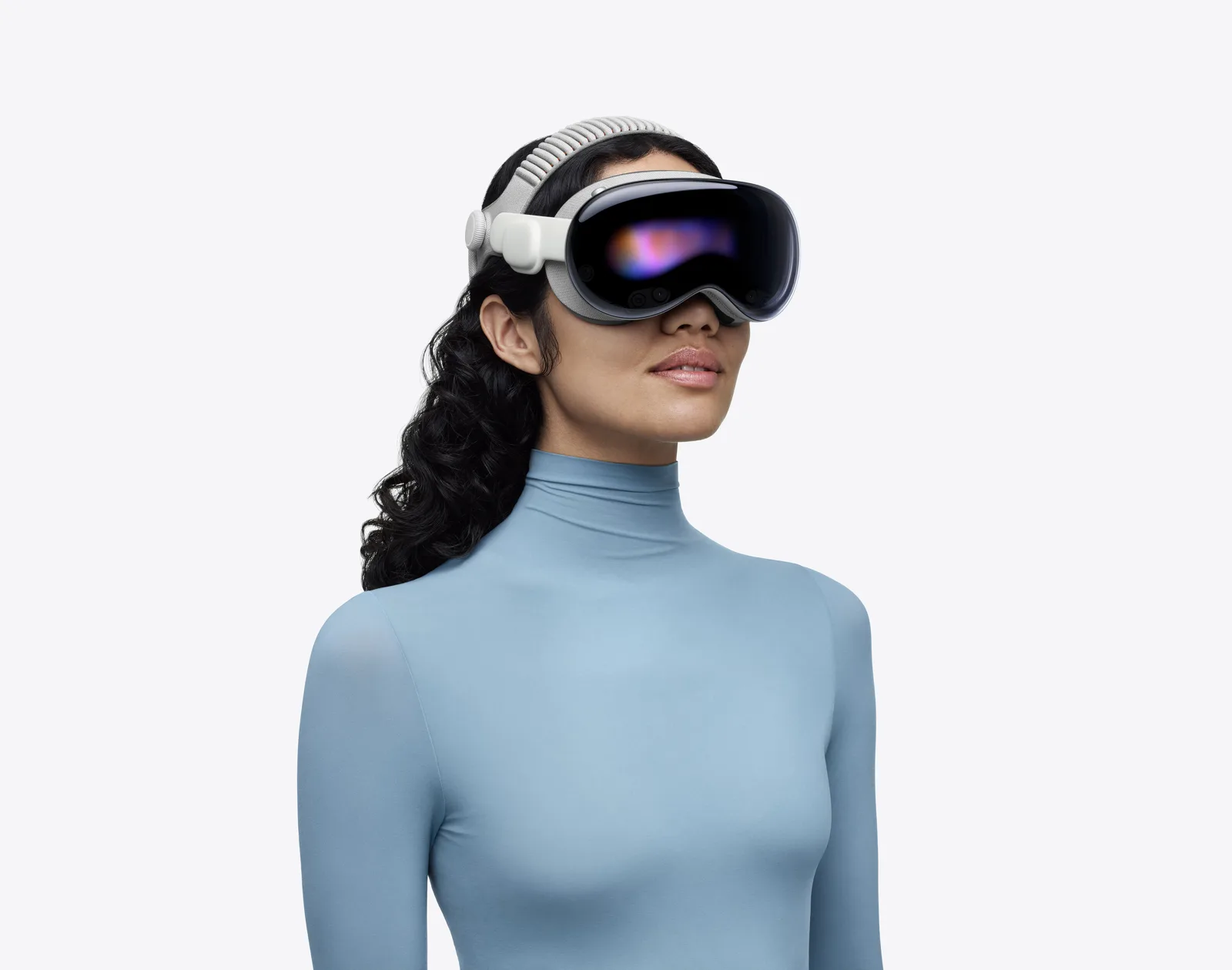
Apple Vision Pro with the M5 chip and the Dual Knit Band. Image: Apple (Apple Newsroom, October 15, 2025) [18].
Key takeaways
- To see SBS and top-bottom files in 3D, use a 3D player app. For formats Vision Pro does not play natively, Apple's help says to search for "VR video player" in the App Store [2].
- MV-HEVC is the 3D format visionOS uses [3]. Apple's help says to open an MV-HEVC 3D video from the Files app [2].
- To move a file, use AirDrop, iCloud Drive, or Connect to Server in the Files app [2][4][6]. Many players also stream from a computer or NAS [7][8][10].
- Two pictures side by side, or a picture twice as wide as it should be: the player's layout setting does not match the file. See the fixes.
- If you made the file with Owl3D on a Mac, export it as Spatial Video for Vision Pro. On Windows, export Full SBS and use a player.
Which kind of 3D file do I have?
Look at one frame of the video. The kind of file decides the app.
| What you see in one frame | Its name | Play it in |
|---|---|---|
| Two pictures next to each other, frame twice as wide as normal | Full SBS | A 3D player, layout SBS, Full |
| Two squeezed pictures next to each other, normal-width frame | Half SBS | A 3D player, layout SBS, Half |
| Two pictures, one above the other | Top-bottom (over-under, OU) | A 3D player, layout Top-Bottom / OU |
| One normal picture; the second eye is a hidden layer in the file [3] | MV-HEVC (spatial video) | Files app [2], or Photos when the file is tagged as spatial [1][3] |
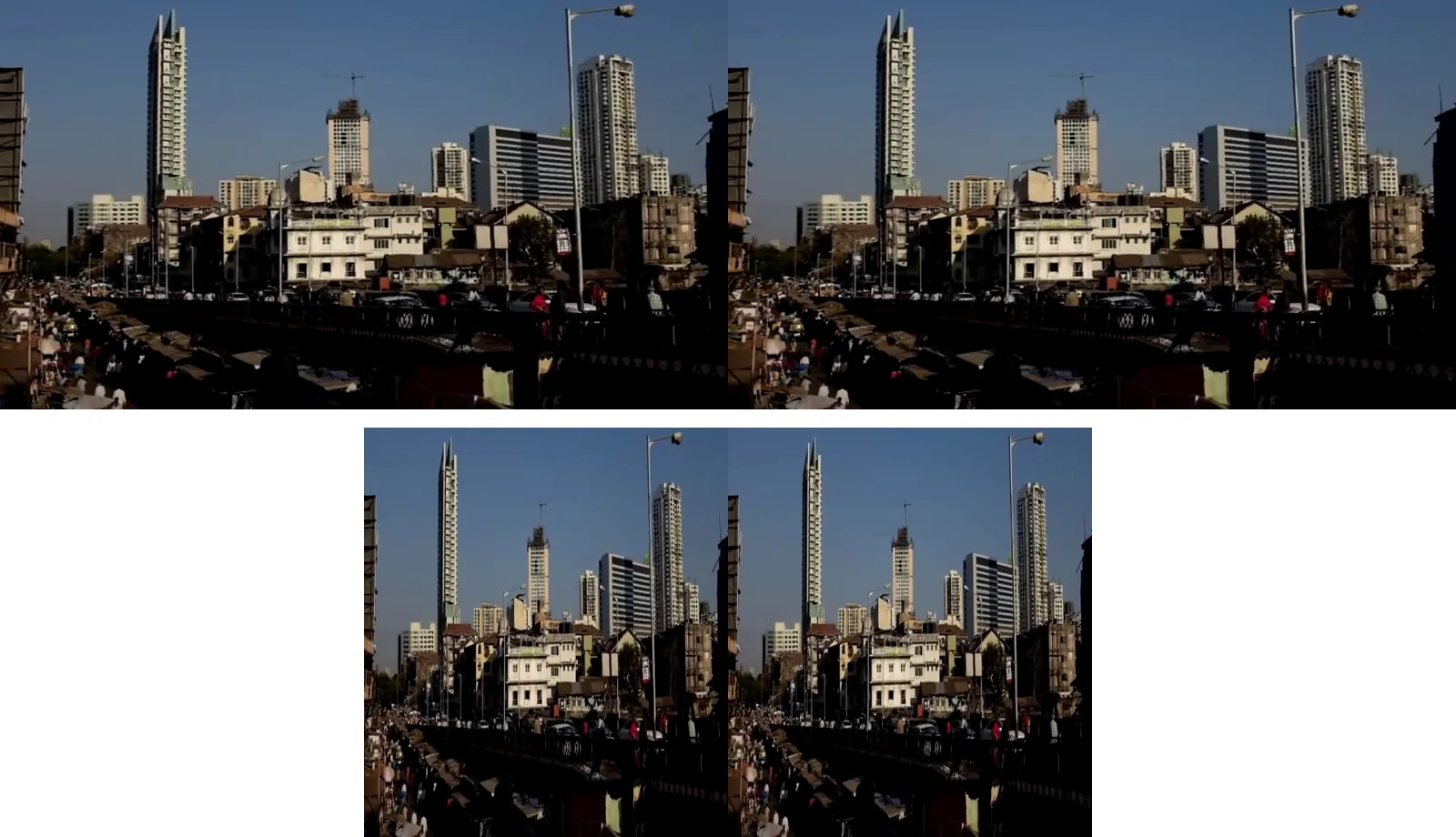
Half SBS squeezes each eye's picture to half width so both fit in a normal-width frame. Full SBS keeps each eye at full width, in a frame twice as wide. The picture below shows both, made from the same clip.
How do I get the file onto Vision Pro?
Pick one of these routes.
- AirDrop from a Mac or iPhone. The two devices must be within 30 feet (10 meters) of each other [4]. On the headset, choose to receive from Contacts Only or Everyone for 10 Minutes [4]. If 3D files do not arrive, see an owner's workaround in what owners report.
- iCloud Drive. Copy the file to iCloud Drive on your Mac, then open it in the Files app on the headset [2][5].
- A file server. In the Files app, tap Connect to Server, then enter a local hostname or a network address [6]. Your Mac can share files for this [6].
- Stream from the player. Reality Player browses SMB and DLNA servers [7]. Moon Player streams "from PC, NAS, MoonLink" and supports SMB, DLNA and WebDAV [8]. SKYBOX plays from a DLNA media server or SMB share, and has a free PC client [10].
Which player app reads which file?
The table lists what each App Store listing says, US store. "Not stated" means the listing does not name that format; it does not mean the app cannot play it.
| App | SBS | Top-bottom | MV-HEVC | Opens files from | Note |
|---|---|---|---|---|---|
| Reality Player [7] | Yes | Yes | Yes | Files, Photos, iCloud Drive, SMB, DLNA | Width option for Full SBS |
| Moon Player [8] | Yes [9] | On Moon's site, all platforms [21] | Not stated | Files, Photos, SMB, DLNA, WebDAV, Plex, Emby | Needs visionOS 27 or later |
| SKYBOX Media Player [10] | Yes | Yes | Not stated | DLNA, SMB, WebDAV, PC client | Detects the 3D format |
| SpatialVideos [11] | Full and Half | Full and Half | Spatial videos | Photos, Files, SMB, DLNA, URL | Last update August 2024 |
| MVPlayer.app [12] | Not stated | Not stated | Yes, its only 3D input | Files, Photos, URL | Free to download |
Last checked : App Store US listings.
Reality Player, Moon Player, SKYBOX and SpatialVideos are paid up front; MVPlayer.app is free to download, with an optional in-app purchase [7][8][10][11][12]. If you have Full SBS files, pick an app that names Full SBS: Reality Player has a width option for "Standard 3D Full SBS videos" [7], and SpatialVideos lists "FSBS, HSBS, FOU, and HOU" [11].
It plays flat or looks wrong: what to do
| What you see | Why | What to do |
|---|---|---|
| Two pictures next to each other, no depth | The app shows the file as a flat 2D video | Open it in a 3D player and choose SBS. In SKYBOX, set Stereo Mode to "3D SBS" [15] |
| Two pictures one above the other | Same, for a top-bottom file | Choose Top-Bottom or OU in the player |
| The picture is twice as wide as it should be, or squeezed | Full and Half SBS do not match the file | In SKYBOX, turn on Full SBS Matching, or put "Full_SBS" in the file name [15]. In Reality Player, use the Full SBS width option [7] |
| Each eye seems to get the other eye's picture | Left and right are swapped [15] | In SKYBOX, check the "L-R Swap" option in Advanced Settings [15] |
| An MV-HEVC file does not show as spatial in Photos | Photos treats a file as spatial only when it carries spatial metadata [3][17] | Open it from the Files app [2] |
On the SKYBOX forum, a Vision Pro owner with Full SBS files reported in November 2024 that "left eye screen is shown right side" [15]. SKYBOX said it had fixed this in version 1.2.1 [15]. In January 2025 the same owner wrote "Issue is fixed.", but still saw a wrong aspect ratio when playing through Airscreen; from an SMB share the aspect ratio was right [15]. The App Store notes for 1.2.2 say "Fixed Full SBS issue" [10]. Update the app before you change settings.
Should I convert SBS to MV-HEVC instead?
Only if you want to play the file without a third-party player. Apple's sample code converts side-by-side video to MV-HEVC [3]. Apple's Compressor app on a Mac takes side-by-side or over/under files and outputs MV-HEVC; this needs a Mac with Apple silicon and macOS 14 or later [16]. The free spatial command-line tool does the same on an Apple silicon Mac [17]. If you only want to watch, a 3D player reads the SBS file as it is, with no conversion.
What owners report
Three owners on the Plex and MacRumors forums, one comment each. We have not tested these setups ourselves.
- A Plex user who moved to Moon Player, Plex forum, February 2024: "It’s coming the closest to playing SBS 3D correctly on Apple Vision Pro." The same owner saw an "aspect ratio being double-wide" on Full SBS files [19].
- An owner on MacRumors, October 2025: "I use Moon Player for 3D Movies - works flawlessly in the AVP." [22]
- An owner on MacRumors, February 2024, sent files by AirDrop from a Mac: "my 3D camcorder video files fail to transfer". The owner then got them across by "placing the files in a folder, then dragging the folder to the AirDrop icon for my Vision Pro", and a dialog offered to save the folder to the Files app's Downloads folder. In the same post, in Moon Player's launch week, the owner wrote: "I could not get it to play 3D video in the AVCHD 3D format from my Panasonic Z10000 3D camcorder" [20].
No 3D file yet?
Owl3D, the publisher of this guide, makes the Owl3D converter. It turns your own 2D videos into 3D on your computer. On a Mac it exports Spatial Video for Apple Vision Pro, which needs macOS 14 or later. On Windows and Mac it exports Full SBS, Half SBS and top-bottom files for a 3D player app. It is an AI conversion, not a studio's 3D version, and it takes time to run; it is not instant.
From Owl3DOwl3D converterA desktop app for Windows and Mac that turns 2D videos and photos into 3D.For 3D films from the studios, see 3D movies on Apple Vision Pro. To record your own, see spatial video.
Frequently asked questions
Can Apple Vision Pro play side-by-side 3D video?
Yes, in a 3D player app from the App Store, such as Reality Player, Moon Player or SKYBOX [7][8][10]. Set the player to the file's layout: SBS Full or SBS Half. The Files app opens MV-HEVC 3D video with no extra app [2].
What is the best 3D video player for Vision Pro?
It depends on your files. For Full SBS, pick an app that names it: Reality Player has a width option for Full SBS videos [7], and SpatialVideos lists Full and Half SBS and top-bottom [11]. To stream from a computer or NAS, Reality Player, Moon Player and SKYBOX read SMB and DLNA servers [7][8][10].
Why does my 3D video show two pictures side by side?
The app plays the file as a flat 2D video. Open it in a 3D player and choose SBS, or Top-Bottom for a file with one picture above the other [15].
Do I need to convert SBS to MV-HEVC to watch it on Vision Pro?
No. A 3D player reads the SBS file as it is. Convert to MV-HEVC only if you want to play the file without a third-party player [3][16][17].
Sources (22)
- Apple Support, "View photos, videos, and memories in Photos on Apple Vision Pro". https://support.apple.com/guide/apple-vision-pro/view-photos-and-videos-tanf794e3fef/visionos (opened 2026-11-14)
- Apple Support, "View 180-degree, 360-degree, and Wide FOV video on Apple Vision Pro" (published August 24, 2026). https://support.apple.com/en-us/125014 (opened 2026-11-14)
- Apple Developer, "Converting side-by-side 3D video to multiview HEVC and spatial video". https://developer.apple.com/documentation/avfoundation/converting-side-by-side-3d-video-to-multiview-hevc-and-spatial-video (opened 2026-11-14)
- Apple Support, "Use AirDrop on Apple Vision Pro to send items to nearby devices". https://support.apple.com/guide/apple-vision-pro/use-airdrop-tan17d04ca55/visionos (opened 2026-11-14)
- Apple Support, "View, modify, and organize files and folders in Files on Apple Vision Pro". https://support.apple.com/guide/apple-vision-pro/view-modify-and-organize-files-and-folders-tanad7873ff3/visionos (opened 2026-11-14)
- Apple Support, "Connect external servers with Files on Apple Vision Pro". https://support.apple.com/guide/apple-vision-pro/connect-external-servers-tan7acdaa0e3/visionos (opened 2026-11-14)
- App Store (US), "Reality Player". https://apps.apple.com/us/app/reality-player/id6449855042 (opened 2026-11-14)
- App Store (US), "Moon Player: AI-Enhanced 3D". https://apps.apple.com/us/app/moon-player-ai-enhanced-3d/id6475702609 (opened 2026-11-14)
- Moon VR, "The Best VR Video Player for Vision Pro: Introducing Moon Player". https://moonvrplayer.com/blog/160/the-best-vr-video-player-for-vision-pro-introducing-moon-player (opened 2026-11-14)
- App Store (US), "SKYBOX Media Player". https://apps.apple.com/us/app/skybox-media-player/id6499200560 (opened 2026-11-14)
- App Store (US), "SpatialVideos". https://apps.apple.com/us/app/spatialvideos/id6450283181 (opened 2026-11-14)
- App Store (US), "MVPlayer.app". https://apps.apple.com/us/app/mvplayer-app/id6480077193 (opened 2026-11-14)
- App Store (US), "Infuse". https://apps.apple.com/us/app/infuse/id1136220934 (opened 2026-11-14)
- App Store (US), "VLC media player". https://apps.apple.com/us/app/vlc-media-player/id650377962 (opened 2026-11-14)
- SKYBOX forum, "Full SBS 3D movie is not working with Apple Vision Pro" (2024-11-17 to 2025-03-11). https://forum.skybox.xyz/d/2650-full-sbs-3d-movie-is-not-working-with-apple-vision-pro (opened 2026-11-14)
- Apple Support, Compressor User Guide, "Modify stereoscopic and spatial properties in Compressor". https://support.apple.com/guide/compressor/modify-stereoscopic-and-spatial-properties-cpsr9678b750/mac (opened 2026-11-14)
- Mike Swanson, "Spatial Video Tool". https://blog.mikeswanson.com/spatial/ (opened 2026-11-14)
- Apple Newsroom, "Apple Vision Pro upgraded with the M5 chip and Dual Knit Band" (October 15, 2025). https://www.apple.com/newsroom/2025/10/apple-vision-pro-upgraded-with-the-m5-chip-and-dual-knit-band/ (opened 2026-11-14)
- Plex forum, "Side-by-Side 3D Movie support for Apple Vision Pro". https://forums.plex.tv/t/side-by-side-3d-movie-support-for-apple-vision-pro/867634 (opened 2026-11-14)
- MacRumors forums, "Moon Spatial Player launching on Apple Vision Pro on February 2nd". https://forums.macrumors.com/threads/get-ready-for-an-epic-experience-moon-spatial-player-launching-on-apple-vision-pro-on-february-2nd.2418035/ (opened 2026-11-14)
- Moon VR, "Moon VR | Best VR Video Player". https://moonvrplayer.com/ (opened 2026-11-14)
- MacRumors forums, "How easy to view 3D movies with AVP?". https://forums.macrumors.com/threads/how-easy-to-view-3d-movies-with-avp.2468793/ (opened 2026-11-14)