UEVR: How to Use the Injector, Profiles and Game Lists
How we researched this: written by Owl3D from published sources, all 10 listed at the end.
Short answer
UEVR, the "Universal Unreal Engine VR Mod", is a free tool by praydog [1][4]. It turns Unreal Engine games into "6DOF VR experiences" [2]. You start UEVRInjector.exe, start the game, pick the game in the list, pick OpenVR or OpenXR, and click Inject [1]. The GitHub page names Unreal Engine 4.8 to 5.4, and the website now says 4.8 to 5.6 [1][4]. UEVR's own pages give no game list. The maker's docs point to community lists and the Flat2VR Discord, where players share profiles [2][4].
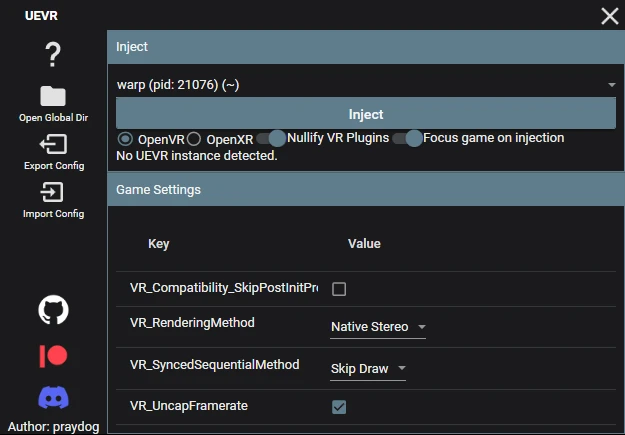
The UEVR 1.05 injector before a game is started. Screenshot: Owl3D, on a Windows PC, November 14, 2026.
Key takeaways
- UEVR works only with Unreal Engine games, on Windows, with DirectX 11 or 12; see what it needs.
- Start UEVRInjector.exe and the game, then inject; see how to inject.
- A profile is a per-game settings folder. Import Config loads one from a zip; see profiles.
- Game lists are made by the community, not by praydog; see game lists.
- Do not inject into multiplayer games: the maker says to assume they have anti-cheat; see fixes.
What UEVR needs
| You need | Details |
|---|---|
| A game | An Unreal Engine 4 or 5 game: 4.8 to 5.4 per the GitHub page [1], 4.8 to 5.6 per uevr.io [4] |
| Graphics | Direct3D 11 or Direct3D 12 [2] |
| A PC VR runtime | SteamVR for OpenVR, or the headset's OpenXR runtime [3] |
| .NET 6 | The docs say ".NET 6.0" and the GitHub page says ".NET 6.0 SDK" [1][2] |
| Windows | The tool is a Windows program, UEVRInjector.exe [1] |
Last checked : the UEVR GitHub page, uevr.io and docs.uevr.io.
Do you need SteamVR? Only for OpenVR. "OpenVR requires SteamVR to be installed" [3]. OpenXR needs your headset's own OpenXR runtime, "but can also run through SteamVR" [3]. The docs add that OpenVR "usually has the highest compatibility", and OpenXR "usually gives higher performance when it works" [3]. With Virtual Desktop, "you must use OpenXR to avoid rotation lag" [3].
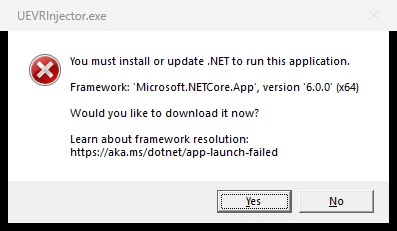
In our test on a clean Windows PC, UEVR 1.05 showed the dialog above at first start. After we installed the .NET 6 Desktop Runtime (x64), version 6.0.36, the injector opened.
Download: stable or nightly
The latest stable release is UEVR 1.05, from November 16, 2024 [5]. The maker's page also links a nightly build [1]. On November 14, 2026 the newest nightly was 01143, from August 30, 2026 [7].
Extract UEVR.zip to a folder of your choice [7]. Antivirus programs "may delete files required to run from UEVR", so you may need to whitelist the UEVR folder [2]. In our test, the 1.05 UEVRInjector.exe had no code signature.
How to inject UEVR into a game
- Start UEVRInjector.exe. Start it as administrator if the game does not appear in the list [1].
- Start the game.
- Pick the game in the process list.
- Pick a runtime: OpenVR or OpenXR (see above).
- Nullify VR plugins if needed. Tick this when the game has its own VR plugin [1].
- Set the pre-injection settings, such as the rendering method [1][3].
- Click Inject [1].
The in-game menu "opens by default at startup". Press Insert on the keyboard, or L3+R3 on an XInput controller, to open it again [1]. You can change both keys [3].
Before you inject, the maker gives these settings [1]:
- Turn off HDR. The game still works with it, "but the game will be darker than usual".
- For a game with its own VR plugins, pass
-nohmdon the game's command line, or delete the VR plugins from the game folder. - Close overlays that can crash the game: "Rivatuner, ASUS software, Razer software, Overwolf, etc..."
- Turn off in-game options such as DLSS Frame Generation.
- Consider turning off Hardware Accelerated GPU Scheduling in Windows Graphics settings.
With the in-game menu open, hold RT on the controller: RT + Y recenters the view, RT + B resets the camera offset, and RT + X resets the standing origin [1]. If you feel sick, the docs suggest "Decoupled Pitch" under the VR options [3]. More on that in our VR motion sickness guide.
Pick a rendering method
UEVR has "3 rendering modes" [1]. You set it with VR_RenderingMethod [3].
| Mode | What the maker says [1][2] | When to use |
|---|---|---|
| Native Stereo | "looks the best, performs the best (usually)". TAA stays intact, and DLSS or FSR2 "usually work completely fine". It "Can cause crashes or graphical bugs". | First choice |
| Synchronized Sequential | Slower than Native Stereo. TAA shows ghosting, and motion blur "will need to be turned off". | When Native Stereo crashes or shows bugs |
| Alternating/AFR | "Causes eye desyncs and usually nausea along with it." | Only when the other two do not work |
Last checked : UEVR GitHub README and docs.uevr.io.
UEVR profiles
A profile is the settings folder of one game. UEVR stores it in %APPDATA%/UnrealVRMod/<game_executable_name> [3]. You change settings in the in-game menu or in the folder's config.txt [3].
The injector has four buttons for this: Open Global Dir, Open Game Dir, Export Config and Import Config [8].
- Get a profile zip for your game, for example from the Flat2VR Discord [2][4].
- Click Import Config in UEVRInjector.exe and pick the zip. UEVR unpacks it into its global folder under the zip's name [8].
- Start the game and inject as above.
The injector warns: "Only import configs with DLLs from trusted sources to avoid potential risks." [8] UObjectHook is not on by default. If you share a profile, turn on "Enabled at Startup" under UObjectHook's config tab [9]. If a profile you got does not work, this setting is the likely cause: open the UObjectHook menu and turn it on [9].
UEVR game lists
UEVR's own pages give no game list. The docs name three places to check a game before you try it [2][4]:
- Alex's spreadsheet. The docs say "Alex also has made a spreadsheet of supported games" [2].
- Rai Pal. It tries to tell you each game's engine and engine version, and shows "user scores given to the VR compatibility of a given game" [2].
- The Flat2VR Discord. uevr.io invites you there to discuss UEVR [4]. There, "someone may have came up with a config for the game" [2].
A game that is not on these lists may still work. If the game is not an Unreal Engine game, the injector warns that it "does not appear to be an Unreal Engine title" [8].
Fixes for common problems
| Problem | What the maker says [2][6] |
|---|---|
| Multiplayer game | "assume that all multiplayer games have Anti-Cheat, and do not attempt to inject into them" |
| Major graphical bugs or crashes | Change the rendering method to Synced Sequential. If it still crashes, try the Compatibility options. "Do not enable Extreme Compatibility Mode, only as a last resort" |
| Game locked at 60 FPS, even in flat | Turn off ASW or motion smoothing |
| Game runs poorly | Lower the in-game settings, or lower the resolution in UEVR or SteamVR |
| Rapid flickering or extreme lag | Likely DLSS Frame Generation is on. Turn it off, or turn off Hardware Accelerated GPU Scheduling |
| Still crashing or lagging | Turn off OpenXR Toolkit |
| Nothing happens at all | Move the UEVR folder to a different folder |
| The injector does not open | Install .NET 6 (see our test) |
Last checked : docs.uevr.io Introduction and the UEVR 1.05 release notes.
When UEVR is not an option
UEVR gives an Unreal game true stereo and head tracking, because it renders the game from two eye positions [2][4]. When your game is not on Unreal Engine, or it does not work yet, there are other ways. vorpX is a paid tool with profiles for games on other engines.
A screen-based converter is a different kind of tool. It estimates depth from the 2D picture and builds a left and a right view as you play. You get 3D depth on a large virtual screen, but no head tracking and no motion controls.
Owl3D Link is our app for Meta Quest. It is not a game mod and changes nothing in the game. With the Owl3D desktop app running on a Windows PC, it shows an ordinary PC game in 3D in the headset, converted instantly as it plays. The 3D is an AI conversion of the picture, not true stereo from the game's geometry as UEVR gives. The PC needs an NVIDIA RTX 3060 or better. Multiplayer competitive games and games with anti-cheat software often block screen capture, and then it cannot convert them. It is not for PC VR games. Owl3D Link is free to use; on the free plan a session lasts 15 minutes and the picture carries a watermark.
Frequently asked questions
What does UEVR do?
It injects into a running Unreal Engine game and renders it for a PC VR headset, with 6DOF head tracking [1][2].
Is UEVR free? Is it open source?
UEVR is "Free to Use" [4]. The code is on GitHub, but its licence file says "All rights reserved" [10]. It is not under an open-source licence such as MIT. You can support the developer on Patreon [4].
Does UEVR work on a standalone Quest?
No. UEVR runs on a Windows PC and needs a PC VR runtime [1][3]. A Quest connected to the PC can be used: Quest 2 and Quest Pro are on uevr.io's list of headsets its testers reported as working [4].
Sources (10)
- praydog, "UEVR" GitHub repository README. https://github.com/praydog/UEVR (opened 2026-11-14)
- UEVR Documentation, Introduction. https://docs.uevr.io/ (opened 2026-11-14)
- UEVR Documentation, "Detailed overview". https://docs.uevr.io/usage/overview.html (opened 2026-11-14)
- UEVR, official website. https://uevr.io/ (opened 2026-11-14)
- praydog, "Releases · UEVR" (GitHub). https://github.com/praydog/UEVR/releases (opened 2026-11-14)
- praydog, "UEVR 1.05" release notes (GitHub). https://github.com/praydog/UEVR/releases/tag/1.05 (opened 2026-11-14)
- praydog, "UEVR-nightly" latest release (GitHub). https://github.com/praydog/UEVR-nightly/releases/latest (opened 2026-11-14)
- praydog, UEVR frontend source code: MainWindow.xaml and MainWindow.xaml.cs. https://github.com/praydog/UEVR-frontend (read 2026-11-14)
- UEVR Documentation, "Adding 6DoF with UObjectHook". https://docs.uevr.io/usage/adding_6dof.html (opened 2026-11-14)
- praydog, UEVR LICENSE file (GitHub). https://github.com/praydog/UEVR/blob/master/LICENSE (opened 2026-11-14)