Secret Anaglyph Message: Make a Red-Filter Hidden Message
How we researched this: written by Owl3D from published sources, all 1 listed at the end.
Short answer
Write the message in light blue or green. Cover it with scribbles in red, pink and orange. Through a red filter, red ink looks the same as white paper, and blue and green ink look dark [1]. So the scribbles fade and the message stands out. For red-cyan 3D glasses you can hide two messages: one in red ink and one in cyan ink, each seen by one eye.
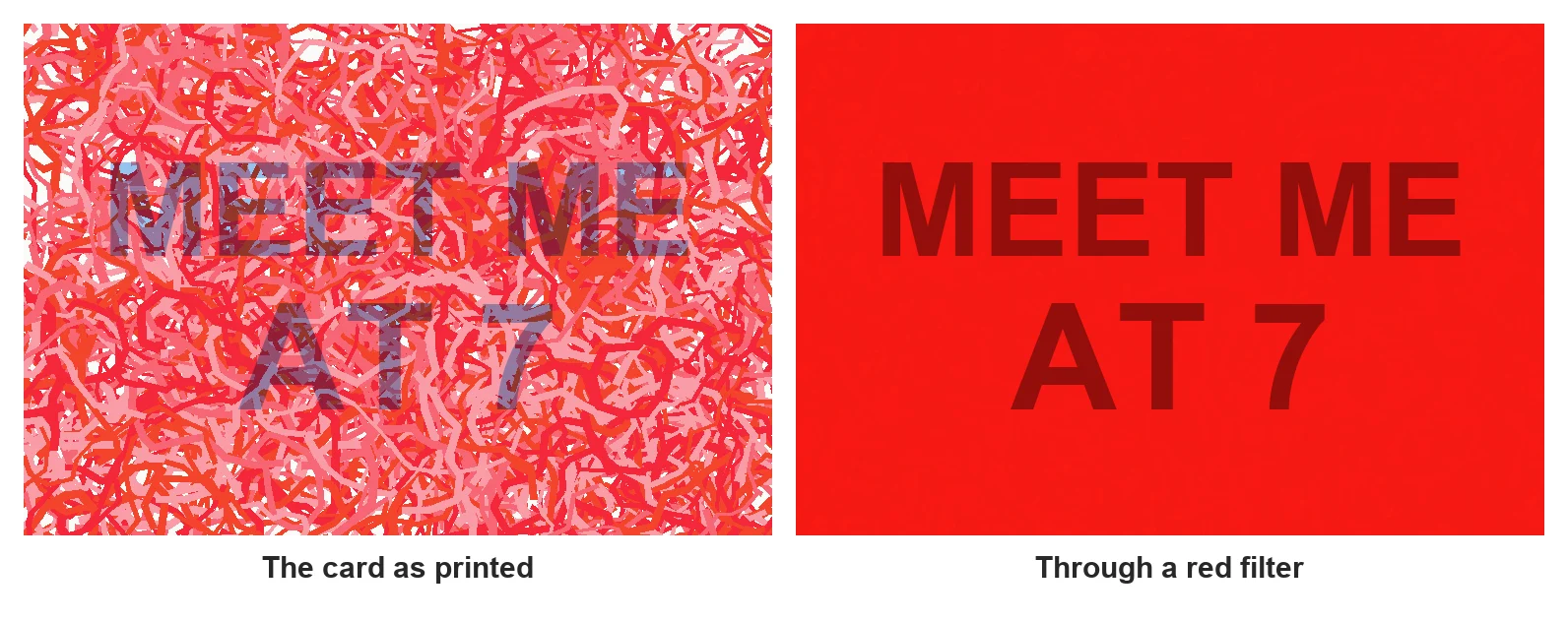
Our test card. Left: as printed. Right: what a red filter lets through, calculated from the red channel of the same image, not a photo through a filter. Made by Owl3D, November 16, 2026.
Key takeaways
- Red, pink, orange and yellow vanish under a red filter. Blue, green and black show dark. See the color table.
- Write the message in pale blue and scribble over the whole card. On our card the text was still readable without the filter; see what we found.
- In a photo editor, set the red scribble layer to Multiply. See on a computer.
- Red-cyan glasses can show a different word to each eye. See two messages.
- To draw red-blue 3D art, draw each line twice and shift the red copy. See draw anaglyph art.
Make a hidden message with markers
- Write the message. Use a light blue or light green marker or colored pencil. Big, thick letters read best through the filter.
- Hide it. Scribble over the whole card with red, pink and orange markers. Use two or three shades, and cover the empty paper as much as the letters, so the letters do not stand out as a shape.
- Check it. Look through a red filter: red cellophane, a red plastic sheet, or the red lens of red-cyan 3D glasses. The scribbles should fade into the paper and the letters should look dark. If you can still read the message without the filter, add more red scribbles over the letters.
Which ink colors show through a red filter
A red filter passes red light and blocks blue and green [1]. Ink that reflects red light looks like white paper through it. Ink that absorbs red light looks dark.
| Ink color | Through a red filter | Use it for |
|---|---|---|
| Red, pink, orange | Fades into the paper | The scribbles that hide the message |
| Yellow | Fades too (yellow is red and green light together [1]) | More hiding scribbles, never the message |
| Light blue, light green | Dark | The message |
| Dark blue, black | Dark | Not good: also easy to read without the filter |
What we found on our own card
We made the card at the top of this page on a computer and checked it with a calculated red-filter view. What we saw:
- We drew the scribbles as see-through ink (Multiply mode), so they darken the letters instead of covering them. Solid red painted over the letters would look like white paper through the filter [1] and cut gaps in them.
- Pale blue (#96C3F0) letters under about 1,150 scribbles were harder to see, but you can still read them without the filter (left half of the picture).
- Through the filter, the pale blue letters came out dark and clear.
We did not print the card or test it through real red cellophane. Printer inks are not pure colors, so print one test card and look at it through your filter before you make many.
On a computer: a "secret message generator" in any photo editor
You do not need a special generator. Any editor with layers works, for example GIMP or Photoshop.
- Text layer. On a white background, type the message in pale blue (we used #96C3F0).
- Scribble layer. Add a new layer above it. Paint dense red and pink strokes over the whole picture (we used #FA283C, #FC6978, #FDA0AC and an orange, #FA462D).
- Blend. Set the scribble layer's mode to Multiply, so the blue letters stay under the red like marker ink.
- Check before you print. Hide the green and blue channels, or view the red channel alone. That is what a red filter shows. The letters must be clearly darker than the scribbles.
Two messages, one per eye, with red-cyan glasses
Red-cyan 3D glasses have a red lens and a cyan lens, red over the left eye [1]. The eye behind the red lens sees cyan ink as dark and red ink as white. The eye behind the cyan lens sees the opposite [1]. So one card can carry two words: write one in cyan and one in red, on top of each other.
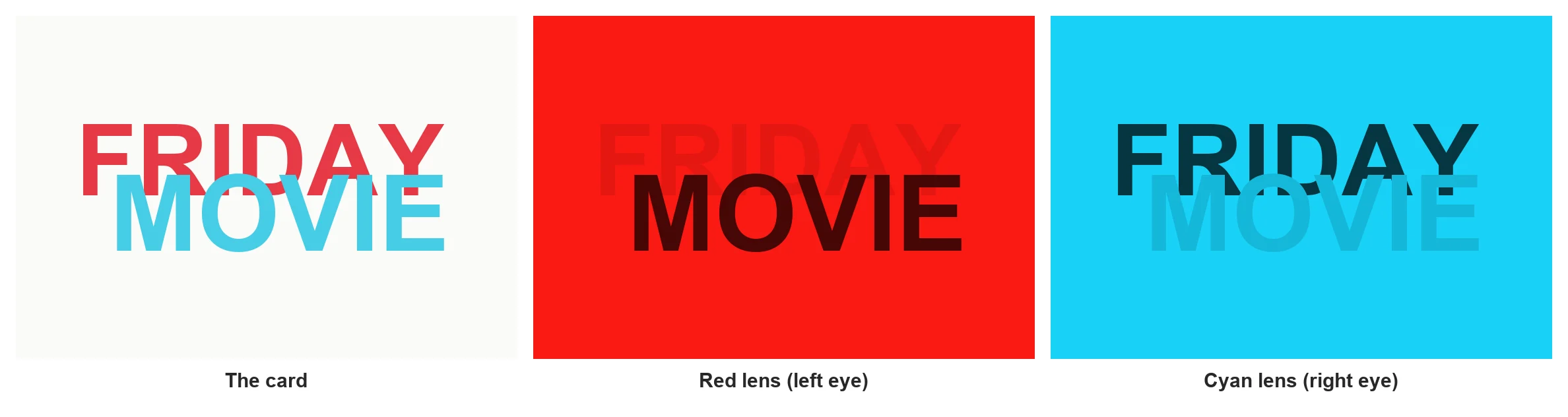
With the glasses on, close one eye, then the other. Each eye reads a different word.
Draw anaglyph art by hand
A drawn anaglyph is the same idea used for depth instead of hiding. You draw the object twice: once in cyan for the left eye, once in red for the right eye [1]. Where the two copies lie on top of each other, the line sits on the page. Where they are shifted sideways, it seems to sit in front of or behind the page [1].
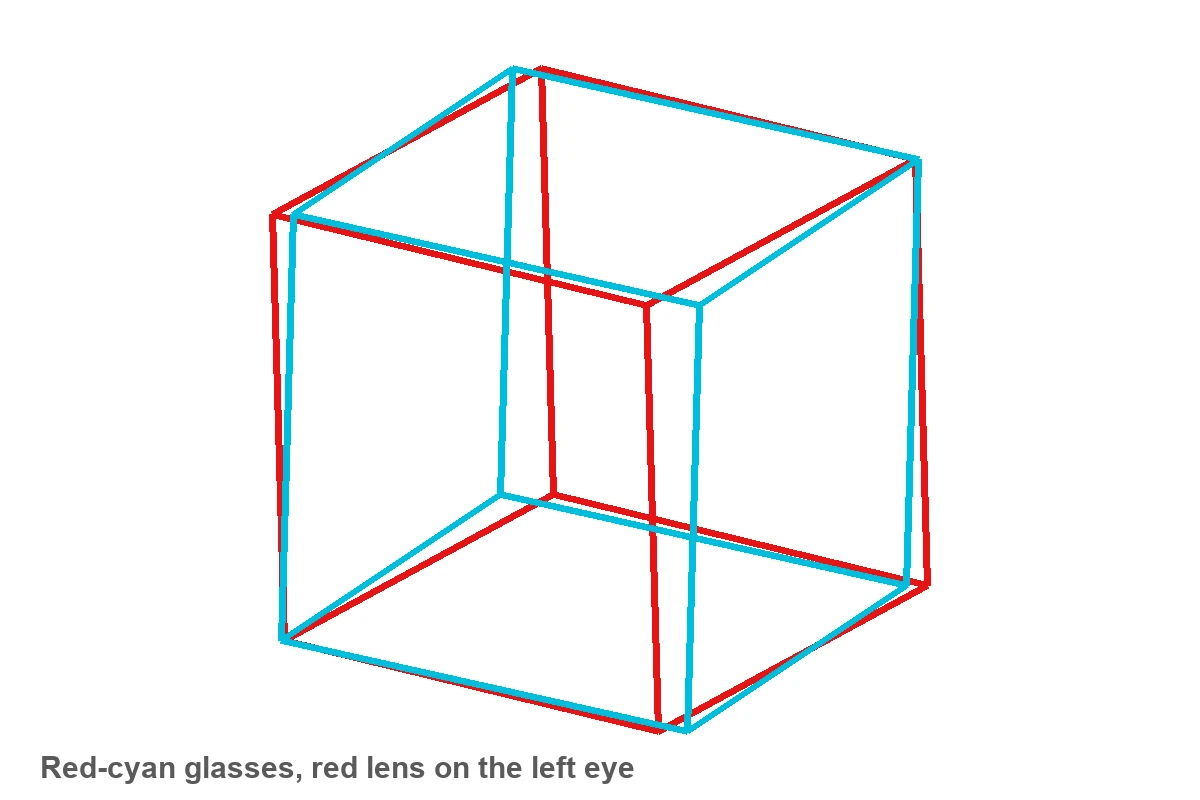
- Draw the cyan copy. This is what the left eye sees.
- Draw the red copy on top. Lines that should sit on the page go exactly over the cyan lines.
- Shift for depth. For a part that should come toward you, draw its red line a little to the left of the cyan line. For a part behind the page, draw it a little to the right. Start with shifts of a few millimetres.
- Check with the glasses, red lens on the left eye. If the depth looks inside out, you swapped the colors or the direction of the shift.
From a drawing to a 3D photo
A drawn anaglyph fakes depth by hand: you move each line a little between the red and the cyan copy. A photo anaglyph does the same with a real depth for every pixel. With two photos taken a few centimetres apart, the depth is already there. With one ordinary photo, an AI model estimates how far away each part of the scene is and builds the second view. Our free Anaglyph Maker does this in your browser and gives you a red-cyan picture. For whole videos, the Owl3D desktop app makes an AI conversion from 2D to 3D. It saves side-by-side 3D for a 3D screen or a VR headset, not red-cyan. How red-cyan pictures work, and where to get glasses: anaglyph 3D.
Frequently asked questions
Do I need 3D glasses, or is a red filter enough?
A red filter is enough for one hidden message. You need red-cyan glasses only for the two-message card or for drawn 3D art.
Why can I still read the message without the filter?
The letters are too dark, or the red scribbles are too thin over them. Use a paler blue, and add more red and pink scribbles over the whole card.
Can I use a yellow highlighter for the message?
No. Yellow reflects red light, so it fades under a red filter with the scribbles [1]. Use light blue or light green.
Sources (1)
- Wikipedia, "Anaglyph 3D" (sections History, Production, Mechanics, Traditional anaglyph processing methods). https://en.wikipedia.org/wiki/Anaglyph_3D (opened 2026-11-16)