PlayStation 3D Display: Specs, What Still Works in 3D, and What to Check on a Used One
How we researched this: written by Owl3D from published sources, all 15 listed at the end.
Short answer
The PlayStation 3D Display (model CECH-ZED1) is a 24-inch-class 1080p monitor that Sony sold for the PS3 from November 2011, at US$499.99 with one pair of active-shutter glasses [1][2]. 3D still works today from a device that sends standard 3D over HDMI: a PS3 with 3D games and 3D Blu-ray, a PC, or a side-by-side or top-and-bottom video [1][2][4]. A PS5 has no 3D output [14]. Its two-player SimulView mode gives each player a full 2D screen, and only works with SimulView PS3 games [2]. On a used unit, the best-known fault is a black screen with a blinking red light [4]. Owl3D, the publisher of this guide, makes a 2D-to-3D video converter, described in one passage below.
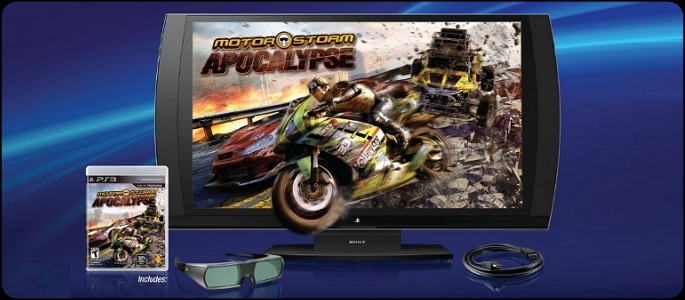
The US launch bundle: display, one pair of 3D glasses, MotorStorm Apocalypse and an HDMI cable [2]. Image: PlayStation LifeStyle.
Key takeaways
- 3D works from a PS3, a PC and side-by-side or top-and-bottom video. Pick the format in the display's 3D Format menu. What plays in 3D.
- A PS5 has no 3D output. We found no source that shows 3D from a PS4 or a Switch on this display. Consoles.
- Before you pay for a used one, check that it shows a picture for an hour: dead units blink a red light. Buying used.
- Sony's own glasses and other Sony IR glasses work, by owners' reports. Off-brand ones may not. Glasses.
- New 3D video for it: convert your own videos to Half Side-by-Side. New 3D video.
Specs
Sony announced the display on June 7, 2011, and it went on sale in the US on November 13, 2011 [1][2]. iFixit says only one model was made, the CECH-ZED1U [10].
| Spec | PlayStation 3D Display |
|---|---|
| Screen | 23.5 in, VA panel, 1920 × 1080 [1] |
| 3D | Active shutter, 240Hz, built-in 3D emitter [2] |
| Inputs | 2 × HDMI 1.4, 1 × component, headphone out [2] |
| Max input | Up to 1080p [2] |
| Speakers | 2 × 3 W plus a 5 W subwoofer [3] |
| Weight | About 5.7 kg with stand [3] |
| Remote | None in the box; the PS3 Remote Control works [2] |
| TV tuner | None [2] |
| Launch price | US$499.99 with one pair of glasses [2] |
Sony also lists a 5000:1 contrast, a 176-degree viewing angle and 4 ms response time [1]. The USB port is "for service use only" [3]. Sony said the design takes no wall-mounting bracket [2].
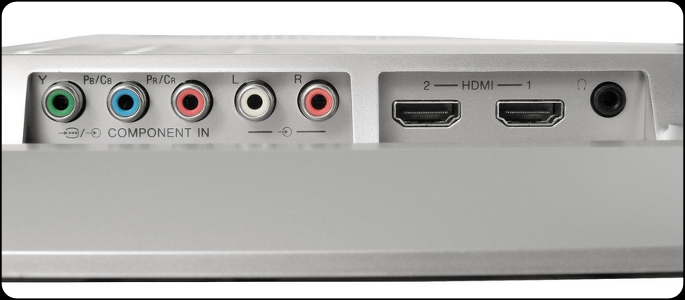
What plays in 3D on it today
Sony's announcement lists three 3D formats the display supports: frame packing, top and bottom, and side by side [1]. Sony also says the connected device must support stereoscopic 3D [1].
| Source | 3D on this display? |
|---|---|
| PS3: 3D games and 3D Blu-ray | Yes. Needs PS3 system software 3.70 or later [3] |
| PC over HDMI | Yes, if the PC sends "HDMI standard format" 3D, per Sony [2] |
| Side-by-side or top-and-bottom video (PC, media player) | Yes. Choose the format in the display's menu [4][5] |
| Games with red-blue (anaglyph) 3D | No 3D effect with the shutter glasses [4] |
The 3D button on the display turns 3D on [3]. For side-by-side or top-and-bottom, open the 3D Format setting, which the manual describes as matching "the 3D format of the content being played" [3]. Connect the PS3 straight to the display: an AV receiver in between can stop 3D and SimulView from showing correctly [3].
On a PC, Sony's answer is yes over standard HDMI 3D [2]. One owner on HardForum (June 2014) reported that NVIDIA-based PC 3D worked in Trine but in no other game they tried [8]. A reviewer at TechCrunch called it "not even a good 3D monitor for PCs" [7].
PS4, PS5 and Switch
- PS4: System update 1.75 (July 2014) added 3D Blu-ray playback [13]. One owner reported in April 2022 using the display daily with a PS4 [12].
- PS5: Sony's PS5 FAQ at launch said: "No, 3D stereoscopic output is not supported on PS5." [14]
- Switch: One owner reported in November 2019 that they use it with a PS4, a PS3, a Wii U and a Switch [12].
SimulView: two players, two full screens
Sony: "each player gets their own full (2D) HD screen while wearing the 3D Glasses" [2]. The two pictures are 2D, not 3D [2]. Each player needs a pair of PlayStation 3D glasses, and it only works from a SimulView PS3 game, not from two inputs [2]. Launch games: MotorStorm Apocalypse, Gran Turismo 5, Killzone 3 and Super Stardust HD [2]. One owner reported "bleed through of the other image" [8].
Glasses that work
The PlayStation 3D glasses (CECH-ZEG1) are active-shutter glasses with a rechargeable battery and IR sync [1][3]. They cost $69.99 at launch [2]. Sony said they also work with active-shutter 3D TVs from Sony, Samsung, Panasonic, Mitsubishi, Toshiba and Sharp that use IR emitters, and gave no guarantee for other TVs and monitors [2].
For this display, RetroRGB's author tried three kinds in 2022. Used PlayStation and Sony Bravia glasses "both produced a high-quality 3D image". New off-brand glasses "did not produce a quality 3D image" [4]. Hold your head level: the manual says a tilted head can lose the 3D effect [3].
Buying a used one: what to check
Is it worth it? Sony said in 2011 that it was the only display with SimulView [2], and a 1080p 3D monitor for a PS3 or a PC. In March 2022 RetroRGB saw complete units sell for about $280 on PriceCharting [4]. CNET's reviewer called the $500 launch price "too much money" [6].
- Turn it on and leave it on for an hour. A black screen with a blinking red standby light is the known EEPROM fault [4]. One owner on iFixit (October 2015) reported the screen going black for a few seconds every 40 minutes to an hour [15].
- Look for a thin vertical line. An iFixit answer says there is "no DIY fix" for it [11]. One owner reported in 2022 that a light tap on the top cleared the line on their unit [12].
- Try both HDMI inputs and the 3D button with a 3D source.
- Check the stand. The base latch can break, and the corners are fragile [4].
- Ask for the glasses. The US box had one pair [2].
A power-saving mode puts the display in standby when it gets no video signal for more than five seconds [1]. That is normal, not a fault.
What owners report
These are owners' own reports. We have not tested a unit.
- Failures: "I own 2 of these … Both failed shortly after purchase, Sony sent me boxes and repaired them, haven't had a problem since" (HardForum, June 2014) [8]. On iFixit, the usual cause named for the red light is "the chip labeled 'U4', an eeprom" [9].
- Long use: One owner reported in April 2022 that they still used it "on a daily/nightly basis, for both PS4 and PC" [12].
- Picture and sound: One owner on HardForum (June 2014) found the 24-inch size too small, "but otherwise its a phenominal monitor in my opinion" [8]. Another owner in the same thread said it was "ok for use with the playstation" but the sound was poor [8].
New 3D video for the display
The Owl3D desktop app converts your own 2D videos to 3D, and one output is Half Side-by-Side, which the app describes as "for older 3D TVs". Play the file from a PC or a media player over HDMI, and set the display's 3D Format to side by side [3][4]. It is an AI conversion of your video, not a studio's 3D version, and it takes time to process rather than playing live.
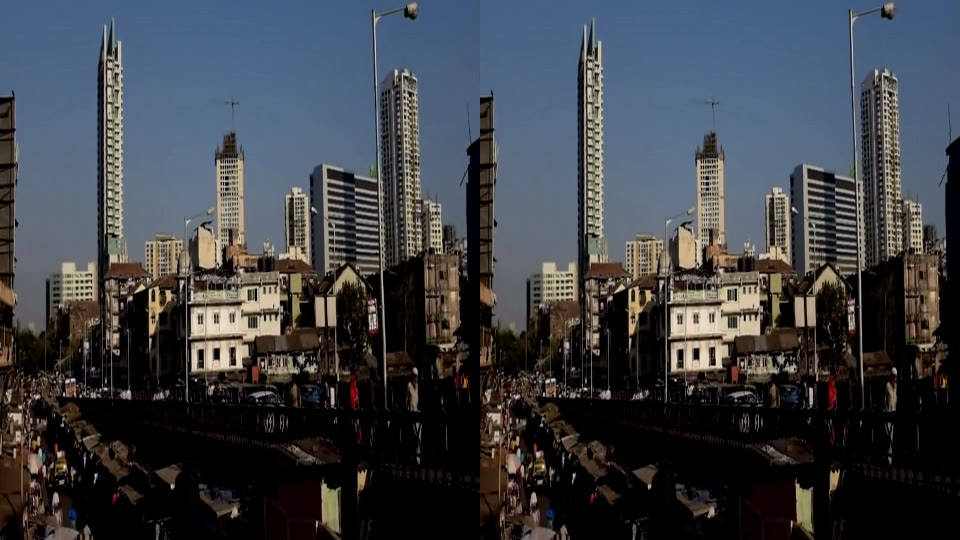
For 3D TVs in general, see our 3D TV guide.
Frequently asked questions
Does the PlayStation 3D Display work without a PS3? Yes. It takes any HDMI or component source [2]. 3D needs a source that sends 3D [1].
Can I use it as a PC monitor? Yes, up to 1080p over HDMI [2]. 3D needs standard HDMI 3D output from the PC [2].
Does it convert 2D to 3D by itself? We found no 2D-to-3D mode in Sony's pages or manual. Plan on 3D content from the source.
Does it have a remote? No. The PS3 Remote Control works with it [2].
Sources (15)
- Sony Computer Entertainment, press release, June 7, 2011. https://www.sie.com/corporate/release/2011/110607b.html (opened 2026-11-14)
- PlayStation Blog, "3D Display Arrives in November: Read the FAQ", October 19, 2011. https://blog.playstation.com/2011/10/19/3d-display-arrives-in-november-read-the-faq/ (opened 2026-11-14)
- Sony, PlayStation 3D Display instruction manual, CECH-ZED1E (English, Europe). https://www.playstation.com/content/dam/global_pdc/en/corporate/support/manuals/accessories/ps3-accessories/cech-zdc1e-3d-display/CECH-ZDC1E_3D%20Display_IM%24en.pdf (opened 2026-11-14)
- RetroRGB, "PlayStation 3D Display: Overview and Buying Guide", March 2022. https://retrorgb.com/playstation-3d-display-overview-and-buying-guide.html (opened 2026-11-14)
- TheSixthAxis, "A Few Days With The PlayStation 3D Display", April 26, 2012. https://www.thesixthaxis.com/2012/04/26/a-few-days-with-the-playstation-3d-display/ (opened 2026-11-14)
- CNET, "Sony PlayStation 3D Display review". https://www.cnet.com/reviews/sony-playstation-3d-display-review/ (opened 2026-11-14)
- TechCrunch, "Review: The PlayStation 3D Display", January 2, 2012. https://techcrunch.com/2012/01/02/review-the-playstation-3d-display-lets-you-bring-all-of-your-friends/ (opened 2026-11-14)
- HardForum, "Sony Playstation 3D monitor f.y.e $99", June 2014 (owners' reports). https://hardforum.com/threads/sony-playstation-3d-monitor-f-y-e-99.1823526/ (opened 2026-11-14)
- iFixit Answers, "Why is the display not turning on and a red light blinking" (user's answer). https://www.ifixit.com/Answers/View/264889/Why+is+the+display+not+turning+on+and+a+red+light+blinking (opened 2026-11-14)
- iFixit, "Sony PlayStation 3D Display". https://www.ifixit.com/Device/Sony_PlayStation_3D_Display (opened 2026-11-14)
- iFixit Answers, "Why does a thin green vertical line appear on the left of my screen" (user's answer). https://www.ifixit.com/Answers/View/443000/Why+does+a+thin+green+vertical+line+appear+on+the+left+of+my+screen (opened 2026-11-14)
- VideoGameObsession, PlayStation 3D Display owner's review with updates to 2022. https://www.videogameobsession.com/videogame/ps3/PlayStation3DDisplay/index.htm (opened 2026-11-14)
- Pocket-lint, "PS4 1.75 system update now available, adds 3D Blu-ray support", July 2014. https://www.pocket-lint.com/games/news/playstation/130112-ps4-1-75-system-update-now-available-adds-3d-blu-ray-support-and-more/ (opened 2026-11-14)
- XtremePS3, "PS5 FAQ reveals launch day firmware update, no 3D Blu-ray…", November 10, 2020 (copy of Sony's PS5 FAQ). https://www.xtremeps3.com/2020/11/10/ps5-faq-reveals-launch-day-firmware-update-no-3d-blu-ray-no-themes-and-more/ (opened 2026-11-14)
- iFixit Answers, "Why does my screen flicker black periodically" (users' reports). https://www.ifixit.com/Answers/View/264731/Why+does+my+screen+flicker+black+periodically (opened 2026-11-14)