Minecraft 3D Anaglyph: What It Did and How to Get 3D Now
How we researched this: written by Owl3D from published sources, all 9 listed at the end.
Short answer
3D Anaglyph was a video setting in Minecraft: Java Edition. It drew the game in red and cyan so that red-cyan 3D glasses showed it with depth [1]. Without the glasses, the screen just looks red and blue. The setting came in Classic 0.24_SURVIVAL_TEST and went in snapshot 17w43a, the first snapshot of 1.13, on October 25, 2017 [1][2]. To play in 3D now, use a version before 1.13, a mod, or a VR or 3D screen.
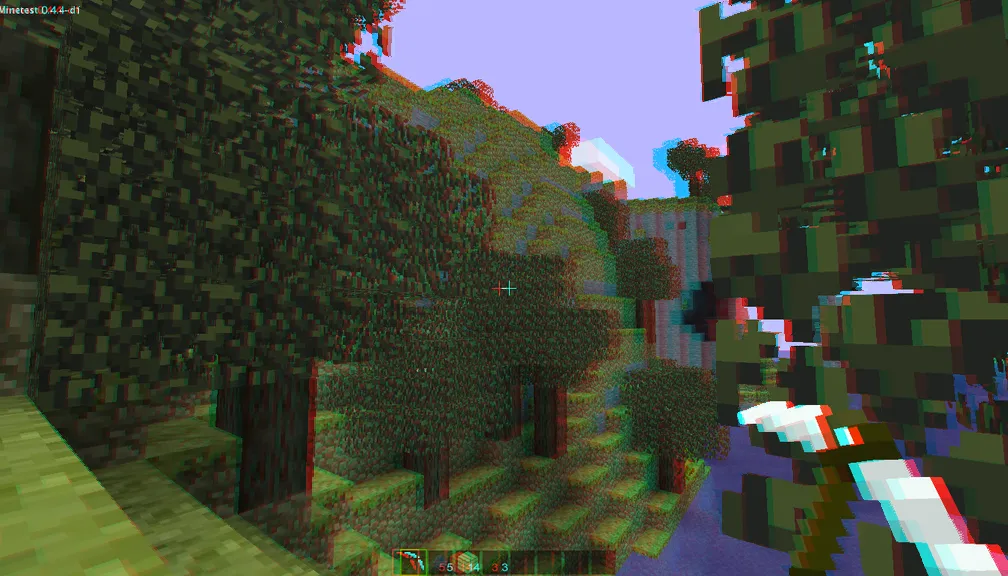
Red-cyan 3D, like the old setting, made by us from a 2D screenshot of Minetest, an open-source block game (not Minecraft). Look through red-cyan glasses, red over the left eye. Screenshot: Kotolegokot, Wikimedia Commons, CC BY-SA 3.0; red-cyan version by Owl3D, CC BY-SA 3.0, November 2026.
Key takeaways
- The setting needs red-cyan 3D glasses. Without them it only tints the screen. See what it did.
- It is in Java Edition from Classic 0.24 up to 1.12.2, and in no version from 1.13 on. See when it was removed.
- Screen red and blue? Turn it off in Options › Video Settings. See turn it off.
- For 3D in a current version, use a mod or a VR or 3D screen. See 3D in Minecraft today.
What the 3D Anaglyph setting did
The setting gave the game "a red-cyan stereoscopic effect" [1]: each frame was drawn from two eye positions a little apart, and the two views were laid over each other. The left eye's view went in the red channel and the right eye's in blue and green, that is cyan, as a 2015 comment on a Minecraft bug report shows from a screenshot [9]. Red-cyan glasses let each eye see only its own view, and your brain joins the two into one picture with depth. Near blocks seem closer than far terrain.
This is the same trick as red-blue 3D pictures and comics. How the glasses split the colors is in our anaglyph 3D guide.
The setting was an on/off button in Options › Video Settings [1]. In the game's settings file, options.txt, it was the line anaglyph3d with the value true or false [3]. Snapshot 14w30b, for 1.8, changed the effect "to look more accurate close up" [4].
When Minecraft removed it, and why
Mojang took the setting out in snapshot 17w43a, released on October 25, 2017. The snapshot changelog has one line about it: "Removed 3D Anaglyph completely." [2] So Java Edition 1.13 and every version after it have no 3D Anaglyph button. Versions from Classic 0.24 to 1.12.2 still have it.
The Minecraft Wiki gives "low usage of the feature" as the reason, but it marks that claim "citation needed" [1]. We found no statement from Mojang that gives a reason.
The Minecraft Wiki lists it among Java Edition's removed features [1], and we found no wiki page that mentions it for Bedrock Edition.
The screen is red and blue: turn it off
You are in a version before 1.13 and 3D Anaglyph is on.
- Open the menu. Press Esc in the game, then Options [9]. On the title screen, open Options.
- Open Video Settings. Find the 3D Anaglyph button. It shows ON.
- Press it once. It changes to OFF, and the normal colors come back.
If the menu is hard to read in red and cyan, close the game. Open options.txt in your .minecraft folder with a text editor, change anaglyph3d:true to anaglyph3d:false, save, and start the game again [3].
How to get 3D in Minecraft today
| Way | What you need | What you see |
|---|---|---|
| A version before 1.13 | The Minecraft Launcher, a new installation set to 1.12.2 or older [5] | Red-cyan 3D, with red-cyan glasses |
| Anaglyph fabric mod | Java Edition 1.20 to 1.20.4, Fabric, ClothConfigAPI and ModMenu [6] | Red-cyan 3D by default, with red-cyan glasses |
| StereoCraft mod | Fabric 26.1.2 or 1.21.11 or NeoForge 1.21.1 with Sodium, or 1.7.10 (GTNH) with Angelica [7] | True side-by-side 3D for a 3D TV, a 3D monitor or a VR headset's virtual screen |
| Vivecraft mod | A PC VR headset; Java Edition 1.18.2 up to 26.3 on Fabric, Forge, NeoForge or Quilt [8] | Minecraft in VR, room-scale or seated |
| Owl3D, live (we make it) | Owl3D Link: a Windows PC with an NVIDIA RTX 3060 or better and a Meta Quest. Or the Owl3D Shift screen, with a PC with an NVIDIA RTX 30 series or newer, or an Apple Silicon Mac | Any version, no mod: an AI 3D picture of the game window as you play |
Last checked : each mod's Modrinth page.
An old version. In the Minecraft Launcher, open Installations, press New installation and pick a version from the list [5]. Version 1.12.2 still has the 3D Anaglyph button. You get the game without the blocks and mobs added since. The Minecraft Wiki recommends running an old version in a separate game directory and backing up worlds [5].
Anaglyph fabric. It brings back red-cyan 3D as a mod. In ModMenu you set the eye separation, the eye angle and the glasses' colors, and you can switch off the crosshair and make fog grey [6]. Its author warns that the Nether's red colors work badly with red-cyan glasses and suggests a few hours in the Overworld first [6]. The last update was about three years ago [6].
StereoCraft. It splits the window into a left and a right view, with eye distance (55 to 100 mm) and convergence you can set [7]. It draws the game itself from two eye positions, so the depth comes from the game, not from an estimate [7]. It needs a screen that takes side-by-side 3D: a 3D TV, a 3D monitor, or a virtual screen in a VR headset [7].
Vivecraft. It is a full VR mod: you stand or sit inside the world [8]. It runs on a PC with a VR headset. It does not run on its own on a Meta Quest; Questcraft is a separate project for that [8].
3D without a mod: Owl3D, live
We make this one, so read it as our own product. Owl3D turns what the computer shows into 3D in real time: it estimates depth from the normal 2D picture as it plays. It works on the screen image, not inside the game, so it needs no mod and no particular Minecraft version. Two ways to watch:
- Owl3D Link shows the game in 3D in a Meta Quest. It needs a Windows PC with an NVIDIA RTX 3060 or better. It is free to use; on the free plan a session lasts 15 minutes and the picture carries a watermark.
- Live 3D Screen on the Owl3D Shift, a glasses-free 3D screen that you connect to the computer. Drag the game window onto it. The computer needs an NVIDIA RTX 30 series or newer card, or an Apple Silicon Mac.
This is an AI estimate of depth, not the game's own 3D, so its depth is a guess from the picture, where StereoCraft and Vivecraft draw it from the game itself. It is instant and needs no setup in the game. Multiplayer games with anti-cheat software often block screen capture, and then Owl3D cannot convert them.
How we made the red-cyan picture on this page
The picture at the top started as one ordinary 2D screenshot. We ran it through the same code as our free Photo to 3D tool: a depth model guesses how far away each pixel is, and the code shifts near pixels more than far ones to make a left and a right view. Then the Anaglyph Maker code put the left view in red and the right view in cyan.
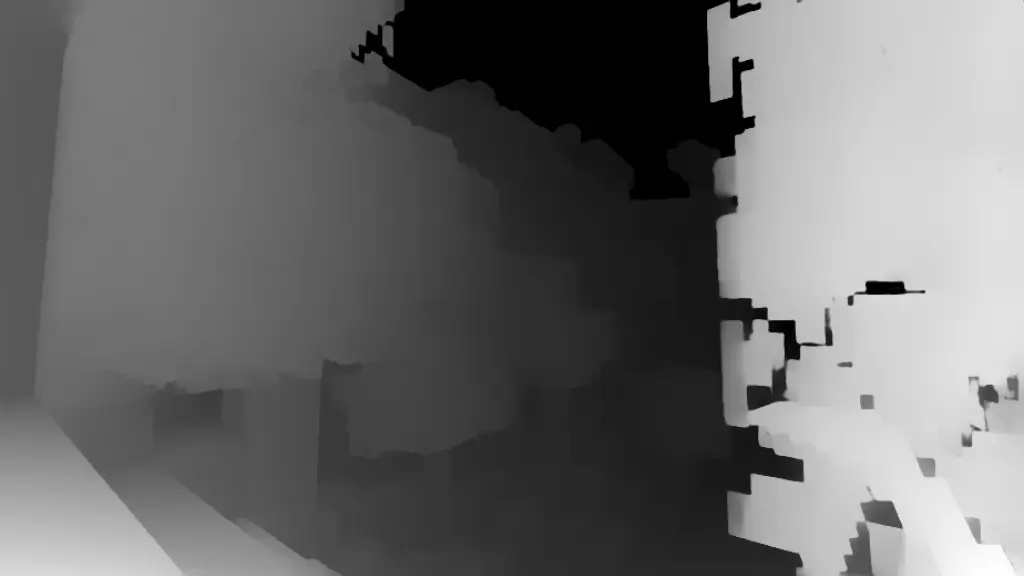
The near leaves and the pickaxe get the widest red and cyan edges, so they come forward through the glasses. You can do the same with any Minecraft screenshot: make a left and right pair, or two photos from slightly different positions, and put them through the Anaglyph Maker.
Frequently asked questions
Is Minecraft 3D or 2D?
The world is 3D: it has height, width and depth, and you move through it. But a normal screen shows it as one flat picture. 3D Anaglyph, StereoCraft and VR add the second view that gives your eyes real depth.
Can I use 3D Anaglyph in Bedrock Edition?
We found no source for 3D Anaglyph in Bedrock Edition. The live Owl3D route above works on the screen image, so it does not depend on the edition.
Do I need special glasses?
Yes, red-cyan 3D glasses [1], red over the left eye [9]. Cinema and 3D TV glasses work a different way. See anaglyph glasses.
Sources (9)
- Minecraft Wiki, "Java Edition removed features", section "3D Anaglyph" option. https://minecraft.wiki/w/Java_Edition_removed_features Opened 2026-11-19.
- Minecraft Wiki, "Java Edition 17w43a" (release date and changelog). https://minecraft.wiki/w/Java_Edition_17w43a Opened 2026-11-19.
- Minecraft Wiki, "Options.txt (Java Edition)", key anaglyph3d. https://minecraft.wiki/w/Options.txt_(Java_Edition) Opened 2026-11-19.
- Minecraft Wiki, "Java Edition 14w30b". https://minecraft.wiki/w/Java_Edition_14w30b Opened 2026-11-19.
- Minecraft Wiki, "Minecraft Launcher", section Installations. https://minecraft.wiki/w/Minecraft_Launcher Opened 2026-11-19.
- Modrinth, "Anaglyph fabric" mod page. https://modrinth.com/mod/anaglyph-fabric Opened 2026-11-19.
- Modrinth, "StereoCraft: Stereoscopic 3D" mod page. https://modrinth.com/mod/stereocraft-stereoscopic-3d Opened 2026-11-19.
- Modrinth, "Vivecraft" mod page. https://modrinth.com/mod/vivecraft Opened 2026-11-19.
- Mojira bug MC-9095, "Red of 3D Anaglyph mode is not the same as the standard color of 3D glasses", on mojira.dev (a third-party mirror of bugs.mojang.com). https://mojira.dev/MC-9095 Opened 2026-11-19.