How to Make Your Own View-Master Reels
How we researched this: written by Owl3D from published sources, all 16 listed at the end.
Short answer
Yes, you can still get a reel of your own photos. The easy way is to order one: you upload seven photos and a service prints them onto a reel [2][7]. The catch is depth. A standard custom reel shows the same photo to both eyes, so it looks flat [2][3][5]. For real 3D, each of the seven scenes needs two pictures, one for each eye [1]. A 3D camera takes them. For an ordinary photo, a depth tool can make the second view [15], but ask the reel maker first: Your Own Reel's 3D mode is "Only for photos that were taken in 3D" [6]. Owl3D makes the free Photo to 3D tool and the Owl3D app named here. We do not make or sell reels, and View-Master is a trademark of Mattel.
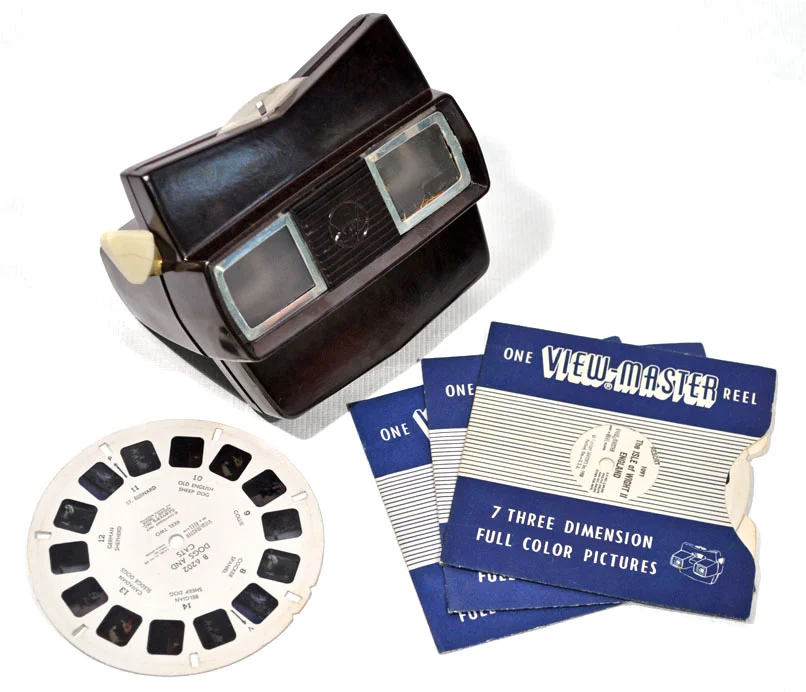
A vintage View-Master viewer with reels. Photo: Museum of Hartlepool, no known copyright restrictions, via Wikimedia Commons [13].
Key takeaways
- One reel holds seven scenes in 14 windows: a left and a right picture for each [1]. See how a reel is laid out.
- Ordered a reel and it looks flat? It was made from one photo per scene. See why custom reels look flat.
- No 3D camera? Turn each photo into a stereo pair first. See one photo to a stereo pair.
- Want to build it by hand? See make a reel yourself.
Three ways to get your own reel
| Way | What you do | Depth |
|---|---|---|
| Order a printed reel | Upload 7 photos to a reel maker, such as Image3D's Retroviewer or Your Own Reel [2][7] | Flat from ordinary photos [2][3]. 3D if you send 7 stereo pairs [5] |
| Make one by hand | Get your pairs onto slide film, cut 14 frames, mount them in a card reel [8][9] | 3D |
| Shoot real 3D | Take two photos of each scene about 4 inches (10 cm) apart [8], or use a stereo camera [10]. See 3D photography. | 3D |
Two things to check before you order:
- Your viewer. Classic View-Master reels kept the same basic design, so every reel works in every model [1]. Your Own Reel says its reels work in vintage View-Master viewers, and that the modern "View-Master Classic" sold in stores can catch from time to time [5]. Image3D's price list says its current paper reels and illuminated viewers are designed to work together, and that "Neither is compatible with earlier film reels or non-illuminated Retroviewers" [4]. If you want to use an old viewer, ask the maker first.
- 3D orders. On 2026-11-20 Image3D's stereo page said "Stereo Orders Temporarily Paused", with standard 2D reels still on sale [3]. Your Own Reel takes "14 L/R images or 7 MPO files" [5], and its designer also takes side-by-side images [6]. Its product page lists a "Convert to 3D" option but does not say how it works [7].
Why custom reels look flat
A View-Master shows one picture to each eye at the same time [1]. When the two pictures were taken from slightly different places, your brain fuses them into depth. Image3D explains its own reels this way: "the images directly across from one another are the same exact image" [2]. Same picture in both eyes means no depth, so a reel made from ordinary photos looks like a flat slide show [2]. A New Atlas review of Image3D in 2011 said the same: "regular two-dimensional photos will remain in 2D" [16].
So the fix is upstream: give the reel maker a pair for each scene, not one photo.
One photo to a stereo pair
If your photos are ordinary ones (a phone, a wedding album, scans), you can make the second view. A depth model guesses how far away each part of the photo is. Then the photo is redrawn as seen from a little to the left and a little to the right, with near things shifted more than far things [15].


- Open Photo to 3D and add one photo. It runs in your browser; the photo is not uploaded [15].
- Keep the depth strength low. Raise it only until the picture has depth without tearing at the edges [15].
- Save the side-by-side picture. That one file holds the left view on the left and the right view on the right. Each view is at most 1,024 pixels on its long side, and the file carries a small "owl3d.com" in one corner [15].
- Repeat for all seven scenes, then ask your reel maker whether it takes pairs made from one photo. Your Own Reel's designer takes side-by-side files in its 3D mode, but says that mode is "Only for photos that were taken in 3D" [6].
For larger pictures, the Owl3D app for Windows and Mac converts JPG and PNG photos to 3D, and its Split L/R output saves each eye as its own full-size file. That gives you the 14 separate left and right images some makers ask for [5]. Neither tool prints or cuts reels.
The depth is an AI estimate, not a second photograph. It is usually convincing for small shifts and wrong in places, most often at hair, thin objects and the edges of things [15]. Pick scenes with a clear near, middle and far, as the Instructables makers advise for real 3D shots [8].
From Owl3DOwl3D converterA desktop app for Windows and Mac that turns 2D videos and photos into 3D.How the 14 pictures sit on a reel
A reel is a card disc about 3.5 inches (90 mm) across [12][11]. It holds 14 film frames in seven pairs [1]. The left and right picture of one pair sit directly opposite each other [6]. Each press of the lever turns the reel by two frames, to the next pair [8]. The German standard DIN 4531 drawing gives a frame of 11.75 × 10.5 mm [11].
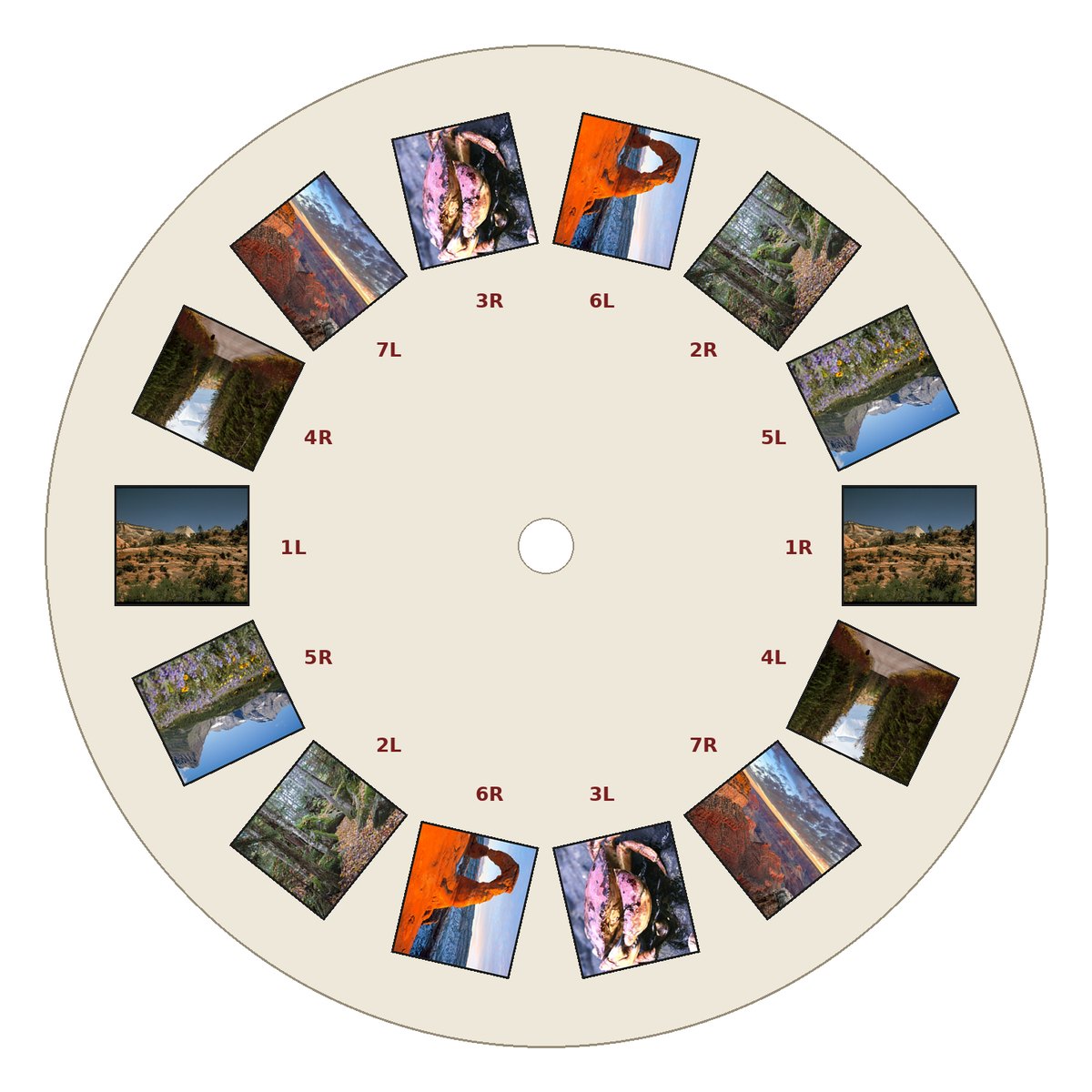
Two things trip people up. Going round the reel, the pictures alternate between upright and upside down [8]. And the left and right frames must not be swapped: "it won't work when you get them mixed up" [8].
Make a reel yourself
Building a reel by hand means getting tiny pictures onto film. A classic reel's pictures are small transparent photographs on film [1]. (Image3D's paper reels work only with its own illuminated viewers [4].)
- Make or shoot the seven pairs (above).
- Put the pairs onto 35 mm slide film. Charles Barnard used a Photoshop template and sent it to a service with a film recorder [9]. The Instructables makers shot slide film directly [8].
- Cut the 14 frames. Barnard punched them with the View-Master Mark I film cutter of the 1950s Personal line [9][1].
- Mount them between two card discs. The Instructables makers laser-cut the discs from card stock at a makerspace [8].
What makers report
- Instructables, October 2016 (kenyer): they shot each pair with one film camera on a slider, "10 - 12 cm (4 - 5 inch) from each other", then laser-cut the reels. "No step was really easy with this project", but "The reels came out great and they did fit perfectly in the viewmaster" [8].
- Chuck Miller, April 2017 (his blog): he sent seven stereo pairs shot on Nimslo and Kodak Stereo cameras to Image3D. They asked for pairs "oriented in such a way so as to show true stereo depth". People who looked through the reel said "Wow!" and "How did you do this?" [10]
We have not tested either method ourselves.
Frequently asked questions
Can you still buy View-Master reels?
Yes. Mattel, which has owned View-Master since 1997, stopped its scenic reels in December 2008 but kept making reels with animated characters [1]. Custom reels come from independent makers [2][7].
How many pictures go on one reel?
Seven scenes, in 14 windows: one left and one right picture per scene [1][2]. Image3D calls seven "the magic number, no more, no less" [2].
Can I use phone photos?
Yes. Your Own Reel accepts JPEG, PNG, HEIC and MPO files, and names 1400 × 1250 pixels as "the sweet spot" [5]. The frame is "roughly 9:8 (almost square)", so wide photos get black borders [5]. Phone photos come out flat unless you turn each into a stereo pair first.
Do custom reels work in old Sawyer's or GAF viewers?
Your Own Reel says its reels work in genuine vintage View-Master viewers, "especially the heavy-duty models from the 60s to 80s" [5]. Image3D's current paper reels are made for its illuminated viewers [4]. Check with the maker before you order.
Sources (16)
- Wikipedia, "View-Master". https://en.wikipedia.org/wiki/View-Master (opened 2026-11-20)
- Image3D, "7 images only, explained" (Retroviewer). https://www.image3d.com/retroviewer/7-images (opened 2026-11-20)
- Image3D, "Stereo Orders Temporarily Paused" (Retroviewer stereo). https://www.image3d.com/retroviewer_stereo/ (opened 2026-11-20)
- Image3D, Retroviewer price list (compatibility line). https://www.image3d.com/retroviewer/price-list (opened 2026-11-20)
- Your Own Reel, FAQ. https://myownreel.com/faq/ (opened 2026-11-20)
- Your Own Reel, "MyOwnReel Designer". https://myownreel.com/reel-designer/ (opened 2026-11-20)
- Your Own Reel, "Your Own Reel" product page. https://myownreel.com/shop/custom-view-master-reel/ (opened 2026-11-20)
- kenyer, "DIY Viewmaster Reels", Instructables, October 16, 2016. https://www.instructables.com/DIY-Viewmaster-Reels/ (opened 2026-11-20)
- Charles Barnard, "Make custom viewmaster reels on your computer!", View-Master Resource. https://www.vmresource.com/digitalvm.htm (opened 2026-11-20)
- Chuck Miller, "The Homemade View-Master® Concept Reel", April 8, 2017. https://chuckthewriter.blog/2017/04/08/the-homemade-view-master-concept-reel/ (opened 2026-11-20)
- "View-Master-DinNorm.jpg" (reel drawing after DIN 4531), Wikimedia Commons, public domain. https://commons.wikimedia.org/wiki/File:View-Master-DinNorm.jpg (opened 2026-11-20)
- The Henry Ford, "Picture Tour of Scenic Wonders U.S.A." View-Master Reel, 1960-1966 (diameter 3.5 in). https://www.thehenryford.org/collections/explore/artifact/549871 (opened 2026-11-20)
- Museum of Hartlepool, "View-Master with Reel.jpg", Wikimedia Commons, no known copyright restrictions. https://commons.wikimedia.org/wiki/File:View-Master_with_Reel.jpg (opened 2026-11-20)
- US National Park Service photos on Wikimedia Commons, public domain: Zion ZION2437, Acadia Beech Mountain Trail, Acadia Jonah crab, Black bear in Glacier National Park, Glacier National Park (32419754123), Delicate Arch, Sunrise from Grand Canyon Village. https://commons.wikimedia.org/wiki/File:Acadia_National_Park,_Beech_Mountain_Trail.jpg (and the six other file pages; opened 2026-11-20)
- Owl3D, "Photo to 3D" (sections "How to use it" and "What this tool does"). https://www.owl3d.com/tools/photo-to-3d (opened 2026-11-20)
- Ben Coxworth, "Image3D lets you create your own View-Master-esque photo reels", New Atlas, December 16, 2011. https://newatlas.com/image3d-custom-view-master/20874/ (opened 2026-11-20)