Fujifilm FinePix Real 3D W3: View Its 3D Photos Today
How we researched this: written by Owl3D from published sources, all 5 listed at the end.
Short answer
The Fujifilm FinePix Real 3D W3 is a pocket 3D camera with two image sensors that takes 10-megapixel pictures [1]. It saves 3D photos as MPO files and 3D movies as 3D-AVI files [1]. Most photo apps show only one view of an MPO, so the photo looks flat. To see it in 3D today, open the MPO in a stereo tool and save it as side-by-side, red-cyan or a wiggle GIF. A 3D TV, a VR headset or a glasses-free 3D monitor then shows it with depth. Skip to: what the files are · buying a used W3 · every way to view it · 3D movies · sample pictures
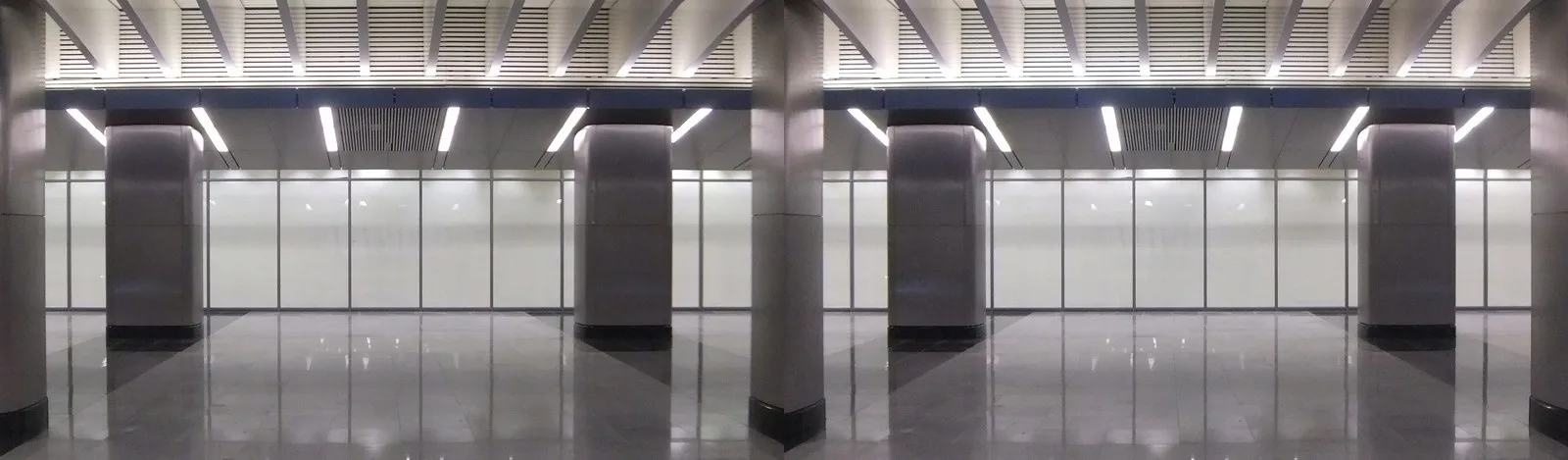
Our own test: we took a side-by-side W3 photo, rebuilt it as an MPO, opened the MPO again (2 frames) and saved the two views. Photo: Artyom Svetlov, Fujifilm FinePix Real 3D W3, January 2014, CC BY 4.0, via Wikimedia Commons [4]. Processing: Owl3D, November 20, 2026.
Key takeaways
- One W3 photo is two JPEGs in one MPO file, one for each eye [1].
- A flat-looking photo is not broken. Your app shows only the first of the two views.
- Our free Stereo Photo Maker opens an MPO in your browser and saves side-by-side, red-cyan, two JPEGs or a wiggle GIF.
- The W3's 3D movies are 3D-AVI files with two picture streams [1]. StereoMovie Maker on Windows opens them [3].
What the W3 saves: MPO and 3D-AVI
Fujifilm's specifications list these formats [1]:
| You shoot | File | What is inside |
|---|---|---|
| 3D photo | MPO, or MPO + JPEG | Two pictures, left and right, in one file (Multi Picture Format) |
| 2D photo | JPEG | One picture |
| 3D movie | 3D-AVI | "Stereo AVI format with 2 image channels" |
| 2D movie | AVI | Motion JPEG with stereo sound |
Movies record at up to 1280 x 720, 24 frames a second [1]. With "MPO + JPEG", the camera also saves a flat JPEG copy beside each MPO [1]. That JPEG is one view only. Keep the MPO: it holds the depth.
The camera's own 3.5-inch screen is a lenticular screen with about 1,150,000 dots [1]. It shows the 3D without glasses, which is why photos look 3D on the camera and flat on a computer.
Is a used W3 worth buying? What to check
The W3 is worth it if you want real two-lens stereo photos in a pocket camera. Plan for a viewer: the camera screen is the only 3D screen it comes with. Check these points on a used one:
- The 3D screen. Switch to 3D playback and look at a photo. Both views should line up, and the screen should show depth.
- The battery. It uses the NP-50 Li-ion battery [1]. Fujifilm gives about 150 shots per charge in 3D Auto mode with Power Save 1 [1]. Buy a spare.
- The card. The W3 takes SD and SDHC cards [1]. The specifications do not list SDXC. For movies, Fujifilm recommends class 6 or faster [1].
- The cable. For a 3D TV, you need a mini-HDMI cable. The W3 has an "HDMI 1.4-3D compliant" mini-HDMI port [1].
The owner's manual is on iFixit's W3 page, in English, Spanish and Japanese [2].
Every way to view W3 photos in 3D today
| Screen | What you do with the MPO | Glasses? |
|---|---|---|
| 3D TV | Connect the camera over mini-HDMI and play from the camera [1] | The TV's 3D glasses |
| VR headset (Quest, Vision Pro and others) | Save as side-by-side, copy it over, open it in a viewer that reads side-by-side | Headset |
| Any screen, red-cyan glasses | Save as red-cyan anaglyph | Red-cyan glasses |
| Any screen, no glasses | Save as a wiggle GIF | None |
| Glasses-free 3D monitor | Open the MPO or a side-by-side copy | None |
The first step is the same for most rows. Open the MPO in Stereo Photo Maker, our free browser tool. Then choose the output. Your photos are not uploaded.
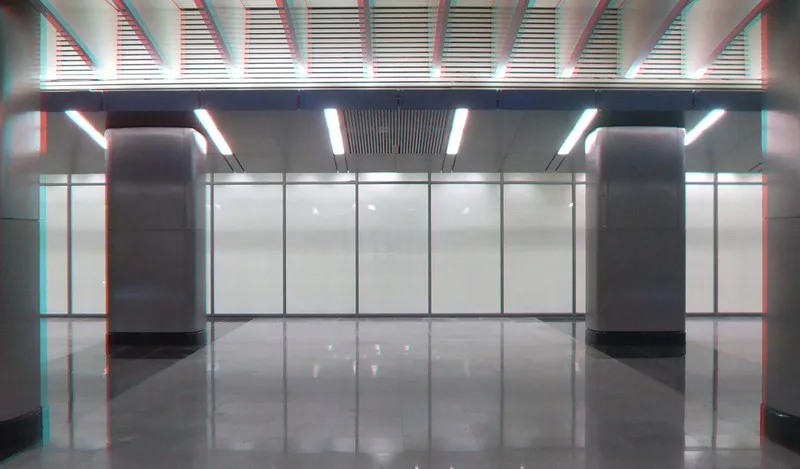
No glasses at all: a wigglegram flips between the two views. The depth shows as a small rocking motion. Our Wigglegram Maker makes one from one ordinary photo. For a W3 pair, use the "wiggle GIF" output of Stereo Photo Maker.
On a glasses-free 3D monitor: we sell one, the Owl3D Shift, so read this with that in mind. It sits beside your computer and shows 3D to one viewer at a time without glasses. Its Playlist player opens MPO files and shows both views in 3D. Today that player ships in the Mac app, and the Windows version is still in testing. On a Mac or a Windows PC, a side-by-side copy also shows in 3D in the Shift's SBS Mode.
How to play the W3's 3D movies
A 3D-AVI file holds two picture streams [1]. A normal video player shows one of them, or fails to open the file.
- On a 3D TV: play the movie from the camera over mini-HDMI [1].
- On a computer: StereoMovie Maker, a free Windows program last updated in 2014, opens and plays 3D-AVI files from the Fujifilm W1, and added the W3's 1280 x 720 size in version 1.20 [3]. We have not tested it with a W3 movie. It can save the two streams as separate left and right movies [3]. It can also "Save movie in different stereo-format", with options such as "Half Width" in its "Save Stereo Movie" menu [3].
- In a VR headset or on a 3D monitor: save a side-by-side movie with StereoMovie Maker first. Then play it as a side-by-side video.
We have not tested a W3 3D-AVI file on the Shift.
Sample pictures from a W3
The pictures on this page come from one W3 owner on Wikimedia Commons, Artyom Svetlov, who shared his side-by-side W3 photos under CC BY 4.0 [4]. His file page links to the Commons category "Taken with Fujifilm FinePix Real 3D W3", where you can browse more W3 pictures and open any side-by-side one in Stereo Photo Maker.
To compare: the Nintendo 3DS also saves its 3D photos as MPO [5]. See how to play 3DS on a TV. For cameras you can buy new, see 3D cameras.
Frequently asked questions
Why does my W3 photo look flat on my computer?
Your app shows only the first picture in the MPO. The second view is still in the file. Open the MPO in a stereo tool such as Stereo Photo Maker to see both.
How do I convert W3 MPO files to JPG?
Open the MPO in Stereo Photo Maker and choose "Left and right files". You get two ordinary JPEGs. Choose "Side-by-side (parallel)" to get both views in one JPEG. Each saved picture carries a small "made with owl3d.com" label in one corner.
Can the W3 shoot 2D photos?
Yes. It saves 2D photos as JPEG and 2D movies as AVI [1].
{{cta}}
Sources (5)
- Fujifilm, "FinePix REAL 3D W3 Specifications". http://www.fujifilm.com/products/3d/camera/finepix_real3dw3/specifications/ (the page is no longer online; read in the Internet Archive copy of 2012-10-10, opened 2026-11-20)
- iFixit, "FujiFilm FinePix Real 3D W3" device page, with the owner's manual PDFs (English, Spanish, Japanese). https://www.ifixit.com/Device/FujiFilm_FinePix_Real_3D_W3 (opened 2026-11-20)
- Masuji Suto, "StereoMovie Maker". http://stereo.jpn.org/eng/stvmkr/index.html (opened 2026-11-20)
- Artyom Svetlov, "Moscow Delovoy Tsentr 2014-01" (Fujifilm FinePix REAL 3D W3), CC BY 4.0, Wikimedia Commons. https://commons.wikimedia.org/wiki/File:Moscow_Delovoy_Tsentr_2014-01_1391193758.JPG (opened 2026-11-20)
- Nintendo (Japan), "ニンテンドー3DSカメラ" (outer-camera photos are saved as 3D photo data in MPO format and 2D photo data in JPEG format). https://www.nintendo.co.jp/hardware/3dsseries/camera/index.html (opened 2026-10-15 for /tools/stereo-photo-maker)