How to Play 3DS on a TV (and Keep the 3D Effect)
How we researched this: written by Owl3D from published sources, all 7 listed at the end.
Short answer
No, you cannot plug a 3DS into a TV. Nintendo says 3DS systems "do not have the ability to connect to a television" [1]. There are four other ways. A modder can fit a capture board to a New 3DS XL and send the picture to a PC [3]. You can run your own games in the Azahar emulator on a PC that is connected to the TV [4][5]. For the 3D effect, Azahar can send a side-by-side 3D picture to a 3D screen [6], and CitraVR plays in 3D on a Meta Quest [7]. Skip to: the four ways · capture board · Azahar on a TV · keep the 3D · Quest · is it legal?
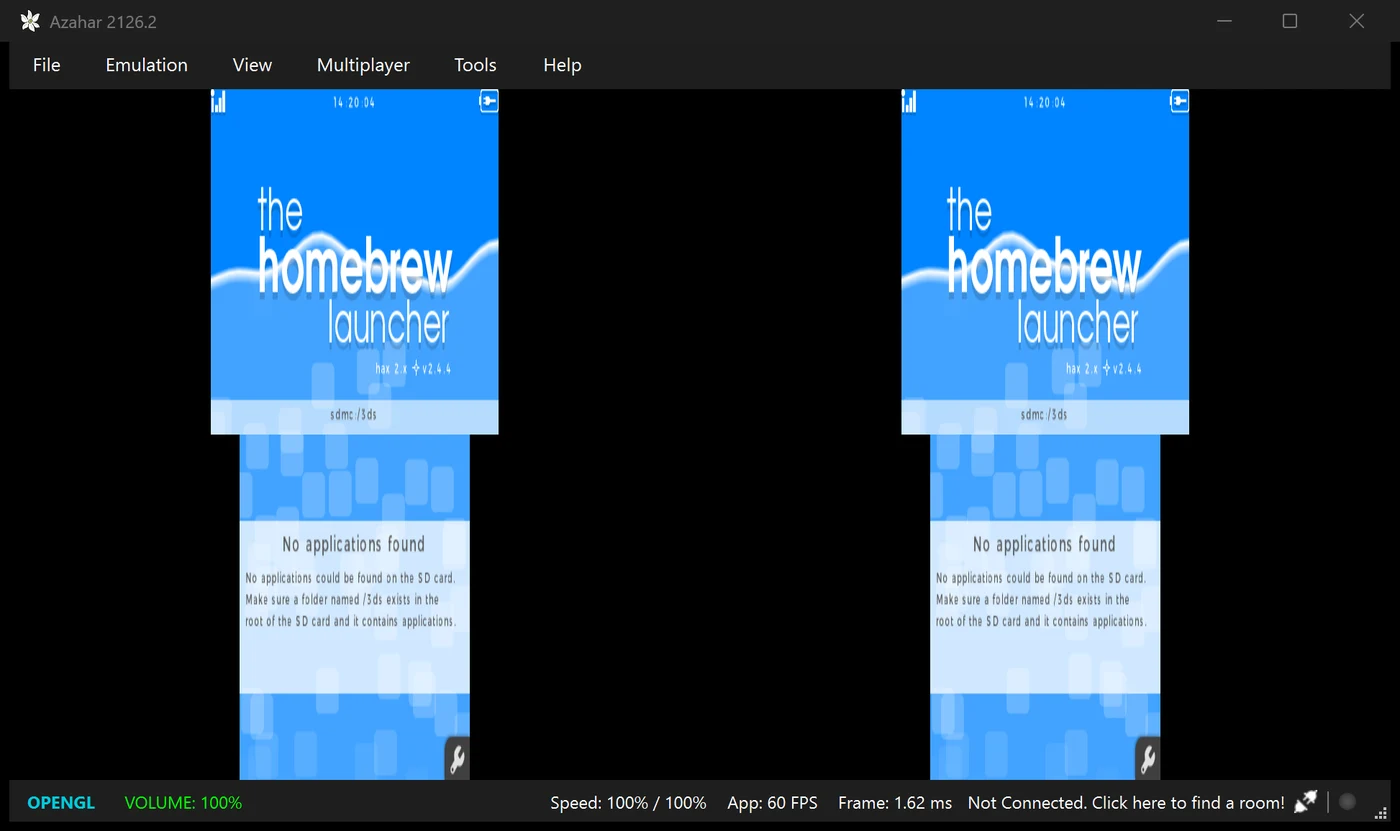
Our own test: Azahar 2126.2 on Windows, Stereoscopic 3D Mode set to Side by Side, Depth 60%, running the free Homebrew Launcher. Each eye gets its own copy of the screens. Owl3D, November 14, 2026.
Key takeaways
- A 3DS has no video output [1]. Every other way goes through a PC or a VR headset [3][4][7].
- The capture board from 3dscapture.com fits only the New 3DS XL and costs $200 with installation [3]. It shows the game in 2D only [3].
- Azahar is an open-source 3DS emulator [4]. It is made for games you dumped from your own 3DS, and for homebrew [5].
- To keep the 3D, you need a 3D screen or a VR headset. A normal TV shows the game in 2D.
The four ways, side by side
| Way | What you need | Cost | Keeps the 3D? |
|---|---|---|---|
| Capture board | A New 3DS XL, the board fitted by a modder, a Windows PC [3] | $200 fitted, $120 if you solder it yourself [3] | No, 2D only for now [3] |
| Azahar on a PC, PC on the TV | A PC, your own 3DS to dump your games [5] | Open-source app [4] | No, on a normal TV |
| Azahar on a 3D screen | Azahar plus a 3D TV or 3D monitor [6] | Open-source app, plus the screen | Yes |
| CitraVR on a Quest | A Meta Quest 2, 3, 3S or Pro [7] | Open-source app [7] | Yes [7] |
Last checked : 3dscapture.com order page.
Pick by what you already own. If you want the real console on the TV, only the capture board does that. If you have a PC, Azahar is the shortest route.
Way 1: a capture board in the 3DS
One board is sold at 3dscapture.com. It is fitted inside the console and sends both screens and the sound over USB [3].
- Which 3DS: the "New" 3DS XL. The seller answers "No" to other 3DS models and the 2DS [3]. The Japanese LL model works [3].
- Price: $200 if you mail the console in and they fit the board. A self-install kit is $120, and "Soldering experience is required" [3].
- Where the picture goes: a Windows PC, through the seller's viewer software. Mac and Linux work only through third-party software [3]. There is no direct HDMI out. The seller says to use "the HDMI output from your PC", or a Raspberry Pi with cc3dsfs [3].
- The 3D: "Only 2D video is output for now. 3D capture is planned for later." [3]
We have not tested a capture board ourselves.
Way 2: Azahar on a PC, then the PC on the TV
Azahar is the emulator that carries on Citra's work [4]. It runs on Windows, Mac, Linux and Android. The version for each device is in best 3DS emulator, and setup steps are in our Azahar setup guide.
- Install Azahar from its official site or GitHub. See Install Azahar.
- Dump your own games with your 3DS. Azahar needs decrypted files, and "you cannot use a PC alone" [5]. Or skip dumping: Artic Base plays a game from your 3DS directly. See the Artic tools.
- Connect the PC to the TV with an HDMI cable, the same as for any PC game.
- Pick a screen layout that fits a wide TV. See Pick a screen layout. The layout called Side by Side is not the 3D mode.
- Use a controller. Map its buttons in Emulation > Configure... > Controls. See Set your controls.
Way 3: keep the 3D on a 3D screen
A 3DS makes its 3D by showing a different picture to each eye [2]. Azahar can do the same on a PC. It draws a left-eye picture and a right-eye picture, then puts them in one frame for a 3D screen [6].
- In Azahar, open Emulation > Configure... > Graphics > Enhancements [6].
- Set Stereoscopic 3D Mode to Side by Side [6].
- Raise Depth above 0%. It starts at 0, so you see no 3D until you raise it [6]. We used 60% for the picture above.
- Put Azahar in fullscreen and set your 3D screen to its side-by-side mode.
Azahar's 3D modes are Side by Side, Side by Side Full Width, Anaglyph, Interlaced and Reverse Interlaced [6]. Its Android app's help text says Side by Side modes "are most common in modern use" [6]. In Side by Side each eye gets half the width of the frame, as in our picture above. Pick the mode your 3D screen takes.
Azahar warns that depth values over 100% "are not possible on real hardware and may cause graphical issues" [6]. More on the modes: 3D output on a 3D screen.
In our test the Homebrew Launcher ran at full speed (60 FPS) with Side by Side on. We did not test it on a 3D TV.
Way 4: CitraVR on a Meta Quest
CitraVR is a version of the emulator for the Quest. Its maker describes it as a way to "Play 3DS homebrew and personal game backups in 3D on the go with your Quest" [7]. It is now built on Azahar [7].
- Headsets: Meta Quest 2, Quest Pro, Quest 3 and Quest 3S [7].
- 3D: stereoscopic rendering, on a large screen you can move and resize, also in mixed reality [7].
- State: a beta. The newest release is v0.6.0 from August 2026 [7].
- Install: follow the project's install guide for Quest [7].
We have not tested CitraVR ourselves.
Is it legal?
Azahar supports "personal game backups you have legally obtained from your own console" [5]. It gives no dumping guide, because copyright laws differ between countries [5]. Check the law where you live. This page links to no games, ROMs or system files.
Frequently asked questions
Can you HDMI a 3DS to a TV?
No. Nintendo says 3DS systems cannot connect to a television [1]. Even with a capture board fitted, the output is USB to a PC, and a USB to HDMI adapter does not work [3].
Is there a 3DS TV dock?
No official one: Nintendo says 3DS systems cannot connect to a television [1].
Does the 3D effect work on a TV?
Not on a normal TV. On a 3D TV or 3D monitor, use Azahar's Side by Side mode [6]. A Meta Quest shows 3D with CitraVR [7].
Does the capture board work with a 2DS or an original 3DS?
No. The seller lists the New 3DS XL only [3].
Can I play 3DS games on a PC without a 3DS?
Not with your own games. Azahar plays backups dumped from your own console, and "you cannot use a PC alone" [5]. Homebrew titles in .3dsx form also run [5].
Sources (7)
- Nintendo Support, "Can I Connect My Nintendo 3DS Family System to My TV?". https://en-americas-support.nintendo.com/app/answers/detail/a_id/241 (opened 2026-11-14)
- Nintendo Support, "How does the Nintendo 3DS system's 3D feature work?". https://en-americas-support.nintendo.com/app/answers/detail/a_id/244 (opened 2026-11-14)
- 3DS Capture, home page, ordering page and FAQ. https://www.3dscapture.com/, https://www.3dscapture.com/order.html and https://www.3dscapture.com/faq.html (opened 2026-11-14)
- Azahar, GitHub repository and release 2126.2. https://github.com/azahar-emu/azahar (opened 2026-11-14)
- Azahar wiki, "Dumping Games". https://github.com/azahar-emu/azahar/wiki/Dumping-Games (opened 2026-11-14)
- Azahar 2126.2 source: Graphics > Enhancements window and the stereo settings. https://github.com/azahar-emu/azahar/blob/2126.2/src/citra_qt/configuration/configure_enhancements.ui https://github.com/azahar-emu/azahar/blob/2126.2/src/common/settings.h and https://github.com/azahar-emu/azahar/blob/2126.2/src/android/app/src/main/res/values/strings.xml (opened 2026-11-14)
- CitraVR, GitHub repository and release v0.6.0. https://github.com/amwatson/CitraVR (opened 2026-11-14)