How Does the 3DS 3D Slider Work?
How we researched this: written by Owl3D from published sources, all 14 listed at the end.
Short answer
The 3D depth slider sets how different two images are: one for your left eye and one for your right [1][12]. The more they differ, the deeper the 3D looks. The top screen shows both images at once. A layer in the screen called a parallax barrier sends each image to one eye only [1][9]. Slider all the way down means 2D [1]. Nintendo says to start low and raise it in small steps [1][6]. The 3D works only from straight in front, at about 10 to 14 inches [1][7]. The New 3DS tracks your face to keep the 3D when you move [3].
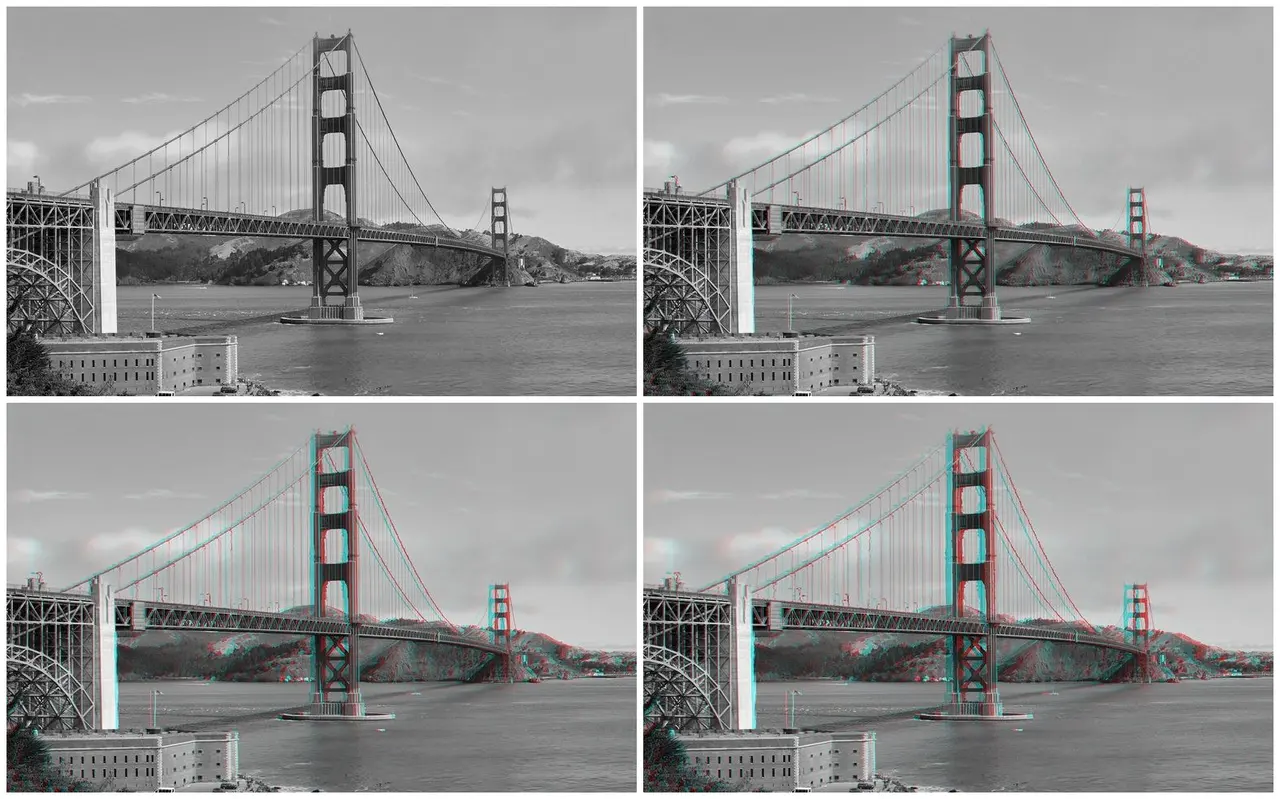
Our own simulation, not a 3DS screen shot. We made a left-eye and a right-eye view of one photo at four depth settings, like slider off, low, mid and full. Red is the left eye, cyan the right eye. Made with the depth model of our Photo to 3D tool. Photo: Frank Schulenburg, CC BY-SA 4.0, via Wikimedia Commons.
Key takeaways
- The slider sets the gap between the left-eye and right-eye images. See what the slider changes.
- 3D only works from straight in front and at the right distance. See the sweet spot.
- Some games and videos only switch 3D on or off. See when the slider does nothing.
- Double images or flicker? See fixes.
- Nintendo says the 3D is for ages 7 and up. See safety.
How the 3D screen works
You see depth because your two eyes are a little apart and each sees a slightly different picture. Nintendo calls this "binocular parallax" [1]. The 3DS top screen uses it. In Nintendo's words, from the correct distance "it displays an image for your left eye in such a way that only your left eye can see it, and an image for your right eye in such a way that only your right eye can see it" [1].
The screen has 800×240 pixels, and "400 pixels are allocated for each eye to enable 3D viewing" [1]. Nintendo's European research team says the first 3DS did this "thanks to a parallax barrier screen" [9]. A second liquid crystal layer makes "thin vertical strips" that send the light "alternately to the left and right eyes" [12]. This means each eye sees only some of the pixel columns, and the strips hide the rest from it [12][13].
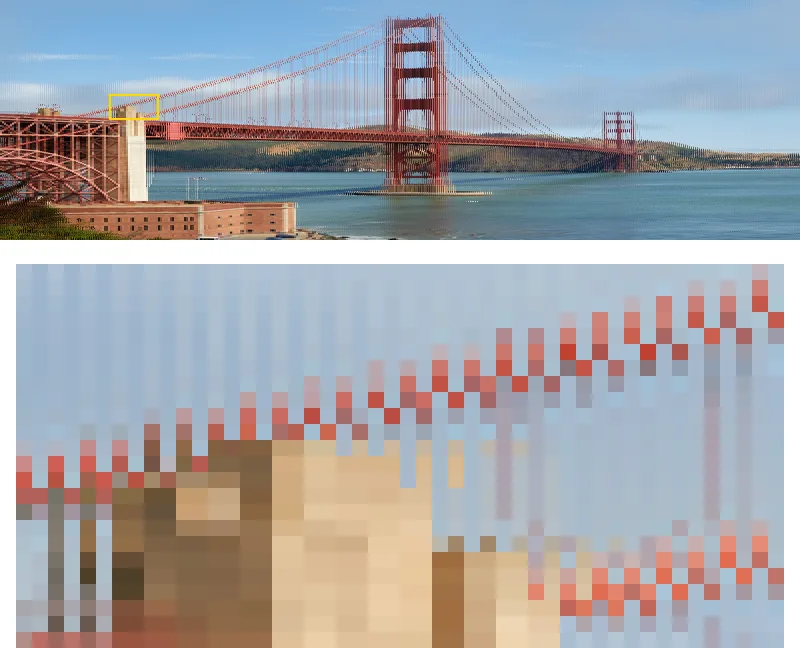
What does the 3D slider do?
Nintendo's manual says you "adjust the apparent depth of these images with the 3D depth slider" [1]. IEEE Spectrum says the slider "changes the differences between the left and right images to increase or reduce the 3-D effect, or remove it altogether" [12]. Move it "down to its lowest position to switch to 2D (flat) display" [1].
To show what more difference means, we made the picture at the top. We measured how far the nearest 1% and the farthest 1% of the 1,600-pixel-wide photo move between the left-eye and right-eye views:
| Our depth setting | Near parts move | Far parts move (other way) | Total gap, as share of width |
|---|---|---|---|
| Off | 0 px | 0 px | 0% |
| Low | 4.7 px | 8 px | 0.8% |
| Mid | 9.5 px | 16 px | 1.59% |
| Full | 14.2 px | 24 px | 2.39% |
Near and far parts move in opposite directions, so the total gap is the two added together. At 0, both eyes get the same picture, so it looks flat. Each step up makes the gap bigger, and the depth looks deeper. These are our numbers for one photo, not Nintendo's slider values. At 400 pixels per eye, our full setting moved any part by at most 6 pixels.
On the original 3DS, a "3D LED" next to the screen "lights up when 3D images are supported by the software you are using" [1]. The 3DS XL has no 3D LED [8].
The sweet spot, and why head movement breaks the 3D
The barrier sends each image in fixed directions [12]. So the 3D works for one viewer in one place: "a single viewer at a set distance, usually around 30 centimeters" [12]. Nintendo's manual says to view the screen "from directly in front" and to hold it "10 to 14 inches (25–35 centimeters) from your eyes" [1].
If you move off that spot, "your left eye will see the image destined for your right" [12]. Nintendo says a "diagonal or tilted position" can "cause you to see double images overlapped or cause the screen to appear black" [1]. Even in the right spot, the two images are not "completely isolated from each other" [6]. A bright object on a dark background can show "a faint ghosting (doubled image)" [6].
What the New 3DS face tracking adds
The New 3DS and New 3DS XL have "Super-Stable 3D". It lets you "move your head or the system during play without losing image quality" [3]. It works "by tracking the position of your face using the inner camera" [3]. Nintendo's research team says it uses the camera and an infrared LED to adjust the "dynamic parallax barrier" [9]. They say it gives "a significantly wider range compared to the original Nintendo 3DS" [9].
It has limits. It "will not work while you are using the inner or outer cameras" [3]. At "an extreme angle, outside the inner camera's field of vision", you still see double images or a dark screen [3]. One New 3DS owner on HardForum played Monster Hunter 4 Ultimate lying on their back (February 2015). They saw "Ghost images, blurring, rapid flickering" [14]. In a later post in the same thread, they wrote: "you have to hold it a specific distance for a specific slider setting for it to work" [14]. We did not test this.
Why is my 3DS 3D slider not working?
- The game has no 3D. The slider has "no effect on software that does not include 3D data, or on 2D scenes" [2]. DS and DSi games have no 3D [8].
- The content is recorded 3D. For "3D videos and photos", the slider "will only switch between 2D and 3D images" [3]. Some games also only switch between 2D and 3D [1].
- The game sets its own depth. Nintendo says "each game or application may have different 3D depths" [6]. So the same slider position can look deeper in one game than in another.
- Parental Controls block 3D. Then "the 3D depth slider will not change the image to 3D" [4].
- It is a 2DS. The 2DS and New 2DS XL "do not display 3D images; they do not have a 3D Depth Slider" [4][5].
- The 3DS XL slider is not past the click. On a 3DS XL, you feel a small click as you move the slider. Set it "to the upper side of the click" [8].
How to fix double or blurry 3D
- Start low. Nintendo says not to start with the slider "all the way up". Start low, then raise it to the best point for that game [6].
- Hold it straight and at the right distance. View it from directly in front, at 10 to 14 inches (12 to 16 inches for a 3DS XL) [6]. Hold the system a little higher or lower to change the angle [6].
- Change the scene and the light. Avoid "a black or dark background" and strong light on the screen [6][11]. Check that "a screen protector is not causing the issue" [6].
- On a New 3DS, calibrate Super-Stable 3D in the system settings [11][3].
- Still double? "A small percentage of people may not be able to see 3D images at all." Then turn the 3D off [1].
Is full 3D safe?
Nintendo's warning is direct: "3D FEATURE ONLY FOR CHILDREN 7 AND OVER" [10]. It says "Viewing of 3D images by children 6 and under may cause vision damage" [10]. Parents can use Parental Controls to show all images in 2D [1][10].
For everyone, Nintendo says 3D may bring eyestrain sooner [10]. It advises "a 10 to 15 minute break every hour, or every half hour when using the 3D feature" [10]. If 3D gives you headaches in films too, see why 3D movies give some people a headache.
Frequently asked questions
Does the 3DS slider turn the 3D off completely?
Yes. Slider at the bottom, the top screen shows 2D [1]. Nintendo says the effect "can be scaled back or even turned off completely" [5].
Can I keep the 3D when I play 3DS games on a TV or PC?
See our guide on playing 3DS on a TV. It compares the ways to do it.
Does the 3D slider use more battery?
We do not know. The Nintendo manuals and support pages we read give no battery numbers for 3D on or off.
Sources (14)
- Nintendo of America, Nintendo 3DS Operations Manual (US English), 2011. https://csassets.nintendo.com/noaext/image/private/t_KA_PDF/manual-nintendo-3ds-operations-english Opened 2026-11-28.
- Nintendo of America, Nintendo 3DS XL Operations Manual (English), 2012. https://csassets.nintendo.com/noaext/image/private/t_KA_PDF/manual-nintendo-3dsxl-operations-english Opened 2026-11-28.
- Nintendo of Europe, New Nintendo 3DS / New Nintendo 3DS XL Operations Manual (UK English), 2015. https://www.nintendo.com/eu/media/downloads/support_1/new_nintendo_3ds/NewNintendo3DS_NewNintendo3DSXL_OperationsManual_UKV.pdf Opened 2026-11-28.
- Nintendo Support, "3D Depth Slider Is Unable to Adjust 3D Image". https://en-americas-support.nintendo.com/app/answers/detail/a_id/641/p/605/c/990 Opened 2026-11-28.
- Nintendo Support, "How to Adjust the 3D Effect". https://en-americas-support.nintendo.com/app/answers/detail/a_id/46/p/605/c/990 Opened 2026-11-28.
- Nintendo Support, "Ghosting/Double Image On Upper Screen". https://en-americas-support.nintendo.com/app/answers/detail/a_id/359/p/605/c/990 Opened 2026-11-28.
- Nintendo Support, "How Does the Nintendo 3DS System's 3D Feature Work?". https://en-americas-support.nintendo.com/app/answers/detail/a_id/244/p/50/c/898 Opened 2026-11-28.
- Nintendo Support, "Image Not Appearing in 3D". https://en-americas-support.nintendo.com/app/answers/detail/a_id/363/p/605/c/990 Opened 2026-11-28.
- Nintendo European Research & Development, "NERD Teams Up With Hardware Experts in Japan to Deliver 'Super-Stable 3d' on the New Nintendo 3DS", October 1, 2014. https://www.nerd.nintendo.com/optics/2014/10/01/Super_stable_3D.html Opened 2026-11-28.
- Nintendo Support, "Health & Safety Precautions: Nintendo 3DS". https://en-americas-support.nintendo.com/app/answers/detail/a_id/50336/ Opened 2026-11-28.
- Nintendo Support, "3D Image is Blurry". https://en-americas-support.nintendo.com/app/answers/detail/a_id/361 Opened 2026-11-28.
- Mark Ellis Harris, "3-D Without Four Eyes", IEEE Spectrum, November 23, 2010. https://spectrum.ieee.org/3d-without-four-eyes Opened 2026-11-28.
- Sharp Corporation, "Sharp Develops 3D Touchscreen LCD—Switchable Between 2D and 3D Modes—with Industry's Highest Brightness", April 2, 2010. https://cgi.global.sharp/corporate/news/100402.html Opened 2026-11-28.
- HardForum, "Is there a huge New 3DS design flaw with the super stable 3D or it just me?", February 14, 2015. https://hardforum.com/threads/is-there-a-huge-new-3ds-design-flaw-with-the-super-stable-3d-or-it-just-me.1852331/ Opened 2026-11-28.