USDZ Viewer: How to Open a USDZ File on Any Device
How we researched this: written by Owl3D from published sources, all 8 listed at the end.
Short answer
On an iPhone or iPad you need no app. Apple's own apps, such as Safari, Messages, Mail, News and Notes, open a USDZ file in 3D with Quick Look [1]. On Windows or Linux, install the free Blender, which imports USDZ files [4]. On Android, or in a tool that does not read USDZ, such as our own web viewer, convert it to GLB first. This guide is by Owl3D, the maker of the Owl3D app and the Owl3D Shift 3D display. Skip to: by device · Mac · convert to GLB · will not open
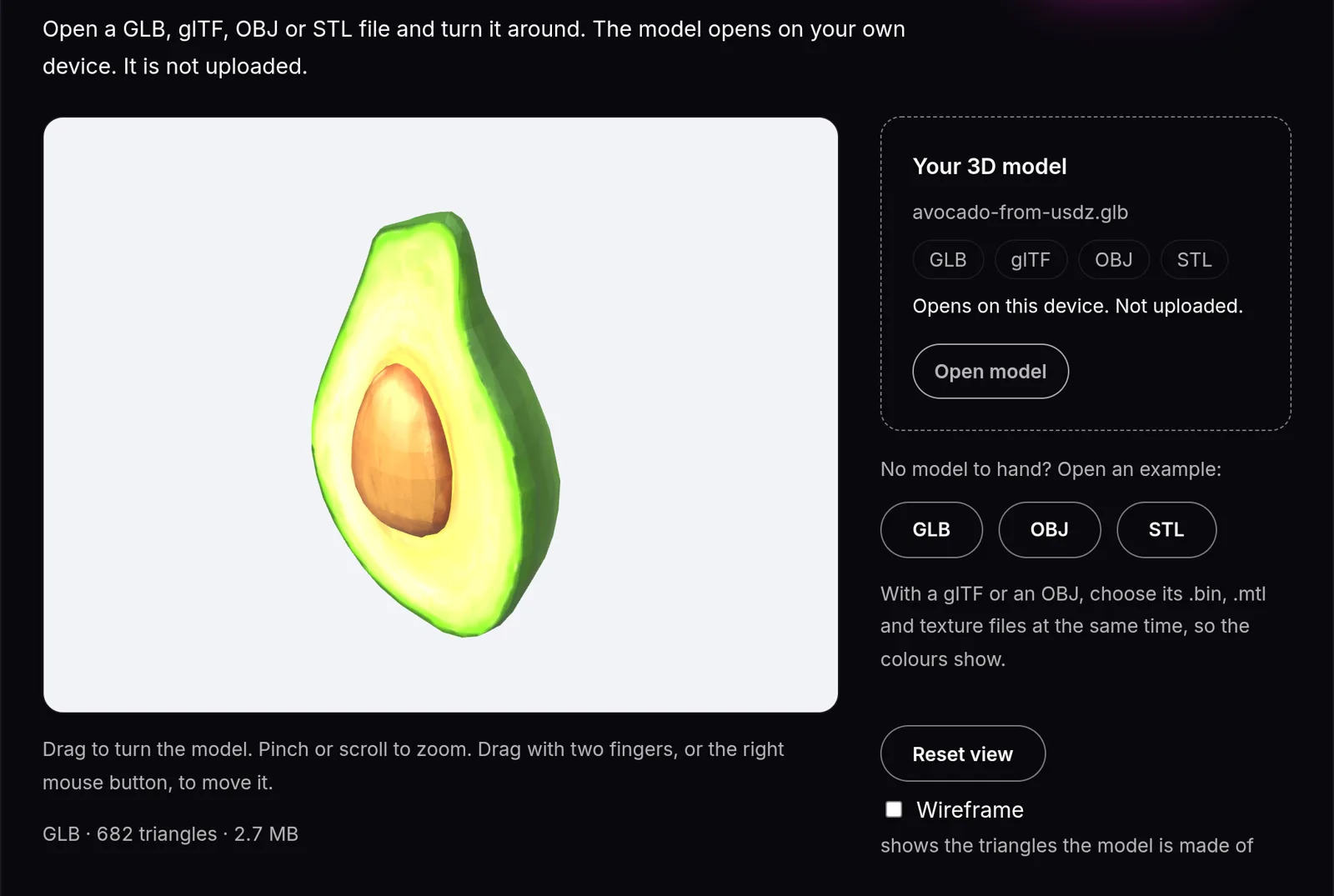
Our test: a USDZ we made from the Khronos Avocado model (CC0) [7], converted to GLB and opened in our free web 3D Model Viewer. Owl3D, 2026-11-20.
Key takeaways
- iPhone, iPad and Apple Vision Pro open USDZ files in built-in apps such as Safari and Mail, with nothing to install (iOS or iPadOS 12 or later, visionOS 1 or later) [1].
- On Windows and Linux, use the free Blender [4]. On Android, convert the file to GLB first.
- Not every web 3D viewer takes USDZ. Ours refused it in our test, and opened the same model once it was a GLB.
- A USDZ is a zip package of USD files and images, with no compression [6].
What opens a USDZ file, by device
| Device | What opens it | Cost |
|---|---|---|
| iPhone, iPad | Quick Look in Safari, Messages, Mail, News, Notes; tap the model to place it in AR [1] | Free, built in |
| Apple Vision Pro | Quick Look [1] | Free, built in |
| Mac | Blender [4]; Quick Look may work, see Mac | Free |
| Windows, Linux | Blender [4] | Free |
| Android | Convert to GLB on a computer, then open it in a web viewer that takes GLB | Free |
| Any browser | A web viewer that takes GLB, after you convert | Free |
On iPhone and iPad, Apple shows its own models in AR: you tap a model to see it and place it in the room [1]. Messages and Mail also open a USDZ file in 3D with Quick Look [1].
Opening a USDZ file on a Mac
Try Quick Look first: select the file in Finder and press the Space bar [2]. Apple's Quick Look help for Mac does not name 3D files [2], so we cannot say that it opens every USDZ file.
Two other routes:
- Blender imports USD files, USDZ included [4]. It is free.
- Reality Composer Pro is Apple's developer tool to preview and prepare 3D content on a Mac [3]. Apple's page does not list the file types it opens. Version 3 needs macOS 26.5 or later. To download it, you sign in with your Apple Account and, if asked, complete a free registration and accept the Apple Developer Agreement [3].
Convert USDZ to GLB
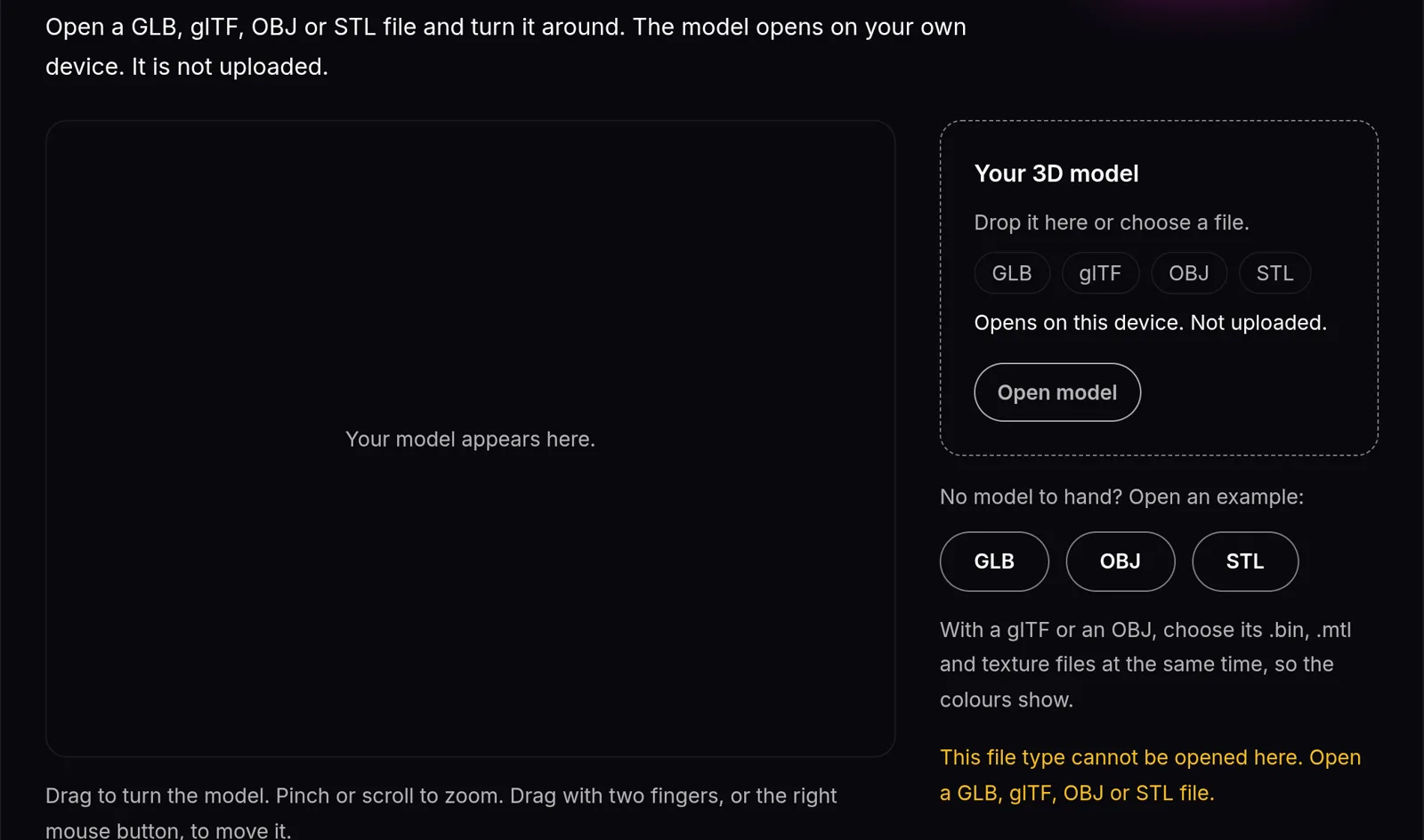
Convert when your tool reads GLB but not USDZ. Our free 3D Model Viewer is one: it opens GLB, glTF, OBJ and STL, and not USDZ [8]. When we chose our USDZ file, it showed "This file type cannot be opened here."
With Blender:
- Import the USDZ file with Blender's Universal Scene Description importer. Look at the Import Textures option: it decides how the textures come out of the zip package [4].
- Choose File > Export > glTF 2.0 (.glb/.gltf) [5].
- Pick the glTF Binary (.glb) format. It packs the mesh, the textures and the rest into one file [5].
- Open the GLB in any viewer that takes GLB, for example our 3D Model Viewer. The file stays on your device [8].
Our test file kept its shape and texture after the round trip: 682 triangles before and after, 2.7 MB as a GLB. We converted it with a script on a Mac, not with Blender. In Blender, curves and other non-mesh data are not kept in a glTF export: convert them to meshes first [5].
Why a USDZ file will not open
- Your viewer does not read USDZ. Our viewer, for example, says "This file type cannot be opened here." Convert it to GLB (above).
- Textures are missing in Blender. The model is grey. Import again and set the Import Textures option [4].
- The file opens as a zip. A USDZ is a zip package [6]. Open the .usdz file itself in Blender; you do not need to unzip it [4].
- Parts of a scene are missing. Blender's USD importer does not yet handle some USD composition features, such as layers and references [4].
See a USDZ model in 3D without glasses
A viewer on a normal screen shows a flat picture: you turn the model with the mouse to see its depth. A glasses-free 3D display shows each eye a slightly different view, so the model has depth on your desk without a headset. On a Mac, the Playlist player of the Owl3D Shift shows 3D models in glasses-free 3D, USDZ included. On Windows its Playlist takes GLB and glTF only, so convert first. Our 3D Model Viewer can also save a side-by-side 3D picture of a GLB for a 3D screen or VR headset [8].
Frequently asked questions
How do I open a USDZ file on Windows?
Install Blender, which is free, and import the file with its USD importer [4]. To view it in a browser instead, convert it to GLB.
Can I open a USDZ file on Android?
Not directly with the tools in this guide. Convert it to GLB on a computer, then open the GLB in a web viewer that takes GLB.
Is there a USDZ viewer that does not upload my file?
Blender is a program you install on your computer, and it imports the file there [4]. Our 3D Model Viewer opens a GLB on your device without uploading it [8], but it does not open USDZ.
Can Blender open USDZ?
Yes. Blender's USD importer takes USDZ archives. Look at the Import Textures option when you import [4].
What is the difference between USD and USDZ?
USD is the scene format. USDZ is a package: an uncompressed zip archive that holds USD files (usda, usdc, usd) with their images and audio [6].
Sources (8)
- Apple Developer, "AR Quick Look gallery". https://developer.apple.com/augmented-reality/quick-look/ (opened 2026-11-21)
- Apple Support, "View and edit files with Quick Look on Mac". https://support.apple.com/guide/mac-help/view-and-edit-files-with-quick-look-mh14119/mac (opened 2026-11-21)
- Apple Developer, "Reality Composer Pro". https://developer.apple.com/augmented-reality/tools/ (opened 2026-11-21)
- Blender 5.3 Manual, "Universal Scene Description". https://docs.blender.org/manual/en/latest/files/import_export/usd.html (opened 2026-11-21)
- Blender 5.3 Manual, "glTF 2.0". https://docs.blender.org/manual/en/latest/addons/import_export/scene_gltf2.html (opened 2026-11-21)
- Pixar Animation Studios, "Usdz File Format Specification". https://openusd.org/release/spec_usdz.html (opened 2026-11-21)
- Khronos Group, glTF Sample Assets, "Avocado", CC0 1.0. https://github.com/KhronosGroup/glTF-Sample-Assets/tree/main/Models/Avocado (downloaded 2026-11-20)
- Owl3D, "3D Model Viewer", FAQ. https://www.owl3d.com/tools/3d-model-viewer (opened 2026-11-21)