The Best AI 2D to 3D Video Converters in 2026: What Real Depth Estimation Looks Like (and How to Spot the Fakes)
|
7
min read

You searched for an AI 2D to 3D video converter. You got back a list of tools — Tipard, Wondershare, HitPaw, maybe a few others. They all say "AI." They all promise stunning 3D results. And they all look more or less the same.
Here's what most reviews don't tell you: the majority of those tools aren't using AI at all. They're applying a technique that's been around since the 1990s — dressed up with modern branding. The result is videos that technically "play in 3D" but look wrong on modern headsets, cause eye strain after 20 minutes, and often won't work on Meta Quest or Apple Vision Pro without extra workarounds.
This guide cuts through the noise. You'll understand exactly what separates a genuine AI 2D to 3D converter from a pixel-shift filter with a rebrand, see which tools are actually worth your time in 2026, and learn how to convert your videos into a format your headset natively understands.
What Makes a 2D to 3D Converter Actually "AI"?
The word "AI" appears on a lot of 3D conversion tools. Most of the time, it's marketing copy. Understanding why means knowing what the two types of conversion actually do under the hood.
Two types of "3D conversion" on the market
These tools take your 2D video and duplicate the image frame. Then they shift the duplicate horizontally by a fixed number of pixels — so your left eye sees one offset, your right eye sees another. Add red-and-cyan color tints and you have classic anaglyph 3D, the format that requires those paper glasses. Some newer versions skip the tint and produce a side-by-side output instead, but the underlying method is identical: no depth analysis, just mechanical pixel offset.
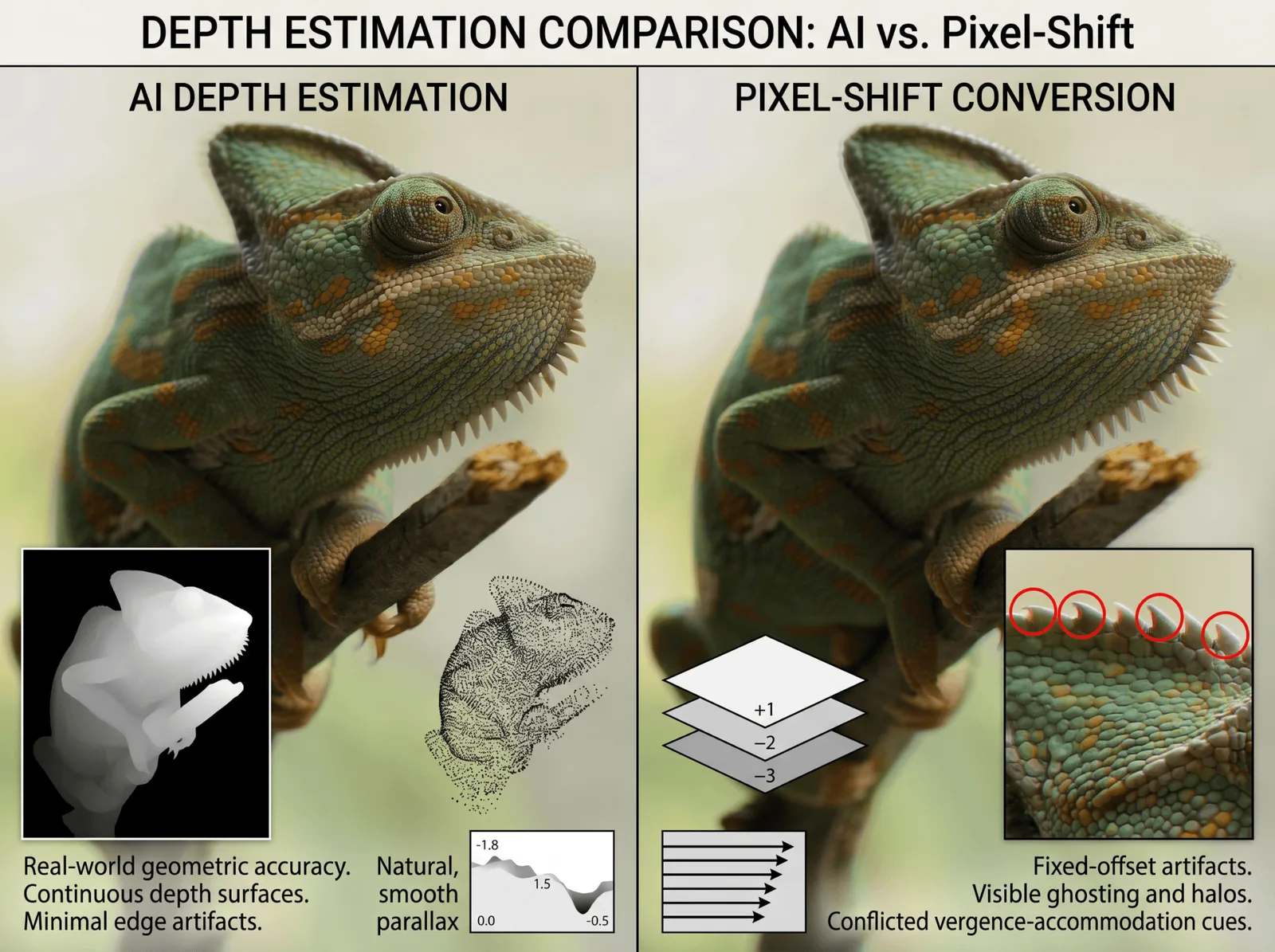
The 3D effect these produce looks flat at the edges, generates visible ghosting on high-contrast areas, and often causes headaches — because the vergence-accommodation relationship your eyes rely on to perceive depth is violated. These tools don't understand what's in your video. They just shift pixels.
A genuine AI 2D to 3D converter doesn't duplicate your image. It analyzes it. A neural network examines every pixel in every frame and predicts how far each element in the scene is from the camera. A lamppost close. A mountain in the background. A person in between. That prediction becomes a depth map: a grayscale image where brightness represents distance.
From that depth map, the converter synthesizes two geometrically accurate views — one for your left eye, one for your right — and encodes them in formats like SBS (Side-by-Side) for Meta Quest, MV-HEVC for Apple Vision Pro, or RGBD for depth-aware applications.
The difference isn't just visual quality. It's whether the output works on modern 3D platforms at all.
Why the distinction matters for your headset
Meta Quest expects SBS video with proper parallax between the two views. Apple Vision Pro requires MV-HEVC — a format that encodes depth metadata natively into the video stream. Anaglyph output from a pixel-shift tool doesn't meet either of these requirements. You can play it, but the 3D will feel artificial and uncomfortable, because it is.
What Does an AI 2D to 3D Video Converter Actually Do?
An AI 2D to 3D video converter uses monocular depth estimation — a neural network trained on millions of images to predict the distance of every pixel from the camera in a single image or video frame. The model recognizes the same visual cues your brain uses naturally: objects that appear smaller are farther away, surfaces with less texture recede into the background, edges that blur are out of focus. From those cues, it generates a per-pixel depth map for every frame in your video.
That depth map is then used to synthesize two separate views: the left-eye image and the right-eye image. Because the depth information is spatially accurate — not a fixed pixel offset applied uniformly across the frame — the parallax between the two views is geometrically correct. Your brain receives the same cue structure it would get from footage filmed with an actual 3D camera. The result is real perceived depth, without the eye strain, without the ghosting, and in a format your headset natively understands.
This is what "AI" means in a 2D to 3D video converter: not a filter, not a shift, but a per-frame, per-pixel depth prediction that reconstructs the missing dimension from visual evidence.
AI Conversion vs. Classic Conversion: The Depth Quality Difference
If you've ever watched a pixel-shifted "3D" video on a modern headset and wondered why it felt wrong, now you know. Here's how the two approaches compare directly:
AI Depth Estimation | Pixel-Shift / Anaglyph | |
|---|---|---|
How it works | Neural network predicts depth per pixel per frame | Duplicate + horizontal offset |
Output formats | SBS, MV-HEVC, RGBD, VR180 | Anaglyph (red-cyan) or basic SBS |
Meta Quest compatible | ✅ Native SBS with correct parallax | ⚠️ Basic SBS only — depth is artificial |
Apple Vision Pro compatible | ✅ MV-HEVC supported | ❌ MV-HEVC not produced |
Depth accuracy | Geometrically correct, scene-aware parallax | Fixed offset regardless of scene content |
Eye strain risk | Low — vergence cues are correct | High — vergence-accommodation conflict |
Edge artifacts | Minimal | Common at high-contrast boundaries |
Works on 3D displays without glasses | Yes (lenticular / VR headsets) | Requires red-cyan glasses for anaglyph |
What pixel-shift actually does to your visual system
When your eyes perceive depth, two things happen at the same time: they converge (rotate inward for near objects) and they accommodate (physically focus). In real 3D footage — or AI-generated depth output — these two signals match naturally. In pixel-shifted video, convergence is forced artificially by the fixed offset, but your eyes still accommodate to the flat screen. Your visual system receives conflicting signals simultaneously. That's the direct cause of headaches after 20 minutes of anaglyph viewing.
A real AI converter solves this because the depth it generates is grounded in the actual geometry of the scene. The parallax your eyes receive matches what they would naturally experience from real-world depth — so your visual system trusts it.
The Best AI 2D to 3D Video Converters in 2026: Compared
Only a handful of tools currently use genuine AI depth estimation for video. Here's a fair comparison of the ones that do, followed by a clear note on tools to avoid.
Owl3D
Owl3D uses neural network-based monocular depth estimation to convert 2D video into true stereoscopic 3D. Output formats include SBS for Meta Quest and VR headsets, MV-HEVC for Apple Vision Pro, and RGBD for development and depth-aware playback. The platform is built for creators who want ready-to-watch spatial video without needing to understand the underlying technical process — upload your file, select your output format, download.
Owl3D also handles still images using the same depth estimation pipeline, making it a single-tool solution for both video and photo conversion without switching platforms.
Immersity AI
Built by Leia Inc., the spatial video company behind the Leia lightfield display platform, Immersity AI offers a web-based converter powered by their proprietary depth engine. A free tier is available for conversion up to 720p with a watermark and no commercial use. Paid plans start at $24.99/month for video conversion (3,300 credits/month), scaling to $49.99/month for Video+ (7,500 credits/month) and $99.99/month for Pro Video (20,000 credits/month). All paid tiers support up to 4K, watermark-free exports, and commercial licensing.
Immersity is strong for shorter clips, social media content, and designers already familiar with the Leia ecosystem. The credit-based model suits occasional use more than high-volume production pipelines.
Depthify.ai
Depthify offers two deployment modes: cloud conversion at $1.50 per minute of video, and a fully offline desktop application that processes locally on your machine. The desktop version supports multiple depth estimation models — Depth Anything (Small and Base), dpt-hybrid-midas, and dpt-large — and lets you input your own custom depth map alongside the 2D source if you want manual control over the depth output.
It's the most technically flexible option currently available, best suited to technical users who want local processing, model selection, or the ability to integrate custom depth data from their own pipelines.
Tools to avoid — legacy converters using AI branding
Tipard, Wondershare, HitPaw, and VideoProc consistently appear in search results for "AI 2D to 3D video converter." None of them use neural depth estimation. Their conversion is pixel-shift or anaglyph-based, which means the outputs are not compatible with Apple Vision Pro (no MV-HEVC) and produce artificial rather than geometrically accurate parallax on Meta Quest.
The simplest way to verify a converter before using it: ask whether it produces SBS or MV-HEVC output from a depth map. If the answer is "it produces anaglyph" or "it shifts pixels" — it's not using AI depth estimation, regardless of what the marketing says.
How to Convert 2D Video to 3D with Owl3D
Converting a 2D video to 3D with Owl3D is a four-step process.
Step 1: Upload your video
Drag and drop your 2D video file into Owl3D. The platform accepts standard video formats including MP4, MOV, and AVI.
Step 2: Choose your 3D output format
Select based on where you plan to watch:
SBS (Side-by-Side) — for Meta Quest, Samsung Gear VR, 3D TVs, and most VR headsets
MV-HEVC — for Apple Vision Pro (the native Spatial Video codec; required for Vision Pro's full 3D experience)
RGBD — for developers, depth-aware playback applications, and post-production workflows
Step 3: Set depth intensity and processing quality
Adjust the depth strength to control how much perceived separation exists between near and far elements in your scene. Higher quality settings produce more accurate depth maps for scenes with complex geometry. Lower settings work well for drafts or simpler footage.
Step 4: Download and watch
Once processing completes, download your converted video and either side-load it to your headset or import it to your 3D media library. For Apple Vision Pro, import via the Files app or a compatible media player. For Meta Quest, use the built-in SBS player or a third-party media app.
AI 2D to 3D Photo Converter: It Works on Images Too
The same monocular depth estimation that converts video frames works identically on still images. If you have a library of flat photos — family archives, travel shots, product photography — an AI photo converter can reconstruct the depth dimension using the same process: scene analysis, depth map generation, stereo pair synthesis.
Output formats for converted photos include spatial JPEG pairs for Apple Vision Pro, MPO format for stereoscopic displays, and side-by-side image pairs for VR headsets.
Use cases for AI photo conversion
Archiving old photographs in 3D for immersive headset viewing is one of the most compelling applications — footage that was never filmed in 3D can gain real depth from content that's decades old. Product photography is another: customers browsing in XR environments see products with real perceived depth, which improves spatial understanding of dimensions and form. Creators producing spatial content for social platforms that support 3D images can also convert existing photo assets without a new shoot.
Owl3D handles both video and photo conversion from the same interface, so you don't need a separate tool for each media type.
FAQs: AI 2D to 3D Video Conversion
Is AI 2D to 3D conversion the same quality as filming in native 3D?
No — AI-converted 3D is not identical to native stereoscopic footage filmed with a dual-lens 3D camera. Native footage captures real parallax at the moment of filming. AI conversion reconstructs parallax from depth estimation, which is accurate but not perfect, particularly on highly complex scenes or footage with rapid motion. For most viewing purposes the difference is not perceptible.
Can I watch AI-converted 3D video on Meta Quest or Apple Vision Pro?
Yes, if the converter produces the correct output format. For Meta Quest, you need SBS (Side-by-Side) video with geometrically accurate parallax. For Apple Vision Pro, you need MV-HEVC — Apple's native Spatial Video codec. Real AI converters like Owl3D and Depthify.ai support both.
How long does AI 2D to 3D video conversion take?
Processing time depends on video length, resolution, and depth quality settings. A typical 1080p clip of a few minutes processes in a few minutes on cloud-based converters. Higher resolution or 4K footage takes proportionally longer.
Does AI conversion work on old movies or archival footage?
Yes — the depth estimation model analyzes visual content, not metadata, so it works on any footage regardless of age, source, or format quality.
What is the difference between SBS, MV-HEVC, and anaglyph 3D?
SBS places the left-eye and right-eye views next to each other in a single widescreen video file. MV-HEVC is Apple's native codec for Spatial Video on Vision Pro, encoding depth metadata alongside standard video. Anaglyph uses color filtering (red-cyan) to separate the two views, requiring glasses and incompatible with VR headsets.
Is Tipard or Wondershare a real AI 2D to 3D video converter?
No. Despite using "AI" in their marketing, Tipard, Wondershare, HitPaw, and similar tools use pixel-shift and anaglyph methods — not neural network depth estimation. Their output does not produce MV-HEVC or proper SBS formats compatible with Meta Quest or Apple Vision Pro.
You searched for an AI 2D to 3D video converter. You got back a list of tools — Tipard, Wondershare, HitPaw, maybe a few others. They all say "AI." They all promise stunning 3D results. And they all look more or less the same.
Here's what most reviews don't tell you: the majority of those tools aren't using AI at all. They're applying a technique that's been around since the 1990s — dressed up with modern branding. The result is videos that technically "play in 3D" but look wrong on modern headsets, cause eye strain after 20 minutes, and often won't work on Meta Quest or Apple Vision Pro without extra workarounds.
This guide cuts through the noise. You'll understand exactly what separates a genuine AI 2D to 3D converter from a pixel-shift filter with a rebrand, see which tools are actually worth your time in 2026, and learn how to convert your videos into a format your headset natively understands.
What Makes a 2D to 3D Converter Actually "AI"?
The word "AI" appears on a lot of 3D conversion tools. Most of the time, it's marketing copy. Understanding why means knowing what the two types of conversion actually do under the hood.
Two types of "3D conversion" on the market
These tools take your 2D video and duplicate the image frame. Then they shift the duplicate horizontally by a fixed number of pixels — so your left eye sees one offset, your right eye sees another. Add red-and-cyan color tints and you have classic anaglyph 3D, the format that requires those paper glasses. Some newer versions skip the tint and produce a side-by-side output instead, but the underlying method is identical: no depth analysis, just mechanical pixel offset.
The 3D effect these produce looks flat at the edges, generates visible ghosting on high-contrast areas, and often causes headaches — because the vergence-accommodation relationship your eyes rely on to perceive depth is violated. These tools don't understand what's in your video. They just shift pixels.
A genuine AI 2D to 3D converter doesn't duplicate your image. It analyzes it. A neural network examines every pixel in every frame and predicts how far each element in the scene is from the camera. A lamppost close. A mountain in the background. A person in between. That prediction becomes a depth map: a grayscale image where brightness represents distance.
From that depth map, the converter synthesizes two geometrically accurate views — one for your left eye, one for your right — and encodes them in formats like SBS (Side-by-Side) for Meta Quest, MV-HEVC for Apple Vision Pro, or RGBD for depth-aware applications.
The difference isn't just visual quality. It's whether the output works on modern 3D platforms at all.
Why the distinction matters for your headset
Meta Quest expects SBS video with proper parallax between the two views. Apple Vision Pro requires MV-HEVC — a format that encodes depth metadata natively into the video stream. Anaglyph output from a pixel-shift tool doesn't meet either of these requirements. You can play it, but the 3D will feel artificial and uncomfortable, because it is.
What Does an AI 2D to 3D Video Converter Actually Do?
An AI 2D to 3D video converter uses monocular depth estimation — a neural network trained on millions of images to predict the distance of every pixel from the camera in a single image or video frame. The model recognizes the same visual cues your brain uses naturally: objects that appear smaller are farther away, surfaces with less texture recede into the background, edges that blur are out of focus. From those cues, it generates a per-pixel depth map for every frame in your video.
That depth map is then used to synthesize two separate views: the left-eye image and the right-eye image. Because the depth information is spatially accurate — not a fixed pixel offset applied uniformly across the frame — the parallax between the two views is geometrically correct. Your brain receives the same cue structure it would get from footage filmed with an actual 3D camera. The result is real perceived depth, without the eye strain, without the ghosting, and in a format your headset natively understands.
This is what "AI" means in a 2D to 3D video converter: not a filter, not a shift, but a per-frame, per-pixel depth prediction that reconstructs the missing dimension from visual evidence.
AI Conversion vs. Classic Conversion: The Depth Quality Difference
If you've ever watched a pixel-shifted "3D" video on a modern headset and wondered why it felt wrong, now you know. Here's how the two approaches compare directly:
AI Depth Estimation | Pixel-Shift / Anaglyph | |
|---|---|---|
How it works | Neural network predicts depth per pixel per frame | Duplicate + horizontal offset |
Output formats | SBS, MV-HEVC, RGBD, VR180 | Anaglyph (red-cyan) or basic SBS |
Meta Quest compatible | ✅ Native SBS with correct parallax | ⚠️ Basic SBS only — depth is artificial |
Apple Vision Pro compatible | ✅ MV-HEVC supported | ❌ MV-HEVC not produced |
Depth accuracy | Geometrically correct, scene-aware parallax | Fixed offset regardless of scene content |
Eye strain risk | Low — vergence cues are correct | High — vergence-accommodation conflict |
Edge artifacts | Minimal | Common at high-contrast boundaries |
Works on 3D displays without glasses | Yes (lenticular / VR headsets) | Requires red-cyan glasses for anaglyph |

What pixel-shift actually does to your visual system
When your eyes perceive depth, two things happen at the same time: they converge (rotate inward for near objects) and they accommodate (physically focus). In real 3D footage — or AI-generated depth output — these two signals match naturally. In pixel-shifted video, convergence is forced artificially by the fixed offset, but your eyes still accommodate to the flat screen. Your visual system receives conflicting signals simultaneously. That's the direct cause of headaches after 20 minutes of anaglyph viewing.
A real AI converter solves this because the depth it generates is grounded in the actual geometry of the scene. The parallax your eyes receive matches what they would naturally experience from real-world depth — so your visual system trusts it.
The Best AI 2D to 3D Video Converters in 2026: Compared
Only a handful of tools currently use genuine AI depth estimation for video. Here's a fair comparison of the ones that do, followed by a clear note on tools to avoid.
Owl3D
Owl3D uses neural network-based monocular depth estimation to convert 2D video into true stereoscopic 3D. Output formats include SBS for Meta Quest and VR headsets, MV-HEVC for Apple Vision Pro, and RGBD for development and depth-aware playback. The platform is built for creators who want ready-to-watch spatial video without needing to understand the underlying technical process — upload your file, select your output format, download.
Owl3D also handles still images using the same depth estimation pipeline, making it a single-tool solution for both video and photo conversion without switching platforms.
Immersity AI
Built by Leia Inc., the spatial video company behind the Leia lightfield display platform, Immersity AI offers a web-based converter powered by their proprietary depth engine. A free tier is available for conversion up to 720p with a watermark and no commercial use. Paid plans start at $24.99/month for video conversion (3,300 credits/month), scaling to $49.99/month for Video+ (7,500 credits/month) and $99.99/month for Pro Video (20,000 credits/month). All paid tiers support up to 4K, watermark-free exports, and commercial licensing.
Immersity is strong for shorter clips, social media content, and designers already familiar with the Leia ecosystem. The credit-based model suits occasional use more than high-volume production pipelines.
Depthify.ai
Depthify offers two deployment modes: cloud conversion at $1.50 per minute of video, and a fully offline desktop application that processes locally on your machine. The desktop version supports multiple depth estimation models — Depth Anything (Small and Base), dpt-hybrid-midas, and dpt-large — and lets you input your own custom depth map alongside the 2D source if you want manual control over the depth output.
It's the most technically flexible option currently available, best suited to technical users who want local processing, model selection, or the ability to integrate custom depth data from their own pipelines.
Tools to avoid — legacy converters using AI branding
Tipard, Wondershare, HitPaw, and VideoProc consistently appear in search results for "AI 2D to 3D video converter." None of them use neural depth estimation. Their conversion is pixel-shift or anaglyph-based, which means the outputs are not compatible with Apple Vision Pro (no MV-HEVC) and produce artificial rather than geometrically accurate parallax on Meta Quest.
The simplest way to verify a converter before using it: ask whether it produces SBS or MV-HEVC output from a depth map. If the answer is "it produces anaglyph" or "it shifts pixels" — it's not using AI depth estimation, regardless of what the marketing says.
How to Convert 2D Video to 3D with Owl3D
Converting a 2D video to 3D with Owl3D is a four-step process.
Step 1: Upload your video
Drag and drop your 2D video file into Owl3D. The platform accepts standard video formats including MP4, MOV, and AVI.
Step 2: Choose your 3D output format
Select based on where you plan to watch:
SBS (Side-by-Side) — for Meta Quest, Samsung Gear VR, 3D TVs, and most VR headsets
MV-HEVC — for Apple Vision Pro (the native Spatial Video codec; required for Vision Pro's full 3D experience)
RGBD — for developers, depth-aware playback applications, and post-production workflows
Step 3: Set depth intensity and processing quality
Adjust the depth strength to control how much perceived separation exists between near and far elements in your scene. Higher quality settings produce more accurate depth maps for scenes with complex geometry. Lower settings work well for drafts or simpler footage.
Step 4: Download and watch
Once processing completes, download your converted video and either side-load it to your headset or import it to your 3D media library. For Apple Vision Pro, import via the Files app or a compatible media player. For Meta Quest, use the built-in SBS player or a third-party media app.
AI 2D to 3D Photo Converter: It Works on Images Too
The same monocular depth estimation that converts video frames works identically on still images. If you have a library of flat photos — family archives, travel shots, product photography — an AI photo converter can reconstruct the depth dimension using the same process: scene analysis, depth map generation, stereo pair synthesis.
Output formats for converted photos include spatial JPEG pairs for Apple Vision Pro, MPO format for stereoscopic displays, and side-by-side image pairs for VR headsets.
Use cases for AI photo conversion
Archiving old photographs in 3D for immersive headset viewing is one of the most compelling applications — footage that was never filmed in 3D can gain real depth from content that's decades old. Product photography is another: customers browsing in XR environments see products with real perceived depth, which improves spatial understanding of dimensions and form. Creators producing spatial content for social platforms that support 3D images can also convert existing photo assets without a new shoot.
Owl3D handles both video and photo conversion from the same interface, so you don't need a separate tool for each media type.
FAQs: AI 2D to 3D Video Conversion
Is AI 2D to 3D conversion the same quality as filming in native 3D?
No — AI-converted 3D is not identical to native stereoscopic footage filmed with a dual-lens 3D camera. Native footage captures real parallax at the moment of filming. AI conversion reconstructs parallax from depth estimation, which is accurate but not perfect, particularly on highly complex scenes or footage with rapid motion. For most viewing purposes the difference is not perceptible.
Can I watch AI-converted 3D video on Meta Quest or Apple Vision Pro?
Yes, if the converter produces the correct output format. For Meta Quest, you need SBS (Side-by-Side) video with geometrically accurate parallax. For Apple Vision Pro, you need MV-HEVC — Apple's native Spatial Video codec. Real AI converters like Owl3D and Depthify.ai support both.
How long does AI 2D to 3D video conversion take?
Processing time depends on video length, resolution, and depth quality settings. A typical 1080p clip of a few minutes processes in a few minutes on cloud-based converters. Higher resolution or 4K footage takes proportionally longer.
Does AI conversion work on old movies or archival footage?
Yes — the depth estimation model analyzes visual content, not metadata, so it works on any footage regardless of age, source, or format quality.
What is the difference between SBS, MV-HEVC, and anaglyph 3D?
SBS places the left-eye and right-eye views next to each other in a single widescreen video file. MV-HEVC is Apple's native codec for Spatial Video on Vision Pro, encoding depth metadata alongside standard video. Anaglyph uses color filtering (red-cyan) to separate the two views, requiring glasses and incompatible with VR headsets.
Is Tipard or Wondershare a real AI 2D to 3D video converter?
No. Despite using "AI" in their marketing, Tipard, Wondershare, HitPaw, and similar tools use pixel-shift and anaglyph methods — not neural network depth estimation. Their output does not produce MV-HEVC or proper SBS formats compatible with Meta Quest or Apple Vision Pro.